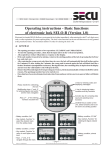
1
B) OPERATION
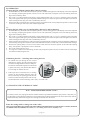
Clearing the lock without opening delay (factory setting)
1.
Press On/Enter key. When the lock is ready for operation, the welcoming phrase on the display will soon be replaced
by a message prompting the operator to enter a secret code. The black, rectangular cursor sits blinking at the first
digit of the code entry field.
Key-in the 7- or 8-digit number code (factory setting: administrator code 1 2 3 4 5 6 7). Following each successful
entry a star appears in the space just completed, and the blinking cursor shifts one place to the next figure to be entered.
After entering the last digit, the code is validated by the lock.
If the lock is able to match the entry with a previously programmed code, it will prompt the operator for five seconds
to turn the round input unit and to start unblocking the lock.
2.
3.
or:
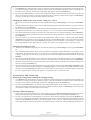
Clearing the lock with a pre-set opening delay (between 1 and 99 minutes)
1.
2.
3.
4.
5.
6.
Press On/Enter key. When the lock is ready for operation, the welcoming phrase on the display will soon be replaced
by a message prompting the operator to enter a secret code. The black, rectangular cursor sits blinking at the first
digit of the code entry field.
Key-in the 7- or 8-digit number code (factory setting: administrator code 1 2 3 4 5 6 7). Following each successful
entry a star appears in the space just completed, and the blinking cursor shifts one place to the next figure to be entered.
After entering the last digit, the code is validated by the lock.
If the lock is able to match the entry with a previously programmed code, it starts the preset opening delay and displays
the remaining waiting time. If the lock cannot match the entered code to a valid code, it will send out a fault message.
Wait for the opening delay to come to an end. Until it does, the lock cannot be opened. At the end of the opening
delay, the operator is prompted to enter a valid code.
Key-in the valid code once more.
As a sign of its readiness for unblocking, the lock will prompt the operator for five seconds to turn the round input
unit and start unblocking the lock.
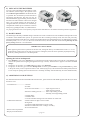
Unblocking the lock - relocking and securing the lock
1. To unblock the lock during the five second
readiness for opening, turn the round input unit
clockwise through a half turn from its end position. Please note that the input unit can be turned
a quarter turn at any time, but that this distance
is not enough to unblock the lock.
2. If the input unit is turned back to its starting
position in anti-clockwise direction after the
five-second ready-for-opening period, the lock
will return to the blocked position and can only
be unblocked after renewed clearing and re-entry of a valid code.
C) CHANGING THE NUMERICAL CODE
TEST – TO BE PERFORMED WITHOUT FAIL!!
For safety reasons, only reprogram the lock with the safe door open and blocked in the open position. Only after you
are absolutely certain that the lock has been reprogrammed successfully and that the lock can be electrically cleared
and mechanically unblocked using the new settings, should the door be closed.
Enter the setting mode to change one of the codes
ONLY CHANGE THE LOCK SETTINGS WITH THE SAFE DOOR OPEN AND BLOCKED. DO NOT MAKE UP
NUMBER CODE OF PERSONAL DATES (i.e. no wedding anniversaries, birthdays etc.)
-- page 2 --