1
E) REPLACING THE BATTERIES
As soon as the symbol depicting the battery condition indicates „almost empty“, the operator is also
warned Please replace batteries! each time the lock
is operated. We recommend you heed the advice
and change the batteries! The lock can only be
unblocked a further, approximately, 50 times. Please
note that none of the number codes can be changed
until a set of fresh batteries has been fitted. To
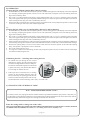
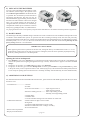
change the batteries, lift off the cover of the battery
compartment with the tip of a screwdriver. Fit three
leak-proof, type Mignon LR6, AA, alkaline batteries, paying attention to the correct polarity. Dispose of the old batteries in accordance with anti-pollution legislation!
F) BACKUP MODE
The advantage of the fully redundant design is that the lock can be switched over from standard to backup mode in case
of a failure of the standard lock system. To open the lock after switching to backup mode, enter the code previously
assigned in the backup mode. However, until the system administrator has changed the factory-set administrator code for
the backup mode, i.e. 1 2 3 4 5 6 7, to the secret code of his choice, the lock will send out the warning Backup cde still
factory setting whenever it is switched on.
IMPORTANT SAFETY ISSUE !
When preparing the lock for operation for the first time, change the factory-set administrator code 1 2 3 4 5 6 7
of the backup system to the secret code of your choice. Failing this, the lock can be opened by anybody knowing
the factory setting whenever it is in backup mode.
Opening the lock in backup mode
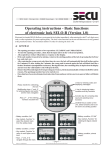
1. Press On/Enter. Next, press Function key to enter the menu of the setting mode. Above the “1” and “2” keys you
will see the symbols for navigating through the menu (up or down). The first item to appear is the menu for Code
change.
2. Using keys “1” and “2”, go to Mode select. To select, press On/Enter.
3. Using keys “1” and “2”, go to sub-item Backup mode. To select, press On/Enter. Using the Function key, return
to the point where you are requested to enter a code. After keying in any code entered in the backup mode, the lock
is now ready for opening (the next time the lock is started up normally will automatically be in the standard mode).
G) ADDITIONAL LOCK SETTINGS
For detailed information about the additional lock functions, please check the CD-ROM supplied with the lock. These
functions cover:
- Time functions----------------- Set time
- Set date
- Set access time frames------------- Input range for timer A
- Input range for timer B
- Block for holiday periods--------- Once-only holiday periods
- Annually recurring holiday periods
- Opening delay
- Calibrate clock
- Activate automatic changeover from summer to winter time
- Administrator functions
- Define number of digits of secret codes
- Reorganize
- Assignment and administration of user codes
- Block user authorization for a change of code(s)
- Reset time functions
- Read out list of operations
- Display lock information
-- page 4 --