1
MODELS HD50NT • HD80NT
Page 2
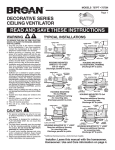
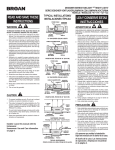
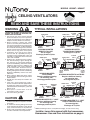
TYPICAL INSTALLATIONS
(continued)
INSTALL THE H OUSING
(continued)
New Construction
4" ROUND
DUCT
POWER
CABLE
HOUSING
SUSPENDED
CEILING MATERIAL
MOUNTING
TAB
GRILLE
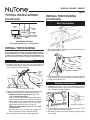
SUSPENDED CEILINGS
Housing hung with wires - 3-point mount.
INSTALL THE H OUSING
- PLEASE NOTE THE FOLLOWING INSTALLATION ILLUSTRATIONS SHOW 2 X 6 JOISTS.
IF YOU HAVE A TRUSS OR “I”-JOIST INSTALLATION, MOUNT THE VENTILATOR TO THE ADDITIONAL FRAMING IN THE SAME MANNER. (Additional framing must be a 2x6 (minimum height), at least 9-inches long.)
3. Set housing aside and drive nails partially into joist at the
top of both keyhole marks.
New Construction
1. Choose the location for your fan in the ceiling. For best
possible performance, use the shortest possible duct run
and a minimum number of elbows.
HOLES
TAB
4. Hang housing from nails and pound nails tight. To ensure
a noise-free mount, pound another nail through the top
hole of each mounting tab.
Existing Construction
1-1/4
1
5/8
BOTTOM EDGE OF JOIST
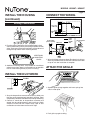
2. Position mounting brackets against joist so that bottom
edge of housing will be flush with finished ceiling.
Additional positioning feature for 5/8”, 1”, &
1-1/4” thick ceiling material:
Holes in corners of housing are labeled with various
ceiling material thicknesses. Position housing so
bottom edge of joist is visible through a matched
set of holes. The housing is now in the proper
position for that ceiling material thickness.
Additional positioning feature for 1/2” thick
ceiling material:
Bend two tabs, on side of housing, 900 outward. Lift
housing until tabs contact underside of joist.
Mark the keyhole slot on both mounting brackets.
1. Choose the location for your fan in the ceiling. For best
possible performance, use the shortest possible duct run
and a minimum number of elbows.
2. In attic, position mounting brackets against joist. Trace
outline of housing on ceiling material.
3. Set housing aside and cut ceiling opening slightly larger
than marked.