1
Speed settings for warm or cold weather
depend on factors such as room size, ceiling
height and number of fans, etc.
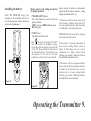
Installing the battery:
Restore power to the ceiling fan and test
for proper operation.
Install 12V MN21/A23 battery (not
included). If the transmitter will not be
used for long periods remove the battery
to prevent being damaged.
1. "HI, MED, LOW" buttons:
These three buttons are used to set the fan
speed as follows:
LOW=Low speed MED= Medium speed
HI=High speed
The Reverse switch is located on the top of
motor housing. Slide the switch to the Left
for warm weather operation. Slide the switch
to the Right for cool weather operation.
2. "OFF" button:
This button turns the fan off.
NOTE: Wait for fan to stop before changing
the setting of the slide switch.
3.The " " button turns the light ON or OFF
and also controls the brightness setting.
Press and release the button to turn the light
ON or OFF. Press and hold the button to set
the desired brightness. The light key has an
auto-resume, it will stay at the same
brightness as the last time it was turned off.
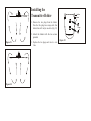
Warm weather - (Forward) A downward air
flow creates a cooling effect as shown in
Figure 19. This allows you to set your air
conditioner on a higher setting without
affecting your comfort. Slide the switch to
the left for the forward direction.
Cool weather - (Reverse) An upward airflow
moves warm air off the ceiling area as shown
in Figure 20. This allows you to set your
heating unit on a lower setting without
affecting your comfort. Slide the switch to
the right for the reverse direction.
Figure 17
Figure 18
Operating the Transmitter 9.