1
Universal Remote Control, Inc.
4
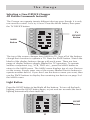
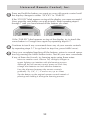
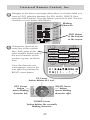
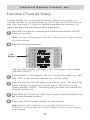
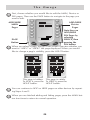
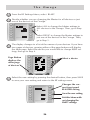
Navigate to the device and page where there is a button label you
want to EDIT, selecting between the FAV, MAIN, DEVICE, then
using the PAGE button. Press the button you wish to edit. The first
character of your button label blinks.
Blinking
Character
EDIT flashes
at the bottom
of the screen.
5
Change the character by
using any of the number
keys. Each press of the
same number button selects
the next character of that
number’s group, as shown
here.
G,H,I,3
A,B,C,1
D,E,F,2
J,K,L,4
M,N,O,5
P,Q,R,6
S,T,U,7
V,W,X,8
Y,Z,9
Once the character you
want appears, move to the
next space by pressing the
RIGHT cursor button.
UP Cursor
button deletes ALL text.
LEFT Cursor
button
moves blinking
character left.
RIGHT Cursor
button
moves blinking
character right.
DOWN Cursor
button deletes the currently
blinking character.
17