1
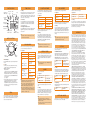
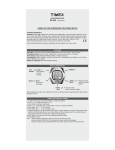
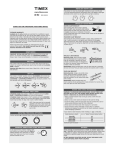
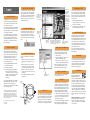
TIME OF DAY
WATCH DISPLAY
Appointment
within 3 Days
Day of the
Week
Chime
ON
Timeline
Setting
Date
Countdown
Timer
Running
Pull out the Crown to set. Turn the Crown to change
the flashing item’s value. Press MODE to set the
time, time format, date, date format, year, day of the
week or week number, and time zone name. Push in
the Crown to save your changes.
Time Zones
Press STOP/RESET once and hold it to display the
second time zone; press twice and hold to display
the third time zone. Continue holding to switch to
the displayed time zone.
Chronograph
Running
Next Appointment/Occasion
NIGHT-MODE
Feature ON
Alarm or Appt Alert
within 12 Hours
Time in
HH:MM ss Format
Press START/SPLIT once and hold to display the next
Appointment; press twice and hold to display the
next Occasion.
Tip
• Use the PC software to set the watch; it’s much
easier than using the buttons.
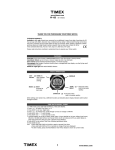
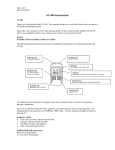
WATCH CONTROLS
USB
Connector
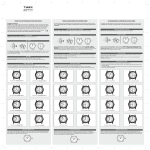
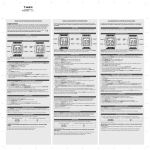
COUNTDOWN TIMER
APPOINTMENT
This feature informs you of appointments.
Enter and retrieve short messages.
Operation
Operation
Operation
To view appointments
Turn the Crown
To view the notes
Turn the Crown
To delete a note
Hold STOP/RESET
To view the timers
Turn the Crown
To arm or disarm an
appointment
Press START/SPLIT
To start the timer
Press START/SPLIT
To delete an appointment
Hold STOP/RESET
To stop the timer
Press STOP/RESET
To resume countdown
or
To reset the timer
Press START/SPLIT
When an alert sounds, press any button to silence it.
If not silenced, it repeats once in 5 minutes.
Hold STOP/RESET
When the countdown finishes, an alert sounds until
you press any button or the Crown.
Setting
To set a timer, turn the Crown to display a timer
and pull out the Crown. Turn the Crown to change
the flashing item’s value. Press MODE to set the
hours, minutes, seconds, and the action at the end:
STOP, REPEAT, or (start) CHRONO. Push in the
Crown to save your changes.
Setting
To set an appointment, turn the Crown to display an
existing or unused appointment and pull out the
Crown. Turn the Crown to change the flashing item’s
value. Press MODE to set the time, recurrence, alert
time, and message. Push in the Crown to save your
changes.
Tip
• The symbol AP appears when an appointment is
scheduled within the next 3 days.
MODE
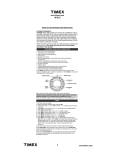
CHRONOGRAPH
Crown
Time an event and record lap or segment times that
you can review during or after the event.
Tip
• Activate the Halfway reminder by pressing
STOP/RESET before starting the timer.
INTERVAL TIMER
To start the chronograph Press START/SPLIT
STOP/
RESET
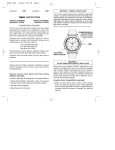
MODE Button
Press the MODE button to cycle through the watch
modes.
Crown
Scrolling – In any mode (other than Time of Day),
turn the Crown to scroll through the entries.
INDIGLO® night-light –
Electroluminescent technology used in the INDIGLO night-light
illuminates the entire watch face at night and in
low-light conditions. Press the crown to activate;
hold for 4 seconds to activate NIGHT-MODE® feature. for 8 hours
(see Options).
Setting – Pull the Crown out to set. Turn the Crown
to change the flashing item’s value. Press the
MODE button to advance to the next item or
STOP/RESET to return to the previous item. Push
the Crown in to save your changes and return to
the normal display.
DEMO
Your watch may be preloaded with a running Demo
mode. You may exit the demo by pressing the MODE
button. The demo is deactivated when you set the
date or send data to the watch.
To take a split
Press START/SPLIT
To stop the chronograph
Press STOP/RESET
To restart the chronograph
or
Press START/SPLIT
To clear the workout
or
To store the workout
To recall a stored workout when the chrono is
reset (at zero)
then
To review lap/split times
or
To delete a workout
Press and hold
STOP/RESET
This is a sequence of linked countdown timers.
When one countdown timer interval ends, an alert
sounds and the next interval starts. Operation and
setting are otherwise similar to the Countdown
Timer.
Tip
• After setting an interval, press START/SPLIT to go
to the next interval.
Turn the Crown one click
ALARM
Turn the Crown to scroll
the entries
Set one or more alarms.
Pull out and turn
the Crown
Hold STOP/RESET
Tips
• Lap/split times can be recalled while the chronograph is running or after it is stopped.
• When you take a split, the display freezes for 10
seconds, then resumes with the next lap. Press
MODE to immediately display the next lap.
• When the chronograph is reset (at zero), you can
change the format of the display. Pull the Crown
out and turn to select the positions of the lap and
split times or the time of day.
OPTIONS
Access three watch options. Turn the Crown to
choose among them.
Operation
START/
SPLIT
NOTE
A countdown timers counts backward to zero from a
time you set. You can set multiple countdown timers
on your watch
Operation
To view the list of alarms Turn the Crown
To arm or disarm an
alarm
Press START/SPLIT
To delete an alarm
Hold STOP/RESET
When an alarm alert sounds, press any button to
silence it. If not silenced, it repeats once in 5 minutes.
Setting
To set an alarm, turn the Crown to display an existing or unused alarm and pull out the Crown. Turn
the Crown to change the flashing item’s value. Press
MODE to set the time, active day(s), and message.
Push in the Crown to save your changes.
Tips
• When setting the time of an alarm, press
START/SPLIT to switch between 5 minute and 1
minute increments.
• The alarm icon appears only when an alarm is set
to alert within 12 hours.
NIGHT-MODE® Feature
When this feature is activated, the INDIGLO® nightlight is turned on whenever a button is pressed. It
can be set to OFF, ON, or AUTO. When ON, the
NIGHT-MODE feature is active for 8 hours. AUTO
activates it between the ON and OFF times you set.
To change to ON, OFF, or Press START/SPLIT or
STOP/RESET
AUTO
To set the ON and OFF
times
Pull out the Crown, turn
the Crown, press MODE
Chime
When this feature is activated, the watch chimes at
each hour. It can be set to OFF, ON, or AUTO. When
ON, the watch chimes every hour. AUTO activates
the chime between the ON and OFF times you set.
To change to ON, OFF, or Press START/SPLIT or
STOP/RESET
AUTO
To set the ON and OFF
times
Pull out the Crown, turn
the Crown, press MODE
Button Beep
When this feature is activated, the watch beeps with
each button press.
To change between ON
and OFF
Press START/SPLIT or
STOP/RESET
ADDITIONAL MODES
Other modes can be downloaded to the watch with
the PC software. See the Software Help.
Setting
To edit or create a note, turn the Crown to display an
existing or unused note and pull out the Crown. Turn
the Crown to change the character at the cursor.
Press MODE to move to the next position. Push in
the Crown to save your changes.
WARRANTY
To obtain warranty service, please return your watch to
Timex, one of its affiliates or the Timex retailer where the
product was purchased, together with a completed original Product Repair Coupon or, in the U.S. and Canada
only, the completed original Product Repair Coupon or a
written statement identifying your name, address, telephone number and date and place of purchase. Please
include the following with your watch to cover postage
and handling (this is not a repair charge): a US$ 7.00
check or money order in the U.S.; a CAN$6.00 cheque or
money order in Canada; and a UK£ 2.50 cheque or
money order in the U.K. In other countries, Timex will
charge you for postage and handling. NEVER INCLUDE A
SPECIAL WATCHBAND OR ANY OTHER ARTICLE OF
PERSONAL VALUE IN YOUR SHIPMENT.
For the U.S., please call 1-800-448-4639 for additional
warranty information. For Canada, call 1-800-263-0981.
For Brazil, call 0800-168787. For Mexico, call 91-800-01060. For Central America, the Caribbean, Bermuda and
the Bahamas, call (501) 370-5775 (U.S.). For Asia, call
852-2815-0091. For the U.K., call 44 208 687 9620. For
Portugal, call 351 212 946 017. For France, call 33 3 81 63
42 00. For Germany, call 49 7 231 494140. For the Middle
East and Africa, call 971-4-310850. For other areas,
please contact your local Timex retailer or Timex distributor for warranty information.
TIMEX INTERNATIONAL WARRANTY (U.S. – LIMITED
WARRANTY) Your TIMEX® product is warranted against
manufacturing defects by Timex Corporation for a period
of ONE YEAR from the original purchase date. Timex and
its worldwide affiliates will honor this International
Warranty. Please note that Timex may, at its option,
repair your product by installing new or thoroughly
reconditioned and inspected components or replace it
with an identical or similar model. IMPORTANT –
PLEASE NOTE THAT THIS WARRANTY DOES NOT
COVER DEFECTS OR DAMAGES TO YOUR PRODUCT: 1)
after the warranty period expires; 2) if the product was
not originally purchased from an authorized Timex retailer; 3) from repair services not performed by Timex; 4)
from accidents, tampering or abuse; and 5) lens or crystal, strap or band, watch or transceiver case, attachments
or battery. Timex may charge you for replacing any of
these parts.
THIS WARRANTY AND THE REMEDIES CONTAINED
HEREIN ARE EXCLUSIVE AND IN LIEU OF ALL OTHER
WARRANTIES, EXPRESS OR IMPLIED, INCLUDING ANY
IMPLIED WARRANTY OF MERCHANTABILITY OR FITNESS FOR PARTICULAR PURPOSE. TIMEX IS NOT
LIABLE FOR ANY SPECIAL, INCIDENTAL OR CONSEQUENTIAL DAMAGES. Some countries and states do not
allow limitations on implied warranties and do not allow
exclusions or limitations on damages, so these limitations may not apply to you. This warranty gives you specific legal rights and you may also have other rights
which vary from country to country and state to state.