1
6.
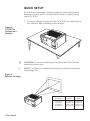
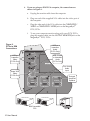
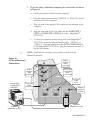
If you are using an IBM VGA computer, the connections are
shown in Figure 9:
a.
Unplug the monitor cable from the computer.
b.
Plug one end of the supplied VGA cable into the video port of
the computer.
c.
Plug the other end of the VGA cable into the COMPUTER 1
VIDEO or COMPUTER 2 VIDEO jack on the MagnaByte®
P170/P170v.
f.
To use your computer monitor along with your P170/P170v,
plug the monitor cable into the OUTPUT MONITOR jack on the
MagnaByte® P170/P170v.
Figure 9.
P170v to IBM
Connections
VCR or
Laserdisc
Audio
(P170v Only)
VIDEO
VCR or
Laserdisc
Video
(P170v Only)
L
R
VCR, S-VHS
or Laserdisc
Audio
(P170v Only)
TV1
VIDEO
L
R
TV2
Line Level
Audio
Input
Super VHS
Video
(P170v Only)
S-VHS
AUDIO
AUDIO
External
Amplified
Speaker
AUDIO
VIDEO
VIDEO
MONITOR
COMPUTER 1
COMPUTER 2
OUTPUT
IBM
Compatib
le
Computer
IBM Compatible
PCs
10 User Manual
The
Big Monitor
347987598
6235 88
Monitor