1
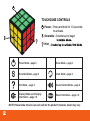
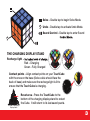
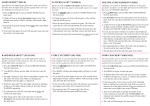
Solve – Double tap to begin Solve Mode.
Undo – Double tap to activate Undo Mode.
Sound Control – Double tap to enter Sound
THE CHARGING DISPLAY STAND
Recharge light
Red – Charging
Green – Fully Charged
Contact points – Align contact points on your TouchCube
with the ones on the base (Solve cubie should face the
back of base) and make sure the recharge light is lit to
ensure that the TouchCube is charging.
Reset area – Press the TouchCube to the
bottom of the charging display stand to restart
the Cube. It will return to its last saved puzzle.
Bottom of Charging
Display Stand
3