1
English
62
Installing memory
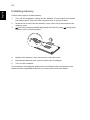
Follow these steps to install memory:
1
Turn off the computer, unplug the AC adapter (if connected) and remove
the battery pack. Then turn the computer over to access its base.
2
Remove the screws from the memory cover; then lift up and remove the
memory cover.
3
(a) Insert the memory module diagonally into the slot, then (b) gently press
it down until it clicks into place.
4
Replace the memory cover and secure it with the screw.
5
Reinstall the battery pack, and reconnect the AC adapter.
6
Turn on the computer.
The computer automatically detects and reconfigures the total memory size.
Please consult a qualified technician or contact your local Acer dealer.