1
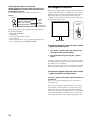
Displaying this monitor’s information
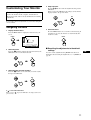
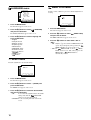
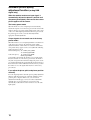
While the monitor is receiving a video signal, press and
hold the MENU button for more than 5 seconds until the
information box appears.
Press the MENU button again to make the box disappear.
Example
MENU
INFORMATION
MODEL : SDM-S204
SER. NO : 1234567
MANUFACTURED : 2003-40
Model
name
Self-diagnosis function
This monitor is equipped with a self-diagnosis function. If there is
a problem with your monitor or computer(s), the screen will go
blank and the 1 (power) indicator will either light up in green or
flash orange. If the 1 (power) indicator is lit in orange, the
computer is in power saving mode. Try pressing any key on the
keyboard or moving the mouse.
Serial
number
1 (power)
indicator
Week and year
of manufacture
If any problem persists, call your authorized Sony dealer and give
the following information:
• Model name: SDM-S204
• Serial number
• Detailed description of the problem
• Date of purchase
• Name and specifications of your computer and graphics board
• Type of input signals (analog RGB/digital RGB)
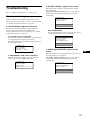
If the picture disappears from the screen and the
1 (power) indicator is green
1
Turn off the 1 (power) switch and disconnect the
video signal cables from the monitor.
2
Turn the monitor on by pressing the 1 (power)
switch.
If all four color bars appear (white, red, green, blue), the monitor
is working properly. Reconnect the video input cables and check
the condition of your computer(s).
If the color bars do not appear, there is a potential monitor failure.
Inform your authorized Sony dealer of the monitor’s condition.
If the picture disappears from the screen and the
1 (power) indicator is flashing orange
Press the 1 (power) switch twice to turn the monitor off
and then on.
If the 1 (power) indicator lights up in green, the monitor is
working properly.
If the 1 (power) indicator is still flashing, there is a potential
monitor failure. Count the number of seconds between orange
flashes of the 1 (power) indicator and inform your authorized
Sony dealer of the monitor’s condition. Be sure to note the model
name and serial number of your monitor. Also note the model
name and specifications of your computer and graphics board.
22