1
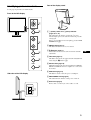
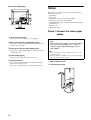
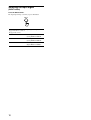
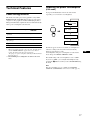
Rear of the LCD display
Setup
Before using your monitor, check that the following items are
included in your carton:
• LCD display
• Power cord
• HD15-HD15 video signal cable (analog RGB)
• DVI-D video signal cable (digital RGB)
• CD-ROM (utility software for Windows/Macintosh, Operating
Instructions, etc.)
• Warranty card
• Quick Setup Guide
Setup 1: Connect the video signal
cables
I AC IN connector (page 7)
This connector connects the power cord (supplied).
• Turn off the monitor and computer before connecting
them.
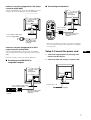
• When connecting the computer to the monitor’s HD15
input connector (analog RGB), refer to “Connect a
computer equipped with an HD15 output connector
(analog RGB).”
J HD15 input connector (analog RGB) (page 7)
This connector inputs analog RGB video signals (0.700 Vp-p,
positive) and sync signals.
K DVI-D input connector (digital RGB) (page 7)
This connector inputs digital RGB video signals that comply
with DVI Rev.1.0.
Note
• Do not touch the pins of the video signal cable connector as this
might bend the pins.
• Check the alignment of the HD15 connector to prevent bending the
pins of the video signal cable connector.
L Cable holder (page 8)
This part secures cables and cords to the monitor.
M Security lock hole
The security lock hole should be used with the Kensington
Micro Saver Security System.
Micro Saver Security System is a trademark of Kensigton.
6
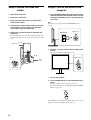
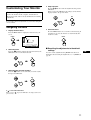
1
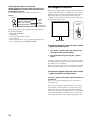
Slide up the back cover.
2
Tilt the display forward.