1
C:\Documents and Settings\Power\My Documents\_upload
job\4094158012\4094158012SDMHS53UC\02US-SDMHS53UC\02UC02BAS-UC.fm
WARNING
To prevent fire or shock hazard, do not expose the
unit to rain or moisture.
masterpage:Left
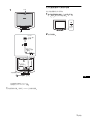
To view the Operating Instructions
on the CD-ROM
Dangerously high voltages are present inside the
unit. Do not open the cabinet. Refer servicing to
qualified personnel only.
Notes
• To view the Operating Instructions on the CD-ROM, Adobe Acrobat
Reader (later than version 4.0) needs to be installed on your computer.
• More information on the commands, features, and tools of Adobe
Acrobat Reader is available from the Reader’s online Help.
Precautions
For Windows
Load the supplied CD-ROM into the CD-ROM drive of your
computer. After a while, the window of the CD-ROM will open
automatically. Double-click on “Manual.pdf” in the window. The
Operating Instruction files will open.
Warning on power connections
• Use the supplied power cord. If you use a different power cord,
be sure that it is compatible with your local power supply.
For the customers in the U.S.A.
If you do not use the appropriate cord, this monitor will not
conform to mandatory FCC standards.
For the customers in the UK
If you use the monitor in the UK, be sure to use the appropriate
UK power cord.
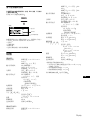
Example of plug types
for 100 to 120 V AC
for 200 to 240 V AC
Note
Depending on a computer you are using, the window of the CD-ROM may
not open automatically. In this case, double-click on the icon of the CDROM to open the window of the CD-ROM.
For Macintosh
Load the supplied CD-ROM into the CD-ROM drive of your
computer. The icon of the CD-ROM will appear on the desktop.
Double-click the icon to open the window of the CD-ROM and
double-click on “Manual.pdf” in the window. The Operating
Instruction files will open.
for 240 V AC only
The equipment should be installed near an easily accessible outlet.
Installation
Do not install or leave the monitor:
• In places subject to extreme temperatures, for example near a
radiator, heating vent, or in direct sunlight. Subjecting the
monitor to extreme temperatures, such as in an automobile
parked in direct sunlight or near a heating vent, could cause
deformations of the casing or malfunctions.
• In places subject to mechanical vibration or shock.
• Near any equipment that generates a strong magnetic field,
such as a TV or various other household appliances.
• In places subject to inordinate amounts of dust, dirt, or sand, for
example near an open window or an outdoor exit. If setting up
temporarily in an outdoor environment, be sure to take
adequate precautions against airborne dust and dirt. Otherwise
irreparable malfunctions could occur.
Note on the LCD (Liquid Crystal Display)
Please note that the LCD screen is made with high-precision
technology. However, black points or bright points of light (red,
blue, or green) may appear constantly on the LCD screen, and
irregular colored stripes or brightness may appear on the LCD
screen. This is not malfunction.
(Effective dots: more than 99.99%)
Note
If you are using Mac OS X, activate the Adobe Acrobat Reader first,
then double-click on “Manual.pdf” in the window.
If you cannot open the Operating Instruction files
Adobe Acrobat Reader may not be installed on your computer.
You can download it for free from the Adobe Web site.
Setup
Unpacking
Make sure your carton contains everything listed below.
• LCD display
• Power cord
• HD15-HD15 video signal cable
• Cord strap
• Utility/Instruction Manual CD-ROM (utility software for
Windows/Macintosh, Operating Instructions)
• Warranty card
• This Quick Setup Guide
Connecting your monitor
Connect your monitor to a computer or other equipment.
• Turn off the monitor, computer, and any other
equipment before connecting them.
• Do not touch the pins of the video signal cable plug.
2 (US)
SDM-HS53/HS73/HS93
4-094-158-01(2)