1
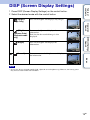
1 Press DISP (Screen Display Settings) on the control button.
2 Select the desired mode with the control button.
(Bright +
Exposure Data)
(Playback mode
only)
Sets screen brighter and displays the
information.
Exif data for the recorded image is also
displayed.
(Bright)
Sets screen brighter and displays the
information.
(Normal)
Sets screen to standard brightness and displays
the information.
MENU/Settings
Search
Sets screen brighter and displays only images.
Operation
Search
(Bright +
Image Only)
Table of
contents
DISP (Screen Display Settings)
Index
Note
• If you view images in bright outside light, adjust the screen brightness up. However, the battery power
may decrease faster under such condition.
19GB