1
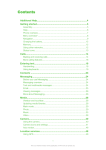
Contents
Additional Help.............................................................................5
Getting started..............................................................................6
Assembly............................................................................................6
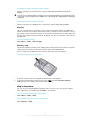
Help in the phone................................................................................8
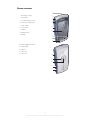
Phone overview...................................................................................9
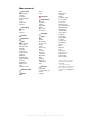
Menu overview*.................................................................................10
Navigation.........................................................................................11
Using other networks........................................................................14
Status icons......................................................................................15
Calls.............................................................................................16
Making and receiving calls.................................................................16
More calling features.........................................................................17
Entering text...............................................................................20
Handwriting.......................................................................................20
Using on-screen keyboards..............................................................21
Address Book ............................................................................24
Messaging...................................................................................25
Before you use Messaging................................................................25
Messaging overview..........................................................................25
Text and multimedia messages.........................................................25
Conversations...................................................................................26
Email.................................................................................................26
Viewing messages............................................................................27
More about Messaging.....................................................................27
Media...........................................................................................30
Viewbar and touchbar.......................................................................30
Updating media libraries....................................................................30
Mark mode.......................................................................................31
Photo................................................................................................31
Music................................................................................................38
Video................................................................................................41
Camera........................................................................................43
Using the camera..............................................................................43
Camera icons and settings................................................................44
Auto review.......................................................................................48
Location services.......................................................................50
Using GPS........................................................................................50
2
This is an Internet version of this publication. © Print only for private use.