1
Instructions for the user
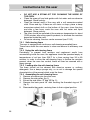
3.2.1 Setting the time
When the oven is used for the first time, or after a power blackout, the
display flashes on and off at regular intervals. Press the
key for 1/2
seconds to stop the display flashing and start setting of the current time.
or
to increase or decrease by
Press the value modification keys
one minute for each time a key is pressed.
Press one of the two value modification keys until the current time
appears. The clock will start from the time set 6/7 seconds after the last
key is pressed.
At the end of each programmed cooking operation, the clock gives 8
beeps, repeated 3/4 times at intervals of about 1 and a half minutes.
The beeps can be stopped at any moment by pressing any key.
3.2.2 Minute-minder
This function does not stop cooking but just triggers the beeps.
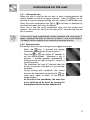
key is pressed the display
When the
illuminates, appearing as shown in figure 1;
Press the
or
keys within 6/7 seconds to
set the minute-minder. Whenever a key is
pressed, 1 outside segment, representing 1
cooking minute will light up (figure 2 shows 10
cooking minutes).
The countdown will start 6/7 seconds after the
last key is pressed; at the end of it, you will hear
the beeps.
During cooking with countdown, the current
time can be displayed by pressing the
key
once; press again to return to the minuteminder display.
At the end of the countdown, the oven has
to be switched off by hand, by turning the
thermostat and the function selector to 0.
1
2
11