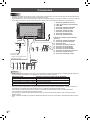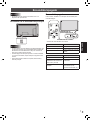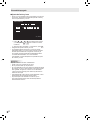
1
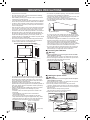
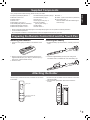
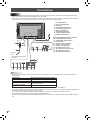
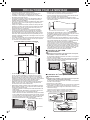
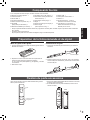
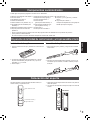
Supplied Components Liquid Crystal Display Monitor: 1 Remote control unit: 1 Cable clamp: 2 Power cord R-6 battery (“AA” size): 2 CD-ROM (Utility Disk for Windows): 1 Setup Manual (this manual): 1 Stand hole protection cover: 2 Vertical sticker (Operation panel): 1 Eraser: 1 Holder: 1 (With 2 hook and loop fasteners) Vertical sticker (Logo): 1 Cover Sharp logo: 1 Touch pen: 1 Place this sticker onto the SHARP logo to Pen tip (for touch pen): 2 cover the logo. Touch pen battery (LR-03 (“AAA” size)): 1 USB cable: 1 Power switch: 1 ENGLISH If any component should be missing, please contact your dealer. * Sharp Corporation holds authorship rights to the Utility Disk program. Do not reproduce it without permission. * For environmental protection! Do not dispose of batteries in household waste. Follow the disposal instructions for your area. Preparing the Remote Control Unit and the Touch Pen Installing the batteries Inserting the battery 1. Press the cover gently and slide it in the direction of the arrow. 1. Rotate the battery cap and remove it, and then pull out the cover. Battery cap 2. See the instructions in the compartment and put in the supplied batteries (R-6 (“AA” size) x 2) with their plus (+) and minus (-) sides oriented correctly. 3. Close the cover. 2. Insert the supplied battery (LR-03 (“AAA” size)) in the orientation shown, and attach the cover and battery cap. Attaching the Holder The touch pen, remote control unit, and eraser can be stored in the holder. 1. Remove the peel-off sheets from the fasteners on the back side of the holder. 2. With the holder spread taut, affix it to the side of the monitor. Touch pen Back side Remote control unit and Eraser 5 E