1
Turning Power On/Off
• Turn on the monitor first before turning on the PC or
playback device.
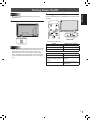
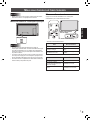
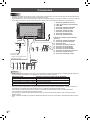
Turning power on/off
Press the POWER button or POWER switch to turn the power
ON/OFF.
Turning on the main power
ENGLISH
Caution
Touch panel power LED
Main power switch
Power LED
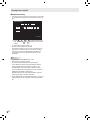
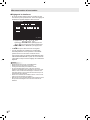
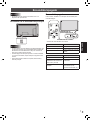
• Status of the power LED
Status
Caution
• The main power must be turned on/off with the main power
switch. Do not connect/disconnect the power cord or turn
the breaker on/off while the main power switch is on.
• When switching the main power switch or the POWER
button off and back on, always wait for at least 5 seconds.
• For a complete electrical disconnection, pull out the main
plug.
Status of the monitor
Green lit
Power on
Orange lit
Power off (Standby mode)
Green flashing
Input signal waiting mode
• Status of the touch panel power LED
Status
Status of the touch panel
Green lit
Operating normally
Blinking orange
Alternately blinking green and Initializing
orange
Touch panel off (power not
Off
supplied, etc.)
7
E