1
RS-232C Specifications and Commands
Computer control
A computer can be used to control the projector by connecting an RS-232C serial control cable (cross type,
commercially available) to the projector. (See page 27 of the projector’s operation manual for connection.)
Communication conditions
Set the serial port settings of the computer to match that of the table.
Signal format: Conforms to RS-232C standard.
Parity bit: None
Baud rate*: 9,600 bps / 115,200 bps
Stop bit: 1 bit
Data length: 8 bits
Flow control: None
*Set the projector’s baud rate to the same rate as used by the computer.
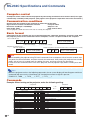
Basic format
Commands from the computer are sent in the following order: command, parameter, and return code. After
the projector processes the command from the computer, it sends a response code to the computer.
Command format
C1
C2
C3 C4
P1
P2
P3
Command 4-digit
Response code format
Normal response
O
K
P4
Return code (0DH)
Parameter 4-digit
Problem response (communication error or incorrect command)
E
Return code (0DH)
R
Return code (0DH)
R
Info
• When controlling the projector using RS-232C commands from a computer, wait at least 30 seconds after
the power has been turned on, and then transmit the commands. After putting the projector into standby
mode, wait at least 90 seconds until the cooling fan stops, and then transmit the commands.
• If more than one command will be sent to the projector, wait for projector reply before sending next command.
Note
• When the projector receives the following commands, the on-screen display will not disappear and these
commands will not reset the “Auto Power Off” function timer when no signal is present.
POWR????, TABN_ _ _1, TLPS_ _ _1, TLTT_ _ _1, TLTL_ _ _1
Commands
Example: When turning on the projector, make the following setting.
Computer
P
O
W
Control Contents
-4
R
_
_
_
1
Command Parameter
Standby
Power On
Power Status
Projector Status
P
P
P
T
O
O
O
A
W
W
W
B
R
R
R
N
_
_
?
_
_
_
?
_
_
_
?
_
0
1
?
1
Lamp Status
Volume (0-60)
AV Mute : Off
AV Mute : On
Keystone (-127 ~ +127)
INPUT 1 (RGB1)
INPUT 2 (RGB2)
INPUT 3 (Video)
INPUT 4 (S-Video)
Freeze : Off
Freeze : On
Auto Sync Start
T
V
I
I
K
I
I
I
I
F
F
A
L
O
M
M
E
R
R
V
V
R
R
D
P
L
B
B
Y
G
G
E
E
E
E
J
S
A
K
K
S
B
B
D
D
Z
Z
S
_
_
_
_
*
_
_
_
_
_
_
_
_
_
_
_
*
_
_
_
_
_
_
_
_
*
_
_
*
_
_
_
_
_
_
_
1
*
0
1
*
1
2
1
2
0
1
1
Projector
→
←
O
K
Return
OK or ERR
OK or ERR
0 : Standby, 1 : On
0 : Normal, 1 : Temp High, 2 : Fan Err, 8 : Lamp Life 5% or less,
16 : Lamp Burnt-out, 32 : Lamp Ignition Failure,
64 : Temp Abnormally High
0 : Off, 1 : On, 2 : Retry, 3 : Waiting, 4 : Lamp Error
OK or ERR
OK or ERR
OK or ERR
OK or ERR
OK or ERR
OK or ERR
OK or ERR
OK or ERR
OK or ERR
OK or ERR
OK or ERR