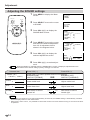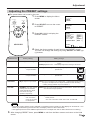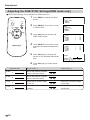
1
Adjustment
Adjusting the PICTURE settings
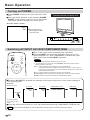
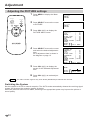
1 Press MENU to display the Menu
screen.
ON/OFF
MUTE
MENU
AV INPUT
2
Press SELECT to move the cursor
to PICTURE.
3
Press VOL (+)/(–) to display the
PICTURE Menu screen.
4
Press SELECT to move the cursor
and select the desired adjustment
item.
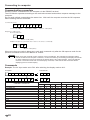
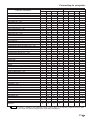
All of adjustment item is shown in
the diagram on page 13.
5
Press VOL (+)/(–) to display the
screen for the selected adjustment
item.
SELECT
VOL
–
VOL
+
SELECT
6
Note
MENU
PICTURE
SOUND
PRESET
MENU
PICTURE
SOUND
PRESET
PICTURE AV1
CONTRAST
[
‰]
TINT
[
‰]
COLOR
[
‰]
BLACK LEVEL
[
‰]
SHARPNESS
[
‰]
RED
[
‰]
BLUE
[
‰]
COLOR SYSTEM [ AUTO]
RESET
SELECT: •
ENTER :( • ) EXIT: MENU
PICTURE AV1
CONTRAST
[
‰]
TINT
[
‰]
COLOR
[
‰]
BLACK LEVEL
[
‰]
SHARPNESS
[
‰]
RED
[
‰]
BLUE
[
‰]
COLOR SYSTEM [ AUTO]
RESET
SELECT: •
ENTER :( • ) EXIT: MENU
COLOR
3‰
SELECT: •
ADJUST:( • ) EXIT: MENU
Press VOL (+)/(–) to make adjustment.
The TINT indication appears only when NTSC (N358/N443) broadcasts are received.
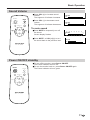
Switching the System
Set the system to AUTO for normal reception. The AUTO mode automatically detects the receiving signal
system and changes the reception system of the set.
When the picture or sound is not stable, switching to an appropriate system may improve the picture or
sound quality.
US
12