1
FO-DC500/FO-DC600
MODEL
FO-DC500/FO-DC600
DOCUMENT COMMUNICATION SYSTEM
DOCUMENT COMMUNICATION SYSTEM
OPERATION MANUAL
1.
2.
3.
4.
5.
6.
7.
8.
9.
10.
Installation
Sending and Receiving Documents
Network Scanner Option
Network Printer Option
Making Copies
Special Functions
Optional Settings
Printing Lists and Reports
Maintenance
Troubleshooting
U.S.A.
WARNING - FCC Regulations state that any unauthorized changes or modifications to this equipment not
expressly approved by the manufacturer could void the user’s authority to operate this equipment.
Note: This equipment has been tested and found to comply with the limits for a Class A digital
device, pursuant to part 15 of the FCC Rules. These limits are designed to provide reasonable
protection against harmful interference when the equipment is operated in a commercial
environment. This equipment generates, uses, and can radiate radio frequency energy and, if not
installed and used in accordance with the instruction manual, may cause harmful interference to
radio communications. Operation of this equipment in a residential area is likely to cause harmful
interference in which case the user will be required to correct the interference at his own expense.
ABOUT THE TELEPHONE CONSUMER PROTECTION ACT OF 1991
"The Telephone Consumer Protection Act of 1991 makes it unlawful for any person to use a
computer or other electronic device to send any message via a telephone facsimile machine unless
such message clearly contains in a margin at the top or bottom of each transmitted page or on the
first page of the transmission the following information:
(1) The date and time of transmission.
(2) Identification of either the business, business entity or individual sending the message.
(3) Telephone number of either the sending machine, business, business entity or individual.
In order to program this information into your facsimile machine, please refer to the appropriate
instructions in the operation manual."
As an ENERGY STAR® partner, SHARP has determined
that this product meets the ENERGY STAR® guidelines
for energy efficiency.
Canada
This product meets the applicable Industry Canada technical
specifications
The Ringer Equivalence Number is an indication of the maximum number of devices
allowed to be connected to a telephone interface. The termination on an
interface may consist of any combination of devices subject only to the
requirement that the sum of the RENs of all the devices does not exceed five.
Introduction
Welcome, and thank you for choosing a SHARP FO-DC500/600 Document
Communication System. The features and specifications of the system are shown
below.
Automatic dialing
Conventional Auto Dialing:
Rapid Key Dialing: 59 numbers
Speed Dialing
FO-DC500: 100 numbers
FO-DC600: 200 numbers
Personal Auto Dial Books
FO-DC500: 20 books
FO-DC600: 40 books
(59 Rapid Keys, 16 Speed Dial numbers
per book)
Memory size*
FO-DC500: 8 MB (approx. 500 pages)
FO-DC600: 16 MB (approx. 1,000 pages)
Optional memory: FO-8MK (8 MB; approx. 500
pages)
Modem speed
33,600 bps (max.) with automatic fallback to lower
speeds.
Transmission time*
Approx. 2 seconds
Toner cartridge yield**
(continuous printing,
4% page coverage,
letter paper)
Initial starter cartridge (included with machine):
Approx. 3000 pages
Replacement cartridge (FO-50ND): Approx. 6000
pages
Drum cartridge yield**
(continuous printing,
4% page coverage,
letter paper)
Initial starter cartridge (included with machine):
20,000 pages (ave.)
Replacement cartridge (FO-47DR): 20,000 pages
(ave.)
Resolution
Standard: 203 x 98 lines/inch (8 x 3.85 lines/mm)
Fine/Halftone: 203 x 196 lines/inch
(8 x 7.7 lines/mm)
Super fine: 203 x 391 lines/inch (8 x 15.4 lines mm)
Ultra fine: 406 x 391 lines/inch (16 x 15.4 lines/mm)
Halftone (grayscale)
64 levels
*Based on Sharp Standard Chart at standard resolution, excluding time
for protocol signals (i.e., ITU-T phase C time only).
**The yields may vary depending on coverage and operating conditions.
1
Automatic document feeder Letter paper (20 lb): Max. 50 pages
Legal paper: Max. 20 pages
(Note: 11” x 17” paper must be loaded one page at
a time.)
2
Paper capacity
FO-DC500: 250 sheets (20 lb)
FO-DC600: 750 sheets (20 lb)
(500-sheet cassette available as option)
Compression scheme
MMR, MR, MH, Sharp (H2), JBIG
Applicable telephone line
Public switched telephone network
Compatibility
ITU-T (CCITT) G3 mode, Super G3 mode
Printing resolution
Horizontal: 406 lines/inch (16 lines/mm)
Vertical: 391 lines/inch (15.4 lines/mm)
Input document size
Automatic feeding:
Width: 5.8 to 10.1" (148 to 257 mm)
Length: 5.0 to 14.3" (128 to 364 mm)
Manual feeding:
Width: 5.8 to 11.0" (148 to 279 mm)
Length: 5.0 to 38.0" (128 to 966 mm)
(maximum length 19" (483 mm) when
ultra fine resolution is used.)
Effective Scanning width
10" (257 mm) max.
Effective Printing width
8.0" (203 mm) max.
Printing speed
16 ppm
Reception modes
Auto/Manual
Instascan speed
1.3 sec/page (letter paper; scan time only,
excludes document feeding time)
Full Dual Access
Yes
Copy function
Single/Multi/Sort (99 copies/page)
Power requirements
120 V AC, 60 Hz
Operating temperature
50 - 86°F (10 - 30°C)
Humidity
20 to 85% RH
Power consumption
FO-DC500
FO-DC600
Standby: 9 W
9W
Standby (all options installed):
16 W
16W
Maximum: 760 W
800 W
Dimensions
FO-DC500
FO-DC600
Width: 21.5" (546 mm)
21.5" (546 mm)
Depth: 16.2" (412 mm)
16.2" (412 mm)
Height: 13.6" (346 mm)
17.0" (431 mm)
(Not including paper tray or attachments)
Weight
Approx. 31.3 lbs. (14.2 kg)
48.5 lbs. (22.0 kg)
(Not including supplies, paper tray or attachments)
As a part of our policy of continuous improvement, SHARP reserves the right to make
design and specification changes for product improvement without prior notice. The
performance specification figures indicated are nominal values of production units.
There may be some deviations from these values in individual units.
Important safety information
Be sure to save these instructions!
When using this equipment, basic safety precautions should always be followed to
reduce the risk of fire, electric shock and injury to persons, including the following:
• CAUTION: To reduce the risk of fire, use only No. 26 AWG or larger
telecommunication line cord.
• Do not disassemble this machine or attempt any procedures not described in
this manual. Refer all servicing to qualified service personnel.
• This machine must only be connected to a 120 V, 60 Hz, grounded (3-prong)
outlet. Connecting it to any other kind of outlet will damage the machine and
invalidate the warranty.
• Do not install or use the machine near water, or when you are wet. For example,
do not use the machine near a bath tub, wash bowl, kitchen sink or laundry tub,
in a wet basement, or near a swimming pool. Take care not to spill any liquids
on the machine.
• Use only the power cord provided with the machine. Do not use an AC
extension cord.
3
• Unplug the machine from the telephone jack and then the power outlet and
consult a qualified service representative if any of the following situations occur:
- Liquid has been spilled into the machine or the machine has been
exposed to rain or water.
- The machine produces odors, smoke, or unusual noises.
- The power cord is frayed or damaged.
- The machine has been dropped or the housing damaged.
• Do not allow anything to rest on the power cord, and do not install the machine
where people may walk on the power cord.
• Never insert objects of any kind into slots or openings on the machine. This
could create a risk of fire or electric shock. If an object falls into the machine that
you cannot safely remove, unplug the machine and consult a qualified service
representative.
• Do not place this machine on an unstable cart, stand or table. The machine
could be seriously damaged if it falls.
• Avoid using a telephone (other than a cordless type) during an electrical storm.
There may be a remote risk of electric shock from lightning.
• Do not use a telephone to report a gas leak in the vicinity of the leak.
• The power outlet must be installed near the equipment and must be easily
accessible.
Important:
• This machine is not designed for use on a line which has call waiting, call
forwarding, or certain other special services offered by your telephone
company. If you attempt to use the machine in conjunction with any of these
services, you may experience errors during transmission and reception of
facsimile messages.
• This machine is not compatible with digital telephone systems.
4
Table of Contents
Introduction
1
Important safety information . . . . . . . . . . . . . . . . . . . . . . . . . . . . . . . . 3
Table of Contents
5
A Look at the Operation Panel
8
1. Installation
Unpacking Checklist . . . . . . . . . . . . . . . . . . . . . . . . . . . . . . . . . . . . .
Connections . . . . . . . . . . . . . . . . . . . . . . . . . . . . . . . . . . . . . . . . . . .
Installing the Print Cartridges . . . . . . . . . . . . . . . . . . . . . . . . . . . . . .
Loading Printing Paper . . . . . . . . . . . . . . . . . . . . . . . . . . . . . . . . . . .
Entering Your Name and Fax Number . . . . . . . . . . . . . . . . . . . . . . .
Setting the Date and Time . . . . . . . . . . . . . . . . . . . . . . . . . . . . . . . .
Volume Adjustment . . . . . . . . . . . . . . . . . . . . . . . . . . . . . . . . . . . . .
2. Sending and Receiving Documents
Transmittable Documents. . . . . . . . . . . . . . . . . . . . . . . . . . . . . . . . .
Loading the Document . . . . . . . . . . . . . . . . . . . . . . . . . . . . . . . . . . .
Adjusting the Resolution and Contrast . . . . . . . . . . . . . . . . . . . . . . .
Sending a Fax by Normal Dialing . . . . . . . . . . . . . . . . . . . . . . . . . . .
Programming Auto-Dial Numbers. . . . . . . . . . . . . . . . . . . . . . . . . . .
Sending a Fax by Automatic Dialing. . . . . . . . . . . . . . . . . . . . . . . . .
Creating and Using Personal Books. . . . . . . . . . . . . . . . . . . . . . . . .
Cover Sheet . . . . . . . . . . . . . . . . . . . . . . . . . . . . . . . . . . . . . . . . . . .
Batch Page Numbering (Page Counter). . . . . . . . . . . . . . . . . . . . . .
Receiving Faxes . . . . . . . . . . . . . . . . . . . . . . . . . . . . . . . . . . . . . . . .
Substitute Reception to Memory . . . . . . . . . . . . . . . . . . . . . . . . . . .
Dual-line Option (FO-DC600 only) . . . . . . . . . . . . . . . . . . . . . . . . . .
Verification Stamp Option. . . . . . . . . . . . . . . . . . . . . . . . . . . . . . . . .
PC Fax Function (Requires the FO-LN1 Option) . . . . . . . . . . . . . . .
14
14
15
18
22
25
27
30
32
32
34
35
37
39
45
54
60
62
63
65
66
70
71
5
Table of Contents
3. Network Scanner Option
73
Introduction . . . . . . . . . . . . . . . . . . . . . . . . . . . . . . . . . . . . . . . . . . . . 73
Setting the IP Address . . . . . . . . . . . . . . . . . . . . . . . . . . . . . . . . . . . 75
Printing out the Network Settings . . . . . . . . . . . . . . . . . . . . . . . . . . . 78
Mail Server and DNS Server Settings. . . . . . . . . . . . . . . . . . . . . . . . 79
Storing Network Scanning Destinations . . . . . . . . . . . . . . . . . . . . . . 81
Scan to E-mail Setup . . . . . . . . . . . . . . . . . . . . . . . . . . . . . . . . . . . . 84
Scan to E-mail Using the E-mail Key . . . . . . . . . . . . . . . . . . . . . . . . 87
Sending an Image Using a Rapid Key or Speed Dial Number . . . . . 89
Installing the Network Scanner Software . . . . . . . . . . . . . . . . . . . . . 96
Inbound Routing . . . . . . . . . . . . . . . . . . . . . . . . . . . . . . . . . . . . . . . 103
4. Network Printer Option
109
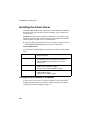
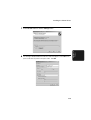
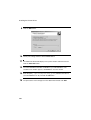
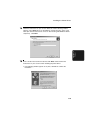
Installing the Printer Driver . . . . . . . . . . . . . . . . . . . . . . . . . . . . . . . 110
Setting Up Status and Alert Messages . . . . . . . . . . . . . . . . . . . . . . 126
Printing from a Computer . . . . . . . . . . . . . . . . . . . . . . . . . . . . . . . . 128
Opening the Printer Driver . . . . . . . . . . . . . . . . . . . . . . . . . . . . . . . 130
Printer Driver Settings . . . . . . . . . . . . . . . . . . . . . . . . . . . . . . . . . . . 131
5. Making Copies
136
6. Special Functions
139
Broadcasting . . . . . . . . . . . . . . . . . . . . . . . . . . . . . . . . . . . . . . . . . . 139
Confidential Operations . . . . . . . . . . . . . . . . . . . . . . . . . . . . . . . . . 145
Polling . . . . . . . . . . . . . . . . . . . . . . . . . . . . . . . . . . . . . . . . . . . . . . . 150
Timer Operations . . . . . . . . . . . . . . . . . . . . . . . . . . . . . . . . . . . . . . 158
Batch Transmission . . . . . . . . . . . . . . . . . . . . . . . . . . . . . . . . . . . . 164
Entering and Using Programs . . . . . . . . . . . . . . . . . . . . . . . . . . . . . 166
Duplex Scanning for Two-sided Documents . . . . . . . . . . . . . . . . . . 176
Print Hold . . . . . . . . . . . . . . . . . . . . . . . . . . . . . . . . . . . . . . . . . . . . 177
Department Control. . . . . . . . . . . . . . . . . . . . . . . . . . . . . . . . . . . . . 180
Blocking Reception of Unwanted Faxes . . . . . . . . . . . . . . . . . . . . . 183
Telephone Billing . . . . . . . . . . . . . . . . . . . . . . . . . . . . . . . . . . . . . . 185
Distinctive Ring . . . . . . . . . . . . . . . . . . . . . . . . . . . . . . . . . . . . . . . . 187
7. Optional Settings
6
189
Table of Contents
8. Printing Lists and Reports
200
9. Maintenance
205
Cleaning the Scanning Glass and Rollers . . . . . . . . . . . . . . . . . . . 205
The Housing . . . . . . . . . . . . . . . . . . . . . . . . . . . . . . . . . . . . . . . . . . 205
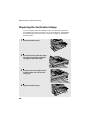
Replacing the Verification Stamp . . . . . . . . . . . . . . . . . . . . . . . . . . 206
10. Troubleshooting
207
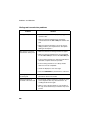
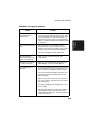
Problems and Solutions . . . . . . . . . . . . . . . . . . . . . . . . . . . . . . . . . 207
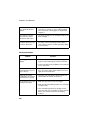
Messages and Signals . . . . . . . . . . . . . . . . . . . . . . . . . . . . . . . . . . 214
Clearing Paper Jams . . . . . . . . . . . . . . . . . . . . . . . . . . . . . . . . . . . 217
FCC Regulatory Information . . . . . . . . . . . . . . . . . . . . . . . . . . . . . . 220
QUICK REFERENCE GUIDE
224
GUÍA DE REFERENCIA RÁPIDA
225
GUIDE DE RÉFÉRENCE RAPIDE
226
Index
227
7
.A
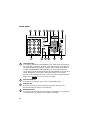
Look at the Operation Panel
Upper panel
1
2
DOCUMENT COMMUNICATION SYSTEM
8
9
5
6
7
(FO-DC500)
(FO-DC600)
ALARM
ALARM
STANDARD
TONER
FINE
LINE IN USE
ULTRA FINE
e-mail
4
HALF TONE
SUPER FINE
CONTRAST
3
Network
TONER
FAX1
FAX2
Network
DATA
DATA
ON LINE
ON LINE
RESOLUTION
ON LINE
10
11
1
Display
This displays messages and prompts to help you operate the machine. The
backlight turns on whenever a key is touched, and then automatically turns off
after a preset time if no further operations are performed. The display can be
tilted to the desired angle for easy viewing.
2
TONER indicator
This blinks when the toner cartridge nears empty, and lights steadily when the
toner cartridge needs replacement.
3
ALARM indicator
This blinks when one of the paper sources is empty, or the drum cartridge is
near or at the end of its life. This lights steadily when all paper sources are
empty, the print compartment cover is open, or a paper jam has occurred. A
message will appear in the display to indicate the problem.
4
LINE IN USE light (FO-DC500 only)
This lights when the machine is using the telephone line.
5
DATA light
This blinks when the machine is receiving a print job over the network (only
when the network printer option is installed).
8
6
ON LINE light (printer option only)
When this light is on, the machine can receive data (print jobs) over the
network. The light is turned on or off with the ON LINE key. (Only available
when the network printer option is installed).
7
FAX1 / FAX 2 lights (FO-DC600 only)
When the dual line option is installed, FAX 1 lights when Line 1 is being used
and FAX 2 lights when Line 2 is being used.
When the dual line option is not installed, only FAX 1 lights when the
telephone line is being used (the FAX 2 light does not operate).
8
CONTRAST key
Press this key to adjust the contrast before sending or copying a document.
9
E-mail key
Press this key to send a scanned document to an e-mail recipient. (Only
available when the network scanner option is installed).
10
RESOLUTION key
Press this key to adjust the resolution before sending or copying a document.
An indicator will light next to the selected setting (HALFTONE, STANDARD,
FINE, SUPER FINE or ULTRA FINE).
11
ON LINE key (printer option only)
Press this key to select whether the machine is online or off-line (the ON LINE
light is on when the machine is online). The machine must be online to receive
print jobs over the network. (Only available when the network printer option is
installed).
9
Middle panel (Rapid Key pad)
12
01
Q / !
11
SYMBOL
21
Caps Lock
31
02
03
W / "
12
13
A / |
22
Z / <
S
05
06
T / %
Y / &
15
16
D
F
24
X / >
33
/ ^
R / $
14
23
32
SHIFT
04
E / #
26
V
34
/ / \
B
H / }
N / *
J / [
K / ]
M / ?
L / +
30
@
38
-
P / =
20
29
37
_
10
O / )
19
28
36
Space
09
I / (
18
27
35
; / :
08
U / '
17
G / {
25
C
07
.com
39
. / ,
DEL
(FO-DC600 only)
12 13 14 15
40
Q / !
50
SYMBOL
41
16
42
W / "
51
43
E / #
52
A / |
PAGE COUNTER CONFIDENTIAL
17
R / $
53
18
19
44
45
T / %
Y / &
54
55
20
46
21
47
U / '
56
22
48
I / (
57
49
O / )
58
P / =
59
S
D
F
G / {
H / }
J / [
K / ]
TIMER
COVER SHEET
LIFE
MEM.STATUS
REPORT
DOCUMENT
LINE
V
B
N / *
M / ?
@
.com
_
-
. / ,
DEL
Caps Lock
Z / <
X / >
C
SHIFT
/ ^
/ / \
; / :
Space
L / +
12
Rapid Dial Keys
Press one of these keys to dial a fax number automatically, or specify an email recipient if the network scanner option is installed. Note that you must
attach the Rapid Key labels. When navigating through the display menu, a
Rapid Key can also be pressed in place of the numeric keys to enter a twodigit number (for example, you can press Rapid Key 01 to enter the number
“01”).
13
SYMBOL key
When entering a name, press this key to enter the symbol on a letter key (the
character to the right of the slash). Press the key again to turn off symbol
entry mode.
14
PAGE COUNTER key
Press this key to include a slash and the total number of pages after each
page number on the pages of a transmitted document.
15
CONFIDENTIAL key
Press this key to send or print out a confidential document.
10
16
TIMER key
Press this key to set up a fax operation to be performed automatically at a
later time.
17
COVER SHEET key
Press this key to include a cover sheet when sending a fax.
18
LIFE key
Press this key, followed by
by the machine. (Press
START/
ENTER
STOP
, to check the total number of pages printed
to return to the date and time display.)
19
MEM. STATUS key
Press this key to check the status of fax transmission jobs, copy jobs, and fax
receptions. This key can also be used to cancel a job.
20
REPORT key
Press this key before sending a fax (or a Scan to E-mail/FTP/Desktop
transmission when the network scanner option is installed) to have a
transaction report printed out after the transmission is finished.
21
DOCUMENT key
Press this key to transmit a document directly from the feeder without reading
it into memory.
22
LINE key (FO-DC600 only)
When the dual line option has been installed, press this key before dialing to
select the line.
11
Lower panel
23
24
JOB STATUS
DUPLEX SCAN
ABC
1
25
PRIORITY
JKL
4
TUV
WXYZ
OPER
MENU
UP
Z
COPY/HELP
START/
ENTER
9
STOP
SPEAKER
32
A
REDIAL
0
23
31
SPEED DIAL
6
8
7
30
3
MNO
5
PQRS
BROADCAST
PERSONAL
BOOK
DEF
2
GHI
26 27 28 29
DOWN
33
34 35
36
37
JOB STATUS key
Press this key to display the FAX STATUS screen, which shows information on
the fax job that is currently in progress. If the dual line option is installed, the
fax status will appear separately for each line. If the network printer option is
installed, the NETWORK PRINT STATUS screen showing information on
current printer activity will appear following the FAX STATUS screen (note that
“IDLE” will appear if a print job has been executed but is not yet being
printed). To move through each of the screens and return to the date and time
display, press
JOB STATUS
one or more times as needed.
24
DUPLEX SCAN key
Press this key to transmit, copy, or scan a two-sided document.
25
PRIORITY key
Press this key when you need to transmit a document ahead of other
documents waiting in memory for transmission.
26
BROADCAST key
Press this key to send a document to a group of fax machines, or to a group of
e-mail recipients if the network scanner option is installed.
12
27
PERSONAL BOOK
Press this key to use or store an auto-dial number in a personal book. If the
book has a passcode, enter the passcode; otherwise, select the book with
or
and press
START/
ENTER
.
28
SPEED DIAL key
Press this key to dial a Speed Dial number.
29
MENU key
Press this key to select special functions and settings.
30
UP and DOWN arrow keys
Volume setting: Press these keys to change the speaker volume when the
SPEAKER key has been pressed, or the ringer volume at any other time.
MENU key settings: Press these keys after pressing the MENU key to scroll
through the MENU key settings.
31
COPY/HELP key
When a document is in the feeder, press this key to make a copy of a
document. At any other time, press this key to print out the Help List, a quick
reference guide to the operation of the machine.
32
Dial keypad (numeric keys)
Use these keys to dial and program fax numbers.
33
REDIAL key
Press this key to automatically redial the last number dialed.
34
SPEAKER key
Press this key when faxing a document by Normal Dialing to listen to the line
and verify the response of the receiving fax machine.
35
START/ENTER key
Press this key to begin fax transmission when using Speed Dialing, Direct
Keypad Dialing, or Normal Dialing. This key is also used to select settings in
the MENU key menu and complete entries when storing names and numbers.
36
Left and right arrow keys
Press these keys to search for an auto-dial number when sending a
document.
37
STOP key
Press this key to cancel an operation before it is completed.
13
1. Installation
Unpacking Checklist
Before setting up, make sure you have all of the following items. If any are
missing, contact your dealer.
Power cord
Telephone
line cord
Toner
cartridge
Drum
cartridge
Received
document tray
Rapid Key
labels
Paper size
labels
Operation
manual
ADF exit tray
Points to keep in mind when setting up
Do not place the
machine in direct
sunlight.
Do not place the
machine near
heaters or air
conditioners.
Keep dust away from
the machine.
Keep the area
around the
machine clear.
About condensation
If the machine is moved from a cold to a warm place, it is possible that
condensation may form on the scanning glass, preventing proper scanning of
documents for transmission. To remove the condensation, turn on the power
and wait approximately two hours before using the machine.
14
Connections
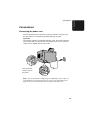
Connecting the power cord
Connect the female end of the power cord to the machine as shown. Insert
the male end into a 120 V, 60 Hz, grounded (3-prong) AC outlet.
Important!
The machine requires its own dedicated power outlet. The power outlet must
not be shared with any other devices. In particular, do not use an extension
cord to connect multiple devices to the outlet.
Press the power
switch to turn on
the power.
Note: If your area experiences a high incidence of lightning or power surges, we
recommend that you install surge protectors for the power and telephone lines.
Surge protectors can be purchased at most telephone specialty stores.
15
1. Installation
Connections
Connections
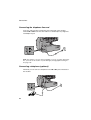
Connecting the telephone line cord
Insert one end of the line cord into the jack on the back of the machine
marked TEL. LINE. Insert the other end into a standard (RJ11C) single-line
wall telephone jack.
Note: The machine is set for touch-tone dialing. If you are on a pulse dial (rotary)
line, you must set the machine for pulse dialing by changing Option Setting 22.
See page 195.
Connecting a telephone (optional)
If desired, you can connect a telephone to the TEL. SET jack on the back of
the machine.
16
Attaching the ADF exit tray
Insert the protrusion on the right side of the machine into the hole in the right
side of the ADF exit tray ➊, then bend the tray slightly and insert so that the
protrusion on the left side of the machine goes into the hole on the left side of
the ADF exit tray ➋. Pull out the tray extension ➌.
1
2
3
Attaching the received document tray
Slide the received document tray into the machine as shown. When it stops,
lift the end slightly and push in so that the tray locks into place.
Important!
The received document tray must be attached for the machine to operate
properly.
17
1. Installation
Connections
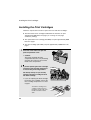
Installing the Print Cartridges
Installing the Print Cartridges
Follow the steps below to install or replace the toner and drum cartridges.
♦ The initial starter toner cartridge included with the machine can print
approximately 3000 letter-size pages (4% coverage of each page;
continuous printing).
♦ The replacement toner cartridge (FO-50ND) can print approximately 6000
letter-size pages.
♦ The drum cartridge (FO-47DR) can print approximately 20,000 letter-size
pages.
1
Press the cover release to open the
print compartment cover.
• Caution!
The fusing unit inside the print
compartment becomes very hot during
operation. Be careful not to touch the
inside of the compartment.
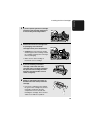
2
If you are replacing the toner cartridge,
remove the old cartridge and dispose
of it according to local regulations.
Go directly to Step 5 if you are only
replacing the toner cartridge and not
the drum cartridge.
• If you are replacing the drum cartridge
but not the toner cartridge, remove the
toner cartridge and place it on a sheet
of paper.
To make the cartridge more
compact for disposal, press
the buttons on the ends of the
handle and fold the handle
down.
18
3
4
If you are replacing the drum cartridge,
remove the old cartridge and dispose
of it according to local regulations.
Remove the new drum cartridge from
its packaging. Insert the drum
cartridge into the print compartment.
• Caution! Excessive exposure to light
BLUE
will damage the drum cartridge. Install
the cartridge promptly after removing it
from its packaging.
GREEN
• Make sure the drum cartridge is
inserted in as far as it will go.
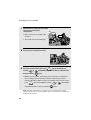
5
6
If you are installing a new toner
cartridge, remove the new toner
cartridge from its packaging. Remove
the tape from the cartridge and then
open the cartridge handle so that it
stands straight up.
Shake as indicated by the arrows to
distribute the toner evenly within the
cartridge.
• If the toner is still lumpy after shaking,
the gears in the cartridge may make a
noticeable sound when the print
compartment cover is closed after
installing the cartridge. This is normal
and does not indicate a problem.
19
1. Installation
Installing the Print Cartridges
Installing the Print Cartridges
7
Hold the toner cartridge by the handle
and insert it into the print
compartment.
• Make sure the toner cartridge clicks
BLUE
into place.
• The handle can be left standing up.
GREEN
8
Close the print compartment cover.
9
Reset the drum counter by pressing
overlay),
or
display, and then
LIFE
V
(flip up the Rapid Key
until DRUM COUNTER CLEAR is selected in the
START/
ENTER
twice.
• Note: The toner counter automatically resets each time you replace the
toner cartridge. There is normally no need to reset the toner counter
manually. Should you find it necessary to manually reset the toner counter,
press
LIFE
V
(flip up the Rapid Key overlay),
COUNTER CLEAR is selected, and then
START/
ENTER
or
until TONER
twice.
Note: The print compartment cover may become noticeably warm if a large
number of pages are successively printed. This is normal and does not indicate a
problem in the machine.
20
When to replace the toner cartridge
When the toner cartridge nears empty (about 100 pages can still be printed),
the toner cartridge indicator on the operation panel will blink. When the toner
cartridge is empty, the toner cartridge indicator will light steadily and
REPLACE TONER will appear in the display. Printing will no longer be
possible. Use the following replacement toner cartridge:
Sharp FO-50ND toner cartridge
Hint:
When the toner cartridge nears empty, try taking it out of the machine and
shaking it. This may increase the number of pages that can be printed before
the toner runs out.
When to replace the drum cartridge
When the drum cartridge nears the end of its life, the ALARM indicator on the
operation panel will blink and DRUM LIFE REACHED will appear in the
display (this message first appears approximately 1000 pages before the
drum needs replacement). Use the following replacement drum cartridge:
Sharp FO-47DR drum cartridge
21
1. Installation
Installing the Print Cartridges
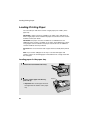
Loading Printing Paper
Loading Printing Paper
You can load up to 250 sheets of letter or legal paper (max. 20 lbs.) in the
paper tray.
FO-DC500: A paper cassette is available as an option. Up to 500 sheets of
letter or legal paper can be loaded in the paper cassette.To have the cassette
installed, consult your dealer.
FO-DC600: One paper cassette is included as a standard feature. An
additional paper cassette is available as an option. Up to 500 sheets of letter
or legal paper can be loaded in each paper cassette.To have an additional
cassette installed, consult your dealer.
Important: Do not use the back side of paper that has already been printed
on.
Note: If you need to add paper to the tray or cassette while paper still
remains, remove the remaining paper and combine it into a single stack with
the new paper.
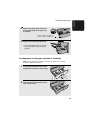
Loading paper in the paper tray
1
2
Remove the received document tray.
Insert a stack of paper into the tray,
print side up.
• Important! The stack of paper must not
be higher than the red line on the paper
tray.
22
Red line
3
Squeeze the paper guide and move it
to match the length of the paper you
are loading.
Attach a letter or legal label
here to indicate the paper size
4
Replace the received document tray.
• The received document tray must be
attached for the machine to operate
properly.
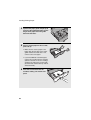
Loading paper in the paper cassette (if installed)
Note: To use A4 paper in the paper cassette, you must have a service
technician adjust the cassette.
1
2
Grasp the hand-hold on the cassette
and pull the cassette out until it stops.
Push the pressure plate down until it
locks into position.
23
1. Installation
Loading Printing Paper
Loading Printing Paper
3
4
Squeeze the paper guide and pull up to
move it to the appropriate holes for the
length of the paper. Push the guide
down into the holes.
Place a stack of paper in the cassette,
print side up.
• Make sure the stack of paper is not
higher than the two tabs on the paper
guide and the two metal tabs. If it is,
remove some of the paper.
• If you find it difficult to load the paper,
remove the cassette from the machine.
(Pull the cassette out as far as it will go,
grasp the left side of the cassette with
your left hand, and then lift it up and out
with both hands.)
5
24
Push the cassette back into the
machine, making sure it clicks into
place.
1
2
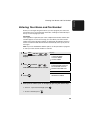
Entering Your Name and Fax Number
Before you can begin using the machine, you must program your name and
fax number. Once you program this information, it will appear automatically at
the top of each fax page you send.
Important!
FCC regulations require that your name, telephone/fax number, and the date
and time appear on each fax message you send. Enter your name and fax
number here and set the date and time as explained in the following section to
have the machine include this information automatically at the top of your fax
messages.
Note: If you have installed the dual-line option, use the procedure on page 66
to enter your name and the number of each line.
1
2
Display:
MENU
Press
and then
or
until ENTRY MODE is selected in the
display.
Press
START/
ENTER
and then
or
until OWN PASSCODE SET is selected.
MENU MODE
1:RECEIVE MODE
2:LISTING MODE
3:ENTRY MODE
ENTRY MODE
01:DESTINATION SETTING
02:PASSCODE SETTING
03:OWN PASSCODE SET
OWN PASSCODE SET
SENDER’S NUMBER
3
Press
4
Enter your fax number (max. of 20 digits) by pressing the numeric keys.
START/
ENTER
.
• To insert a space between digits, press
• To clear a mistake, press
STOP
.
.
25
1. Installation
Entering Your Name and Fax Number
Entering Your Name and Fax Number
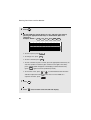
5
6
Press
START/
ENTER
.
Flip the Rapid Key overlay down (if it is up), and enter your name by
pressing the appropriate letter keys as shown below. (Max. of 24
characters.)
S
H / }
Example: SHARP = Caps Lock
P/=
A/ |
R/$
01
02
Q / !
11
03
W / "
12
SYMBOL
21
A / |
22
Caps Lock
31
Z / <
S
/ / \
F
C
G / {
V
B
35
DEL
H / }
J / [
28
N / *
36
K / ]
M / ?
L / +
30
@
38
-
P / =
20
29
37
_
10
O / )
19
. / ,
.com
39
DEL
.
Space
Caps Lock
09
I / (
18
27
Space
; / :
08
U / '
17
26
34
• To clear a mistake, press
07
Y / &
16
25
• To enter a space, press
• To change case, press
06
T / %
15
D
24
X / >
33
/ ^
05
R / $
14
23
32
SHIFT
04
E / #
13
.
.
• To enter a number as part of a name, press the appropriate numeric key. To
enter the symbol on a letter key (the character to the right of the slash),
press SYMBOL (“SYM” will appear in the display) and then the letter key
(press SYMBOL again to turn off symbol entry mode).
• To move the cursor, press
or
. To switch between letter insertion
and letter replacement mode when the cursor is in the middle of a
sequence of letters, press
26
7
Press
8
Press
START/
ENTER
STOP
MENU
.
.
twice to return to the date and time display.
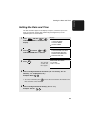
Setting the Date and Time
The date and time appear in the display, in reports, and at the top of each
page you transmit. Set the date and time by pressing the keys on the
operation panel as shown below.
1
2
Display:
MENU
Press
and then
or
until ENTRY MODE is selected in the
display.
Press
START/
ENTER
and then
or
until DATE&TIME SET is selected.
3
4
Press
START/
ENTER
.
The currently
set date and
time appear
MENU MODE
1:RECEIVE MODE
2:LISTING MODE
3:ENTRY MODE
ENTRY MODE
01:DESTINATION SETTING
02:PASSCODE SETTING
03:OWN PASSCODE SET
04:DATE&TIME SET
DATE&TIME SET MODE
01-10-2004
TIME 11:35 AM
Enter a two-digit number for the month (“01” for January, “02” for
February, “12” for December, etc.).
Example: March 0
3
• To correct a mistake, press
to move the cursor back to the mistake and
then enter the correct number.
5
Enter a two-digit number for the day (“01” to “31”).
Example: The 5th
0
5
27
1. Installation
Setting the Date and Time
Setting the Date and Time
6
Enter the year (four digits).
Example: 2004
7
0
0
4
Enter a two-digit number for the hour (“01” to “12”) and a two-digit
number for the minute (“00” to “59”).
Example: 9:25
8
Press
9
Press
10
Press
28
2
0
9
2
5
to select A.M. or
START/
ENTER
STOP
to select P.M.
to start the clock.
twice to return to the date and time display.
Daylight Saving Time
If desired, you can set the clock to move forward and backward automatically
at the beginning and end of Daylight Saving Time.
1
2
Display:
MENU
Press
and then
or
until ENTRY MODE is selected in the
display.
Press
START/
ENTER
and then
or
until DAY LIGHT SAVING is selected.
3
4
5
Press
START/
ENTER
.
MENU MODE
1:RECEIVE MODE
2:DESTINATION SETTING
3:ENTRY MODE
02: PASSCODE SETTING
03:OWN PASSCODE SET
04:DATE&TIME SET
05: DAY LIGHT SAVING
DAY LIGHT SAVING
1=YES
2=NO
Press 1 to turn on the Daylight Saving Time function, or 2
off.
Press
STOP
to turn it
twice to return to the date and time display.
29
1. Installation
Setting the Date and Time
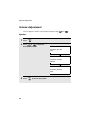
Volume Adjustment
Volume Adjustment
You can adjust the volume of the speaker and ringer using
and
Speaker
1
2
Press
SPEAKER
.
Press
or
to select the
desired volume level.
Display:
ONHOOK DIAL MODE
SPEAKER VOLUME
HIGH
ONHOOK DIAL MODE
SPEAKER VOLUME
MIDDLE
ONHOOK DIAL MODE
SPEAKER VOLUME
LOW
3
30
Press
SPEAKER
to turn off the speaker.
.
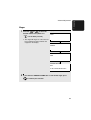
Ringer
1
Press the
or
to select the
desired volume level. (Make sure
SPEAKER
Display:
RINGER VOLUME
HIGH
has not been pressed.)
• The ringer will ring once at the selected
level, and then the date and time will
reappear in the display.
RINGER VOLUME
MIDDLE
RINGER VOLUME
LOW
RINGER VOLUME
OFF
IF OK, PRESS ENTER KEY
2
If you selected “RINGER VOLUME OFF” to turn off the ringer, press
START/
ENTER
to confirm your selection.
31
1. Installation
Volume Adjustment
2. Sending and Receiving Documents
Transmittable Documents
Size and weight
The size and weight of documents that you can load in the document feeder
depend on whether you load one page at a time or several pages at once.
Loading one page at a time:
Minimum
size
11"
(279 mm)
5.8"
(148 mm)
5.0"
(128 mm)
Minimum
weight
Maximum size
(Note: When
ULTRA FINE
resolution is used,
the maximum
length is 19”.)
Maximum
weight
14 lbs.
(52 g/m²)
38"
(966 mm)
36 lbs.
(157 g/m²)
Loading multiple pages at once (letter-size: max. 50 pages, legal-size:
max. 20 pages):
Minimum
size
5.8"
(148 mm)
Maximum
size
10.1"
(257 mm)
5.0"
(128 mm)
Minimum
weight
14 lbs.
(52 g/m²)
14.3"
(364 mm)
Maximum
weight
Note: 11” x 17” paper must be loaded one page at a time.
32
20 lbs.
(80 g/m²)
Transmittable Documents
The area of the document that the machine can scan is slightly smaller than
the actual document size. Any letters or graphics outside this area will not be
scanned.
Maximum scanning width:
10 inches (256 mm)
Maximum scanning length:
The length of the document minus 0.16
inches (4 mm) from the top and bottom of
the document.
Other restrictions
♦ The scanner cannot recognize yellow, greenish yellow, or light blue ink.
♦ Ink, glue, and correcting fluid on documents must be dry before they pass
through the document feeder.
♦ All clips, staples, and pins must be removed from documents before loading
in the feeder. If these are not removed, they may damage the machine.
♦ Documents which are patched, taped, torn, smaller than the minimum size,
carbon backed, easily smudged, or have a slick, coated surface should be
photocopied, and the copy loaded in the feeder.
33
2. Send/Receive
Documents
Maximum scanning area
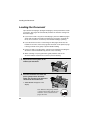
Loading the Document
Loading the Document
Up to 50 letter-sized pages (20 legal-sized pages) can be placed in the feeder
at one time. The pages will automatically feed into the machine starting from
the bottom page.
♦ If you need to send or copy more than 50 pages, place the additional pages
gently and carefully in the feeder just before the last page is scanned. Do
not try to force them in, as this may cause double-feeding or jamming.
♦ If your document consists of several large or thick pages which must be
loaded one at a time, insert each page into the feeder as the previous page
is being scanned. Insert gently to prevent double-feeding.
♦ If there are folds on the document, smooth out the folds before loading the
document. Unsmoothed folds may prevent correct scanning.
♦ When scanning a very long document, gently hold the sides of the
document while it feeds into the scanner to prevent skewing.
1
2
Adjust the document guides to the
width of your document.
Place the document face down and
push it gently into the document
feeder. The top edge of the document
should enter the machine first.
• SEND READY will appear in the
display.
Note: When inserting a large number
of pages in the feeder, slant the front
end of the stack so that the bottom
pages enter first.
34
Adjusting the Resolution and Contrast
Adjust the resolution and/or contrast settings (if desired) and then dial
the receiving machine as explained in the following sections.
2. Send/Receive
Documents
3
Adjusting the Resolution and Contrast
If desired, you can adjust the resolution and contrast before sending a
document.
Resolution
The machine has four resolution settings:
STANDARD
Use STANDARD for ordinary documents. This
setting gives you the fastest and most economical
transmission.
FINE
Use FINE for documents containing small letters or
fine drawings.
SUPER FINE
Use SUPER FINE for documents containing very
small letters or very fine drawings.
ULTRA FINE
Use ULTRA FINE for the highest level of document
reproduction.
HALF TONE
Use HALF TONE for photographs and illustrations.
The original will be reproduced in 64 shades of gray.
The default resolution setting is STANDARD. If you don’t adjust the resolution
before sending a document, the machine will automatically use STANDARD
resolution.
♦ In order to transmit in FINE, SUPER FINE, or ULTRA FINE resolution, the
receiving machine must also have that resolution. If it doesn’t, the next best
available setting will be used.
♦ The resolution settings are only effective for transmitting and copying a
document. They are not effective for receiving a document.
35
Adjusting the Resolution and Contrast
To adjust the resolution setting, press
RESOLUTION
one or more times until the
indicator light next to the desired setting comes on.
HALF TONE
STANDARD
RESOLUTION
FINE
SUPER FINE
ULTRA FINE
Contrast
The machine has three contrast settings. The default setting is AUTO.
AUTO
Use AUTO for normal documents.
DARK
Use DARK for faint documents.
LIGHT
Use LIGHT for documents with a dark
background.
To adjust the contrast, press
CONTRAST
until the desired setting appears in the
display.
JAN-10 MON 09:34 AM M:00%
( AUTO)
CONTRAST
JAN-10 MON 09:34 AM M:00%
( DARK)
JAN-10 MON 09:34 AM M:00%
( LIGHT)
36
Sending a Fax by Normal Dialing
With Normal Dialing, you press
SPEAKER
and then dial by pressing the numeric
keys.
♦ Normal Dialing allows you to listen to the line through the speaker to make
sure the other fax machine is responding. (Note that the speaker is not a
speakerphone; it cannot be used for talking.)
♦ If you have connected an extension telephone to the machine, you can also
pick up the extension phone and dial using the extension phone (do not
press
SPEAKER
on the machine). If a person answers, you will be able to
speak to them through the phone before sending a fax.
Note: If you press
SPEAKER
to dial, you will not be able to speak using an extension
phone connected to the machine in the event that a person answers.
1
Load the document(s). (Note: If
desired, you can load the document
after dialing in Step 3, below.)
• SEND READY will appear in the
display.
• Press
RESOLUTION
and/or
CONTRAST
to
set the resolution and contrast if
needed.
2
Press
SPEAKER
or pick up an extension phone connected to the machine.
Listen for the dial tone.
3
If you pressed
SPEAKER
, dial the number of the receiving machine by
pressing the numeric keys on the machine.
If you are using an extension phone, dial using the keypad on the
extension phone.
37
2. Send/Receive
Documents
Sending a Fax by Normal Dialing
Sending a Fax by Normal Dialing
• If Option Setting 26 (TEL. BILLING CODE, page 196) has been set to ON
and BILLING CODE DIAL has been set to AFTER, press
REDIAL
after
dialing.
4
Wait for the connection. When you hear a fax tone, press
START/
ENTER
on the
machine.
• If a person answers and you are using an extension phone, ask them to
press their Start key. When you hear the fax tone, press
START/
ENTER
on your
machine.
Using the REDIAL key
You can press
press
START/
ENTER
REDIAL
to redial the last number dialed. To send a document,
when you hear the fax tone after the connection is established.
Note that the speaker is automatically activated when you press
38
REDIAL
.
Programming Auto-Dial Numbers
You can dial a fax number by simply pressing a Rapid Key, or by pressing
SPEED DIAL
and entering an abbreviated Speed Dial number.
To use a Rapid Key or Speed Dial number, you must first program the full fax
number in the Rapid Key or Speed Dial number. It is usually convenient to
program your most frequently dialed numbers in Rapid Keys.
♦ Up to 59 Rapid Keys can be programmed for shared use.
♦ Up to 100 Speed Dial numbers can be programmed for shared use on the
FO-DC500. Up to 200 Speed Dial numbers can be programmed for shared
use on the FO-DC600.
You can also create personal books for auto-dial numbers. Up to 59 Rapid
Keys and 16 Speed Dial numbers can be stored in each personal book. For
information on creating and using personal books, see page 54.
Programming Auto Dial numbers through a PC (Network Scanner option
required)
The following procedure expains how to store fax numbers using the
operation panel of the machine. If the network scanner option is installed, you
can also conveniently store fax numbers in Rapid Keys and Speed Dial
numbers by accessing the Web page in the machine from your computer. See
page 82 for more information. To store an e-mail address in a Rapid Key or
Speed Dial number using the operation panel, see page 89.
1
2
MENU
Press
and then
or
until ENTRY MODE is selected in the
display.
Press
START/
ENTER
. Make sure that
DESTINATION SETTING is selected.
Display:
MENU
MODE
3:ENTRY
MODE
1:RECEIVE
MODE
ENTER
#(01-10,
, )
2:LISTING MODE
3:ENTRY MODE
ENTRY MODE
01:DESTINATION SETTING
02:PASSCODE SETTING
03:OWN PASSCODE SET
39
2. Send/Receive
Documents
Programming Auto-Dial Numbers
Programming Auto-Dial Numbers
3
Press
START/
ENTER
. Make sure that SET is
DESTINATION SETTING
1=SET
2=CLEAR
.
DESTINATION SET
PRESS RAPID OR SPEED
selected.
4
5
Press
START/
ENTER
To program a Rapid Key number, press the Rapid Key that you wish to
use. (To select Rapid Keys 40 through 59, flip up the Rapid Key overlay.)
To program a Speed Dial number, press
SPEED DIAL
and then enter the
number that you wish to use (“1” to “100” on the FO-DC500, or “1” to
“200” on the FO-DC600). (If you enter less than three digits, press
START/
ENTER
to complete the entry.)
6
If the network scanner option is installed, SELECT DESTINATION TYPE
will appear in the display. Make sure that “FAX” is selected (press
or
if needed), and then press
START/
ENTER
.
(To program an e-mail address in an auto-dial number, see page 89.)
7
Enter the fax number by pressing the numeric keys (maximum of 60
digits including pauses).
• To clear a mistake, press
DEL
.
• If a pause is required between any of the digits to access a special service
or an outside line, press
REDIAL
(two seconds per pause). The pause will
appear as a hyphen. Several pauses can be entered in a row.
8
40
Press
START/
ENTER
.
9
Enter the name of the party by pressing the letter entry keys (max. of 20
characters). (Make sure the Rapid Key overlay is flipped down.)
S
H / }
Example: SHARP = Caps Lock
P/=
A/ |
R/$
01
02
Q / !
11
03
W / "
12
SYMBOL
21
A / |
22
Caps Lock
31
Z / <
S
24
06
Y / &
16
F
C
26
V
• To enter a space, press
• To change case, press
B
• To clear a mistake, press
DEL
J / [
M / ?
L / +
30
@
38
-
P / =
20
K / ]
29
37
_
10
O / )
19
28
36
. / ,
.com
39
DEL
.
Space
Caps Lock
H / }
N / *
35
09
I / (
18
27
Space
; / :
08
U / '
17
G / {
25
34
/ / \
07
T / %
15
D
X / >
33
/ ^
05
R / $
14
23
32
SHIFT
04
E / #
13
.
.
• To enter a number as part of a name, press the appropriate numeric key. To
enter the symbol on a letter key (the character to the right of the slash),
press SYMBOL (“SYM” will appear in the display) and then the letter key
(press SYMBOL again to turn off symbol entry mode).
• To move the cursor, press
or
. To switch between letter insertion
and letter replacement mode when the cursor is in the middle of a
sequence of letters, press
10
11
Press
START/
ENTER
.
MENU
.
DESTINATION SET
CHAIN DIAL
1=YES
2=NO
Press
or
to select “YES” if the number programmed is an
area code or access code to be used for Chain Dialing (see Chain
Dialing at the end of this procedure). Select “NO” if the number is a
regular fax number. After making the selection, press
START/
ENTER
.
41
2. Send/Receive
Documents
Programming Auto-Dial Numbers
Programming Auto-Dial Numbers
12
If the dual-line option is installed (and Chain Dial was set to NO in the
above step), SELECT THE LINE will appear. Select LINE-1 if you want the
auto-dial number to use only Line 1. Select LINE-2 if you want the autodial number to only use Line 2. Select AUTO if you want the auto-dial
number to use the first available line. Press
selection, and then press
13
START/
ENTER
or
to make the
.
Return to Step 5 to program another number, or press
STOP
repeatedly
to return to the date and time display.
• If you programmed a Rapid Key number, you can write the name of the
party on the label above the Rapid Key.
Chain Dialing for area and access codes
You can also program an area code or access code in a Rapid Key or Speed
Dial number using the above programming procedure. In Step 10, select
“YES” to set the number as a Chain Dialing number.
After you dial an area code or access code using a Rapid Key or Speed Dial
number set for Chain Dialing, the machine will wait for you to dial the
remainder of the number (you can dial the remainder of the number by
pressing a Rapid Key, by pressing the Speed Dial key and entering a Speed
Dial number, or by pressing numeric keys). Note that the remainder of the
number should not be set as a Chain Dial number if programmed in a Rapid
Key or Speed Dial number.
♦ The maximum number of digits that can be dialed at one time by Chain
Dialing is 60.
42
Programming Auto-Dial Numbers
To make changes in a number previously stored, repeat the programming
procedure. Select the Rapid Key or Speed Dial number for which you want to
make changes in Step 5, and then change the number(s) and/or name(s)
when they appear in the display (Steps 7 and 9).
Clearing auto-dial numbers
Note: You cannot clear a number if it is used in a program or timer operation,
or if it is included in a Group Key. First clear the number from the operation or
group, then perform the following clearing procedure. To check where the
number is used, print out the Program/Group List or the Timer List as
explained on page 200.
1
2
Display:
MENU
Press
and then
or
until ENTRY MODE is selected in the
display.
Press
START/
ENTER
. Make sure that
DESTINATION SETTING is selected.
3
Press
START/
ENTER
. Press
CLEAR.
4
Press
START/
ENTER
.
to select
MENU MODE
1:RECEIVE MODE
2:LISTING MODE
3:ENTRY MODE
ENTRY MODE
01:DESTINATION SETTING
02:PASSCODE SETTING
03:OWN PASSCODE SET
DESTINATION SETTING
1=SET
2=CLEAR
DESTINATION CLEAR
PRESS RAPID OR SPEED
43
2. Send/Receive
Documents
Editing auto-dial numbers
Programming Auto-Dial Numbers
5
To clear a Rapid Key, press the Rapid Key.
To clear a Speed Dial number, press
SPEED DIAL
and then enter the number
with the numeric keys. (If you enter less than three digits, press
START/
ENTER
complete the entry.)
6
Press
7
Return to Step 5 to clear another number, or press
START/
ENTER
.
return to the date and time display.
44
STOP
repeatedly to
to
Sending a Fax by Automatic Dialing
Sending a Fax by Automatic Dialing
2. Send/Receive
Documents
Dual Access
The machine features full dual access, which means that you can load a
document and dial by automatic dialing even when the machine is occupied
with another job. After you dial, your document will be immediately scanned
into memory and then transmitted once all previously stored jobs have been
completed.
If more than one document has been scanned into memory for transmission,
the documents (jobs) will be transmitted in the order in which they were
scanned. If you have an urgent transmission and do not want to wait until
previously stored jobs are completed, you can press PRIORITY after loading
your document. Your document will be transmitted immediately after the
current job is finished.
If you don’t want the document to be transmitted from memory, you can press
DOCUMENT
M/?
after loading the document. Your machine will call the receving fax
machine immediately after the current job is finished (ahead of any previously
stored jobs in memory), and the document will be scanned as soon as the
connection is established.
♦ The FO-DC500 can hold approximately 500 pages of average content in
memory. The FO-DC600 can hold approximately 1,000 pages. Less pages
can be held if any were scanned using fine, super fine, ultra fine, or halftone
resolution.
♦ The amount of memory currently occupied appears as a percentage
("M:00%") in the display.
45
Sending a Fax by Automatic Dialing
Rapid Key Dialing
If the number you want to dial has been programmed in a Rapid Key, you can
dial it by pressing the Rapid Key.
1
Load the document(s).
SEND READY will appear in the
display.
• Press
RESOLUTION
and/or
CONTRAST
to
set the resolution and contrast if
needed.
• To send the document ahead of other
documents waiting for transmission,
press
PRIORITY
.
• To send the document directly from the
feeder (not through memory), press
DOCUMENT
M/?
. (Flip up the Rapid Key overlay
if it is down.)
2
Press the appropriate Rapid Key.
• The name of the receiving party will appear in the display. (If the destination
is not correct, press
STOP
.)
• The document will be automatically transmitted once the connection is
established.
46
Sending a Fax by Automatic Dialing
If the number you want to dial has been programmed in a Speed Dial number,
you can dial it by pressing
1
SPEED DIAL
and then entering the Speed Dial number.
Load the document(s).
SEND READY will appear in the
display.
• Press
RESOLUTION
and/or
CONTRAST
to
set the resolution and contrast if
needed.
• To send the document ahead of other
documents waiting for transmission,
press
PRIORITY
.
• To send the document directly from the
feeder (not through memory), press
DOCUMENT
M/?
. (Flip up the Rapid Key overlay
if it is down.)
2
SPEED DIAL
Press
and then enter the Speed Dial number by pressing the
numeric keys.
• If you enter less than 3 digits for the Speed Dial number, press
START/
ENTER
to
START/
ENTER
. (If
complete the entry.
3
Check the display. If the destination shown is correct, press
not, press
STOP
and then repeat Step 2.)
47
2. Send/Receive
Documents
Speed Dialing
Sending a Fax by Automatic Dialing
Direct Keypad Dialing
You can also enter a full number with the number keys and then press
START/
ENTER
to begin dialing.
1
Load the document(s). (Note: If
desired, you can load the document
after dialing in Step 2, below.)
SEND READY will appear in the
display.
• Press
RESOLUTION
and/or
CONTRAST
to
set the resolution and contrast if
needed.
• To send the document ahead of other documents waiting for transmission,
press
PRIORITY
.
• To send the document directly from the feeder (not through memory), press
DOCUMENT
M/?
2
. (Flip up the Rapid Key overlay if it is down.)
Enter the number of the receiving machine by pressing the numeric
keys.
• If a pause is required between any of the digits to access a special service
or an outside line, press
REDIAL
(two seconds per pause). The pause will
appear as a hyphen. Several pauses can be entered in a row.
3
Check the display. If the number of the receiving machine shown is
correct, press
START/
ENTER
.
• If it is not correct, press
STOP
to backspace and clear one digit at a time,
and then re-enter the correct digit(s).
48
Sending a Fax by Automatic Dialing
If you don’t remember the Rapid Key or Speed Dial number in which you have
programmed a particular fax number, you can search for the number by
following the steps below. Once you have found the number, you can dial it
and transmit the loaded document by simply pressing
START/
ENTER
.
♦ You can also use this procedure to search for Group Keys and Program
Keys (the name you programmed for the Group or Program key will
appear). This can be done at any point in a transmission or polling
procedure where you need to press a Group Key or a Program Key.
1
Load the document(s).
SEND READY will appear in the
display.
• Press
RESOLUTION
and/or
CONTRAST
to
set the resolution and contrast if
needed.
2
Display:
Press
A
to search from the
beginning of the alphabet, or
Z
to
search from the end.
SEARCH [ ]
AAAAAAA
AAAAAAAAA
BBBBBBBB
The names of your stored
destinations appear
3
Enter the first character of the stored name by pressing the appropriate
letter entry key.
• If you don’t remember the first letter, go to Step 4 (you will scroll through the
list from the beginning).
4
Press
or
to scroll through the names. Stop when the desired
name appears in the display.
49
2. Send/Receive
Documents
Searching for an auto-dial number
Sending a Fax by Automatic Dialing
• If no numbers have been stored under the entered letter, NOT FOUND will
appear.
• If multiple fax numbers (or e-mail addresses) have been stored under a
name, press
A
to display the fax numbers and then press
or
to select the desired fax number (or e-mail address).
5
Press
START/
ENTER
. The document will be automatically transmitted once the
connection is established.
Chain Dialing
An auto-dial number set for Chain Dialing can be combined with another autodial number or digits entered manually with the numeric keys to dial one
phone number up to 60 digits long. The following are some examples of how
this can be done:
♦ Press appropriate Rapid Keys in the proper order. For example, press
Rapid Key 01 (set for Chain Dialing), then Rapid Key 02 (not set for Chain
Dialing).
♦ Press a Rapid Key (set for Chain Dialing) and then manually enter a
number by pressing appropriate numeric keys. Press
START/
ENTER
after the final
numeric key to begin transmission.
If the memory becomes full...
If the memory becomes full while a document is being scanned, MEMORY
FULL will appear in the display. If Option Setting 23 (Quick On-line) is set to
ON, scanning will automatically resume when memory becomes free again as
pages are transmitted. (Note: Quick On-Line is initially set to ON at the
factory. To change the setting, see page 195.)
If Quick On-Line is set to OFF the transmission will be canceled and
MEMORY FULL ERROR will appear in the display. Press
STOP
to clear the
message. Try the transmission again later when memory is free.
50
Sending a Fax by Automatic Dialing
The display normally shows the date and time and prompts related to operations
you are performing. To check and see what number the machine is currently
calling or transmitting to, or what number the machine is currently receiving a
JOB STATUS
document from (if this information is available), press
. Information on the
current fax job (FAX STATUS) will appear in the display. If the dual line option is
installed, the fax status will appear separately for each line. To switch back to the
JOB STATUS
date and time display, press
one or more times as needed. (If the
network printer option is installed, the NETWORK PRINT STATUS screen
showing current printer activity will also appear.)
To cancel a fax transmission or reception
To cancel a fax transmission or reception that is currently in progress, press
JOB STATUS
so that the status of the transmission or reception appears in the
FAX-STATUS display, and then press
STOP
.
Checking and canceling stored transmission jobs
To display information on fax jobs that are waiting in memory for transmission,
follow the steps below. You can also use this procedure to cancel a fax job.
1
Press
MEM.STATUS
B
Display:
(flip up the Rapid Key
overlay) and then
or
until
MEMORY TX STATUS is selected in the
display.
2
Press
START/
ENTER
Number of stored
transmission jobs
.
• The fax jobs appear.
• To print out the list of the jobs,
press
REPORT
N/*
MEMORY STATUS REPORT
1:COPY STATUS
2:MEMORY TX STATUS
3:MEMORY RX STATUS
4:MESSAGE CLEAR
.
Name or number
of destination
3-digit memory
number assiged to job
TX STATUS (004)
001:M#132
10:34 AM
XXXXX Co.: RECALL (01)
002:M#135
10:38 AM
YYYYYY Co.: WAITING
Status of job
51
2. Send/Receive
Documents
Checking the status of the current job
Sending a Fax by Automatic Dialing
3
Press
or
to scroll through the list of jobs.
To cancel a job, press
then press
4
START/
ENTER
or
to select the job, press
DEL
, and
.
When you have finished checking the list, press
STOP
twice to return to
the date and time display.
Note: To directly print out a list of the jobs waiting in memory for transmission,
press
MEM.STATUS
B
,
or
to select REPORT PRINT, and then
START/
ENTER
.
Canceling a memory transmission by number
If you know the memory number assigned to a memory transmission, you can
cancel it with the following procedure. (If you don’t know the memory number,
use the preceding procedure.)
1
Press
MEM.STATUS
B
Display:
(flip up the Rapid Key
overlay) and then
or
until
MESSAGE CLEAR is selected in the
display.
52
MEMORY STATUS REPORT
1:COPY STATUS
2:MEMORY TX STATUS
3:MEMORY RX STATUS
4:MESSAGE CLEAR
2
Press
3
Enter the 3-digit memory number of the job you wish to cancel.
4
Press
START/
ENTER
START/
ENTER
.
.
Sending a Fax by Automatic Dialing
If you use automatic dialing (including Direct Keypad Dialing) and the line is
busy, the machine will automatically redial the number. The machine is set at
the factory to make 2 redialing attempts at intervals of 5 minutes.
To cancel automatic redialing, cancel the job as explained in Checking and
canceling stored transmission jobs on page 51.
If desired, you can change the number of redial attempts with Option Setting
6, and the interval at which redialing takes place with Option Setting 7 (see
page 191).
♦ Under certain conditions (for example if a person answers the call on a
telephone), automatic redialing may stop before the set number of redialing
attempts are made.
Memory Retransmission
If a line error occurs during any type of memory transmission, your fax will
automatically redial the number and attempt to complete the transmission.
Retransmission will begin from the page which was being transmitted when
the error occurred.
The machine has been set at the factory to make 10 attempts at
retransmission, with each attempt made immediately after the previous
attempt. If desired, you can change the number of attempts by changing
Option Setting 17, and have the fax wait a selected number of minutes
between each attempt by changing Option Setting 18 (see page 194).
♦ The numbering of pages retransmitted will begin from "1" again.
♦ If an error or power failure occurs during transmission of a cover sheet,
retransmission will not take place.
♦ To cancel retransmission, cancel the job as explained in Checking and
canceling stored transmission jobs on page 51.
53
2. Send/Receive
Documents
Automatic redialing
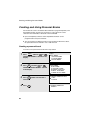
Creating and Using Personal Books
Creating and Using Personal Books
Personal books can be created that allow inviduals to program Rapid Key and
Speed Dial numbers for their own personal use. Up to 20 books can be
created in the FO-DC500, or 40 books in the FO-DC600.
♦ Up to 59 Rapid Key numbers and 16 Speed Dial numbers can be
programmed in each personal book.
♦ You can program a 4-digit passcode for a personal book. When this is done,
the passcode must be entered to use or edit the book.
Creating a personal book
To create a new personal book, follow the steps below:
1
2
Display:
MENU
Press
and then
or
until ENTRY MODE is selected in the
display.
Press
START/
ENTER
and then
or
until BOOK ENTRY MODE is selected
in the display.
3
Press
START/
ENTER
54
Press
START/
ENTER
ENTRY MODE
06:ID # MODE
07:SYSTEM # MODE
08:STORE JUNK FAX #
09:DEPT. PASSCODE
10:BOOK ENTRY MODE
. Make sure that SET is
PERSONAL
BOOK SETTING
3:ENTRY MODE
1=SET
ENTER
#(01-10, , )
2=CLEAR
.
PERSONAL BOOK SET
BOOK #=
selected.
4
MENU MODE
1:RECEIVE MODE
2:LISTING MODE
3:ENTRY MODE
Creating and Using Personal Books
Enter a 2-digit number from 01 to 20 (FO-DC500) or 01 to 40 (FO-DC600).
2. Send/Receive
Documents
5
• This number will identify the personal book.
6
Enter a name for the personal book by pressing the letter entry keys.
(Make sure the Rapid Key overlay is down.)
S
H / }
Example: SHARP = Caps Lock
P/=
A/ |
R/$
• For more information on entering letters, see Step 5 on page 26.
01
02
Q / !
11
SYMBOL
21
31
8
Press
10
S
23
Z / <
/ / \
06
07
T / %
Y / &
15
16
D
24
X / >
33
/ ^
05
R / $
14
F
G / {
25
C
34
; / :
26
V
START/
ENTER
08
U / '
17
B
35
Space
09
I / (
18
H / }
27
J / [
28
N / *
36
K / ]
M / ?
L / +
30
@
38
-
P / =
20
29
37
_
10
O / )
19
. / ,
.com
39
DEL
.
Enter a four-digit passcode for the
personal directory book (this can be
any four-digit number you like).
If you do not wish to use a passcode,
press
9
START/
ENTER
A / |
32
SHIFT
04
E / #
13
22
Caps Lock
7
03
W / "
12
PERSONAL BOOK SET
USING NAME AS FAX HEADER
1=YES
2=NO
to skip this step.
Press
or
to select YES if you wish to use the book name in
the header of faxes sent using the book.
Select NO to use the sender’s name entered on page 25.
Press
START/
ENTER
.
55
Creating and Using Personal Books
11
If the network scanner option is not installed, this completes the
procedure. Press
STOP
repeatedly to return to the date and time display.
If the network scanner option is installed, press the letter keys to enter
the sender’s name that will appear when you send a document to an email recipient from the book.
• This sender’s name and the e-mail address entered below will be used in
place of the default name and address entered in the procedure on page
84. These are used whenever a sender’s name and e-mail address are not
entered manually when sending a document to an e-mail recipient.
• Make sure the Rapid Key overlay is down. For more information on entering
letters, see Step 5 on page 26.
01
Q / !
11
SYMBOL
21
Caps Lock
31
SHIFT
12
13
Press
03
W / "
12
04
E / #
13
A / |
22
S
23
Z / <
32
24
/ / \
06
Y / &
16
F
C
; / :
26
V
09
I / (
18
H / }
27
B
35
Space
08
U / '
17
G / {
25
34
07
T / %
15
D
X / >
33
/ ^
05
R / $
14
J / [
28
N / *
36
M / ?
L / +
30
@
38
-
P / =
20
K / ]
29
37
_
10
O / )
19
. / ,
.com
39
DEL
.
Press the letter keys to enter your e-mail address (sender’s e-mail
address).
14
Press
15
Press
56
START/
ENTER
02
START/
ENTER
STOP
.
repeatedly to return to the date and time display.
Creating and Using Personal Books
To program or use a Rapid Key or Speed Dial number in a personal book, you
must first open the book. Follow these steps:
1
2
Press
PERSONAL
BOOK
Display:
.
SELECT PERSONAL BOOK
BY
KEY OR PASSCODE
The display briefly shows the
following and then reverts to the
date and time:
Enter the 4-digit passcode of your
book.
If the book doesn’t have a passcode,
press
once, enter the first letter of
** PERSONAL BOOK **
SUSAN
the name of the book if desired, press
or
until the book is selected
in the display, and then press
3
START/
ENTER
The name of your book
appears here
.
When your book is open, all of the Rapid Keys on the operation panel
automatically convert to keys for use in your book. Speed Dial numbers
1 through 16 are also available for use in your book.
You can perform the following operations in a book:
♦ Program any Rapid Key, or a Speed Dial number from 1 to 16, as explained
on page 39.
♦ Use a Rapid Key to fax a document as explained on page 46.
♦ Use a Speed Dial number to fax a document as explained on page 47.
♦ Program a Group Key in your book using Rapid Key and Speed Dial
numbers from your book (see page 142).
♦ Broadcast a fax to multiple destinations using Rapid Keys, Speed Dial
numbers, or a Group Key in your book (see page 139).
♦ Set up a Program Key in your book (see page 166). (Note: Only Rapid Keys
and Speed Dial numbers from your book can be used. A memory polling
program cannot be entered. )
57
2. Send/Receive
Documents
Using a personal book
Creating and Using Personal Books
♦ Poll one or more fax machines using Rapid Keys and Speed Dial numbers
from your book (see page 150).
♦ Set up a timer operation using a Rapid Key or Speed Dial number from your
book (see page 158).
♦ Print out the Destination List, Program/Group List, or Timer List (see page
200). When printed from your book, these lists will show the corresponding
information in your book.
♦ Press
REDIAL
to redial the last number dialed from your book.
♦ If the network scanner option is installed, you can program any Rapid Key
or a Speed Dial number from 1 to 16 for Scan to E-mail as explained on
page 89, and use the Rapid Key or Speed Dial number to send a document
to an e-mail recipient as explained on pages 89 and 91.
Closing a book
A book will automatically close when the operation performed from the book is
completed. If you need to close a book before performing an operation, press
STOP
. The display will show:
CANCEL BOOK?
1=YES
2=NO
Make sure that YES is selected and then press
START/
ENTER
.
♦ If an operation is not performed within minute after opening a book, the
book will automatically close.
Canceling an operation performed from a book
To cancel an operation that was set up from a book, you must first open the
book (as explained on page 57) and then cancel the operation.
For example, if you need to cancel a fax transmission that was performed from
a book, open your book and then cancel the operation as explained on page
51 or 52. Note that the job status of the fax can be checked without opening
your book.
To clear a Rapid Key or Speed Dial number in a book, open the book and then
clear the key or number.
58
Creating and Using Personal Books
Note: Before you can clear a personal book, you must clear all Rapid Keys,
Speed Dial numbers, Group Keys, and Program Keys that are in the book. If a
transmission or timer operation is pending that uses a number in a book, the
book cannot be cleared until the operation is completed or canceled.
1
2
Display:
MENU
Press
and then
or
until ENTRY MODE is selected in the
display.
Press
START/
ENTER
and then
or
until BOOK ENTRY MODE is selected
in the display.
3
Press
START/
ENTER
and then
select CLEAR.
or
to
MENU MODE
1:RECEIVE MODE
2:LISTING MODE
3:ENTRY MODE
ENTRY MODE
06:ID # MODE
07:SYSTEM # MODE
08:STORE JUNK FAX #
09:DEPT. PASSCODE
10:BOOK ENTRY MODE
PERSONAL
BOOK SETTING
3:ENTRY MODE
1=SET
ENTER
#(01-10, , )
2=CLEAR
4
Press
5
Enter the 2-digit number of the book you wish to clear.
6
If the book has a passcode, enter the passcode.
7
Press
8
Press
START/
ENTER
START/
ENTER
STOP
.
.
repeatedly to return to the date and time display.
59
2. Send/Receive
Documents
Clearing a book
Cover Sheet
Cover Sheet
You can have the machine generate a cover sheet and send it as the last page of
your fax transmission. The cover sheet includes the date and time, the receiver’s
name and number if a Rapid Key or Speed Dial number is used, the sender’s
name and number, and the total number of pages.
♦ Your name and number must be programmed in order for them to appear
on the cover sheet (see page 25).
♦ To have the recipient’s name appear, you must dial using a Rapid Key or
Speed Dial number with the name programmed.
(Example)
1
Load the document(s).
• SEND READY will appear in the
display.
• Press
RESOLUTION
and/or
CONTRAST
set the resolution and contrast if
needed.
60
to
Cover Sheet
COVER SHEET
Press
. (Flip up the Rapid Key
C
overlay if it is down.)
2. Send/Receive
Documents
2
• The display will briefly show COVER SHEET MODE ENTERED and then
revert to SEND READY.
• To cancel the cover sheet selection, press
3
STOP
.
Dial the receiving party and transmit the fax.
If desired, you can set your fax to automatically send a cover sheet with every
transmission (you do not have to press
COVER SHEET
C
each time). This is
accomplished by setting Option Setting 10 (Auto Cover Sheet) to YES as
explained on page 192.
61
Batch Page Numbering (Page Counter)
Batch Page Numbering (Page Counter)
You can change the page numbering of the transmitted document from simple
numbering ("P.01", "P.02", etc.) to batch numbering, which means that a slash
and the total number of pages being sent are added after each page number
(for example, "P. 01/05", "P.02/05", etc.). This allows the recipient to check for
missing pages.
1
Load the document(s).
• SEND READY will appear in the
display.
• Press
RESOLUTION
and/or
CONTRAST
to
set the resolution and contrast if
needed.
2
3
PAGE COUNTER
Press Caps Lock . (Flip up the Rapid Key
overlay if it is down.)
Display:
PAGE COUNTER
# OF PAGE(S) =
Enter the total number of pages (“01” to “99”) by pressing the numeric
keys.
Example: 5 pages 0
5
• If you are sending a cover sheet, do not include it in the total number of
pages (the number will be adjusted automatically).
4
Dial the receiving machine and transmit the document.
♦ If you need to cancel a batch number entry, remove the document from the
feeder or press
STOP
.
♦ If the number of pages actually transmitted does not coincide with the batch
number entered, the alarm will sound and PAGE COUNT ERROR will
appear in the display. PAGE E. will also appear in the NOTE column of the
Transaction Report if printed.
62
Receiving Faxes
The machine has two modes for receiving faxes:
AUTO mode:
Select this mode when you only want to receive faxes on the line connected to
the machine. The machine will answer all calls automatically and receive
incoming faxes.
MANUAL mode:
Select this mode when you have an extension phone connected to the same
line as the machine and you want to receive both faxes and voice calls. All
calls, including faxes, must be answered by picking up the extension
phone.
Setting the reception mode
The reception mode is initially set to AUTO. To change the reception mode,
follow the steps below.
♦ If you have the dual-line option, use the procedure on page 69 to select the
reception mode. Note that the reception mode can only be selected for Line
1 (Line 2 is fixed at AUTO).
1
2
3
4
MENU
Display:
Press
. Make sure that
RECEIVE MODE is selected in the
display.
Press
START/
ENTER
.
Press
or
RECEPTION.
Press
START/
ENTER
MENU MODE
1:RECEIVE MODE
2:DESTINATION SETTING
3:ENTRY MODE
RECEIVE MODE
1 = AUTO RECEPTION
2 = MANUAL RECEPTION
to select AUTO RECEPTION or MANUAL
.
63
2. Send/Receive
Documents
Receiving Faxes
Receiving Faxes
Using AUTO Reception Mode
In AUTO reception mode, the machine automatically answers all calls on one
ring and receives incoming faxes.
♦ You can change the number of rings on which the machine answers calls
by changing Option Setting 2 (see page 190).
♦ If you pick up an extension phone before the machine answers, you can talk
to the other party and/or receive a fax as explained in the following section,
Using MANUAL Reception Mode.
Using MANUAL Reception Mode
1
2
When the machine rings, answer the
call on an extension phone connected
to the same line.
If you hear a fax tone, press
START/
ENTER
on the machine.
• If the other party first speaks with you, press
START/
ENTER
after speaking. (Press
your START key before the sender presses their Start key.)
• If there is a document in the feeder, remove the document before pressing
START/
ENTER
3
64
(otherwise the document will be transmitted).
When RECEIVING appears in the
display, hang up.
Substitute Reception to Memory
In situations where printing is not possible, such as when the machine runs
out of paper or toner, or a paper jam occurs, incoming faxes will be received to
memory. Confidential faxes (see page 146) are also received to memory.
When you have received a fax to memory, FAX RCVD IN MEMORY will
appear in the display, along with NO PAPER, REPLACE TONER, or PAPER
JAM. When you add paper, replace the toner cartridge, or clear the jam, the
stored faxes will automatically print out.
You can display information on faxes received to memory by following these
steps:
1
Display:
Press
MEM.STATUS
B
(flip up the Rapid Key
overlay) and then
or
until
MEMORY RX STATUS is selected in the
display.
2
MEMORY STATUS REPORT
1:COPY STATUS
2:MEMORY TX STATUS
3:MEMORY RX STATUS
4:MESSAGE CLEAR
Number of received faxes
Press
START/
ENTER
.
• The received faxes appear.
• To print out the list of faxes, press
REPORT
N/*
RX STATUS (004)
001:CONF. RX
10:34 AM
3456849123
002: CONF. RX
10:38 AM
5249762384
.
“CONF.” indicates that
the fax is confidential
3
Press
4
When you have finished checking the list, press
or
Number of
sender
to scroll through the list of jobs.
STOP
twice to return to
the date and time display.
65
2. Send/Receive
Documents
Substitute Reception to Memory
Dual-line Option (FO-DC600 only)
Dual-line Option (FO-DC600 only)
The dual line option (FO-60DL) allows your machine to be connected to a
second telephone line. If you wish to use this option, consult your dealer to
have the dual line kit installed. The dual-line option is only available on the
FO-DC600.
Note: The FO-60DL dual line option and the FO-NP1 network printer option
cannot both be installed on the same machine.
After your dealer installs the dual line kit, connect your second phone line to
the LINE 2 jack.
Caution: Do not insert the line into the port on the LAN board (if installed).
This will damage the LAN board.
LINE 2
♦ Manual fax transmission (Normal Dialing using the SPEAKER key or an
extension phone connected to the machine) and manual fax reception are
only possible on Line 1. An extension phone connected to the machine
uses Line 1.
♦ The machine will only ring when a call is received on Line 1. When a call is
received on Line 2, the FAX 2 indicator will blink.
Entering your name and fax numbers
If you have the dual-line option, use the following procedure to enter your
name (only one name can be entered) and the fax number of each line. This
information will appear at the top of each fax page you send.
1
66
MENU
Press
and then
or
until ENTRY MODE is selected in the
display.
Display:
MENU MODE
1:RECEIVE MODE
2:LISTING MODE
3:ENTRY MODE
Dual-line Option (FO-DC600 only)
Press
START/
ENTER
and then
ENTRY MODE
01:DESTINATION SETTING
02:PASSCODE SETTING
03:OWN PASSCODE SET
or
until OWN PASSCODE SET is selected.
3
4
Press
START/
ENTER
2. Send/Receive
Documents
2
OWN PASSCODE SET
SENDER’S NAME
.
Flip the Rapid Key overlay down (if it is up), and enter your name by
pressing the appropriate letter keys as shown below. (Max. of 24
characters.)
S
H / }
Example: SHARP = Caps Lock
P/=
A/ |
R/$
01
02
Q / !
11
03
W / "
12
SYMBOL
21
A / |
22
Caps Lock
31
Z / <
S
/ / \
C
26
V
DEL
J / [
28
N / *
M / ?
L / +
30
@
38
-
P / =
20
K / ]
29
37
_
10
O / )
19
. / ,
.com
39
DEL
.
Space
Caps Lock
H / }
36
Space
09
I / (
18
27
B
35
; / :
08
U / '
17
G / {
25
34
• To clear a mistake, press
07
Y / &
16
F
24
• To enter a space, press
• To change case, press
06
T / %
15
D
X / >
33
/ ^
05
R / $
14
23
32
SHIFT
04
E / #
13
.
.
• To enter a number as part of a name, press the appropriate numeric key. To
enter the symbol on a letter key (the character to the right of the slash),
press SYMBOL (“SYM” will appear in the display) and then the letter key
(press SYMBOL again to turn off symbol entry mode).
5
Press
START/
ENTER
.
OWN PASSCODE SET
LINE 1: SENDER’S NUMBER
67
Dual-line Option (FO-DC600 only)
6
Enter the fax number (maximum of 20 digits) of Line 1.
• To insert a space between digits, press
• To clear a mistake, press
STOP
.
.
OWN PASSCODE SET
LINE 2: SENDER’S NUMBER
7
Press
8
Enter the fax number (maximum of 20 digits) of Line 2.
9
Press
10
Press
START/
ENTER
START/
ENTER
STOP
.
.
until you return to the date and time display.
Selecting the line
If you wish to use a particular line to fax a document, press
LINE
@
one or
more times before dialing until the desired line appears in the display. The
selections will appear in the following order in the display:
LINE-1 SELECTED
LINE-2 SELECTED
LINE AUTO SELECTED.
If you select LINE AUTO SELECTED or do not make a selection with
the first available line will be used.
68
LINE
@
,
Dual-line Option (FO-DC600 only)
♦ If you wish to restrict either of the lines to transmission only or reception
♦ When you program an auto-dial number (Rapid Key or Speed Dial number),
you can specify that the number use a particular line.
Note: The
LINE
@
key cannot be used to select a line if either of the lines has
been set to reception only as explained in the following section. A line
selection made with
LINE
@
will override a line selection programmed into a
Rapid Key or Speed Dial number.
Restricting a line to transmission or reception /
selecting the reception mode for Line 1
You can restrict either line to transmission only or reception only. You can also
use this procedure to select the reception mode (AUTO or MANUAL) for Line
1 (the reception mode for Line 2 is fixed at AUTO).
1
2
MENU
Press
and then
so that
LINE SETTING MODE is selected in the
display.
Press
START/
ENTER
.
• Line 1 is intially selected. If you wish to
Display:
MENU MODE
1:LINE SETTING MODE
2:LISTING MODE
3:ENTRY MODE
LINE SETTING MODE
1:LINE 1
2:LINE 2
adjust the setting for Line 2, press
to select LINE 2.
69
2. Send/Receive
Documents
only, see the following section.
Verification Stamp Option
3
Press
START/
ENTER
and then
or
until the desired setting is selected.
• Note: “TX” stands for “transmission”
and “RX” stands for “reception”.
“AUTO” and “MANU” indicate AUTO
and MANUAL reception modes.
Settings for Line 1:
LINE 1 SETTING
1=TX AND RX (AUTO)
2=TX AND RX (MANU)
3=RX (AUTO) ONLY
4=RX (MANU) ONLY
Settings for Line 2:
LINE 2 SETTING
1=TX AND RX (AUTO)
2=TX ONLY
3=RX ONLY
4
5
Press
START/
ENTER
.
Go back to Step 3 to select a setting for the other line, or press
exit.
STOP
to
Verification Stamp Option
When transmitting a document, you can have the machine stamp each
document page as it is scanned. After scanning, you can check to see if all
documents have been stamped to verify that no double feeds occurred. (A
double feed occurs when two pages are fed through the scanner at once,
which means that one of the pages is not scanned.)
To use this function, have your dealer install the Verification Stamp option,
and then set Option Setting 29 to ON as explained on page page 197.
70
PC Fax Function (Requires the FO-LN1
Option)
The PC-Fax function allows you to fax documents directly from your computer.
This saves you the trouble of printing a document and then faxing it from the
machine.
Important: The PC-Fax function can only be used to send faxes. It cannot be
used to receive faxes to your computer.
To use the PC Fax function,
♦ The FO-LN1 network interface kit must be installed in the machine. (This kit
is also used for the network scanner option and printer option explained in
the following chapters.)
♦ The PC-Fax driver must be installed in your computer. The PC-Fax driver is
installed from the CD-ROM in the FO-LN1 network interface kit.
The Status Monitor can also be installed to monitor the status of faxes sent
from your computer using the PC-Fax driver. The Status Monitor notifies you
when transmission is completed and alerts you if an error occurs.
System requirements
To use the PC-Fax driver, you must have one of the following versions of
Windows:
Windows 98/ME/NT 4.0/2000/XP
Installing the PC-Fax driver in your computer
To install the PC-Fax driver in your computer, see the installation guide in the
CD-ROM in the FO-LN1 network interface kit. The installation guide
(“Installation Guide.pdf”) is located in the PC-FAX folder of the CD-ROM.
71
2. Send/Receive
Documents
PC Fax Function (Requires the FO-
PC Fax Function (Requires the FO-LN1 Option)
Using the PC-Fax function
To fax a document from your computer, open the document in the application
used to create it and select Print from the File menu. In the Print window,
select “SHARP FO-DC Series FAX” for the printer and then click OK.
A window will appear to let you enter the destination fax number (or select it
from the address book) and select any other fax settings. When finished, click
OK. The document will be sent to the machine, which will then dial the fax
number and fax the document to the recipient.
For detailed information on using the PC-Fax function, open the Help file for
the PC-Fax driver.
72
3. Network Scanner Option
Introduction
The FO-NS2 Network Scanner Expansion Kit allows you to scan a document
and directly transmit the image to an e-mail address (Scan to E-mail), FTP
server (Scan to FTP), or computer desktop on your network (Scan to
Desktop). To use this option, the machine must be connected to a network.
3. Network
Scanner
Depending on the file format selected for the image, the recipient can view it
with Adobe Acrobat Reader®, any Tiff-compatible viewer such as Imaging®,
or in the case of Scan to Desktop, SharpDesk.
Scan a document
and transmit the
image file to...
An FTP server,
for downloading
by recipients at
their convenience
Any e-mail
address
Your computer
desktop, for
processing as
you desire
Scan destinations can be stored in
Rapid Keys on the machine, for easy
one-touch scanning and transmission.
73
Introduction
Steps required for setup
The following steps are required to use the network scanner option. The steps
must be completed in the order shown.
1. Your dealer must install the FO-LN1 network interface kit and the FO-NS2
network scanner kit, and enter the network scanner product key. The machine
must be connected to the network.
2. Your network administrator must decide whether the machine will be
assigned a permanent IP address, or receive an address automatically from a
DHCP server (assigning a permanent IP address is recommended; if DHCP
is used, the lease time for the address should be set to unlimited). If a
permanent IP address is to be assigned, the network administrator must
determine what address will be used, and identify the subnet mask and
gateway. Once this information has been determined, the IP address setting
should be completed in the machine as explained on page 75.
❏ Permanent IP address
IP address (
.
.
Gateway (
.
.
❏ DHCP server
.
) Subnet mask (
.
)
.
.
.
3. The following information must be entered in the Web page in the machine
using a Web browser on a computer connected to the same network. This
procedure is explained on page 79. Obtain the information from your network
administrator.
-The IP address or host name of your e-mail server
IP address (
.
.
.
) Host name (
)
-The IP address of your DNS server
(
)
-Your domain name
(
)
-Your network administrator’s e-mail address (
)
4. Scan to E-mail setup must be completed as explained on page 84.
5. To use Scan to Desktop, you must install the Network Scanner Tool and
Sharpdesk programs in your computer. These programs are installed from the
CD-ROM that comes with the network scanner kit (see page 96 for installation
instructions). User’s guides in PDF format for the programs are also included
on the CD-ROM.
6. Destinations for Scan to E-mail and Scan to FTP can be programmed into
Rapid Key and Speed Dial numbers using the Web page in the machine.
These procedures are explained on page 81. Scan to E-mail destinations can
also be programmed using the operation panel of the machine as explained
on page 89. To use a Rapid Key or Speed Dial number to transmit a scanned
document, see pages 89 and 91. To transmit a scanned document to an email address without using a Rapid Key or Speed Dial number, see page 87.
74
)
Setting the IP Address
Setting the IP Address
Note: Although “DHCP” is available as a setting for the IP address (this
means that the machine automatically obtains an address from a DHCP
server), it is recommended that a permanent IP address be assigned to the
machine. If DHCP must be used, it is recommended that the DHCP lease time
for the IP address be set to unlimited. To check the IP address currently
assigned to the machine when DHCP is used, print out the network setting list
as explained on page 78.
1
2
MENU
Press
and then
or
until NETWORK SETTING is selected in
the display.
Press
START/
ENTER
.
• Make sure that NETWORK CONFIG
Display:
MENU MODE
5:PROGRAM/GROUP MODE
6:SERIAL POLLING MODE
7:MEMORY POLL MODE
8:NETWORK SETTING
NETWORK SETTING
1:NETWORK CONFIG SET
2:SCAN TO E-MAIL SET-UP
3:NETWORK SETTING LIST
SET is selected.
3
Press
START/
ENTER
.
• Make sure that IP ADDRESS SETTING
NETWORK CONFIG SET
1:IP ADDRESS SETTING
2:INITIALIZE THE NIC
is selected.
4
Press
START/
ENTER
.
IP ADDRESS SETTING
ENABLE DHCP
1:YES
2:NO
75
3. Network
Scanner
Once your dealer has installed the network scanner option and the machine is
connected to the network, the network administrator or administrator of the
machine should use the following procedure to set the IP address of the
machine.
Setting the IP Address
5
If the machine will receive an IP address automatically from a DHCP
server, make sure that “YES” is selected (this will enable DHCP).
If the machine will be assigned a permanent IP address, press
or
to select “NO”.
6
Press
START/
ENTER
.
• If you enabled DHCP by selecting “YES” in the previous step, this
completes the setting. Wait while the machine writes the setting to the NIC
board (“DO NOT POWER DOWN” will appear in the display). When the
display changes to “OK”, turn off the power of the machine and then turn it
back on to make the new setting take effect. (Before turning off the power,
make sure the machine is not in the middle of a job: 1) check whether the
JOB STATUS
machine is printing, and 2) press
machine is sending or receiving a fax.)
7
8
IP ADDRESS
[ ] [ ] [ ][ ]
If you are entering a permanent IP
address, press
START/
ENTER
and check the display to see if the
.
Enter the IP address of your machine (to move the cursor to the right,
press
). When finished, press
• To correct a mistake, press
START/
ENTER
.
to move the cursor back to the mistake,
and then enter the correct number.
9
10
76
Enter the IP subnet mask. When finished, press
Enter the IP gateway. When finished, press
START/
ENTER
START/
ENTER
.
.
Setting the IP Address
11
Wait while the machine writes the setting to the NIC board (“DO NOT
POWER DOWN” will appear in the display). When the display changes to
“OK”, turn off the power of the machine and then turn it back on to make
the new settings take effect. (Before turning off the power, make sure
the machine is not in the middle of a job: 1) check whether the machine
JOB STATUS
3. Network
Scanner
and check the display to see if the
is printing, and 2) press
machine is sending or receiving a fax.)
Initializing the network interface board
Normally the network interface board (NIC) does not need to be initialized
(returned to the factory default settings). In the event that you do need to
initialize the board, follow the Steps 1 to 3 of the previous procedure to access
“NETWORK CONFIG SET”, press
then press
START/
ENTER
. Press
to select “INTIALIZE THE NIC”, and
to select “YES” and then press
START/
ENTER
. Wait
while the machine writes the setting to the NIC board (“DO NOT POWER
DOWN” will appear in the display). When the display changes to “OK”, turn off
the power of the machine and then turn it back on to make the new setting
take effect. (Before turning off the power, make sure the machine is not in the
middle of a job: 1) check whether the machine is printing, and 2) press
JOB STATUS
and check the display to see if the machine is sending or receiving a
fax.)
77
Printing out the Network Settings
Printing out the Network Settings
You can print lists showing the current network settings and network interface
board settings.
♦ To check the IP address of the machine, select PRINT NETWORK
SETTINGS in Step 3 below.
1
Display:
MENU
Press
and then
or
until NETWORK SETTING is selected in MENU MODE
5:PROGRAM/GROUP MODE
the display.
6:SERIAL POLLING MODE
7:MEMORY POLL MODE
8:NETWORK SETTING
2
Press
START/
ENTER
and then
.
• Make sure that NETWORK SETTING
NETWORK SETTING
1:NETWORK CONFIG SET
2:SCAN TO E-MAIL SET-UP
3:NETWORK SETTING LIST
LIST is selected.
3
Press
4
Press
press
78
START/
ENTER
.
or
START/
ENTER
NETWORK SETTING LIST
1:PRINT NETWORK SETTINGS
2:PRINT NIC INFORMATION
to select the list that you wish to print, and then
. (Note: “NIC” is an acronym for “network interface board”.)
Mail Server and DNS Server Settings
Mail Server and DNS Server Settings
Settings for your E-mail server and DNS server must be configured in order to
use the network scanner function. To configure the settings, access the
machine's Web page from a computer that is connected to the same network
as the machine. The Web page can be displayed with your Web browser
(Internet Explorer 4.0 or later, or Netscape Navigator 4.0 or later).
To access the Web page in the machine, type in the IP address of the
machine in your browser in the format http://XXX.XXX.X.X, where the X’s are
the IP address (the number of digits between periods will vary depending on
the address). If you need to check the IP address of the machine, print out the
network settings as explained on page 78.
Mail server and DNS server
To configure your mail server and DNS server settings, click E-mail & DNS Setup
in the menu at the left of the Web page. Enter the IP address or host name of your
e-mail server in E-mail Server, the e-mail address of your network administrator
in System Administrator Address, the IP address of your DNS server in DNS
Server, and your domain name in Domain Name. Select your time zone from the
list in Time Zone. Note that the IP address of your DNS server must be entered if
you enter a host name instead of an IP address in E-mail Server. This is also true
if host names will be used for Scan to FTP or Scan to Desktop destinations.
♦ If “DHCP” was selected for the IP address of the machine, the IP address of
the DNS server appears automatically and cannot be changed.
79
3. Network
Scanner
Accessing the Web page in the machine
Mail Server and DNS Server Settings
Setting Passwords
Passwords can be set to restrict Web page access and protect settings. An
administrator password and a user password can be set. When the Web page
is accessed with the administrator password, all settings can be configured.
When the Web page is accessed with the user password, destinations in the
Scanner Destination Management menu can be stored, deleted, and edited;
however, settings in the Setup menu cannot be configured.
To enable password protection, click Passwords in the Web page menu and
select the “Enable Password Protection of this Web Site” checkbox. The
passwords for “User” and “admin” are both initially set to “Sharp”. If you wish
to change a password, enter “Sharp” in Old Admin Password, and then
enter the new password under User Password or Admin Password. A
password must consist of alphanumeric characters and be no more than 10
characters long. Passwords are case sensitive.
When you are finished, click Submit to store the new settings and then turn
the machine power off and then back on. The next time you attempt to access
the Web page, you will be prompted for the password. For the User name,
enter “user” if you are accessing the page as a user, or “admin” if you are
accessing the page as an administrator.
For more information on setting passwords, click Help at the bottom of the
Web page menu.
Network Scanning and Sender E-mail settings
The network scanning settings allow you to select the method for assigning a
file name to a scanned image and enter a subject for Scan to E-mail (the
subject can also be entered from the operation panel of the machine as
explained in Scan to E-mail Setup on page 84).
Click Network Scanning in the menu and then configure the settings as
needed. When finished, be sure to click Submit to store the new settings.
To enter the sender name and sender e-mail address that appear on e-mail
that you send, click Sender E-mail. The sender information can be entered
separately for each personal book and for the COMMON book.
For detailed information on all the settings in the Web page, click Help.
80
Storing Network Scanning Destinations
Storing Network Scanning Destinations
Network scanning destinations can be stored in Rapid Keys and Speed Dial
numbers. The Rapid Keys and Speed Dial numbers can be in a personal book
or in the COMMON book.
mail address at the time of transmission, or by using a Rapid Key or Speed
Dial number. A Scan to E-mail destination can be stored in a Rapid Key or
Speed Dial number using the Web page, or using the operation panel on
the machine (to use the operation panel, see page 93).
♦ To use Scan to FTP, the destination must be previously stored in a Rapid
Key or Speed Dial number. A Scan to FTP destination can only be stored in
a Rapid Key or Speed Dial number using the Web page.
♦ To use Scan to Desktop, the Network Scanner Tool and SharpDesk
programs must be installed in the destination computer. During installation
and setup the Network Scanner Tool automatically stores the computer as
a Scan to Desktop destination, and for this reason, the Web page should
not be used to store Scan to Desktop destinations. However, the Web page
can be used to change the selected file format for a Scan to Desktop
destination, copy a Scan to Desktop destination into a different address
book, or delete a Scan to Desktop destination if the Network Scanner Tool
has been uninstalled from the computer.
♦ Fax destinations can also be stored in Rapid Keys and Speed Dial numbers
using the Web page.
81
3. Network
Scanner
♦ Scan to E-mail can be performed by manually entering the destination e-
Storing Network Scanning Destinations
Storing destinations in the Web page
To store a destination, click the desired destination type (E-mail, FTP, Fax or
Group) under Destination Management in the Web page menu. In the
Destination Management page, enter the destination name and select a
personal address book or the COMMON book. To select a Rapid Key or
Speed Dial number, select the Location Assigned Manually checkbox and
select a Rapid Key or Speed Dial number from the list. Enter the information
required for the destination type, and click Submit.
To edit or delete a destination, click Destination Management in the Web
page menu, select the destination you wish to edit or delete, and click Edit or
Delete at the bottom of the page. For detailed information on setting up,
editing, and deleting destinations, click Help at the bottom of the Web page
menu.
82
Storing Network Scanning Destinations
Scan to FTP (Hyperlink)
When using Scan to FTP to send an image to an FTP server, you can also have
notifications automatically sent by e-mail to selected recipients informing them
that the image has been posted on the server. The e-mail will contain a hyperlink
to the image file on the server, allowing the recipients to open the file by simply
clicking on the hyperlink (unless the FTP server requires a password).
To use this feature, select the “Enable Hyperlink to FTP server to be e-mailed”
checkbox when storing the Scan to FTP destination, and then select the
recipients for the e-mail from the E-mail Destination list.
3. Network
Scanner
Creating personal books in the Web page
To create a new personal book in the Web page, click Personal Address
Book in the Web page menu, and then click Add in the Personal Address
Book Setup page. Enter the required information and click Submit.
Information on using Scan to Desktop
Unlike the case where a scanner is directly connected to your computer,
scanning using Scan to Desktop cannot be directly initiated from a scanning
application in your computer. Instead, scanning is begun by pressing the
Rapid Key or Speed Dial number on the machine that contains your computer
as a Scan to Desktop destination. To use Scan to Desktop, the Network
Scanner Tool must be running in your computer (it starts and runs
automatically in the background when you power up your computer).
Your computer is automatically stored as a Scan to Desktop destination in a
Rapid Key or Speed Dial number when you install the Network Scanner Tool.
After you install and set up the Network Scanner Tool, access the Web page
in the machine from your browser on your computer, and click Destination
Management in the menu to see which Rapid Key or Speed Dial number your
computer is stored in. This will be the Rapid Key or Speed Dial number you
will use to scan documents to your computer.
83
Scan to E-mail Setup
Scan to E-mail Setup
To use the Scan to E-mail function, the subject and sender information (name
and e-mail address) that appear when an image is sent to an e-mail recipient
must be entered, and the file format for the scanned image must be selected.
(Note: The file format set in this procedure does not apply to Scan to E-mail
using a Rapid Key or Speed Dial number.)
♦ The preset subject is “Scanned image from FO-DCXXX” (where “XXX” is
“500” or “600”), and the preset file format is “TIFF/G4”.
♦ You can enter a different sender name and select a different file format at
the time of transmission. The subject can only be changed using the
following procedure.
Important: To use Scan to E-mail, sender information must be set using the
following procedure, or using the Web page as explained on page 80, even if
a sender is manually entered at the time of transmission.
Note: In the event that your e-mail server is unable to deliver a Scan to E-mail
transmission to a specified e-mail address, your server will send notification to
the sender’s e-mail address that you enter in the following procedure or at the
time of transmission.
1
2
Display:
MENU
Press
and then
or
until NETWORK SETTING is selected in
the display.
Press
START/
ENTER
and then
or
until SCAN TO E-MAIL SET-UP is
selected.
84
3
Press
START/
ENTER
.
4
Press
START/
ENTER
.
MENU MODE
5:PROGRAM/GROUP MODE
6:SERIAL POLLING MODE
7:MEMORY POLL MODE
8:NETWORK SETTING
NETWORK SETTING
1:NETWORK CONFIG SET
2:SCAN TO E-MAIL SET-UP
3:NETWORK SETTING LIST
SCAN TO E-MAIL SET-UP
1:E-MAIL SUBJECT
2:E-MAIL SENDER
3:FILE FORMAT
Scan to E-mail Setup
Enter the e-mail subject by pressing the letter entry keys (max. of 60
characters). (Make sure the Rapid Key overlay is flipped down.)
01
02
Q / !
11
03
W / "
12
SYMBOL
21
A / |
22
Caps Lock
31
Z / <
S
/ / \
F
C
G / {
V
B
35
DEL
H / }
J / [
28
N / *
36
K / ]
M / ?
L / +
30
@
38
-
P / =
20
29
37
_
10
O / )
19
. / ,
.com
39
DEL
.
Space
Caps Lock
09
I / (
18
27
Space
; / :
08
U / '
17
26
34
• To clear a mistake, press
07
Y / &
16
25
• To enter a space, press
• To change case, press
06
T / %
15
D
24
X / >
33
/ ^
05
R / $
14
23
32
SHIFT
04
E / #
13
3. Network
Scanner
5
.
.
• To enter a number, press the appropriate numeric key. To enter the symbol
on a letter key (the character to the right of the slash), press SYMBOL (“SYM”
will appear in the display) and then the letter key (press SYMBOL again to
turn off symbol entry mode).
• To move the cursor, press
or
. To switch between letter insertion
and letter replacement mode when the cursor is in the middle of a
sequence of letters, press
6
Press
START/
ENTER
MENU
.
.
• Make sure that E-MAIL SENDER is
SCAN TO E-MAIL SET-UP
1:E-MAIL SUBJECT
2:E-MAIL SENDER
3:FILE FORMAT
selected.
7
Press
8
Press the letter keys to enter the sender’s name (see Step 5)
9
Press
START/
ENTER
START/
ENTER
.
.
85
Scan to E-mail Setup
10
Press the letter keys to enter your e-mail address (see Step 5).
11
Press
START/
ENTER
.
• Make sure that FILE FORMAT is
SCAN TO E-MAIL SET-UP
1:E-MAIL SUBJECT
2:E-MAIL SENDER
3:FILE FORMAT
selected.
12
13
Press
START/
ENTER
FILE FORMAT SETTING
1:TIFF-G4
2:TIFF-G3
3:TIFF-NO COMPRESSION
4:PDF-G4
5:PDF-G3
.
Press
or
to select the desired combination of file format
(TIFF or PDF) and compression method (G3, G4, or NO COMPRESSION).
• TIFF is a bitmap format that can be compressed without loss of data. TIFF
images can be viewed by many viewer programs. PDF is a widely used
format that requires Adobe Acrobat Reader® to view.
• G4 provides the greatest amount of compression and works well with most
black and white files. If the recipient cannot open a G4-compressed file or
experiences other difficulties, try G3 or “NO COMPRESSION”.
14
Press
START/
ENTER
and then press
time display.
86
STOP
repeatedly to return to the date and
Scan to E-mail Using the E-mail Key
Scan to E-mail Using the E-mail Key
Use the e-mail key when you wish to manually enter the e-mail address of a
recipient for Scan to E-mail. The scanned image will be sent as an e-mail
attachment. A message can also be included as explained in Steps 5 and 6.
3. Network
Scanner
Important:
To use Scan to E-mail, the setup procedures outlined on page 73 must be
completed. This includes setting a default sender as explained in the
procedure beginning on page 84 of this manual.
♦ If you need to change the e-mail subject, use the procedure on page 84.
1
Load the document(s).
• SEND READY will appear in the
display.
• Press
RESOLUTION
and/or
CONTRAST
to set
the resolution and contrast if needed.
The default resolution is FINE. Note
that STANDARD and SUPER FINE are
primarily for faxing and are not
recommended for scanning.
2
Press
e-mail
Display:
.
SCAN TO E-MAIL
TO: [
3
Enter the e-mail address of the recipient by pressing the letter entry
keys (for details, see Step 5 on page 85; max. of 60 characters). (Make
sure the Rapid Key overlay is flipped down.)
01
Q / !
11
SYMBOL
21
Caps Lock
31
SHIFT
02
03
W / "
12
04
E / #
13
A / |
22
S
23
Z / <
32
24
/ / \
06
Y / &
16
F
C
; / :
26
V
09
I / (
18
H / }
27
B
35
Space
08
U / '
17
G / {
25
34
07
T / %
15
D
X / >
33
/ ^
05
R / $
14
J / [
28
N / *
36
M / ?
L / +
30
@
38
-
P / =
20
K / ]
29
37
_
10
O / )
19
. / ,
.com
39
DEL
87
Scan to E-mail Using the E-mail Key
4
5
Press
START/
ENTER
.
If you wish to enter a message, your
name, or your return e-mail address, or
select the file format for the document,
press
.
(If you wish to use the default settings
you entered on page 84 and do not
need to enter a message, go directly to
Step 8.)
1:START SCANNING
2:FROM
XXX
3:FILE FORMAT
XXX
4:MESSAGE
NO MESSAGE
Your preset sender and file
format appear in “XXX”.
6
Press
START/
ENTER
to select the option you want to change, and then press
. Change the selected option as follows:
• FROM
Enter your name, press
START/
ENTER
, enter your e-mail address, and press
START/
ENTER
.
• FILE FORMAT
Press
to select the desired combination of file format (TIFF or PDF)
and compression (G3, G4 or NO COMPRESSION), and then press
START/
ENTER
• MESSAGE
Use the letter entry keys to enter a message (see Step 5 on page 85;
maximum of 256 characters). A line break can be entered by pressing
. When finished, press
7
.
When you have finished changing the
options, press
or
START SCANNING.
88
START/
ENTER
to select
1:START SCANNING
2:FROM
XXX
3:FILE FORMAT
XXX
4:MESSAGE
NO MESSAGE
.
Sending an Image Using a Rapid Key
8
Press
START/
ENTER
. The document is scanned and transmitted.
Sending an Image Using a Rapid Key or
Speed Dial Number
Use this procedure to scan a document and send the image to an E-mail, FTP,
or Desktop destination that has been stored in a Rapid Key.
Important: To use this procedure, the setup procedures outlined on page 73
must be completed. In the case of Scan to E-mail, this includes setting a
default sender as explained in the procedure beginning on page 84 of this
manual.
♦ If you are sending the image to an e-mail destination and need to change
the subject, use the procedure on page 84.
1
Load the document(s).
• SEND READY will appear in the
display.
• Press
RESOLUTION
and/or
CONTRAST
to set
the resolution and contrast if needed.
The default resolution is FINE. Note
that STANDARD and SUPER FINE are
primarily for faxing and are not
recommended for scanning.
2
Press the appropriate Rapid Key.
• The name of the recipient will appear in the display. (If the destination is not
correct, press
STOP
.)
• If the destination is an FTP or Desktop destination, or if the destination is
an e-mail destination and you don’t need to enter a message or change any
of the e-mail options, this completes the procedure.
89
3. Network
Scanner
Sending an image using a Rapid Key
Sending an Image Using a Rapid Key or Speed Dial Number
3
If the destination is an e-mail
destination and you wish to enter a
message, or change the sender name
or e-mail address, or select the file
format for the document, press
WITHIN 5 SECONDS after pressing the
Rapid Key in Step 2.
(After 5 seconds, the document will be
scanned and transmitted using the
settings that were stored in the Rapid
Key.)
4
Press
START/
ENTER
1:START SCANNING
2:FROM
XXX
3:FILE FORMAT
XXX
4:MESSAGE
NO MESSAGE
to select the option you want to change, and then press
. Change the selected option as follows:
• FROM
Enter your name, press
START/
ENTER
, enter your e-mail address, and press
START/
ENTER
.
• FILE FORMAT
Press
to select the desired combination of file format (TIFF or PDF)
and compression (G3, G4 or NO COMPRESSION), and then press
START/
ENTER
.
• MESSAGE
Use the letter entry keys to enter a message (maximum of 256 characters).
A line break can be entered by pressing
5
When you have finished changing the
options, press
or
START SCANNING.
6
90
Press
START/
ENTER
to select
. When finished, press
1:START SCANNING
2:FROM
XXX
3:FILE FORMAT
XXX
4:MESSAGE
NO MESSAGE
to begin scanning and transmission.
START/
ENTER
.
Sending an Image Using a Rapid Key
Sending an image using a Speed Dial number
Use this procedure to scan a document and send the image to an E-mail, FTP,
or Desktop destination that has been stored in a Speed Dial number.
Important: To use this procedure, the setup procedures outlined on page 73
must be completed. In the case of Scan to E-mail, this includes setting a
default sender as explained in the procedure beginning on page 84 of this
manual.
3. Network
Scanner
♦ If you are sending the image to an e-mail destination and need to change
the subject, use the procedure on page 84.
1
Load the document(s).
• SEND READY will appear in the
display.
• Press
RESOLUTION
and/or
CONTRAST
to set
the resolution and contrast if needed.
The default resolution is FINE. Note
that STANDARD and SUPER FINE are
primarily for faxing and are not
recommended for scanning.
2
SPEED DIAL
Press
and then enter the Speed Dial number by pressing the
numeric keys.
• If you enter less than 3 digits for the Speed Dial number, press
START/
ENTER
to
complete the entry.
• Check the display to make sure the destination shown is correct (if not,
press
STOP
and repeat Step 2).
91
Sending an Image Using a Rapid Key or Speed Dial Number
3
If the destination is an e-mail
destination and you wish to enter a
message, your name, or your return email address, or select the file format
for the document, press
.
(If the destination is an FTP or Desktop
destination, or if you wish to use the email settings that were stored in the
Speed Dial number and do not need to
enter a message, go directly to Step 6.)
4
Press
START/
ENTER
1:START SCANNING
2:FROM
XXX
3:FILE FORMAT
XXX
4:MESSAGE
NO MESSAGE
to select the option you want to change, and then press
. Change the selected option as follows:
• FROM
Enter your name, press
START/
ENTER
, enter your e-mail address, and press
START/
ENTER
.
• FILE FORMAT
Press
to select the desired combination of file format (TIFF or PDF)
and compression (G3, G4 or NO COMPRESSION), and then press
START/
ENTER
.
• MESSAGE
Use the letter entry keys to enter a message (maximum of 256 characters).
A line break can be entered by pressing
5
When you have finished changing the
options, press
or
START SCANNING.
6
92
Press
START/
ENTER
to select
. When finished, press
1:START SCANNING
2:FROM
XXX
3:FILE FORMAT
XXX
4:MESSAGE
NO MESSAGE
to begin scanning and transmission.
START/
ENTER
.
Sending an Image Using a Rapid Key
Storing an e-mail address in a Rapid Key or Speed Dial
number
This section explains how to store e-mail addresses in Rapid Key and Speed
Dial numbers using the operation panel of the machine. This will allow you to
send documents to e-mail recipients without having to manually enter the email address each time.
♦ This procedure cannot be used to store an FTP or Desktop destination
1
2
MENU
Press
and then
or
until ENTRY MODE is selected in the
display.
Press
START/
ENTER
. Make sure that
DESTINATION SETTING is selected.
3
Press
START/
ENTER
4
Press
START/
ENTER
Display:
MENU MODE
1:RECEIVE MODE
2:LISTING MODE
3:ENTRY MODE
ENTRY MODE
01:DESTINATION SETTING
02:PASSCODE SETTING
03:OWN PASSCODE SET
. Make sure that SET is
DESTINATION SETTING
1=SET
2=CLEAR
.
DESTINATION SET
PRESS RAPID OR SPEED
selected.
3. Network
Scanner
(these can only be stored as explained on page 81).
93
Sending an Image Using a Rapid Key or Speed Dial Number
5
To program a Rapid Key number, press
the Rapid Key that you wish to use. (To
select Rapid Keys 40 through 59, flip
up the Rapid Key overlay.)
DESTINATION SET
SELECT DESTINATION TYPE
1=FAX
2=E-MAIL
To program a Speed Dial number,
press
SPEED DIAL
and then enter the
number that you wish to use (“1” to
“100” on the FO-DC500, or “1” to “200”
on the FO-DC600). (If you enter less
than three digits, press
START/
ENTER
to
complete the entry.)
6
Press
7
Press
8
START/
ENTER
.
Enter the e-mail address of the recipient by pressing the letter entry
keys (for details, see Step 5 on page 85; max. of 60 characters). (Make
sure the Rapid Key overlay is flipped down.)
• To clear a mistake, press
01
Q / !
11
SYMBOL
21
Caps Lock
31
SHIFT
9
94
DESTINATION SET
SELECT DESTINATION TYPE
1=FAX
2=E-MAIL
to select E-MAIL.
Press
START/
ENTER
.
02
03
W / "
12
04
E / #
13
A / |
22
Z / <
32
S
/ / \
06
Y / &
16
F
C
; / :
26
V
09
I / (
18
H / }
27
B
35
Space
08
U / '
17
G / {
25
34
07
T / %
15
D
24
X / >
33
/ ^
05
R / $
14
23
.
DEL
J / [
28
N / *
36
K / ]
M / ?
L / +
30
@
38
-
P / =
20
29
37
_
10
O / )
19
. / ,
.com
39
DEL
Sending an Image Using a Rapid Key
11
12
Enter the name of the party by pressing the letter entry keys (max. of 20
characters). (Make sure the Rapid Key overlay is flipped down.)
Press
START/
ENTER
DESTINATION SET
SELECT FILE FORMAT
1:TIFF-G4
2:TIFF-G3
3:TIFF-NO COMPRESSION
4:PDF-G4
5:PDF-G3
.
Press
or
to select the file format (TIFF or PDF) and
compression method (G3, G4, or NO COMPRESSION) for the document
that will be sent as an e-mail attachment. (Note: You can override this
setting during the transmission procedure.)
13
Press
14
Return to Step 5 to program another number, or press
START/
ENTER
.
STOP
repeatedly
to return to the date and time display.
• If you programmed a Rapid Key number, you can write the name of the
destination on the label above the Rapid Key.
Editing a Rapid Key or Speed Dial number
To make changes in a Rapid Key or Speed Dial number, repeat the
programming procedure. Select the Rapid Key or Speed Dial number for
which you want to make changes in Step 5, and then change the
programmed information as needed in the following steps.
Clearing a Rapid Key or Speed Dial number
To clear a Rapid Key or Speed Dial number, select CLEAR in Step 3 of the
programming procedure, press
START/
ENTER
, select the Rapid Key or Speed Dial
number as explained in Step 5, and then press
START/
ENTER
.
95
3. Network
Scanner
10
Installing the Network Scanner Software
Installing the Network Scanner Software
To use the Scan to Desktop function, the following two software programs
must be installed in your computer (the destination computer for Scan to
Desktop). The programs are installed from the CD-ROM that comes with the
network scanner expansion kit.
♦ Sharpdesk (Desktop Document Management Software)
♦ Network Scanner Tool
Note: Sharpdesk can be installed and used in 5 computers. If you need to install
Sharpdesk in more than 5 computers, please contact your Sharp dealer.
Software Programs
For detailed information on each of the software programs, please refer to the
user's guides on the CD-ROM.
Sharpdesk (Desktop Document Management Software)
Sharpdesk lets you manage a variety of electronic information such as
scanned image data from the network scanner or documents created using
word processing or spreadsheet application software. Some of the important
features of Sharpdesk are:
♦ Sharpdesk works with your scanner to let you read paper documents into
your computer using a full-featured set of scanning controls and options.
♦ Sharpdesk makes editing of your images and documents quick and easy.
♦ A text image scanned into Sharpdesk can be converted into editable text for
use with your favorite word processor. Sharpdesk uses an advanced
Optical Character Recognition (OCR) engine that even preserves your
document layouts.
Note: For the best results, set the resolution to ULTRA FINE when
scanning a document for OCR conversion.
Network Scanner Tool
This is a utility that helps you use Scan to Desktop. It configures the
necessary settings in the network scanner and client computer to receive
data. In addition, Network Scanner Tool will automatically start Sharpdesk
when image data is received. The scanned image received by your computer
can be:
96
Installing the Network Scanner Software
♦ Saved in a folder.
♦ Passed to an application set in the Network Scanner Tool.
♦ Sent as e-mail.
♦ Saved in Sharpdesk.
The Manual folder in the CD-ROM contains user's guides (in PDF format) for
each of the software programs.
♦ Sharpdesk User's Guide
♦ Network Scanner Tool User's Guide
Acrobat Reader Version 4.05 or later is needed to view the user's guides. If
not already installed in your computer, you can install Acrobat Reader from
the CD-ROM. (Note: If Acrobat Reader 3.0 is already installed in your
computer, uninstall it before installing the new version from the CD-ROM.)
Installing Acrobat Reader
1
2
Quit any software applications and/or resident programs that are running on
your computer.
Insert the CD-ROM into your CD-ROM drive.
• If the Sharpdesk installation window appears, click Cancel to close the
window.
3
Double-click My Computer (
4
Click the CD-ROM icon (
5
Double-click the Acrobat folder, and then double-click “ar405eng.exe” (
6
Follow the instructions on the screen.
).
) and select Open from the File menu.
).
97
3. Network
Scanner
User's Guides for Software Programs
Installing the Network Scanner Software
Installing the software programs
Note the following when installing the software programs from the CD-ROM:
♦ Be sure to check the system requirements for installation of each of the
software programs in the user's guides and on the information screen
during installation.
♦ The user's guides give detailed instructions for installing and setting up the
programs. Be sure to read the user's guides before installing the programs.
♦ If you perform a standard installation of Sharpdesk (select Typical in the
installation type selection screen), Network Scanner Tool will also be
installed. You can also select Custom installation and install only Network
Scanner Tool.
♦ If your computer does not currently have Internet Explorer version 5.01 or
later installed, Sharpdesk will install a minimal version of Internet Explorer
5.01 on your computer.
1
2
Quit any software applications and/or resident programs that are running on
your computer.
Insert the CD-ROM into your CD-ROM drive.
• If the Sharpdesk installation screen appears. go to Step 6.
• If the screen does not appear, continue with Step 3.
3
Double-click "My Computer" (
4
Double-click the CD-ROM icon (
5
Double-click the Sharpdesk folder, and then double-click SETUP (
6
Follow the instructions on the screen.
).
).
).
• In the license number entry line in the user information screen, enter the
license number that appears on the cover of this manual.
98
Installing the Network Scanner Software
• If you select Typical in the installation type screen, Network Scanner Tool
will also be installed. If you only wish to install Network Scanner Tool, select
Custom in the installation type screen and then check only Network
Scanner Tool.
• Sharpdesk Imaging is installed together with Sharpdesk. If Imaging for
Windows was previously installed, Sharpdesk Imaging will overwrite
Imaging for Windows.
3. Network
Scanner
• The Sharpdesk installation package contains Sharpdesk Imaging, which is
a version of Eastman Software's “Imaging for Windows Professional
Edition” that has been customized for the Sharp Corporation. If Eastman
Software's “Imaging for Windows Professional Edition” has already been
installed on your computer, Sharpdesk Imaging will not be installed.
• “Imaging for Windows Professional Edition” and Sharpdesk Imaging use
common registry entries, and installing “Imaging for Windows Professional
Edition” after Sharpdesk has been installed may cause abnormal operation.
In this case, uninstall Sharpdesk and Sharpdesk Imaging, and then install
“Imaging for Windows Professional Edition”. After that, reinstall Sharpdesk.
Setting up Network Scanner Tool
When installation of the software is completed, the Sharp Network Scanner
Tool Setup Wizard will appear. The setup wizard is used to select how you
wish your computer to handle images that it receives. You can select multiple
methods for handling images (called “Process Definitions”), and each method
is automatically assigned to a separate Rapid Key or Speed Dial number on
the machine. Follow these steps to set up the Network Scanner Tool.
♦ The FO-DC500/600 is referred to as “Copier” in the windows of the setup
wizard.
1
When the Sharp Network Scanner Tool Setup Wizard appears, click OK after
confirming that the FO-DC500/600 is connected to the network. Follow the
on-screen instructions to complete the setup.
99
Installing the Network Scanner Software
2
Enter any name you wish for the Process Definition Prefix and any letter for
Initial, and click Next. The prefix is used in the name that is assigned to the
Process Definitions you will select in step 3, and in the name of the Rapid Key
or Speed Dial number that is assigned to each selected process.
• The name of your computer initially appears in the Prefix box. If you wish to
change the prefix, enter a name in 6 characters.
• Enter any letter for the Initial (the initial is not used on the FO-DC500/600,
however, an entry is necessary).
3
Select the Process Definitions that you wish to use and click Next. Each
process that you select will be assigned a Rapid Key or Speed Dial number on
the machine.
• Network Scanner Tool is shipped with 3 pre-defined sets of instructions
called Process Definitions if you install both Sharpdesk and Network
Scanner Tool. The “Process Definition Prefix” that was set in Step 2
appears in the name of each process (“Sharp” is used for the prefix in the
examples below).
100
Installing the Network Scanner Software
- Convert By OCR (Rapid Key or Speed Dial name: Sharp-OCR)
Converts a scanned file to an editable document.
- Send Email (Rapid Key or Speed Dial name: Sharp-Email)
Launches your default e-mail application so the file can be e-mailed.
- Sharpdesk Desktop (Rapid Key or Speed Dial name: Sharp-Desk),
Launches the Sharpdesk application (this is the default application).
• Network Scanner Tool is shipped with 2 pre-defined Process Definitions if
- Send Email (Rapid Key or Speed Dial name: Sharp-Email),
- My Documents (Rapid Key or Speed Dial name: Sharp-MyDocs)
Stores the file in the “My Documents” folder in your computer (this is the
default).
4
Select the machine (or machines) that you wish to use as a network scanner.
The name that initially appears is the machine name set during the installation
of the network scanning function. If a name was not set, “FO-DC500(600)” (or
a higher number if there are multiple FO-DC500/600 machines on the
network) will appear.
Click the Properties button and then the Advanced button, and select
whether your computer uses an IP address or a host name on the network
(ask your network administrator if you do not know).
When finished, click Next.
• The FO-DC500/600 is automatically detected on the network.
• The settings in Steps 3 and 4 can be changed later by clicking the Windows
Start button, pointing to Programs, Sharpdesk and then selecting
Network Scanner Tool Configuration. For more details, see online Help
or the Network Scanner Tool User's Guide in the CD-ROM.
101
3. Network
Scanner
you install only Network Scanner Tool.
Installing the Network Scanner Software
5
When the completion message appears, click Finish.
Uninstalling a program
You can uninstall the software with “Add/Remove Programs” in the Windows
Control Panel, or with the Sharpdesk Uninstaller.
♦ When Sharpdesk is uninstalled, Network Scanner Tool is also uninstalled.
Note that if Network Scanner Tool is uninstalled, you will no longer be able
to directly receive image data from the machine.
♦ The Sharpdesk desktop folder is not removed when you uninstall
Sharpdesk.
♦ If you uninstall Sharpdesk Imaging, you will not be able to open image files
unless you re-install the Windows accessory Imaging for Windows.
♦ If you uninstall the programs, use the Web page in the machine to clear the
Rapid Key or Speed Dial number that contained your computer as a Scan
to Desktop destination.
Uninstalling the software programs with the Sharpdesk Uninstaller
Click Start and then point to Programs (All Programs in Windows XP),
Sharpdesk, and then Uninstall. Follow the instructions on the screen.
If an additional FO-DC500/600 machine is installed on the
network
If an additional FO-DC500/600 machine is installed on your network after you
have installed Sharpdesk and the Network Scanner Tool, it is not necessary to
reinstall the software. Simply follow the steps below to automatically detect
the new machine.
1
2
3
102
Click the Start button, point to Programs, Sharpdesk, and then Network
Scanner Tool Configuration.
Click the Copiers tab in the window that appears.
Click the Auto Detect button. The names of the FO-DC500/600 machines on
your network will be displayed. Select the name of the new machine.
Inbound Routing
Inbound Routing
When the network scanner option is installed, you can have incoming faxes
from specified senders (or all senders) automatically converted to e-mail and
sent to designated e-mail recipients.
♦ This function provides a convenient means of forwarding received faxes to
someone who is out of the office.
3. Network
Scanner
♦ The function can also be used to send copies of all received faxes to an
administrator for centralized document storage.
Entering sets of sender’s numbers and forwarding e-mail
addresses
To use the Inbound Routing function, you must store one or more sets of
sender’s fax numbers and forwarding e-mail addresses. Each set correlates a
particular sender’s number (or numbers) with a particular forwarding e-mail
address (or addresses). Up to 41 sets can be stored. To be used, a stored set
must be activated.
♦ When a fax is received from one of the sender’s fax numbers in an
activated set, the fax is converted to e-mail and sent to each of the
forwarding e-mail addresses in that set. When multiple sets are stored, the
machine checks each activated set and forwards the fax as appropriate.
♦ You can also configure one set to have all received faxes forwarded to the
e-mail addresses in the set. For example, to have all received faxes
forwarded by e-mail to an administrator for centralized storage, select
“TRANSFER ALL” in Step 7 of the following procedure and store the e-mail
address of the administrator as the forwarding address. Note that only one
set can be configured to have all received faxes forwarded.
♦ To store a set that uses e-mail addresses in a personal book as forwarding
addresses, open the book before storing the set.
1
MENU
Press
and then
or
until ENTRY MODE is selected in the
display.
Display:
MENU MODE
1:RECEIVE MODE
2:LISTING MODE
3:ENTRY MODE
103
Inbound Routing
2
Press
START/
ENTER
and then
to select
FAX TRANSFER SETTING.
3
Press
START/
ENTER
. Make sure that SET is
selected.
4
5
6
7
Press
START/
ENTER
.
ENTRY MODE
07:SYSTEM # MODE
08:STORE JUNK FAX #
09:DEPT. PASSCODE
10:BOOK ENTRY MODE
11:FAX TRANSFER SETTING
FAX
TRANSFER
3:ENTRY
MODE SETTING
1=SET
ENTER
#(01-10, , )
2=CLEAR
3=ON/OFF
FAX TRANSFER SET
SETTING #=
Enter a 2-digit number from 01 to 41. This number is used to identify the
set that you are storing.
Enter a name for the set by pressing the letter entry keys (see Step 6 on
page 26). (Maximum of 20 characters.)
If you don’t want to enter a name, go directly to Step 7.
Press
START/
ENTER
.
• If “TRANSFER ALL” has already been
FAX
TRANSFER
3:ENTRY
MODE SET # 01
1=INPUT
TSI# , )
ENTER
#(01-10,
2=TRANSFER ALL
selected for a set, or if you are storing
the set from a personal book, you must
enter one or more sender’s numbers
(the display at right does not appear).
Go to step 10.
8
9
Press
or
to select INPUT TSI# if you wish to only forward
faxes from specific sender’s numbers.
Select TRANSFER ALL if you wish to forward all received faxes.
Press
START/
ENTER
.
• If you selected TRANSFER ALL in Step 8, go to step 12.
104
The set number
appears here
Inbound Routing
10
Enter a sender’s fax number (max. 20 digits) by pressing the numeric
keys and then press
START/
ENTER
. Repeat until all you have entered all desired
sender’s numbers.
Example: If the sender’s number is 201-555-1212, enter 2105551212.
Do not enter 12105551212 (do not enter “1” for a long distance number).
A sender’s number that is already entered in another set cannot be entered.
• If you need to delete a sender’s number, press
number and then press
11
12
Press
START/
ENTER
STOP
or
to select the
.
.
Enter the forwarding e-mail addresses using any of the following
methods:
• Press a Rapid Key.
• Press
SPEED DIAL
and enter a Speed Dial number. (If you enter less than 3
digits for the number, press
• Press
e-mail
START/
ENTER
to complete the entry.)
, enter an e-mail address, and then press
START/
ENTER
. (Maximum
of 20 full e-mail addresses.)
Note: If you need to delete an e-mail address, press
the address and then press
STOP
or
to select
.
Note: Scan to FTP and Scan to Desktop destinations cannot be selected.
13
Press
START/
ENTER
.
FAX
TRANSFER
3:ENTRY
MODE SET # 01
1=ACTIVATE
ENTER
#(01-10,NOW
, )
2=ACTIVATE LATER
105
3. Network
Scanner
• A combined total of up to 410 sender’s numbers can be entered for all sets.
Inbound Routing
14
To activate the set immediately, make sure that ACTIVATE NOW is
selected in the display and press
START/
ENTER
.
If you do not want to activate the set, press
ACTIVATE LATER and press
15
Press
STOP
START/
ENTER
or
to select
.
repeatedly to return to the date and time display.
Deleting a set
♦ To delete a set that was created in a personal book, open the book before
performing the steps below.
♦ To delete a set, you will need to know its number. To check the number,
print the Fax Transfer List as explained on page 200.
1
2
Display:
MENU
Press
and then
or
until ENTRY MODE is selected in the
display.
Press
START/
ENTER
and then
ENTRY MODE
07:SYSTEM # MODE
08:STORE JUNK FAX #
09:DEPT. PASSCODE
10:BOOK ENTRY MODE
11:FAX TRANSFER SETTING
to select
FAX TRANSFER SETTING.
3
Press
START/
ENTER
. and then
select CLEAR.
4
106
Press
START/
ENTER
.
or
MENU MODE
1:RECEIVE MODE
2:LISTING MODE
3:ENTRY MODE
to
FAX
TRANSFER
3:ENTRY
MODE SETTING
1=SET
ENTER
#(01-10, , )
2=CLEAR
3=ON/OFF
FAX TRANSFER CLEAR
SETTING #=
Inbound Routing
5
Enter the 2-digit number of the set that you wish to delete.
6
Press
7
Press
STOP
.
repeatedly to return to the date and time display.
3. Network
Scanner
START/
ENTER
Activating or deactivating a set
Even if a set is stored, forwarding will not take place unless the set is
activated. Follow these steps to activate or deactivate a set.
1
2
Display:
MENU
Press
and then
or
until ENTRY MODE is selected in the
display.
Press
START/
ENTER
and then
ENTRY MODE
07:SYSTEM # MODE
08:STORE JUNK FAX #
09:DEPT. PASSCODE
10:BOOK ENTRY MODE
11:FAX TRANSFER SETTING
to select
FAX TRANSFER SETTING.
3
Press
START/
ENTER
. and then
select ON/OFF.
4
Press
START/
ENTER
.
or
MENU MODE
1:RECEIVE MODE
2:LISTING MODE
3:ENTRY MODE
to
FAX
TRANSFER
3:ENTRY
MODE SETTING
1=SET
ENTER
#(01-10, , )
2=CLEAR
3=ON/OFF
FAX
TRANSFER
3:ENTRY
MODE ON/OFF
01=SETTING
ENTER
#(01-10, #01, [ON]
)
02=SETTING #02 [OFF]
107
Inbound Routing
5
Press
or
to select the set
that you wish to activate or deactivate
and press
START/
ENTER
FAX
TRANSFER
3:ENTRY
MODE SET # 01
1=ACTIVATE
ENTER
#(01-10,NOW
, )
2=ACTIVATE LATER
.
The selected set
number appears here
6
To activate the selected set, make sure that ACTIVATE NOW is selected
in the display and press
START/
ENTER
.
To deactivate the selected set, press
LATER and press
7
Press
STOP
START/
ENTER
or
to select ACTIVATE
.
repeatedly to return to the date and time display.
Printing forwarded faxes
The machine is initially set to print all faxes that are forwarded. If desired, you
can change this setting to have the machine print only faxes that are not
successfully forwarded. See Option Setting 37 on page 198.
File format
The file format when a fax is converted to e-mail is PDF or TIFF as selected in
SCAN TO E-MAIL SET-UP (see page 84). The compression method is fixed
at G4.
108
4. Network Printer Option
The FO-NP1 Printer Expansion Kit allows the FO-DC500/600 Document
Communication System to be used as a network printer.
The features of the printer include:
♦ Print speeds of up to 16 pages per minute.
♦ Printing multiple sets of documents.
♦ Printing multiple document pages on a single sheet (N-up printing).
The following steps are necessary to use the network printer option. The
steps must be completed in the order shown.
2. The IP address of the machine must be set as explained in the following
section.
3. The printer driver must be installed in all computers on the network that will
be using the printer. The printer driver is installed from the CD-ROM that is
included in the network printer kit. The procedures for installing the printer
driver and configuring print settings are explained in this chapter.
Setting the IP address of the machine
To allow computers to communicate with the printer over the network, the
printer must be assigned an IP address. This procedure should be performed
by the network administrator or administrator of the machine, and is explained
in Setting the IP Address on page 75.
Note: Although “DHCP” is available as a setting for the IP address (this
means that the machine automatically obtains an address from a DHCP
server), it is recommended that a permanent IP address be assigned to the
machine. If DHCP must be used, it is recommended that the DHCP lease time
for the IP address be set to unlimited.
♦ Note that the printer cannot be directly connected to a computer using a
parallel cable. The printer must be connected to the network through the
FO-LN1 network interface kit.
♦ If you plan on moving the printer, contact your Sharp dealer.
109
4. Network
Printer
1. Your dealer must install the FO-LN1 network interface kit and the FO-NP1
network scanner kit. The machine must be connected to the network.
Installing the Printer Driver
Installing the Printer Driver
The SHARP PCL XL printer driver printer driver is provided in the CD-ROM in
the FO-NP1 printer kit. This driver must be installed in every computer that
uses the printer.
Important: The printer driver cannot be installed unless the FO-NP1 Printer
Expansion Kit and FO-LN1 LAN interface have been installed in the machine
and the machine is ready for use as a network printer.
♦ Before installing the printer driver, be sure to read the “Readme” file on the
CD-ROM (Option\English\Readme.txt) for the latest information.
System Requirements
You will need the following hardware and software in order to install the printer
driver.
Computer
• IBM PC/AT or compatible computer equipped with an
Ethernet interface
Operating System
• Windows 98 Second Edition, Windows Me, Windows NT
4.0 Workstation/Server (Service Pack 3 or later),
Windows 2000 Professional/Server, XP Home/
Professional.
CPU
• Windows 98 / Windows NT 4.0 / Windows Me / Windows
2000: Pentium, 200 MHz or higher
• Windows XP: Pentium, 300 MHz or higher
RAM
• Windows 98 / Windows NT 4.0 / Windows Me / Windows
2000: 64 MB or higher
• Windows XP: 128 MB or higher
Printing out the IP address of the printer
In some cases it is necessary to enter the IP address of the machine when
installing the printer driver. To check the IP address, follow the procedure in
Printing out the Network Settings on page 78.
110
Installing the Printer Driver
Network types
There are two types of networks, a peer to peer network where you print
directly to the printer without going through a server, and a client-server
network where you print through a server. Follow the appropriate instructions
below for your operating system and your network type to install the printer
driver.
Client-server network:
Installing the printer driver in the server
Windows 2000 Server
1
2
3
Click the Windows Start button, point to Settings, and then click on Printers.
Double-click Add Printer in the Printers window to run the Add Printer Wizard
and then click Next.
Select Local Printer. Make sure that “Automatically detect and install my
Plug and Play printer” is not selected and click Next.
111
4. Network
Printer
To use the printer on a client-server network, the printer driver must first be
installed in the server (this must be done before installing the printer driver in
client computers). Follow the appropriate procedure for your server's
operating system.
Installing the Printer Driver
4
Select “Create a new port” and select “Standard TCP/IP Port” from the list.
Click Next.
5
The “Add Standard TCP/IP Printer Port Wizard” will appear. Click Next.
6
Enter the IP address of the printer (the port name is filled in automatically).
• If you need to check the IP address, follow the procedure in Printing out the
Network Settings on page 78.
Make sure that the printer has been turned on and has been configured for
network printing, and then click the Next button.
112
Installing the Printer Driver
8
Select Custom and then click the Settings button.
The ”Configure Standard TCP/IP Port Monitor” window will appear. Select LPR for the
protocol, and enter any name for the queue name. Click OK.
113
4. Network
Printer
7
Installing the Printer Driver
9
10
11
12
13
14
114
Click the Next button.
Check your settings and then click the Finish button.
The Add Printer Wizard will display a list of printer models and manufacturers.
Click the Have Disk button.
Insert the PRINTER UTILITIES CD-ROM into your CD-ROM drive. If the
“Readme First” window appears, click Cancel to close the window.
Enter the path Q:\Option\English\2kxp_pclxl (substitute the letter of
your CD-ROM drive for “Q”) and click the OK button.
The printer driver name will appear in the Add Printer Wizard. Click Next.
Installing the Printer Driver
Follow the instructions on your screen. When the “Printer Sharing” window
appears, select Share as. If you would like to change the name, enter a new
name (this must be 8 characters or less to allow sharing with Windows 98/Me
computers). Click Next.
4. Network
Printer
15
16
Enter a location and comment if desired, click Next, and then follow the
instructions on your screen to finish installing the printer driver.
• If the following window appears at any time, click Yes to continue the
installation.
115
Installing the Printer Driver
Windows NT Server
1
2
3
116
The first step is to install Microsoft TCP/IP Printing. Click the Windows Start
button, point to Settings, and then click on Control Panel.
In the Control Panel window, double-click Network to open the Network
window. Click the Services tab. If “Microsoft TCP/IP Printing” already
appears in the list, close the Network window and go to Step 6. If “Microsoft
TCP/IP Printing” does not appear, click the Add button.
The “Select Network Service” window shows a list of services. Select
“Microsoft TCP/TP Printing”, and click the OK button.
Installing the Printer Driver
5
6
7
8
9
10
Insert your Windows NT Server 4.0 CD-ROM into your CD-ROM drive. Make
sure the correct path is entered and click the Continue button.
Follow the instructions on your screen to install the component. When
finished, restart Windows.
The next step is to install the printer driver using the Add Printer Wizard. Click
the Start button, point to Settings, and then click on Printers.
Double-click Add Printer in the Printers window to run the Add Printer
Wizard. Select My Computer and then click Next.
4. Network
Printer
4
A list of the ports will appear. Click the Add Port button.
The Printer Ports window will show a list of the available ports. Select LPR
Port and click the New Port button.
The “Add LPR compatible printer” window will appear. Enter the IP address of
the printer and any queue name you wish, and click the OK button.
• If you need to check the IP address, follow the procedure in Printing out the
Network Settings on page 78.
117
Installing the Printer Driver
11
12
13
14
15
16
118
Click the Close button in the Printer Ports window.
Make sure the new port is selected in the list of ports and then click the Next
button.
The Add Printer Wizard will display a list of printer models and manufacturers.
Click the Have Disk button.
Insert the PRINTER UTILITIES CD-ROM into your CD-ROM drive. If the
“Readme First” window appears, click Cancel to close the window.
Enter the path Q:\Option\English\Nt_pclxl (substitute the letter of
your CD-ROM drive for “Q”) and click the OK button.
The printer driver name will appear in the Add Printer Wizard. Click Next.
Installing the Printer Driver
18
Follow the instructions on your screen. When the following window appears,
select Share. If you would like to change the Share name, enter a new name
(this must be 8 characters or less to allow sharing with Windows 98/Me
computers). Click Next.
4. Network
Printer
17
Follow the instructions on your screen to finish installing the printer driver.
Client-Server Network: Installing the Printer Driver in a
Client Computer
There are two ways to install the printer driver in a client computer on a clientserver network: using the Integrated Installer in the PRINTER UTILITIES CDROM, or using Add Printer in the Printers folder in Windows.
♦ If you are installing the printer driver in a Windows 2000/XP client when the
server is NT Server, see page 122.
Important: The printer driver must be installed in the server before it can be
installed in a client computer.
Using the Integrated Installer
The Integrated Installer is included in the PRINTER UTILITIES CD-ROM that
came with the network printer kit. The following procedure can be used in all
operating systems.
1
Insert the PRINTER UTILITIES CD-ROM into your CD-ROM drive.
If the “Readme First” window appears, go directly to Step 4.
119
Installing the Printer Driver
2
3
Click the Windows Start button and then click Run.
Type Q:\Setup.exe (substitute the letter of your CD-ROM drive for “Q”) and
then click the OK button.
4
The “Readme First” window will appear. Read the text and then click Next.
5
Select User Tools and click Next.
6
Select “PCL XL Printer Driver” and click Next.
7
8
9
10
120
The name of the printer driver to be installed from the CD-ROM will appear.
Click Start.
When the Type of Model window appears, select your model and tray/casette
configuration.
Follow the instructions on the screen. When the following window appears,
click Browse and select “SHARPFO-DC500(600)” (or the name that was
entered for the printer when the printer driver was installed in the server).
Follow the instructions on the screen to complete the installation.
Installing the Printer Driver
Using Add Printer
The following procedure is used in all supported operating systems.
2
3
4
5
Open the Printers folder in Windows (click the Start button, point to Settings,
and select Printers; the exact steps may vary depending on your operating
system).
Double-click Add Printer in the Printers window to run the Add Printer Wizard
and then click Next.
Select Network Printer and click Next.
4. Network
Printer
1
Click Browse and select “SHARPFO-DC500(600)” (or the name that was
entered for the printer when the printer driver was installed in the server).
Follow the instructions on your screen.
• If the “Readme First” window appears when you insert the PRINTER
UTILITIES CD-ROM into your CD-ROM drive, click Cancel to close the
window.
• When you are asked to specify the path of the driver, refer to the following
table:
Printer Driver Path
Substitute the letter of your CD-ROM drive for “Q” in the path
6
Operating system
Path
Windows 98/Windows Me
Q:\Option\English\98Me_pclxl
Windows NT 4.0
Q:\Option\English\Nt_pclxl
Windows 2000/XP
Q:\Option\English\2kxp_pclxl
If at any time the “Digital Signature Not Found” window or other hardware
installation warning appears, click OK or Continue Anyway to continue the
installation.
121
Installing the Printer Driver
7
Follow the instructions on your screen to finish installing the printer driver.
Installation in a Windows 2000/XP client when the server is NT Server
To install the printer driver in a Windows 2000/XP client when the server is NT
server, follow the Using Add Printer procedure on the previous page. In Step
3, select Local Printer, click Next, and then go to Step 5. When the port
selection window appears, select LPT1 (this is just a temporary selection).
Continue following the on-screen instructions to complete the installation.
Next, repeat the procedure once again, only this time select Network Printer
in Step 3 (follow all steps of the procedure as indicated). When the installation
is completed, open the Printers window. Two Sharp printer icons will appear,
one for a local printer and one for a network printer. Delete the icon for a local
printer.
Peer to Peer Network: Installing the Printer Driver
Follow the appropriate procedure for your operating system to install the
printer driver in a computer on a peer to peer network.
Windows 2000/XP
Follow Steps 1 through 14 of the procedure for installing the printer driver in
Windows 2000 Server. In Step 15, select “Do not share this printer”, click
Next, and then follow the instructions on your screen to finish installing the
printer driver.
During the procedure you will need to enter the IP address of the printer. To
check the IP address, see "Printing out the IP address of the printer" on page
“Printing out the IP address of the printer” on page 110.
Windows NT
Follow Steps 1 through 15 of the procedure for installing the printer driver in
Windows NT Server. In Step 16, select Not shared, click Next, and then
follow the instructions on your screen to finish installing the printer driver.
During the procedure you will need to enter the IP address of the printer. If
you need to check the IP address, follow the procedure in Printing out the
Network Settings on page 78 .
122
Installing the Printer Driver
Windows 98/Me
Before installing the printer driver in Windows 98/Me, you must first install the
IP Peer-to-Peer Redirector. The IP Peer-to-Peer Redirector is installed from
the CD-ROM in the FO-LN1 network interface kit. Follow these steps to install
the IP Peer-to-Peer Redirector and then the printer driver.
1
Insert the FO-LN1 network interface CD-ROM into your CD drive.
2
Click the Start button and select Run.
3
Type in Q:\IP-P2P\SETUP.EXE (substitute the letter of your CD-ROM
4
Follow the instructions in the Setup program.
• If the Setup program detects a previous installation of the IP Peer-to-Peer
Redirector, the program asks whether to delete the old driver and continue
the installation procedure. Click Yes or No.
5
When the Peer-to-Peer Setup screen appears, click Find Printers.
6
Select the name of the printer to install. Then click Select and Permanent.
7
Click OK.
• After the redirector is installed, the printer selected in Step 6 will appear as
a port in Printer Properties.
8
9
Next, install the printer driver. Click the Start button, point to Settings, and
then click on Printers.
Double-click Add Printer in the Printers window to run the Add Printer Wizard
and then click Next.
123
4. Network
Printer
drive for “Q”), and click OK.
Installing the Printer Driver
10
11
12
13
14
15
16
Select Local Printer and click Next.
The Add Printer Wizard will display a list of printer models and manufacturers.
Click the Have Disk button.
Insert the PRINTER UTILITIES CD-ROM into your CD-ROM drive. If the
“Readme First” window appears, click Cancel to close the window.
Enter the path Q:\Option\English\98Me_pclxl (substitute the letter of
your CD-ROM drive for “Q”) and click the OK button.
The printer driver name will appear in the Add Printer Wizard. Click Next.
The Add Printer Wizard will show a list of available ports. Select the port you
added when you installed the IP Peer-to-Peer Redirector and click Next.
Follow the instructions on your screen to finish installing the printer driver.
Printer Status Monitor and Printer Administration Utility
The Printer Status Monitor allows you to monitor the status of print jobs that
you send to the printer. The Printer Administration Utility provide tools for the
administrator to monitor and configure the printer. Follow the steps below to
install either of these components.
For information on using the Printer Status Monitor or Printer Administration
Utility, see the Help files for each.
1
Insert the PRINTER UTILITIES CD-ROM into your CD-ROM drive.
If the “Readme First” window appears, go directly to Step 4.
2
124
Click the Start button and then click Run.
Installing the Printer Driver
4
5
6
7
8
Type Q:\Setup.exe (substitute the letter of your CD-ROM drive for “Q”) and
then click the OK button.
The “Readme First” window will appear. Read the text and then click Next.
To install the Printer Status Monitor, select User Tools. To install the Printer
Administration Utility, select Administrator Tools. When finished, click Next.
Select Printer Status Monitor or Printer Administration Utility as
appropriate and click Next.
The name of the component to be installed from the CD-ROM will appear.
Click Start.
4. Network
Printer
3
Follow the instructions on your screen to complete the installation.
Printing a Test Page from Your Computer
You can print a test page to make sure that the printer and your computer are
communicating correctly.
1
From the Windows desktop, click on the Start button.
2
Point to Settings and then click on Printers.
3
Right click on the Sharp printer icon and then click on Properties.
4
Click on Print Test Page.
5
Follow the instructions on the screen to print the test page.
125
Setting Up Status and Alert Messages
Setting Up Status and Alert Messages
You can set up the machine to automatically send status and alert messages
by e-mail to specified recipients.
♦ Status messages are sent on a regular basis (you can select the schedule),
and let you know the number of pages that have been printed for copying
and for network printing (the print count includes received faxes and lists
printed from the operation panel of the machine).
♦ Alert messages alert you to problems in the machine that affect printing,
such as paper jams, out of paper, and out of toner. You can select the
conditions that cause an alert message to be sent.
Accessing the Web page in the machine
To set up status and alert messaging, access the machine's Web page from a
computer that is connected to the same network as the machine. The Web
page can be displayed with your Web browser (Internet Explorer 4.0 or later,
or Netscape Navigator 4.0 or later).
To access the Web page in the machine, type in the IP address of the
machine in your browser in the format http://XXX.XXX.X.X, where the X’s are
the IP address (the number of digits between periods will vary depending on
the address). If you need to check the IP address of the machine, print out the
network settings as explained on page 110.
Mail server and DNS server
To have the status and alert messages sent by e-mail, your mail server and DNS
server settings must be configured. Click E-mail & DNS Setup in the menu at the
left of the Web page and enter the information in the appropriate boxes.
Note that your DNS server must be entered if you enter a host name instead
of an IP address in E-mail Server under E-mail Setup.
Setting up status and alert messaging
To set up status and alert messaging, first click Status & Alert E-mail in the
menu at the left of the Web page. Enter a name for the machine, and a
machine code (if desired) and location. For more information on the settings,
click Help at the bottom of the Web page menu.
126
Setting Up Status and Alert Messages
4. Network
Printer
Next, click Status Message Parameters in the Web page menu. Enter the email addresses to which status messages are to be sent, and select the
schedule (1 or 2) for sending status messages. Schedules 1 and 2 can be set
up at the bottom of the page.
To set up alert messaging, click Alert Message Parameters in the Web
menu. Enter the e-mail addresses to which alert messages are to be sent,
and select the conditions that will cause an alert message to be sent.
Setting Passwords
Passwords can be set to restrict Web page access and protect settings. For
more information, see page 80.
127
Printing from a Computer
Printing from a Computer
Before printing, make sure that the ON LINE indicator on the machine is lit. If
the ON LINE indicator is not lit, press
ON LINE
to switch the machine to the on-
line state.
1
2
3
4
5
When you are ready to print a document from an application on your
computer, select Print from the File menu. The Print dialog box appears.
If you need to adjust any of the print settings, select Properties, Setup, or
Printer from the Print dialog box (the name of the button varies depending on
the application).
The Properties appear. Adjust the settings as desired, and then click OK. (The
settings are explained in the following pages and in on-screen Help.)
Select the print range and adjust any other settings as desired in the Print
dialog box.
When you are ready to begin printing, click Print or OK in the Print dialog
box.
Note: When you adjust the print settings as explained above in Step 2, your
changes will only remain in effect while you are using the application. If you
wish to make permanent changes, open the Printers folder in Windows, rightclick on the Sharp printer icon, and select Properties (Windows NT:
Document Defaults, Windows 2000/XP: Printing Preferences) from the
sidebar menu.
128
Printing from a Computer
Canceling a print job
Follow the steps below to cancel a print job.
♦ If there is a problem with a print job that is sent to the machine (for
example, the machine does not have the paper size specified for the job)
the ALARM light on the machine will come on. When this happens, you can
either cancel the job, or continue the job in spite of the problem.
Canceling a print job
1
Press
2
Press
3
Press
4
Press 1 to select YES.
JOB STATUS
STOP
once to switch the machine off-line.
4. Network
Printer
ON LINE
twice to display the NETWORK PRINT STATUS screen.
.
Continuing a print job when the ALARM light is on
Note: If the ALARM light has come on because the machine does not have
the size of paper specified for the job and you continue the job anyway, the job
will be printed on a different size of paper.
1
Press
2
Press
3
Press 1 to select YES.
JOB STATUS
START/
ENTER
twice to display the NETWORK PRINT STATUS screen.
.
129
Opening the Printer Driver
Opening the Printer Driver
Opening the printer driver from an application
When you adjust the printer driver settings from an application, your changes
will only remain in effect while you are using the application.
1
2
Within the application, select Print from the File menu.
Click the Properties, Setup, or Printer button in the Print dialog box (the
name of the button varies depending on the application).
3
The properties of the SHARP FO-DC Series printer driver will appear.
4
Select the desired settings on each tab.
5
Click the OK button to store the settings and close the properties.
Opening the printer driver from the Start menu
When you adjust the printer driver settings from the Start menu, your changes
will remain in effect for all subsequent jobs.
1
2
Open the Printers folder (click the Start button, point to Settings, and select
Printers; the exact steps may vary depending on your operating system).
Right-click the Sharp printer driver icon and select Properties (Windows NT:
Document Defaults, Windows 2000/XP: Printing Preferences) from the
sidebar menu.
3
The properties of the SHARP FO-DC Series printer driver will appear.
4
Select the desired settings on each tab.
5
Click the OK button to store the settings and close the properties.
130
Printer Driver Settings
Printer Driver Settings
The print settings that can be selected in the Paper, Page Layout, Quality, and
Options tabs of the printer driver are described below.
4. Network
Printer
Paper tab
Paper Size
Select the paper size to be used for printing.
If the paper size set in the application is different from this setting, the paper
size in the application normally takes precedence.
Fit to Paper
Check Fit to Paper to adjust the size of the image sent from the application to
the paper size specified in Output Paper Size.
Limitations:
When one of following is selected, the "Fit to Paper" function can not be
selected.
Scaling:
Any setting except 100%
N-Up:
Any setting except Off
All Raster:
On
Note: When Fit to Paper is selected, the paper size specified in the
application is not used (the size specified in the Fit to Paper setting is used
instead).
Orientation
Select Portrait or Landscape for the orientation.
131
Printer Driver Settings
Paper Source
Select the paper source to be used. When Auto Select is selected, the
source which contains the same size of paper as the paper size setting is
automatically selected. If a specific source is selected, paper is drawn from
that source regardless of the paper size setting.
Limitation:
The Paper Source selections that appear are determined by the Input Option
setting in the Options tab. When the Input Option setting is Tray only,
Cassette 1 and Cassette 2 are not available. When the Input Option setting
is Tray + Cassette, Cassette 2 is not available.
Scaling
Scaling allows you resize an image on the paper.
Limitation:
When one of following is selected, Scaling can not be selected.
N-Up:
Any setting except Off
Fit to Paper:
On
All Raster:
On
Copies
Use this box to specify the number of copies (from 1 to 99).
Collate at Printer
Select On if you want copies of each page to be printed in collated sets
(1,2,3,·1,2,3,· 1,2,3,·...).
Select Off if you want copies of each page to be printed together (1,1,1,·
2,2,2,· 3,3,3,·...).
Note: On can only be selected when a number greater than “1” is selected for
the Copies setting.
132
Printer Driver Settings
Page Layout tab
N-up allows multiple document pages (where N is the number of pages) to be
printed on a single sheet of paper by reducing each page. Selections are Off,
2-up, 4-up, 9-up and 16-up.
Limitation:
When any of the following settings are selected, the N-up function cannot be used.
Fit to Paper:
On
Scaling:
Any setting except 100%
All Raster:
On
Borderline
When the borderline feature is selected with N-up, borderlines are printed
around each document page on the sheet of N-up output.
Limitation:
The borderline feature cannot be selected when N-up is set to Off.
Details of N-up
Click the Details of N-up button to open the “Details of N-up” window. This
allows you to select the layout order for N-up printing.
Limitation:
Details of N-up cannot be selected when N-up is set to Off.
Watermark
To have a watermark printed on each page of your output, select the desired
watermark from the list (“CONFIDENTIAL”, “DRAFT”, “DO NOT COPY” or
“COPY”). When None is selected, the Watermark is not printed. You can
also add a new Watermark to the list.
133
4. Network
Printer
N-up
Printer Driver Settings
First Page Only
Select this checkbox to print the Watermark on the first page only.
Edit Watermark
Click the Edit Watermark button to open the “Edit Watermark” window. This
window lets you modify, add, or delete a Watermark.
XY Image Shift
This setting lets you shift the position of the image on the paper. Use the up
and down arrows to select amount of the shift in the X and Y directions (from
-10 to 10).
Quality tab
Resolution
The resolution is fixed at 600 dpi.
All Raster
Select On to print images using Raster Graphics (the image will consist of a
group of dots similar to bitmap data or an image captured with a scanner) .
Limitation:
When any of the following settings are selected, the All Raster function cannot
be selected.
134
Scaling:
Any setting except 100%
Fit to Paper:
On
N-up:
Any setting except Off
Printer Driver Settings
Use Printer True Type Font
Set this checkbox to use the True Type fonts that are resident in the printer.
When this checkbox is not selected, printing will take place using fonts
downloaded from the computer.
Limitation:
When the All Raster setting is selected, this function cannot be used.
4. Network
Printer
Options tab
Input Option
Use this setting to specify the paper sources that are installed in the machine.
The sources that you specify here will be available for selection in the Paper
Source setting in the Paper tab. For example, if Tray + Cassette is selected,
the selections in the Paper Source list will be Tray, Cassette 1, and Auto.
Notify Job End
Select this checkbox if you wish to be notified through the Printer Status
Monitor when your print jobs are completed.
Limitations:
Notify Job End only functions when the Printer Status Monitor is open.
About
Click this button to check the version of the printer driver and copyright
information.
135
5. Making Copies
Your machine can also be used to make copies. Single and multiple copies
(up to 99 per original) can be made, enabling the machine to double as an
office copier.
♦ You can perform all steps of a copy job even when the machine is busy
printing other copy jobs, or when it is printing a received fax after the line
has been disconnected. Your copy job will be automatically stored in
memory and then printed when all previous printing jobs are completed.
♦ The default resolution for copying is FINE. If desired, you can change the
default resolution to SUPER FINE or ULTRA FINE by changing Option
Setting 30 (see page 197).
1
Load the document.
• SEND READY will appear in the
display.
• Press
RESOLUTION
and/or
CONTRAST
to
set the resolution and contrast if
needed.
2
Display:
COPY/HELP
Press
.
COPY MODE
• If you are only making a single copy of
the original (or of each original), press
START/
ENTER
3
01
. Copying will begin.
Enter the desired number of copies per
original with the numeric keys.
• If the desired number of copies is from
1 to 9, enter “0” first.
136
ENTER #(01-99)
MULTI/SORT COPY MODE
1 = MULTI
2 = SORT
Making Copies
4
Select MULTI if you do not want the copies sorted, or SORT if you want
the copies sorted (press
or
).
A
Example of three copies
each of three originals
B
C
Not sorted (MULTI COPY)
Sorted (SORT COPY)
A
5
Press
START/
ENTER
B
C
A
B
C
A
Originals
B
C
A
A
A
B
B
B
C
C
C
to begin copying.
Checking and canceling copy jobs in memory
1
Press
MEM.STATUS
B
(flip up the Rapid Key
overlay). Make sure that COPY STATUS
is selected in the display.
2
Press
START/
ENTER
.
5. Making
Copies
You can display the status of copy jobs in memory by following the steps
below. You can also cancel a copy job with this procedure.
Display:
MEMORY STATUS REPORT
1:COPY STATUS
2:MEMORY TX STATUS
3:MEMORY RX STATUS
4:MESSAGE CLEAR
Number of stored copy jobs
• The copy jobs appear.
•
COPY STATUS (004)
001:M#133
10:36 AM
To print out the list of jobs, press
COPY
: COPYING
REPORT
002:M#136
10:39 AM
.
N/*
SORT COPY: COPYING
3-digit memory
number
assiged to job
Type of job
(sort or not)
137
Making Copies
3
Press
or
to scroll through the list of jobs.
To cancel a job, press
then press
4
START/
ENTER
to select the job, press
DEL
, and
.
When you have finished checking the list, press
the date and time display.
138
or
STOP
twice to return to
6. Special Functions
Broadcasting
The Broadcasting function allows you to send the same fax to as many as 179
destinations on the FO-DC500, or 279 destinations on the FO-DC600, in a
single operation. First load the document, then enter the numbers of the
receiving machines. The document will be automatically transmitted to each
destination.
♦ If the network scanner option is installed, you can also select e-mail
recipients as destinations of a broadcast transmission (this is called “I
SEND MODE”). An e-mail address can be entered directly or specified
using a Rapid Key or Speed Dial number.
1
Load the document (s).
• SEND READY will appear in the
display.
2
Press
3
Select the destinations using any of the following methods:
BROADCAST
.
• Press
SPEED DIAL
6. Special
Functions
• Press a Rapid Key.
and enter a Speed Dial number. (If you enter less than 3
digits for the number, press
START/
ENTER
to complete the entry.)
• Press a Group Key. (See Storing numbers in Group Keys on page 142.)
• Enter a full fax number with the numeric keys (max. 60 digits) and then
press
START/
ENTER
. (Note: A maximum of 20 full fax numbers can be entered.
Less can be entered if a large number of programs, timer operations, and/
or group keys have been stored.)
139
Broadcasting
• Press
e-mail
, enter an e-mail address, and then press
START/
ENTER
. (Only if the
network scanner option is installed; maximum of 20 full addresses.)
Note: If you need to delete a destination, press
destination and then press
STOP
or
to select the
.
Note: Scan to FTP and Scan to Desktop destinations cannot be selected.
4
5
6
Press
START/
ENTER
.
RESOLUTION
If desired, press
contrast.
and/or
CONTRAST
to set the resolution and
If you are sending the document to only fax destinations, press
START/
ENTER
twice. Transmission will begin.
If e-mail recipients are included in the destinations, press
START/
ENTER
once
and go to the following step.
7
If you are sending the document to email destinations, the display at right
will appear to let you adjust the e-mail
settings. To adjust a setting, press
or
then press
to select the setting and
START/
ENTER
(see Step 6 on page
88 for information on adjusting the
settings). Note that if you don’t select a
file format, the format selected in
SCAN TO E-MAIL SETUP (page 84 and
following) is used.
When you are ready to send the
document, select “START SCANNING”
and press
140
START/
ENTER
.
Display when e-mail recipients
have been selected:
1:START SCANNING
2:FROM
XXX
3:FILE FORMAT
XXX
4:MESSAGE
NO MESSAGE
Note: If fax destinations have also
been selected, the selections for
the file format are “TIFF-G4” and
“PDF-G4” (G3 cannot be used).
Broadcasting
When broadcasting to fax destinations, a Transaction Report is automatically
printed out after broadcasting is completed. Check the "Note" column of the
report to see if any of the fax destinations are marked "Busy" or have a
communication error code. If so, send the document to those destinations
again.
Broadcasting using a Group Key
If the destinations to which you want to broadcast have all been programmed
into one Group Key (see Storing destinations in Group Keys which follows),
you can perform the broadcasting operation using the following simplified
procedure.
♦ When using a Group Key to broadcast to e-mail destinations, the file format
selected in SCAN TO E-MAIL SETUP (page 84 and following) is used if a
file format is not selected in Step 2 below. If the Group Key also contains
fax destinations, only “TIFF-G4” and “PDF-G4” can be used for the format.
1
Load the document(s).
• SEND READY will appear in the
display.
• Press
RESOLUTION
and/or
CONTRAST
to
2
Press the appropriate Group Key. If the
key contains only fax destinations,
transmission will begin.
01
Q / !
11
SYMBOL
21
Caps Lock
31
SHIFT
02
03
W / "
12
04
E / #
13
A / |
22
23
Z / <
32
24
/ / \
06
Y / &
16
F
34
; / :
26
V
35
09
I / (
18
H / }
27
B
Space
08
U / '
17
G / {
25
C
07
T / %
15
D
X / >
33
/ ^
05
R / $
14
S
28
N / *
36
M / ?
L / +
30
@
38
-
P / =
20
K / ]
29
37
_
10
O / )
19
J / [
6. Special
Functions
set the resolution and contrast if
needed.
. / ,
.com
39
DEL
If the key contains e-mail addresses,
you can set e-mail options as
explained in Step 7 of the Broadcasting
WITHIN 5
procedure. Press
SECONDS after pressing the Group
Key.
141
Broadcasting
Storing destinations in Group Keys
Group Keys allow you to dial a group of fax numbers by simply pressing the
appropriate Group Key once. To store a group of numbers in a Group Key,
follow the steps below.
♦ Any Rapid Key that is not already programmed as a Rapid Key or a
Program Key can be used as a Group Key.
♦ Up to 158 numbers can be stored in one Group Key on the FO-DC500, or
258 numbers on the FO-DC600.
♦ If the network scanner option is installed, e-mail addresses can also be
stored in a Group Key.
♦ To store a fax number or e-mail address in a Group Key, it must be
previously stored in a Rapid Key or Speed Dial number. Fax numbers and
e-mail addresses cannot be directly entered.
1
2
Display:
MENU
Press
and then
or
until PROGRAM/GROUP MODE is
selected in the display.
Press
START/
ENTER
and then
or
select GROUP ENTRY MODE.
3
142
Press
START/
ENTER
.
MENU MODE
2:LISTING MODE
3:ENTRY MODE
4:OPTIONAL SETTING
5:PROGRAM/GROUP MODE
to
PROGRAM/GROUP MODE
1:PROGRAM ENTRY MODE
2:GROUP ENTRY MODE
GROUP ENTRY MODE
1=SET
2=CLEAR
Broadcasting
4
Make sure that “SET” is selected and
then press
START/
ENTER
GROUP SET
PRESS GROUP KEY
.
(To clear a Group Key, select CLEAR
and then press
.)
Press any Rapid Key not already
programmed to select it as a Group
Key.
01
Q / !
11
SYMBOL
21
Caps Lock
31
SHIFT
(If you are clearing a Group Key,
press it and go to Step 9.)
6
02
03
W / "
12
04
E / #
13
A / |
22
S
23
Z / <
32
24
/ / \
06
07
T / %
Y / &
15
16
D
X / >
33
/ ^
05
R / $
14
F
G / {
25
C
26
V
34
Space
; / :
09
I / (
18
H / }
27
B
35
08
U / '
17
J / [
28
N / *
36
29
L / +
30
@
38
-
P / =
20
K / ]
M / ?
37
_
10
O / )
19
. / ,
.com
39
DEL
ENTER NAME
USING KEYBOARD
Enter a name for the Group Key by pressing the letter entry keys (see
Step 6 on page 26). (Maximum of 20 characters.)
If you don’t want to enter a name, go directly to Step 7.
7
Press
8
Enter the destinations using any of the following methods:
START/
ENTER
.
• Press a Rapid Key.
• Press
SPEED DIAL
6. Special
Functions
5
START/
ENTER
and enter a Speed Dial number. (If you enter less than 3
digits for the number, press
START/
ENTER
to complete the entry.)
Note: If you need to delete a destination, press
destination and then press
STOP
or
to select the
.
Note: Scan to FTP and Scan to Desktop destinations cannot be selected.
143
Broadcasting
9
10
Press
START/
ENTER
.
Return to Step 5 to program another Group Key, or press
repeatedly until you return to the date and time display.
STOP
Editing a group
If necessary, you can add numbers to or delete numbers from a group by
repeating the programming procedure for the Group Key. Select SET in Step
3 and select the Group Key in Step 5. Add or delete numbers as explained in
Step 8.
144
Confidential Operations
Confidential Operations
The Confidential function can be used to transmit and receive confidential
documents.
Confidential transmission
When you send a document using the Confidential function, the receiving
machine holds it in memory instead of immediately printing it out. When the
receiving party enters the correct passcode, the document is printed out.
♦ Confidential transmission is only possible when the receiving machine is a
Sharp model with confidential reception capability.
♦ To use this function, your name and fax number (OWN PASSCODE) must
be entered in your machine as explained on page 25.
♦ Some machines have multiple mailboxes for receiving confidential faxes. If
you are sending to a machine with multiple confidential mailboxes, contact
the receiving party in advance for the appropriate mailbox number.
1
Load the document (s).
• SEND READY will appear in the
display.
• Press
RESOLUTION
and/or
CONTRAST
to
2
3
CONFIDENTIAL
Press Z/<
(flip up the Rapid Key
overlay if it is down).
6. Special
Functions
set the resolution and contrast if
needed.
Display:
CONFIDENTIAL FUNCTION
1:CONFIDENTIAL TX
2:CONFIDENTIAL DATA PRINT
3:CONFIDENTIAL CODE SET
4:CONFIDENTIAL CODE CLEAR
Make sure that CONFIDENTIAL TX is selected and then press
START/
ENTER
.
145
Confidential Operations
4
If the receiving machine has multiple confidential mailboxes, enter the
appropriate mailbox number with the numeric keys (this step is required
for machines with multiple mailboxes).
If the receiving machine doesn’t have multiple mailboxes, go directly to
Step 5.
5
Press
6
Dial the receiving machine using one of the following methods:
START/
ENTER
.
• Press a Rapid Key.
• Press
SPEED DIAL
digits, press
and enter a Speed Dial number (if you enter less than 3
START/
ENTER
and then press
to complete the entry). Check the name that appears,
START/
ENTER
.
• Enter a full fax number with the numeric keys, and press
START/
ENTER
.
Transmission will take place when the connection is established.
Confidential reception
When another machine sends you a document by confidential transmission,
your machine holds it in memory instead of immediately printing it out. The
document cannot be printed out until you enter the correct passcode.
Your fax has 10 "mailboxes" in which confidential documents can be received.
Each mailbox has its own passcode, allowing up to 10 different people or
groups to each receive their own confidential documents. The mailboxes are
identified by 2-digit numbers.
146
Confidential Operations
Programming the confidential passcode
To receive a confidential document, you must first program a 2-digit mailbox
number and a 4-digit passcode.
Note: Be sure to inform the transmitting party of your 2-digit mailbox number in
advance. The transmitting party will need this number to send you confidential
faxes.
Press
Display:
CONFIDENTIAL
Z/<
(flip up the Rapid Key
CONFIDENTIAL FUNCTION
1:CONFIDENTIAL TX
2:CONFIDENTIAL DATA PRINT
until CONFIDENTIAL CODE SET
3:CONFIDENTIAL CODE SET
is selected in the display.
4:CONFIDENTIAL CODE CLEAR
overlay if it is down) and then
2
3
Press
START/
ENTER
or
.
Enter a 2-digit number (from "00" to "99") by pressing the numeric keys.
This number identifies the mailbox.
4
Enter a 4-digit passcode for the mailbox with the numeric keys.
5
Press
6
START/
ENTER
.
6. Special
Functions
1
Enter a name for the mailbox (max. of 20 characters) by pressing the
letter entry keys (make sure the Rapid Key overlay is down).
S
H / }
Example: SHARP = Caps Lock
P/=
A/ |
R/$
• For more information on entering letters, see Step 6 on page 26.
01
Q / !
11
SYMBOL
21
Caps Lock
31
SHIFT
02
03
W / "
12
04
E / #
13
A / |
22
S
23
Z / <
32
24
/ / \
06
Y / &
16
F
C
; / :
26
V
09
I / (
18
H / }
27
B
35
Space
08
U / '
17
G / {
25
34
07
T / %
15
D
X / >
33
/ ^
05
R / $
14
J / [
28
N / *
36
M / ?
L / +
30
@
38
-
P / =
20
K / ]
29
37
_
10
O / )
19
. / ,
.com
39
DEL
147
Confidential Operations
7
Press
START/
ENTER
.
Note: After entering the passcode, the machine will print it out for your records. If
you forget the passcode and have kept no record, contact your Sharp dealer.
Clearing a passcode
1
Press
CONFIDENTIAL
Z/<
Display:
(flip up the Rapid Key
overlay if it is down) and then
until CONFIDENTIAL CODE
CLEAR is selected in the display.
or
CONFIDENTIAL FUNCTION
1:CONFIDENTIAL TX
2:CONFIDENTIAL DATA PRINT
3:CONFIDENTIAL CODE SET
4:CONFIDENTIAL CODE CLEAR
2
Press
3
Enter the 2-digit number that identifies the mailbox you want to clear.
4
Enter the 4-digit passcode of the mailbox with the numeric keys.
5
Press
148
START/
ENTER
START/
ENTER
.
.
Confidential Operations
Printing out received documents
When you have received a confidential document, RCVD CONF. FAX will
appear in the display. Print out the Confidential Reception List as explained on
page 200 to see which mailbox has received the document, and then follow
the steps below to print out the document.
Press
CONFIDENTIAL
Z/<
Display:
(flip up the Rapid Key
overlay if it is down) and then
until CONFIDENTIAL DATA
PRINT is selected in the display.
2
Press
3
Enter your mailbox number.
4
Enter your confidential passcode.
5
Press
START/
ENTER
START/
ENTER
or
CONFIDENTIAL FUNCTION
1:CONFIDENTIAL TX
2:CONFIDENTIAL DATA PRINT
3:CONFIDENTIAL CODE SET
4:CONFIDENTIAL CODE CLEAR
.
.
• Printing will begin. After printing, the document will be erased from memory.
6. Special
Functions
1
149
Polling
Polling
Polling allows you to call another fax machine and have it send a document to
your machine without operator assistance. In other words, the receiving fax
machine, not the transmitting fax machine, initiates the transmission. You can
use your machine to both poll and be polled by others.
Polling others
To poll another fax machine, follow the steps below.
♦ If desired, you can dial more than one fax number to receive documents
consecutively from a group of fax machines (this is called "Serial Polling"; a
maximum of 179 fax machines can be polled in one operation on the FODC500, or 279 fax machines on the FO-DC600).
1
2
3
Display:
MENU
Press
and then
or
until SERIAL POLLING MODE is
selected in the display.
Press
START/
ENTER
MENU MODE
3:ENTRY MODE
4:OPTIONAL SETTING
5:PROGRAM/GROUP MODE
6:SERIAL POLLING MODE
.
Dial the number(s) of the fax machine(s) you want to poll using any of
the following methods:
• Press a Rapid Key.
• Press
SPEED DIAL
and enter a Speed Dial number. (If you enter less than 3
digits for the number, press
START/
ENTER
to complete the entry.)
• Press a Group Key. (See Storing destinations in Group Keys on page 142.)
150
Polling
• Enter a full fax number with the numeric keys (max. 60 digits) and then
press
START/
ENTER
. (Note: A maximum of 20 full fax numbers can be entered.
Less can be entered if a large number of programs, timer operations, and/
or group keys have been stored.)
Note: If you need to delete a destination, press
destination and then press
4
Press
START/
ENTER
STOP
or
to select the
.
. Reception will begin.
Serial Polling using a Group Key
If the fax machines you want to poll have all been programmed into one Group
Key, you can poll them by simply pressing that Group Key. (The procedure for
programming Group Keys is explained on page 142.)
♦ Make sure no documents are in the feeder before you press the Group Key.
To let another fax machine poll your machine, you must first store the
document(s) in memory using the following procedure. Transmission will take
place when the other fax machine calls your machine and activates polling.
You can choose whether to allow polling only once, or an unlimited number of
times. In the latter case, your machine can be used as an electronic "bulletin
board".
♦ Multiple documents can be stored for memory polling. To add a document
to others already stored, simply repeating the storing procedure (note that if
Department Control is activated, documents cannot be added by a
department other than that which stored the first document). When polling
is initiated, the polling machine will receive all documents stored.
♦ If you allow polling only once, the document(s) will be automatically cleared
from memory after polling. If you allow polling an unlimited number of times,
the document will remain in memory until you clear it as explained in the
following section, Clearing a document.
151
6. Special
Functions
Being polled (Memory polling)
Polling
1
Load the document.
2
Make sure the reception mode is set to AUTO (see page 63).
3
Display:
MENU
Press
and then
or
until MEMORY POLL MODE is selected
in the display.
MEMORY POLLED MODE
1=SET
2=CLEAR
4
Press
5
Make sure that “SET” is selected in the
START/
ENTER
.
display and then press
MENU MODE
4:OPTIONAL SETTING
5:PROGRAM/GROUP MODE
6:SERIAL POLLING MODE
7:MEMORY POLL MODE
START/
ENTER
.
Display when no other memory
polling documents are stored:
MEMORY POLLED SET
1=1 TIME
2=REPEAT
Display when another document
is already stored:
MEMORY POLLED SET
1=APPEND
2=CANCEL
6
152
If no other memory polling documents have been stored, select “1
TIME” to allow polling only once, or “REPEAT” to allow polling an
Polling
unlimited number of times, and then press
START/
ENTER
.
If another document has already been stored, make sure that APPEND is
selected and then press
7
Press
RESOLUTION
and/or
desired, and then press
8
Press
START/
ENTER
START/
ENTER
.
CONTRAST
START/
ENTER
to adjust the resolution and contrast if
.
.
• The document will be scanned into memory, and your fax will go on polling
standby.
Clearing a document
To clear a memory poll document (or documents) from memory, follow the
steps below:
2
Display:
MENU
Press
and then
or
until MEMORY POLL MODE is selected
in the display.
Press
START/
ENTER
and then
select “CLEAR”.
3
Press
START/
ENTER
or
to
MENU MODE
4:OPTIONAL SETTING
5:PROGRAM/GROUP MODE
6:SERIAL POLLING MODE
7:MEMORY POLL MODE
MEMORY POLLED MODE
1=SET
2=CLEAR
twice to clear the documents.
153
6. Special
Functions
1
Polling
Polling Security
Polling Security allows you to prevent unauthorized polling of your machine.
When this function is activated, polling will only take place when one of the
following conditions is met:
♦ The fax number of the polling fax machine has been stored in your
machine’s list of permitted fax numbers (called "passcode numbers"). The
polling fax machine must also have its fax number programmed in itself, as
explained in Entering Your Name and Fax Number in Chapter 1.
♦ A System number has been programmed in the polling fax machine which
matches your machine’s System number or one of your machine’s ID
numbers.
♦ An ID number has been programmed in the polling fax machine which
matches your machine’s System number.
System and ID numbers are 4-digit numbers which provide you with an
alternate means of giving and receiving polling permission when you don’t
want to use fax numbers. The steps for programming these numbers are
described in the following pages.
Note: System and ID numbers can only be used if the other fax machine is also a
Sharp machine.
Turning Polling Security on and off
Polling Security is turned on or off with Option Setting 8 as explained on page
191.
154
Polling
Storing and clearing fax numbers for polling permission
You can store up to 10 fax numbers in your machine’s list of permitted
numbers.
2
Display:
MENU
Press
and then
or
until ENTRY MODE is selected in the
display.
Press
START/
ENTER
and then
or
until PASSCODE SETTING is selected.
3
Press
START/
ENTER
. Make sure that “SET” is
selected.
(To clear a number, select “CLEAR”.)
4
5
Press
START/
ENTER
MENU MODE
1:RECEIVE MODE
2:LISTING MODE
3:ENTRY MODE
ENTRY MODE
01:DESTINATION SETTING
02:PASSCODE SETTING
03:OWN PASSCODE SET
PASSCODE SETTING
1=SET
2=CLEAR
.
Storing: Enter a 2-digit number (from 01 to 10).This number identifies
the fax number you will enter in the next step.
Clearing: Enter the 2-digit number which identifies the fax number you
want to clear, and go to Step 7.
6
Enter the fax number (max. 20 digits) by pressing the numeric keys.
7
Press
8
Return to Step 3 to enter (or clear) another number, or press
START/
ENTER
.
STOP
repeatedly to return to the date and time display.
155
6. Special
Functions
1
Polling
Programming and clearing a System number
One 4-digit System number can be programmed in your machine for giving
and receiving polling permission. Polling will take place if your System number
matches the other fax machine’s System number or one of its ID numbers.
1
2
Display:
MENU
Press
and then
or
until ENTRY MODE is selected in the
display.
Press
START/
ENTER
and then
or
until SYSTEM # MODE is selected.
3
Press
START/
ENTER
. Make sure that “SET” is
selected.
(To clear the number, select “CLEAR”,
MENU MODE
1:RECEIVE MODE
2:LISTING MODE
3:ENTRY MODE
05:DAY LIGHT SAVING
06:ID # MODE
07:SYSTEM # MODE
SYSTEM # MODE
1=SET
2=CLEAR
press
START/
ENTER
, and go to Step 6.)
4
Press
START/
ENTER
.
5
Enter the number (4 digits) with the numeric keys.
6
Press
7
Press
156
START/
ENTER
STOP
.
repeatedly to return to the date and time display.
Polling
Storing and clearing ID numbers for polling permission
Up to five 4-digit ID numbers can be programmed in your machine for giving
and receiving polling permission. Polling will take place if one of your ID
numbers matches the other fax machine’s System number.
2
Display:
MENU
Press
and then
or
until ENTRY MODE is selected in the
display.
Press
START/
ENTER
and then
or
until ID # MODE is selected.
3
Press
START/
ENTER
. Make sure that “SET” is
selected.
(To clear a number, select “CLEAR”.)
4
5
Press
START/
ENTER
MENU MODE
1:RECEIVE MODE
2:LISTING MODE
3:ENTRY MODE
04:DATE&TIME SET
05:DAY LIGHT SAVING
06:ID # MODE
ID # MODE
1=SET
2=CLEAR
.
Storing: Enter a number from 1 to 5. This number identifies the ID
number you will enter in the next step.
Clearing: Enter the number which identifies the ID number you want to
clear, and go to Step 7.
6
Enter the ID number (4 digits) by pressing the numeric keys.
7
Press
8
Return to Step 3 to enter (or clear) another number, or press
START/
ENTER
.
STOP
repeatedly to return to the date and time display.
157
6. Special
Functions
1
Timer Operations
Timer Operations
The Timer function allows you to store a fax job to be performed automatically
at a specified time. Up to 59 timer jobs can be stored at any one time, and the
time of each can be specified up to a week in advance.
You can use this function to take advantage of lower off-peak rates without
having to be there when the operation is performed.
♦ The timer function cannot be used for e-mail transmissions.
♦ The DOCUMENT key cannot be used for a timer transmission.
Initial procedure
To store a timer job, first perform the following procedure. After you have
completed this procedure, go to the procedure for the specific job you want to
store (see the following pages).
1
2
3
Display:
TIMER
Press X/>
. (Flip up the Rapid Key
overlay if it is down.)
Make sure that “SET” is selected and
then press
START/
ENTER
Press
or
START/
ENTER
.
TIMER MODE
1=SET
2=CLEAR
TIMER SET
1:SEND MODE
2:BROADCAST MODE
3:CONFIDENTIAL TX MODE
4:POLLING MODE
5:SERIAL POLLING MODE
to select the desired operation and then press
).
Note: “CONFIDENTIAL TX MODE” stands for “confidential transmission
mode”.
4
158
Enter a two-digit number for the hour (“01” to “12”) and a two-digit
number for the minute (“00” to “59”).
Timer Operations
5
6
7
Press
to select A.M. or
to select P.M.
Press
or
to select the day on which you want the operation to
take place (if you want the operation to take place within the next 24
hours, select “WITHIN A DAY”.)
Press
START/
ENTER
and go to the specific procedure for your operation (see the
following pages).
Transmission (SEND MODE)
(Continued from Initial procedure.)
8
Dial the receiving machine using one of the following methods:
• Press a Rapid Key.
• Press
SPEED DIAL
digits, press
and enter a Speed Dial number (if you enter less than 3
START/
ENTER
to complete the entry).
9
Press
10
Press
START/
ENTER
.
RESOLUTION
and/or
desired, and then press
11
6. Special
Functions
• Enter a full fax number with the numeric keys.
CONTRAST
START/
ENTER
to adjust the resolution and contrast if
.
Load the document and then press
START/
ENTER
.
• The document will be scanned into memory.
159
Timer Operations
Broadcasting
(Continued from Initial procedure.)
8
Select the destinations using any of the following methods:
• Press a Rapid Key.
• Press
SPEED DIAL
and enter a Speed Dial number. (If you enter less than 3
digits for the number, press
START/
ENTER
to complete the entry.)
• Enter a full fax number with the numeric keys and then press
START/
ENTER
.
• Press a Group Key.
Note: If you need to delete a destination, press
destination and then press
9
Press
10
Press
START/
ENTER
.
RESOLUTION
and/or
CONTRAST
START/
ENTER
to adjust the resolution and contrast if
.
Load the document and then press
START/
ENTER
.
• The document will be scanned into memory.
160
to select the
.
desired, and then press
11
STOP
or
Timer Operations
Confidential transmission
(Continued from Initial procedure.)
8
9
10
Enter the mailbox number (2 digits). (Go directly to Step 9 if the
receiving machine does not have mailboxes.)
Press
START/
ENTER
.
Dial the receiving machine using one of the following methods:
• Press a Rapid Key.
.
SPEED DIAL
• Press
and enter a Speed Dial number (if you enter less than 3
digits, press
START/
ENTER
to complete the entry).
• Enter a full fax number with the numeric keys.
Press
12
Press
START/
ENTER
.
RESOLUTION
and/or
desired, and then press
13
CONTRAST
START/
ENTER
to adjust the resolution and contrast if
6. Special
Functions
11
.
Load the document and then press
START/
ENTER
.
• The document will be scanned into memory.
161
Timer Operations
Polling
(Continued from Initial procedure.)
8
Dial the machine to be polled using one of the following methods:
• Press a Rapid Key.
• Press
SPEED DIAL
digits, press
and enter a Speed Dial number (if you enter less than 3
START/
ENTER
to complete the entry).
• Enter a full fax number with the numeric keys.
9
Press
START/
ENTER
.
Serial Polling
(Continued from Initial procedure.)
8
Dial the machines to be polled using one or more of the following
methods:
• Press one or more Rapid Keys.
• Enter one or more Speed Dial numbers, pressing
SPEED DIAL
before each
number. (If you enter less than 3 digits for a Speed Dial number, press
START/
ENTER
to complete the entry.)
• Enter one or more full fax numbers with the numeric keys, pressing
START/
ENTER
after each full number.
• Press one or more Group Keys.
Note: If you need to delete a destination, press
destination and then press
162
STOP
.
or
to select the
Timer Operations
9
Press
START/
ENTER
.
Canceling a timer operation
If you need to cancel a timer operation before it is performed, follow the steps
below.
♦ You will need to know the number assigned to the operation in order to
cancel it. If you don’t remember the number (it appears in the display when
you set the operation), print out the Timer List. (See page 200.)
1
Press
TIMER
X/>
Display:
(flip up the Rapid Key
overlay if it is down) and then
or
TIMER MODE
1=SET
2=CLEAR
to select “CLEAR“.
2
Press
3
Enter the 2-digit number assigned to the operation.
4
Press
5
Press
START/
ENTER
STOP
.
6. Special
Functions
START/
ENTER
.
repeatedly until you return to the date and time display.
163
Batch Transmission
Batch Transmission
Batch transmission allows you to store multiple fax jobs in memory for
automatic transmission to one destination at a set time. If you often send
faxes to a particular destination, this function helps reduce telephone costs by
allowing you to conveniently send multiple faxes on one connection.
Note: If the telephone billing function is turned on, the batch transmission function
cannot be used.
Programming a Batch Key
To perform a batch transmission, you must first program the number of the
receiving machine and the time of transmission into a Batch Key. Any Rapid
Key which has not already been programmed can be used as a Batch Key.
If you specify a day-of-the-week in your program, the transmission will be
performed every week on that day. If you do not specify a day-of-the-week, the
transmission will be performed every day.
To program a Batch Key, follow the procedure for entering programs explained
in Entering and Using Programs on page 166. In Step 10 of the initial
procedure, select “Batch transmission”.
Clearing a Batch Key
To clear a Batch Key, follow the procedure on page 173.
Storing documents for transmission
Follow the steps below to store a document under a Batch Key for
transmission. When you store the document, it is given a message number to
distinguish it from other jobs stored in the same batch.
♦ If no jobs have been stored under a Batch Key when the time for
transmission arrives, transmission will not take place.
1
Load the document (s).
• SEND READY will appear in the
display.
164
Batch Transmission
2
Press the appropriate Batch Key.
01
Q / !
11
• After scanning, the message number
SYMBOL
21
Caps Lock
31
assigned to your document will appear
in the display.
3
Press
STOP
SHIFT
02
03
W / "
12
04
E / #
13
A / |
22
23
Z / <
32
24
/ / \
06
Y / &
16
F
34
; / :
26
V
35
09
I / (
18
H / }
27
B
Space
08
U / '
17
G / {
25
C
07
T / %
15
D
X / >
33
/ ^
05
R / $
14
S
28
N / *
36
29
L / +
30
@
38
-
P / =
20
K / ]
M / ?
37
_
10
O / )
19
J / [
.com
39
. / ,
DEL
.
• The document will be transmitted at the designated time along with any
other jobs stored under the same key. After transmission, all jobs in the
batch will be cleared from memory.
Canceling a document stored for batch transmission
If necessary, you can cancel a document stored for a batch transmission
before transmission takes place. To do so, you will need to know the message
number assigned to the document.
♦ If you don’t remember the message number, print out the Batch
Transmission List (see page 200).
1
Press the Batch Key in which the document you want to clear has been
stored.
2
Enter the 3-digit message number assigned to the document.
3
Press
START/
ENTER
6. Special
Functions
• Make sure no documents are in the feeder.
.
165
Entering and Using Programs
Entering and Using Programs
If you frequently perform the same operation involving the same party, you
can program all the steps of the operation into one Program Key. This allows
you to perform the operation by simply pressing that key.
♦ Any Rapid Key which is not already programmed as a Rapid Key or a
Group Key can be used as a Program Key. You can include a timer setting
in the program to have the operation performed automatically at a selected
time.
♦ If the network scanner option is installed, an e-mail, FTP, or Desktop
destination can be selected. (This is not possible if a timer setting is
included.)
♦ To clear a mistake in the procedures that follow, press
STOP
.
Initial procedure
To program a Program Key, first perform the following procedure. After you
have completed this procedure, go to the procedure for the specific operation
you want to program (see the following pages).
1
PROGRAM/GROUP MODE
1:PROGRAM ENTRY MODE
2:GROUP ENTRY MODE
2
Press
3
Make sure that PROGRAM ENTRY
START/
ENTER
.
MODE is selected and press
4
START/
ENTER
.
Make sure that “SET” is selected and
then press
166
MENU MODE
2:LISTING MODE
3:ENTRY MODE
4:OPTIONAL SETTING
5:PROGRAM/GROUP MODE
MENU
Press
and then
or
until PROGRAM/GROUP MODE is
selected in the display.
START/
ENTER
.
PROGRAM ENTRY MODE
1=SET
2=CLEAR
PROGRAM SET
PRESS PROGRAM KEY
Entering and Using Programs
Select a Program Key by pressing any
Rapid Key that has not yet been
programmed.
01
Q / !
11
SYMBOL
21
Caps Lock
31
02
7
8
9
10
04
E / #
13
A / |
22
32
24
/ / \
06
Y / &
16
F
34
; / :
26
V
35
09
I / (
18
H / }
27
B
Space
08
U / '
17
G / {
25
C
07
T / %
15
D
X / >
33
/ ^
05
R / $
14
S
23
Z / <
SHIFT
6
03
W / "
12
28
N / *
36
29
L / +
30
@
38
-
P / =
20
K / ]
M / ?
37
_
10
O / )
19
J / [
. / ,
.com
39
DEL
Enter a name for the program by pressing the letter entry keys (see Step
6 on page 26). (Maximum of 20 characters.)
If you don’t want to enter a name, go directly to Step 7.
Press
START/
ENTER
.
If you want to include a timer setting, enter a two-digit number for the
hour (“01” to “12”) and a two-digit number for the minute (“00” to “59”).
(If not, go directly to Step 11.)
Press
to select A.M. or
to select P.M.
Press
or
to select the day on which you want the operation to
take place (if you want the operation to take place within the next 24
hours, select “WITHIN A DAY”.)
11
Press
12
Press
press
START/
ENTER
.
or
START/
ENTER
to select one of the following operations and then
.
Transmission (“SEND MODE”)
Broadcast (“I SEND MODE” if the network scanner option is installed
and a timer setting is not included)
Confidential transmission
Polling
Serial Polling
Batch transmission (only possible if a timer setting was made)
Memory Polling (only possible if a timer setting was not made; not
possible if the program is within a personal book)
167
6. Special
Functions
5
Entering and Using Programs
13
Go to the specific procedure for your operation (see the following
pages).
Transmission (SEND MODE)
(Continued from Initial procedure.)
14
Dial the receiving machine using one of the following methods:
• Press a Rapid Key.
• Press
SPEED DIAL
digits, press
and enter a Speed Dial number (if you enter less than 3
START/
ENTER
to complete the entry).
• Enter a full fax number with the numeric keys.
• Press
e-mail
, enter an e-mail address, and then press
START/
ENTER
. (Only if the
network scanner option is installed.)
15
Press
16
Press
START/
ENTER
.
RESOLUTION
and/or
desired, and then press
17
CONTRAST
START/
ENTER
to adjust the resolution and contrast if
.
If you want the document to be sent through memory, press
START/
ENTER
.
If you want the document to be sent directly from the feeder, press
DOCUMENT
M/?
. (This is not possible if you included a timer setting or are
sending the document to an e-mail, FTP, or Desktop destination.)
18
168
Press
STOP
repeatedly until you return to the date and time display.
Entering and Using Programs
Confidential transmission
(Continued from Initial procedure.)
14
Enter the mailbox number (2 digits). (Go directly to Step 15 if the
receiving machine does not have mailboxes.)
15
Press
16
Dial the receiving machine using one of the following methods:
START/
ENTER
.
• Press a Rapid Key.
.
• Press
SPEED DIAL
digits, press
and enter a Speed Dial number (if you enter less than 3
START/
ENTER
to complete the entry).
• Enter a full fax number with the numeric keys.
Press
18
Press
START/
ENTER
.
RESOLUTION
and/or
desired, and then press
19
CONTRAST
START/
ENTER
to adjust the resolution and contrast if
.
If you want the document to be sent through memory, press
START/
ENTER
.
If you want the document to be sent directly from the feeder, press
DOCUMENT
M/?
20
Press
. (This is not possible if you included a timer setting.)
STOP
repeatedly until you return to the date and time display.
169
6. Special
Functions
17
Entering and Using Programs
Polling
(Continued from Initial procedure.)
14
Dial the machine to be polled using one of the following methods:
• Press a Rapid Key.
• Press
SPEED DIAL
digits, press
and enter a Speed Dial number (if you enter less than 3
START/
ENTER
to complete the entry).
• Enter a full fax number with the numeric keys.
15
Press
16
Press
START/
ENTER
STOP
.
repeatedly until you return to the date and time display.
Serial Polling
(Continued from Initial procedure.)
14
Dial the machines to be polled using one or more of the following
methods:
• Press one or more Rapid Keys.
• Enter one or more Speed Dial numbers, pressing
SPEED DIAL
before each
number. (If you enter less than 3 digits for a Speed Dial number, press
START/
ENTER
to complete the entry.)
• Enter one or more full fax numbers with the numeric keys, pressing
after each full number.
• Press one or more Group Keys.
170
START/
ENTER
Entering and Using Programs
Note: If you need to delete a destination, press
destination and then press
15
Press
16
Press
START/
ENTER
STOP
STOP
or
to select the
.
.
repeatedly until you return to the date and time display.
Broadcasting
(Continued from Initial procedure.)
14
Select the destinations using any of the following methods:
• Press a Rapid Key.
SPEED DIAL
and enter a Speed Dial number. (If you enter less than 3
digits for the number, press
START/
ENTER
to complete the entry.)
• Enter a full fax number with the numeric keys and then press
START/
ENTER
.
• Press a Group Key.
• Press
e-mail
, enter an e-mail address, and then press
START/
ENTER
. (Only if the
network scanner option is installed.)
Note: If you need to delete a number, press
destination appears in the display and then press
15
Press
START/
ENTER
or
STOP
until the
.
.
171
6. Special
Functions
• Press
Entering and Using Programs
16
Press
RESOLUTION
and/or
desired, and then press
17
Press
18
Press
START/
ENTER
STOP
CONTRAST
START/
ENTER
to adjust the resolution and contrast if
.
.
repeatedly until you return to the date and time display.
Batch transmission
(Continued from Initial procedure.)
14
Dial the receiving machine using one of the following methods:
• Press a Rapid Key.
• Press
SPEED DIAL
digits, press
and enter a Speed Dial number (if you enter less than 3
START/
ENTER
to complete the entry).
• Enter a full fax number with the numeric keys.
15
Press
16
Press
START/
ENTER
.
RESOLUTION
and/or
desired, and then press
17
Press
18
Press
172
START/
ENTER
STOP
CONTRAST
START/
ENTER
to adjust the resolution and contrast if
.
.
repeatedly to return to the date and time display.
Entering and Using Programs
Being Polled (Memory polling)
(Continued from Initial procedure.)
14
Press 1 to allow polling only once, or 2 to allow polling an unlimited
number of times.
15
Press
16
Press
START/
ENTER
.
RESOLUTION
and/or
CONTRAST
desired, and then press
17
Press
18
Press
START/
ENTER
STOP
START/
ENTER
to adjust the resolution and contrast if
.
.
repeatedly until you return to the date and time display.
To clear a Program Key, follow these steps:
1
2
MENU
Press
and then
or
until PROGRAM/GROUP MODE is
selected in the display.
Press
START/
ENTER
. Make sure that PROGRAM
ENTRY MODE is selected.
Display:
MENU MODE
2:LISTING MODE
3:ENTRY MODE
4:OPTIONAL SETTING
5:PROGRAM/GROUP MODE
PROGRAM/GROUP MODE
1:PROGRAM ENTRY MODE
2:GROUP ENTRY MODE
173
6. Special
Functions
Clearing a Program Key
Entering and Using Programs
3
Press
START/
ENTER
and then
or
to
select CLEAR.
4
5
Press
START/
ENTER
.
Press the Program Key that you want
to clear.
PROGRAM ENTRY MODE
1=SET
2=CLEAR
PROGRAM CLEAR
PRESS PROGRAM KEY
01
Q / !
11
SYMBOL
21
Caps Lock
31
SHIFT
6
Press
7
Press
174
START/
ENTER
STOP
02
03
W / "
12
04
E / #
13
A / |
22
23
Z / <
32
24
/ / \
06
Y / &
16
F
34
; / :
26
V
35
09
I / (
18
H / }
27
B
Space
08
U / '
17
G / {
25
C
07
T / %
15
D
X / >
33
/ ^
05
R / $
14
S
28
N / *
36
29
L / +
30
@
38
-
P / =
20
K / ]
M / ?
37
_
10
O / )
19
J / [
. / ,
.
repeatedly until you return to the date and time display.
.com
39
DEL
Entering and Using Programs
Using a Program Key
Follow the steps below to perform a programmed operation.
1
2
If this is a transmission operation or
memory polling operation, load the
document.
Press the appropriate Program Key.
01
Q / !
11
SYMBOL
21
Caps Lock
31
SHIFT
02
03
W / "
12
04
E / #
13
A / |
22
23
Z / <
32
24
/ / \
06
Y / &
16
F
34
; / :
26
V
35
09
I / (
18
H / }
27
B
Space
08
U / '
17
G / {
25
C
07
T / %
15
D
X / >
33
/ ^
05
R / $
14
S
28
N / *
36
M / ?
L / +
30
@
38
-
P / =
20
K / ]
29
37
_
10
O / )
19
J / [
.com
39
. / ,
DEL
Canceling a programmed timer operation
If a Program Key has been pressed for a timer operation and you need to
cancel the operation before it is performed, follow the steps below.
1
Press the Program Key.
2
Press
START/
ENTER
6. Special
Functions
Note: This procedure will not work for a document stored for a batch transmission.
To cancel a batch transmission operation, see Canceling a document stored for
batch transmission on page 165.
.
175
Duplex Scanning for Two-sided Documents
Duplex Scanning for Two-sided Documents
To transmit or copy documents which have printing or graphics on both sides
of the page or pages, use Duplex Scanning. With this function, you simply
feed the document (all pages) through the machine once, turn the stack of
pages over, and feed it through again.
♦ The machine will automatically sort the pages into the correct order (front of
1st page, back of 1st page, front of 2nd page, back of 2nd page, etc.).
♦ Duplex Scanning can be used for copying (single copies and sorted
multiple copies only) and any type of transmission from memory.
♦ Note that any blank sides must be included when scanning the pages (if the
number of pages is not equal each time the machine scans the stack, an
error will result). The blank sides will not, however, be printed out.
1
Load the document (s).
• Make sure the page(s) are front face
down, with the first page on the bottom.
• SEND READY will appear in the
display.
2
Press
3
Perform all steps of the desired copy or memory transmission.
4
5
176
DUPLEX SCAN
and then
START/
ENTER
.
When all pages of the document have been scanned, turn the stack over
(do not change the page order) and load it again.
Press
START/
ENTER
.
Print Hold
Print Hold
The Print Hold function is used to hold all received faxes in memory instead of
immediately printing them out. To print the faxes, the programmed Print Hold
code must be entered.
To use the Print Hold function, program a Print Hold code and then turn on the
Print Hold function as explained in the following sections.
Programming the Print Hold code
Follow the steps below to program a Print Hold code.
Press
Display:
MENU
and then
.
• Make sure that PRINT HOLD is
selected in the display.
2
Press
START/
ENTER
and then
or
until PRINT HOLD CODE SET is
selected.
MENU MODE
6:SERIAL POLLING MODE
7:MEMORY POLL MODE
8:NETWORK SETTING
9: PRINT HOLD
PRINT HOLD
1:PRINT HOLD DATA PRINT
2:PRINT HOLD CODE SET
3:PRINT HOLD CODE CLEAR
3
Press
4
Press the numeric keys to enter the desired Print Hold code (4 digits).
5
Press
START/
ENTER
START/
ENTER
.
.
• The machine will print out the Print Hold code for your records.
• In the event that you forget the code and have kept no record, contact your
Sharp dealer.
177
5. Special
Functions
1
Print Hold
Turning on the Print Hold function
To turn on the Print Hold function, set Option Setting 38 to YES (see pages
189 and 199).
Note: A Print Hold code must be programmed before Option Setting 38 can
be set to YES.
Printing received faxes
When a fax has been received to memory because the Print Hold function is
turned on, RCVD PRINT HOLD FAX will appear in the display. Follow the
steps below to print the fax (or faxes).
1
Press
Display:
MENU
and then
.
• Make sure that PRINT HOLD is
selected in the display.
2
Press
START/
ENTER
.
• Make sure that PRINT HOLD DATA
MENU MODE
6:SERIAL POLLING MODE
7:MEMORY POLL MODE
8:NETWORK SETTING
9: PRINT HOLD
PRINT HOLD
1:PRINT HOLD DATA PRINT
2:PRINT HOLD CODE SET
3:PRINT HOLD CODE CLEAR
PRINT is selected in the display.
3
Press
4
Press the numeric keys to enter the Print Hold code.
5
Press
START/
ENTER
START/
ENTER
.
.
• The received fax will print out.
178
Print Hold
Clearing the Print Hold code
Follow the steps below if you need to clear the Print Hold code.
Note: To clear the Print Hold code, Option Setting 38 must first be set to NO.
1
Press
Display:
MENU
and then
.
• Make sure that PRINT HOLD is
selected in the display.
2
Press
START/
ENTER
and then
.
• Make sure that PRINT HOLD CODE
MENU MODE
6:SERIAL POLLING MODE
7:MEMORY POLL MODE
8:NETWORK SETTING
9: PRINT HOLD
PRINT HOLD
1:PRINT HOLD DATA PRINT
2:PRINT HOLD CODE SET
3:PRINT HOLD CODE CLEAR
CLEAR is selected in the display.
3
Press
4
Press the numeric keys to enter the Print Hold code.
5
Press
START/
ENTER
.
5. Special
Functions
START/
ENTER
.
179
Department Control
Department Control
Department Control is used to restrict use of the machine to authorized users.
When it is activated, a department code must be entered before an operation
can be performed.
♦ Department Control can only be activated by your Sharp dealer. If you wish
to use this function, contact your dealer.
♦ Department Control allows you to track the number of pages transmitted as
well as the transmission time for each authorized department or person.
See Department Usage List on page 203.
Programming Department Codes
Up to 99 different Department Codes can be programmed to allow access to
the machine. Transmitted pages and transmission time will be kept track of
separately for each code. After you enter a code, inform the appropriate group
or individual.
♦ A name must be assigned to each code. Only the name, not the code, will
appear on the Department Usage List.
♦ Be sure to keep a record of each code and name. If you misplace the
record, contact your dealer.
1
2
Display:
MENU
Press
and then
or
until ENTRY MODE is selected in the
display.
Press
START/
ENTER
and then
or
until DEPT. PASSCODE is selected.
180
MENU MODE
1:RECEIVE MODE
2:LISTING MODE
3:ENTRY MODE
ENTRY MODE
06:ID # MODE
07:SYSTEM # MODE
08:STORE JUNK FAX #
09:DEPT. PASSCODE
10:BOOK ENTRY MODE
Department Control
DEPARTMENT CODE MODE
1=SET
2=CLEAR
3
Press
4
Make sure that “SET” is selected and then press
START/
ENTER
.
START/
ENTER
.
(To clear a Department Code, select CLEAR and then press
5
START/
ENTER
.)
Programming: Enter a 2-digit number from “01” to “99” with the numeric
keys. This number identifies the Department Code that you will enter in
the next step.
Clearing: Enter the 2-digit number that identifies the Department Code
you want to clear.
Note:It is not possible to clear the Department Code that you are currently using to
access the machine. It is also not possible clear a Department Code if only one
code is programmed.
6
Programming: Enter a Department Code (4 digits or the number of digits
set by Option Setting 27 as explained on page 196).
7
Press
8
Press the letter entry keys to enter a name for the Department Code.
9
Press
10
START/
ENTER
START/
ENTER
6. Special
Functions
Clearing: Enter the Department Code that you wish to clear, and go to
Step 9.
.
.
Return to Step 5 to program (or clear) another Department Code, or
press
STOP
repeatedly to return to the date and time display.
181
Department Control
Accessing the machine
When Department Control is activated, you must enter your Department Code
before using the machine.
♦ If you do not begin the operation within one minute after entering the code,
the machine will return to controlled access mode.
Note: You do not need to enter a Department Code to receive faxes manually (by
picking up an extension phone connected to the same line and pressing
the machine).
182
START/
ENTER
on
Blocking Reception of Unwanted Faxes
Blocking Reception of Unwanted Faxes
The Anti Junk Fax function allows you to block reception of faxes from parties
that you specify. This saves paper by not printing out unwanted "junk" faxes.
To use this function, first turn it on by setting Option Setting 20 (Anti-Junk Fax)
to ON as explained on page 195, and then enter the fax numbers from which
you do not want to receive faxes as explained below.
♦ Up to 50 numbers can be entered in the Anti Junk Number List.
♦ To clear a number from the Anti Junk Number List, you need to know the 2digit number that identifies it. If you have forgotten this number, print out the
Anti Junk Number List as explained on page 200.
2
Display:
MENU
Press
and then
or
until ENTRY MODE is selected in the
display.
Press
START/
ENTER
and then
or
until STORE JUNK FAX # is selected.
MENU MODE
1:RECEIVE MODE
2:LISTING MODE
3:ENTRY MODE
ENTRY MODE
06:ID # MODE
07:SYSTEM # MODE
08:STORE JUNK FAX #
09:DEPT. PASSCODE
10:BOOK ENTRY MODE
JUNK FAX # MODE
1=SET
2=CLEAR
3
Press
4
Make sure that “SET” is selected and then press
START/
ENTER
.
6. Special
Functions
1
START/
ENTER
.
(To clear a number from the list, select CLEAR and then press
START/
ENTER
.)
183
Blocking Reception of Unwanted Faxes
5
Entering: Enter a 2-digit number from “01” to “50” with the numeric
keys. This number identifies the fax number that you will enter in the
next step.
Clearing: Enter the 2-digit number that identifies the fax number you
want to clear, and go to Step 7.
6
Enter the fax number.
7
Press
8
Return to Step 5 to enter (or clear) another fax number, or press
START/
ENTER
.
repeatedly to return to the date and time display.
184
STOP
Telephone Billing
Telephone Billing
If you are on a PBX, you can have the machine send a code to the PBX that
identifies the sender for billing purposes each time a fax is sent. Telephone
billing is possible in two ways: using Department Control and by direct billing
code entry.
Using Department Control
If you are using the Department Control function, you can use Department
Codes for telephone billing. In this case, the machine will automatically send
the Department Code that a department member enters to access the
machine to the PBX. The PBX can then use the Department Code to bill the
call to that department.
To use Department Control for telephone billing, program a Department Code
for each group that will use the machine (see Department Control on page
180), and then have your dealer activate Department Control. After this, set
Option Setting 26 (Telephone Billing Code) to ON as explained on page 196.
Direct billing code entry
Note: The billing code should be assigned by your PBX administrator. Billing
codes are not programmed into the machine.
Users should enter their billing code as follows when performing an operation
on the machine. The code need only be entered when calling outside of the
PBX.
185
6. Special
Functions
If you don’t want to use Department Control for telephone billing, you can
have users enter an assigned billing code (any number up 9 digits long) each
time they use the machine. The machine will automatically send this code to
the PBX for billing purposes. To use this function, have your dealer activate
the function and then set Option Setting 26 (Telephone Billing Code) to ON as
explained on page 196.
Telephone Billing
1
Load the document (s).
• If you are using Normal Dialing, press
SPEAKER
or pick up an extension phone
connected to the same line.
• SEND READY will appear in the
display.
2
Enter your number to access an outside line (max. of 3 digits).
3
Flip down the Rapid Key overlay and press
code (max. of 9 digits), and then press
Space
Space
, enter the billing
again.
• Note: The code will appear as asterisks in the display and will not appear in
the Activity List or Transaction Report.
4
5
186
RESOLUTION
Press
desired.
and/or
CONTRAST
to adjust the resolution and contrast if
Dial the other party by the desired method and transmit the document.
Distinctive Ring
Distinctive Ring
Important:
♦ To use distinctive ring, you must subscribe to a distinctive ring service from
your local phone company.
♦ Your machine may not be compatible with some distinctive ring services.
Note for dual line option: Distinctive ring can only be used on Line 1.
Distinctive ring is a service offered by some local telephone companies
whereby they assign an additional second number to your regular single line.
The second number rings differently from your normal number.
If you subscribe to a distinctive ring service, you can set the machine to
automatically answer when your second number is called. This allows you to
use the second number as an exclusive fax number.
To have your fax automatically answer when your second number is called,
follow the steps below:
Display:
MENU
Press
and then
or
until OPTIONAL SETTING is selected in
the display.
2
Press
3
Press
START/
ENTER
, 2 and 8 .
or
MENU MODE
1:RECEIVE MODE
2:LISTING MODE
3:ENTRY MODE
4: OPTIONAL SETTING
6. Special
Functions
1
DISTINCTIVE RING
1= RING PATTERN 1
2= RING PATTERN 2
3= RING PATTERN 3
4= STANDARD RING
5= OFF SETTING
to select the desired setting.
(See the bottom of the following page for the settings in Canada.).
187
Distinctive Ring
RING PATTERN 1
Two short rings
RING PATTERN 2
One short, one long, and one short ring
RING PATTERN 3
Two short rings and one long ring
STANDARD RING
Your standard (normal) ring pattern
OFF SETTING
Turn distinctive ring off
4
Press
5
Press
START/
ENTER
STOP
.
repeatedly to return to the date and time display.
Selections in Canada
In Step 3 of the above procedure, the selections available in Canada are as
follows:
RING PATTERN 1
RING PATTERN 2
RING PATTERN 3
188
Two short rings
One short, one long, and one short ring
Two short rings and one long ring
RING PATTERN 4
Three very short rings
RING PATTERN 5
Two very short rings
STANDARD RING
Your standard (normal) ring pattern
OFF SETTING
Turn distinctive ring off
7. Optional Settings
The optional settings allow you to customize the machine to better suit your
needs.
An initial setting has been made for each optional setting at the factory. To
change a setting, follow the steps below to display the optional setting, and
then select a new setting as explained in the pages that follow.
1
2
3
Display:
MENU
Press
and then
or
until OPTIONAL SETTING is selected in
the display.
Press
START/
ENTER
MENU MODE
1:RECEIVE MODE
2:LISTING MODE
3:ENTRY MODE
4: OPTIONAL SETTING
OPTIONAL SETTING MODE
01:DEFAULT FAX RESOLUTION
02:# OF RINGS AUTO RX
03:# OF RINGS MANUAL RX
04: AUTO LISTING
.
Press the numeric keys to enter the 2-digit number (“01” to “38”) of the
optional setting that you wish to change. (Note: You can also press the
Rapid Key that has the same number as the optional setting.)
Example: Optional Setting 01
0
1
OR
or
to scroll through the optional settings. When the
desired optional setting appears, press
4
5
START/
ENTER
.
7. Optional
Settings
Press
Enter a selection for the optional setting as explained in the following
pages.
After entering a selection, the subsequent option setting will appear in
the display. To return to the date and time display, press
STOP
twice.
189
Optional Settings
Optional Settings
Setting 01: DEFAULT FAX RESOLUTION
This option sets the default resolution (the resolution used if a setting is not
selected with
RESOLUTION
) for transmitting documents. Press
or
to
select STANDARD, FINE, SUPER FINE, or ULTRA FINE, and then press
START/
ENTER
.
♦ Initial setting: STANDARD
Setting 02: NUMBER OF RINGS AUTO RECEPTION
This sets the number of rings the machine waits before answering an
incoming call in AUTO receive mode. Enter a number from 0 to 9 (if 0
is entered, the machine will answer without ringing).
♦ Initial setting: 1
Setting 03: NUMBER OF RINGS MANUAL RECEPTION
You can also have the machine automatically answer a call after a certain
number of rings in MANUAL reception mode. To turn on this function, enter
the desired number of rings (any number from 1 to 9 ). To turn off the
function, enter 0 .
♦ Initial setting: 0 (off)
Setting 04: AUTO LISTING
Select YES to have the machine automatically print an Activity Report once
every 30 send/receive operations. (The report can still be printed on demand
at any time.) Select NO to turn the function off. Press
the selection and then press
♦ Initial setting: NO
190
START/
ENTER
.
or
to make
Optional Settings
Setting 05: TRANSACTION REPORT PRINT SELECTION
This sets the condition for printing out a Transaction Report. Press
to select one of the following conditions, and then press
or
START/
ENTER
ERROR/TIMER/
MEMORY:
A report will be printed after an error, timer
operation, or memory operation
SEND ONLY
A report will be printed only after a
transmission
ALWAYS PRINTS
A report will be printed after each
transmission, reception, or error
NEVER PRINTS
A report will never be printed.
.
ERROR ONLY
A report will be printed only after an error
occurs
♦ Initial setting: ERROR ONLY
Setting 06: RECALL TIMES
This sets the maximum number of times your fax will automatically redial if the
line is busy. Enter any number from 0
to 1
0
4
.
♦ Initial setting: 02
Setting 07: RECALL INTERVAL
This sets the amount of time your fax will wait between automatic redials
1 for 1 minute, 0
when the line is busy. Enter 0
up to a maximum of 15 minutes.
2
for 2 minutes, etc.,
♦ Initial setting: 05
Select ON to turn polling security on, or OFF to turn it off. Press
to make the selection and then press
START/
ENTER
7. Optional
Settings
Setting 08: SECURITY SELECTION
or
.
♦ Initial setting: ON
191
Optional Settings
Setting 09: ERROR CORRECTION MODE (ECM)
Select YES to have any distortions in a transmission due to noise on the
telephone line corrected before print-out at the receiving end. This is only
effective when the other machine has ECM as well. Select NO to turn the
function off. Press
or
to make the selection and then press
START/
ENTER
.
Note: If the transmission or reception is taking place in Super G3 mode, ECM
will operate regardless of the ECM setting.
♦ Initial setting: YES
Setting 10: AUTO COVER SHEET
Select YES to have the fax automatically generate a cover sheet and send it
as the last page of each transmission. Select NO to turn the function off.
Press
or
to make the selection and then press
START/
ENTER
.
♦ Initial setting: NO
Setting 11: FAX SCANNING WIDTH
This setting selects the maximum scanning width. Press
select 10 inches or 8.3 inches, and then press
START/
ENTER
or
to
.
♦ Initial setting: 10 inches
Setting 12: COPY SCANNING
This setting is used to reduce copies slightly before printing to ensure that
data on the edges are not cut off. Press
or
to select AUTO for
automatic reduction, or 100% for no reduction, and then press
START/
ENTER
.
♦ Initial setting: 100%
Setting 13: COPY CUT-OFF
This setting determines how the machine will copy documents that are longer
than the printing paper. Select CONTINUE to have the remainder of the
document printed on a second page, or CUT-OFF to cut off (not print) the
remainder. Press
or
♦ Initial setting: CUT-OFF
192
to make the selection, and then press
START/
ENTER
.
Optional Settings
Setting 14: RECEIVE REDUCE
This setting is used to reduce received documents slightly before printing to
ensure that data on the edges are not cut off. Select AUTO for automatic
reduction or 100% for no reduction. Press
and then press
START/
ENTER
or
to make the selection
.
♦ Initial setting: AUTO
Setting 15: IMAGE MEMORY PRINT
Select YES to include a copy of the first page of the transmitted document on
the Transaction Report. Select NO to turn the function off. This setting is only
effective when transmitting from memory. Press
selection and then press
START/
ENTER
or
to make the
.
♦ Initial setting: YES
Setting 16: CASSETTE SELECTION
Note: This setting will only appear if the machine has two paper cassettes, or
if the machine has one paper cassette and Option Setting 31 (Seperate
Mode) is turned off.
Press
START/
ENTER
or
to select one of the following settings and then press
.
AUTO SELECTION 2: The machine automatically selects the printing paper
source (tray or cassette) according to the size of the first page of the
document received or copied. (If the document consists of multiple pages of
different sizes, all pages will be printed on the same size of paper based on
the size of the first page.)
MANUAL SELECTION: Use this to set a fixed order of priority for the paper
sources. After selecting this setting, the 1ST PRIORITY setting will appear.
Select the source from which you want paper to be always drawn (regardless
of the size of the received document), and then press
START/
ENTER
. The 2ND
193
7. Optional
Settings
AUTO SELECTION:The machine automatically selects the printing paper
source (tray or cassette) according to the size of each page received or
copied. (If a document consists of multiple pages of different sizes, each page
will be printed on the paper that best matches its size.)
Optional Settings
PRIORITY setting will now appear. Use this setting to select the source from
which you want paper to be drawn in the event that the “1ST PRIORITY”
source runs out of paper. If you wish to have the incoming fax received to
memory in this case, select “NONE”. When you have completed the selection,
press
START/
ENTER
.
FO-DC600: If the machine has two paper cassettes and Option Setting 31
(Seperate Mode) is turned off, and if you did not select “NONE” for the “2ND
PRIORITY” setting, the “3RD PRIORITY” setting will appear. Use this to
select the source from which you want paper to be drawn in the event that
both the ”1ST PRIORITY” and the “2ND PRIORITY” sources run out of paper,
or select “NONE” to have the fax received to memory. When you have
START/
ENTER
completed the selection, press
.
♦ Initial setting: AUTO SELECTION
Setting 17: RETRANSMISSION TIMES
This sets the number of times the fax will reattempt a memory transmission
which has been interrupted by a line error or power failure. Enter any 2-digit
number from 0
1
to 1
4
, or enter 0
0
to turn off the function.
♦ Initial setting: 10
Setting 18: RETRANSMISSION INTERVAL
You can select the number of minutes the fax waits between each memory
1 for 1 minute, 0
2 for 2 minutes,
retransmission attempt. Enter 0
etc., up to a maximum of 15 minutes. If you do not want the fax to wait
between attempts, enter 0
0
.
♦ Initial setting: 02
Setting 19: POWER SAVE MODE
To conserve power, you can have the laser printer heater in the machine turn
off when not in use. When this is done, the heater will turn on automatically
when you receive a document (there will be a slight delay before printing while
the heater warms up) and turn off when printing is completed. Select ON to
turn on the function or OFF to turn off the function. Press
make the selection and then press
♦ Initial setting: ON
194
START/
ENTER
.
or
to
Optional Settings
Setting 20: ANTI-JUNK FAX
Select ON to block reception from fax numbers entered in the Anti Junk Fax
List. Select OFF to allow reception from all numbers. Press
START/
ENTER
make the selection and then press
or
to
.
♦ Initial setting: OFF
Setting 21: ALARM VOLUME
This sets the volume of the beep sound that alerts you to error conditions and
informs you that operations have been completed. Press
or
select a volume level (HIGH, LOW or OFF) and then press
START/
ENTER
to
..
♦ Initial setting: LOW
Setting 22: DIAL MODE
This sets the dial mode. Select TONE if you are on a touch-tone line, or
PULSE if you are on a pulse dial (rotary) line. Press
the selection and then press
START/
ENTER
or
to make
.
♦ Initial setting: TONE
Setting 23: QUICK ON-LINE
When you transmit a multi-page document, this setting determines whether
the machine will dial the receiving party and begin transmitting while scanning
is still in progress, or wait until all pages have been scanned before dialing.
Select ON to have the machine dial and begin transmission while scanning is
still in progress, or OFF to have the machine wait until all pages have been
scanned. Press
or
to make the selection and then press
START/
ENTER
.
Setting 24: MULTI TTI
If you are using Department Control, you can select ON to have the
department name (the name associated with the department code entered by
an operator to access the fax) appear at the top of each transmitted
document. This will appear in place of the name entered in Entering Your
Name and Fax Number in Chapter 1. Select OFF to turn Multi TTI off (the
195
7. Optional
Settings
♦ Initial setting: ON
Optional Settings
sender’s name entered in Chapter 1 will appear). Press
make the selection and then press
START/
ENTER
or
to
.
♦ Initial setting: OFF
Setting 25: BEEP LENGTH
This sets the duration of the beep that signals the end of transmission,
reception, and copying. Press
or
to select a duration (3
SECONDS, 1 SECOND, or NO BEEP) and then press
START/
ENTER
.
♦ Initial setting: 3 SECONDS
Setting 26: TELEPHONE BILLING CODE
This setting allows you to use Department Codes or direct billing codes for
telephone billing on a PBX. (Your dealer must first activate Department
Control or direct billing code entry.) Select ON to turn telephone billing on, or
OFF to turn it off. Press
START/
ENTER
or
to make the selection and then press
.
♦ Initial setting: OFF
If you selected ON, the BILLING CODE DIAL selection will subsequently
appear. Select BEFORE if your PBX must receive the billing code before
dialing a telephone number, or AFTER if it must receive the billing code after
dialling a telephone number, and then press
START/
ENTER
. (Refer to your PBX
manual or consult your PBX adminstrator for this information.)
Note: If you select AFTER for the BILLING CODE DIAL selection, you must press
REDIAL
after dialing if you use
SPEAKER
.
Setting 27: DEPARTMENT CODE DIGITS
Use this setting if you are using Telephone Billing and need to change the
number of digits of Department Codes to accord with your PBX’s telephone
billing system. Enter any number from 3 to 9 .
♦ Initial setting: 4
196
Optional Settings
Setting 28: DISTINCTIVE RING
This sets the ring pattern to which your fax will answer if you subscribe to a
distinctive ring service. Press
press
START/
ENTER
or
to select a ring pattern and then
. See page 187 for more details.
♦ Initial setting: OFF
Setting 29: VERIFICATION STAMP
Select ON if you want the machine to stamp each original document page as
it is scanned. After scanning, you can check to see if all pages have been
stamped to verify that no double feeds occurred. Select OFF to turn the
function off. Press
or
to make the selection and then press
START/
ENTER
.
Note: To use this function, your dealer must install the Verification Stamp
option.
♦ Initial setting: OFF
Setting 30: DEFAULT COPY RESOLUTION
Use this setting to select the default copying resolution (the resolution used for
copying if a setting is not made with
RESOLUTION
). Press
or
STANDARD, FINE, SUPER FINE, or ULTRA FINE, and then press
to select
START/
ENTER
.
♦ Initial setting: FINE
Setting 31: SEPARATE MODE
If desired, you can have the machine draw a sheet of paper from one of the
paper sources after each fax reception (and after each print job if the network
printer option is installed). By loading colored (or large) paper in that source,
each colored sheet drawn will act as a separator that makes it easy to
distinguish where one multi-page document ends and another begins. A
Transaction Report printed after a fax reception will also be printed from that
or
to select YES, select the paper source for the separator paper, and
then press
START/
ENTER
. After turning on the function, be sure to load appropriate
paper in the selected paper source. To turn off Seperate mode, press
or
197
7. Optional
Settings
paper source to act as a separator sheet. To turn on this function, press
Optional Settings
to select NO and then press
START/
ENTER
. (Note that the function will turn off
automatically if the selected paper source runs out of paper.)
Note for FO-DC500: This setting is only available if your dealer has installed the
paper cassette option.
♦ Initial setting: NO
Note: If you turn off the Separate Mode setting, Option Setting 16 will
subsequently appear in the display to allow you make an appropriate setting for
cassette selection. If you don’t make a selection, AUTO SELECTION will be
automatically selected.
Setting 32: BACKLIGHT SETTING
Use this setting to set the amount of time until the display backlight turns off
after the operation panel is used (after a key is pressed). Press
or
to select the amount of time (3 MINUTES, 10 MINUTES, or 15 MINUTES), or
select ALWAYS OFF if you never want the backlight to be on. When finished,
press
START/
ENTER
.
♦ Initial setting: 3 MINUTES
Note: Settings 33 through 36 are not used.
Setting 37: FAX TRANSFER
This setting only appears if the network scanner option is installed. Select
ALWAYS PRINT if you wish to have the machine print all faxes that are
forwarded by the Inbound Routing function. Select PRINT ERROR ONLY to
have the machine only print faxes that are not successfully forwarded. Press
or
to make the selection and then press
♦ Initial setting: ALWAYS PRINT
198
START/
ENTER
.
Optional Settings
Setting 38: PRINT HOLD
Use this setting to turn on or turn off the Print Hold function (see page 177).
To turn on the Print Hold function, press
press
START/
ENTER
or
to select YES and then
. (Note: A Print Hold code must be programmed before YES can
be selected.)
To turn off the Print Hold function, press
START/
ENTER
or
, enter the 4-digit Print Hold code, and press
to select NO, press
START/
ENTER
. (Note: NO cannot
be selected if a received fax is being held in memory by the Print Hold
function. First print the fax and then turn off Print Hold.)
7. Optional
Settings
♦ Initial setting: NO
199
8. Printing Lists and Reports
You can print lists showing settings and information entered in the machine.
You can also print out reports on recent activity and individual operations after
they are completed. The lists and reports are described on the following
pages.
To print a list, follow the steps below.
1
2
3
Display:
MENU
Press
and then
or
until LISTING MODE is selected in the
display.
Press
MENU MODE
1:RECEIVE MODE
2:LISTING MODE
3:ENTRY MODE
START/
ENTER
Press the numeric keys to enter the 2-digit number (“01” to “12”) of the
list that you want to print. (Note: You can also press the Rapid Key that
has the same number as the list.)
Example: Activity Report
0
1
OR
Press
or
selected, press
to scroll through the lists. When the desired list is
START/
ENTER
.
Activity Report (List 01)
This report shows information on your most recently performed send and
receive operations (a combined maximum of 30 operations can appear). The
report is divided into two parts: the SEND REPORT, which shows information
on transmissions (including Scan to E-mail transmissions if the network
scanner option is installed), and the RECEIVE REPORT, which shows
information on receptions.
♦ If Option Setting 4 (Auto Listing) is set to YES, a report will be automatically
printed out whenever information on 30 operations has accumulated. (A
report can still be printed on demand at any time.)
200
8. Printing
Lists
Printing Lists and Reports
♦ All information is erased after a report is printed out. If automatic print-out is
turned off and the report is not printed manually for 30 operations, the
information on the oldest operation will be overwritten each time a new
operation is performed.
Explanation of headings
SENDER/
RECEIVER
The name or fax number of the other machine involved in the
transaction.
START
The time at which transmission/reception started.
TX/RX TIME
Total time taken for transmission/reception.
PAGES
Number of pages transmitted/received.
TYPE
CONF. TX - A confidential operation was performed.
(T) - A timer operation was performed.
(D) - The document was sent directly from the feeder, not
from memory.
NOTE
One of the following notes will appear under NOTE in the
report to indicate whether the transaction was successful,
and if not, the reason for the failure. (Note: With the
exception of the error codes CE-00 to CE-05 explained on
the following page, the success or failure of a Scan to E-mail
transmission is not indicated. If your e-mail server is unable
to deliver a Scan to E-mail transmission to an e-mail
address, notification will be sent to your specified sender’s email address.)
OK - Transmission/reception was successful.
P.FAIL - A power failure prevented the transaction.
201
Printing Lists and Reports
JAM - The printing paper or document jammed, preventing
the transaction.
BUSY - The fax was not sent because the line was busy.
COM.E-0 to COM.E-31 - A telephone line error prevented
the transaction. See Line Error in Problems and Solutions in
Chapter 9.
CE-01 to CE-05 - An error occurred when the machine
attempted to establish a connection with your e-mail server
(see page 216 for explanations of the errors).
CANCEL - The transaction was cancelled because the
STOP key was pressed, no document was in the feeder, or
the other machine requested transmission using a function
which your machine does not have.
.
CANCEL 3 - (Used for confidential transmission only)
A confidential transmission was cancelled because the
receiving machine does not have a confidential function, a
confidential passcode is not programmed in the receiving
machine, its memory is full, or it is not a Sharp model.
CANCEL 4 - (Used for confidential transmission only)
A confidential transmission was cancelled because an
incorrect mailbox number was entered for a machine with
confidential mailboxes, or the other machine’s memory is full.
Timer List (List 02)
This list shows the timer operations that are currently set.
Destination List (List 03)
This list shows the fax numbers that have been programmed for automatic
dialing.
Passcode List (List 04)
This list shows your settings for polling security, your name and fax number as
programmed in the machine, and a sample of the header printed at the top of
every page you fax (HEADER PRINT).
202
8. Printing
Lists
Printing Lists and Reports
Optional Setting List (List 05)
This list shows the current status of the option settings.
Program and Group List (List 06)
The top part of this list shows the programs that have been entered. The
bottom part shows the fax numbers that have been programmed into Group
Keys.
Batch Transmission List (List 07)
The Batch Transmission List shows the documents that are currently stored
for batch transmission.
Department Usage List (List 08)
This list shows total transmission time and pages transmitted (including
polling time and pages polled) for each department during the period
indicated on the list. The information is only available if Department Control
has been activated.
♦ Each time you print out the report, the data is cleared and a new period
begins.
Confidential Reception List (List 09)
This list shows which mailboxes have received confidential documents and
the total number of pages received. Print this list out whenever RCVD CONF.
FAX appears in the display.
Anti Junk Number List (List 10)
This list shows the fax numbers from which reception is not allowed.
Personal Book List (List 11)
This list shows the personal books that have been created.
203
Printing Lists and Reports
Fax Transfer List (List 12)
This list shows the sets of sender’s numbers and forwarding e-mail addresses
that have been stored for the Inbound Routing function. (This list is only
available when the network scanner option is installed.)
Transaction Report
This report is printed out automatically after a fax operation is completed to
allow you to check the result. The machine is set at the factory to print out the
report only when an error occurs. If desired, you can change the setting to
have it printed out under a variety of other conditions. The report can also be
printed out after a Scan to E-mail/FTP/Desktop transmission. See Option
Setting 5 (Print Selection) in Chapter 7.
♦ If you wish to have the Transaction Report printed after a particular fax
transmission (or a Scan to E-mail/FTP/Desktop transmission) , press
REPORT
N/*
(flip up the Rapid Key overlay if it is down) before performing the
steps of the transmission. (To cancel printing of the Transaction Report,
press
STOP
.)
♦ The same headings appear in the Transaction Report as in the Activity
Report. See Activity Report in this chapter for an explanation of the
headings.
♦ The first page of the document will also appear below the report if the
document was sent from memory (this does not occur when the
transmission is a Scan to E-mail/FTP/Desktop transmission). If
confidentiality is required, you can prevent printing of the first page of the
document by setting Option Setting 15 (Image Memory Print) to NO.
204
9. Maintenance
9. Maintenance
Cleaning the Scanning Glass and Rollers
Clean the reading glass and rollers frequently to ensure the quality of your
transmitted images and copies.
1
Open the operation panel.
• Squeeze the release marked PANEL
RELEASE and pull up.
2
Wipe the scanning glass, white backplate, and rollers with a soft cloth.
• Make sure that all dirt and stains (such as correcting fluid) are removed, as
dirt will cause vertical lines on transmitted images and copies. (If
necessary, wipe with denatured alcohol.)
White
backplate
Rollers
Scanning
glass
The Housing
Wipe the external parts and surface of the machine with a dry cloth.
Caution!
Do not use benzene or thinner. These solvents may damage or discolor the
machine.
205
Replacing the Verification Stamp
Replacing the Verification Stamp
If you are using the Verification Stamp function, you will need to replace the
ink cartridge in the stamp unit when it runs out of ink (when the stamped mark
on original documents becomes faint). A new ink cartridge can be obtained
from your dealer.
1
2
3
4
Remove the ADF exit tray.
Press down on the protruding tab of
the green ink cartridge and pull the
cartridge out with your fingers.
Insert the new ink cartridge into the
machine (make sure that the tab is
facing out).
1
Replace the ADF exit tray.
2
3
206
10. Troubleshooting
Problems and Solutions
Line error
LINE ERROR appears in
the display, and/or a
transaction report is
printed out with COM. Eand a number from 0 to 31
in the NOTE column.
Solution
Try the transaction again. If the error persists, check
the following:
10. Troubleshotting
Problem
• Check the hookup. The cord from the TEL. LINE
jack to the wall jack should be no longer than six
feet.
• Make sure there are no modem devices sharing the
same telephone line.
• Check with the other party to make sure their fax
machine is functioning properly.
• Have your telephone line checked for line noise.
• Try connecting the machine to a different telephone
line.
• If the problem still occurs, your machine may need
service.
207
Problems and Solutions
Dialing and transmission problems
Problem
Dialing is not possible.
Solution
• Make sure the power cord is properly plugged into
a power outlet.
• Make sure that the telephone line is properly
connected to both the TEL. LINE jack and the wall
jack.
• Make sure that the machine is set to the correct
dialing mode for your telephone line. See Option
Setting 22 in Chapter 7.
The power is on, but no
transmission takes place.
• Make sure that the receiving machine has paper.
• Make sure that the telephone line cord is plugged
into the TEL. LINE jack, and not the TEL. SET jack.
• If the receiving machine is in manual mode with no
attendant, reception will not be possible.
• If the receiving machine is not a Sharp model,
make sure it is G3 compatible.
• Check the display for error messages.
• Press the SPEAKER key and check for a dial tone.
Nothing is printed at the
receiving end.
• Make sure that the document for transmission is
placed face down in the feeder.
A distorted image is
received at the other end.
• If ECM mode (Option Setting 9) is turned off, noise
on the telephone line may cause distortion. Try
sending the document again.
• Make a copy of the document on your machine. If
the copy is also distorted, your machine may need
service.
208
Problems and Solutions
Reception and copying problems
Solution
The machine doesn’t
receive documents
automatically.
• Make sure that the reception mode is set to AUTO.
If you subscribe to a distinctive ring service, make
sure that the Distinctive Ring function is set to the
correct ring pattern. If you do not subscribe to a
distinctive ring service, make sure that Distinctive
Ring is set to OFF SETTING. (See Distinctive Ring
in Chapter 6.)
The received document is
faint.
• Ask the other party to send higher contrast
documents. If the contrast is still too low, your
machine may need service. Make a copy or print a
report to check your machine’s printing ability.
• The toner cartridge may need replacement.
The printed image
appears dirty and/or the
paper jams frequently.
• Have a service technician clean the print
compartment.
The power is on, but no
reception takes place.
• Make sure that the wall jack is connected to the
TEL. LINE jack, and not the TEL. SET jack.
Received images are
distorted.
• If ECM mode (Option Setting 9) is turned off, noise
on the telephone line may cause distortion. Have
the other party try sending the document again.
• If the other machine has ECM mode, make sure
this feature is turned on in both machines (see
Option Setting 9).
• Make a copy or print a report on your machine. If
the copy or report is also distorted, your machine
may need service.
• The drum cartridge may be damaged. Try a new
drum cartridge.
• The fusing unit and transfer roller may need to be
replaced during the life of the machine if print
quality begins to deteriorate. This must be done by
a service technician.
209
10. Troubleshooting
Problem
Problems and Solutions
The quality of copies is
poor and/or black lines
appear.
• Any dirt or material on the scanning glass will
cause lines to appear on copies and transmitted
faxes. Clean the scanning glass as explained in
Chapter 9.
Dots appear at regular
intervals on received
documents and copies.
• The drum cartridge may be damaged. Replace the
drum cartridge.
The printing paper comes
out blank when you try to
receive a document.
• Make sure that the document is loaded properly in
the feeder of the transmitting machine. Make a
copy or print a report to confirm the printing ability
of your machine.
General problems
Problem
Nothing appears in the
display.
Solution
• Make sure the power cord is properly plugged into
a power outlet and the power switch is turned on.
• Connect another electrical appliance to the outlet to
see if it has power.
The machine does not
respond when you press
any of its keys.
• If a beep sound is not made when you press the
keys, turn off the power switch and then turn it on
again several seconds later.
Automatic document
feeding does not work for
transmission or copying.
• Check the size and weight of the document (see
Transmittable Documents in Chapter 2).
No reception occurs when
polling is attempted.
• Make sure you have not run out of paper.
• Make sure the transmitting machine is in automatic
reception mode.
• If the transmitting machine has polling security,
make sure that your fax number has been entered
both in your machine and in the transmitting
machine.
210
Problems and Solutions
Network interface board problems
Solution
The amber light
illuminates steadily.
• The network connection has been lost. This
typically occurs because the server has been shut
down.
The amber light blinks.
• Turn the machine power off, wait briefly, and then
turn it back on. If the problem persists, print out the
“NIC INFORMATION” as explained on page 78. If
there is a problem in the NIC information, reset the
network interface board as explained on page 77. If
the problem persists after resetting the board,
contact your dealer for service.
Cannot connect to the
network for either printing
or scanning.
• The network interface board (NIC) has failed or is
not properly connected, or there is a problem with
the network cable. Make sure the NIC is operating
properly and is connected to the network cable. Make
sure that the cable is Category 5 cable, and that it is
connected in a straight connection (no cross
connections). If the problem persists, contact your
administrator or dealer.
Network printer problems
Problem
The printer function does
not operate.
Solution
• Is the machine plugged in? Plug the machine into a
grounded outlet.
• Is the power switch on? Turn the power switch on.
The machine is on but
data is not received. (The
DATA light does not light or
blink.)
• Is the ON LINE light on? Press the ON LINE key to
turn on the ON LINE light.
• Is the printer driver installed? Install the printer
driver.
• Make sure that the machine is selected as the
printer in the software application and that the
machine is registered on the network.
211
10. Troubleshooting
Problem
Problems and Solutions
The machine is on and
data is received, but the
data is not printed. (The
DATA indicator blinks.)
• Check to see if an error message appears in the
display of the machine.
The machine cannot be
selected from your
computer.
• Is the printer driver installed correctly? Install the
printer driver correctly.
Incorrect printing
orientation
• Is the orientation setting in the printer driver
correct? Correct the orientation setting in the Paper
tab of the printer driver.
The printed image is
clipped or off the edge of
the paper.
• Was a different paper size used? Select the same
paper size as the document in the Paper tab of the
printer driver, and make sure that correct size of
paper is loaded in the selected source.
• Is the specified size of paper loaded in the
machine? Load paper or select another paper size.
• Make sure the orientation setting in the Paper tab
of the printer driver is the same as the orientation of
the original document.
Printing stops in the
middle of a print job.
• Check the display of the machine to see if a
message appears. Correct the problem indicated
by the message.
The paper specified in the
software application is not
used.
• Make sure that the desired paper is set in the paper
tray or cassette of the machine and select "Auto"
for the paper source in the printer driver.
212
Problems and Solutions
Problem
Solution
The recipient can not open
the image data.
• Does the recipient have a software program
(viewer) that is compatible with the format of the file
sent?
Try sending the image using a different file format
(TIFF or PDF) and/or compression method
(uncompressed, G3 or G4).
Data sent does not reach
the recipient.
• Is the image being sent to the correct address?
When using a Rapid Key or Speed Dial number, is
the correct address (e-mail address or FTP
address) stored in the Rapid Key or Speed Dial
number? Check the stored address and correct if
necessary.
• If Scan to E-mail is not successful, check to see if
an unsuccessful delivery message was sent to your
specified sender’s e-mail address. This may
provide details on the problem.
• To use Scan to Desktop, the Network Scanner Tool
must be installed.
Scan to E-mail is not
successful.
• The image might have exceeded the file size limit
set by your administrator for e-mail. Reduce the file
size (decrease the number of scanned pages, use
a lower resolution setting, or use a higher
compression level such as G4). Contact your
administrator to see if there is a file size limit for email.
A long time is required to
send an image.
• A large file size can greatly increase the amount of
time required for transmission. Reduce the file size
(decrease the number of scanned pages, use a
lower resolution setting, or use a higher
compression level such as G4).
213
10. Troubleshooting
Network scanner problems
Messages and Signals
Messages and Signals
Display messages
CHECK CASSETTE
This indicates that the cassette is not installed
properly.
CONF. REFUSED
A confidential transmission has been denied
because you entered an incorrect mailbox number
for a machine with mailboxes.
CONF. RX ERROR
Confidential reception was cancelled because the
mailbox number specified by the transmitting
machine is not programmed in your machine.
CHECK COVER OR DRUM
The print compartment cover is open or the drum
cartridge has not been installed. Close the cover
or install the drum cartridge.
DRUM LIFE REACHED
The drum cartridge must be replaced soon (this
message appears when approximately 1000
pages can still be printed).
E-MAIL TRANSFER
This appears when the Inbound Routing function
is set to forward all received faxes to e-mail
addresses and Option Setting 36 is set to only
print forwarded faxes when an error occurs, so
that normally no received faxes are printed.
FAX RCVD IN MEMORY
A fax has been received in memory because the
toner cartridge needs replacement, you have run
out of printing paper, or the paper is jammed. The
fax will automatically print out when the problem is
fixed.
LINE ERROR
Transmission or reception was not successful.
Press STOP to clear the message and then try
again. If the error persists, see Line Error in
Problems and Solutions in this chapter.
MEMORY FULL ERROR
An internal memory error occurred. You may need
to resend one or more pages of the document
being transmitted when the error occurred.
214
MEMORY FULL ERROR
PRESS STOP KEY
The memory is full (this message appears when
Option Setting 23, Quick On-line, is set to NO).
Press the STOP key to clear the message and
cancel the transmission.
MENU MODE
The MENU key has been pressed.
NO CONF. FUNCTION
Confidential transmission was cancelled because
the receiving machine does not have a
confidential function, a confidential passcode is
not programmed in it, its memory is full, or it is not
a Sharp model.
NO PAPER
This indicates that you are out of paper. If the
machine has multiple paper sources, the message
will be followed by the paper source (or sources)
that is out of paper in parentheses. If no paper
source is indicated, all paper sources are out of
paper.
ONHOOK DIAL MODE
The SPEAKER key has been pressed and the
machine is waiting for you to dial.
OUTPUT TRAY OFF
The received document tray is not attached.
Attach it as explained in Connections in Chapter 1
(the tray must be attached for the machine to
operate properly.)
PAPER JAM
The printing paper is jammed. See the following
section, Clearing Paper Jams.
RCVD CONF. FAX
A confidential fax has been received in memory.
Print the fax as explained in Confidential
Operations in Chapter 6.
REMOVE ORIGINAL(S)
The original document is jammed. See the
following section, Clearing Paper Jams.
SIZE ERROR
This message will be followed by one of the paper
sources in parentheses, and informs you that the
paper loaded in that source is not all the same
size.
REPLACE TONER
The toner cartridge must be replaced.
215
10. Troubleshooting
Messages and Signals
Messages and Signals
WAITING<MEMORY FULL>
The memory has become full and scanning has
stopped during scanning of a multi-page
document. Scanning will automatically resume
when sufficient memory becomes free (for
example, after several pages are transmitted).
Network scanner communication errors
If a communication error occurs during transmission of a scanned image, the
following error message will appear with an error code.
NET-SCAN ERROR CE-XX
Error Code
Description of the Error
CE-01
The network interface board is not installed or is out of order.
CE-02
Cannot find the specified mail server or FTP server.
CE-03
The server was down during scanning of the original.
CE-04
An invalid account name or password for the FTP server was
entered.
CE-05
An invalid directory in the FTP server was entered.
CE-00
An error other than the above occurred.
Audible signals
Continuous tone
3 seconds
Indicates the end of transmission,
reception, or copying.
Intermittent tone
(3 beeps)
5 seconds
(1 second on, 1
second off)
Indicates incomplete transmission,
reception, or copying.
Rapid intermittent
tone
35 seconds
(0.7 seconds on,
0.3 seconds off)
Indicates that an extension phone
connected to the fax is off hook.
216
Clearing Paper Jams
Clearing Paper Jams
Clearing a jammed document
If the original document doesn’t feed properly during transmission or copying,
or REMOVE ORIGINAL(S) appears in the display, first try pressing
START/
ENTER
. If
10. Troubleshooting
the document doesn’t feed out, open the operation panel and remove it.
Important:
Do not try to remove a document without opening the operation panel. This
may damage the feeder mechanism.
1
Open the operation panel.
• Squeeze the release marked PANEL
RELEASE and pull up.
2
3
Remove the document.
Close the operation panel, making sure
it clicks into place.
217
Clearing Paper Jams
Clearing jammed printing paper
If the printing paper jams, PAPER JAM will appear in the display. Follow the
steps below to clear the jam.
1
Press the green release and open the
print compartment cover.
• Caution!
The fusing unit inside the print
compartment becomes very hot during
operation. Be careful not to touch the
inside of the compartment.
2
Remove the toner cartridge and place
it on a sheet of paper.
3
Remove the drum cartridge.
4
Remove the jammed paper.
• Make sure no torn pieces of paper remain in the print compartment and
rollers.
218
Clearing Paper Jams
5
10. Troubleshooting
OR
Replace the drum cartridge.
• Make sure the drum cartridge is
BLUE
inserted in as far as it will go.
GREEN
6
Replace the toner cartridge and then
close the print compartment cover.
BLUE
GREEN
7
8
If you have a paper cassette and the
display still indicates that paper is
jammed, pull out the cassette and
remove the jammed paper.
Replace the paper cassette.
219
FCC Regulatory Information
FCC Regulatory Information
This equipment complies with Part 68 of the FCC rules and the requirements adopted
by the ACTA. On the rear of this equipment is a label that contains, among other
information, a product identifier in the format US:AAAEQ##TXXXX. If requested, this
number must be provided to the telephone company.
A plug and jack used to connect this equipment to the premises wiring and telephone
network must comply with the applicable FCC Part 68 rules and requirements adopted
by the ACTA. A compliant telephone cord and modular plug is provided with this
product. It is designed to be connected to a compatible modular jack that is also
compliant. See installation instructions for details. This equipment connects to the
telephone network through a standard USOC RJ-11C network interface jack.
The REN is used to determine the number of devices that may be connected to a
telephone line. Excessive RENs on a telephone line may result in the devices not
ringing in response to an incoming call. In most but not all areas, the sum of RENs
should not exceed five (5.0). To be certain of the number of devices that may be
connected to a line, as determined by the total RENs, contact the local telephone
company. For products approved after July 23, 2001, the REN for this product is part of
the product identifier that has the format US:AAAEQ##TXXXX. The digits represented
by ## are the REN without a decimal point (e.g., 03 is a REN of 0.3). For earlier
products, the REN is separately shown on the label.
If this equipment causes harm to the telephone network, the telephone company will
notify you in advance that temporary discontinuance of service may be required. But if
advance notice isn't practical, the telephone company will notify the customer as soon
as possible. Also, you will be advised of your right to file a complaint with the FCC if you
believe it is necessary.
The telephone company may make changes in its facilities, equipment, operations or
procedures that could affect the operation of the equipment. If this happens the
telephone company will provide advance notice in order for you to make necessary
modifications to maintain uninterrupted service.
If trouble is experienced with this equipment, or for repair or warranty information,
please contact your authorized Sharp dealer. If the equipment is causing harm to the
telephone network, the telephone company may request that you disconnect the
equipment until the problem is resolved.
This equipment may not be used on coin service provided by the telephone company.
Connection to party line service is subject to state tariffs. Contact the state public utility
commission, public service commission or corporation commission for information.
If your home has specially wired alarm equipment connected to the telephone line,
ensure that the installation of this equipment does not disable your alarm equipment. If
you have questions about what will disable alarm equipment, consult your telephone
company or a qualified installer.
When programming and/or making test calls to emergency numbers:
♦ Remain on the line and briefly explain to the dispatcher the reason for the call.
♦ Perform such activities in the off-peak hours, such as early morning or late evening.
220
S H A R P
Date Revised :Oct. 7, 2002
Date Issued :May. 28, 1998
MATERIAL SAFETY DATA SHEET (1/3)
MSDS No. B-1020
Section 1. Product and Company Identification
Product Name: Toner Cartridge of FO-50ND / DUNT-455BSCZZ
Supplier Identification: Sharp Corporation
22-22 Nagaike-cho, Abeno-ku, Osaka, Japan
Local suppliers are listed below. Please contact the nearest supplier for additional information.
(Country)
(Name and Telephone Number)
U.S.A.
Sharp Electronics Corporation
Telephone number for information: 1-800-237-4277
Emergency telephone number : 1-800-255-3924
Canada
Sharp Electronics of Canada Ltd.
Telephone number for information: 905-890-2100
Emergency telephone number : 1-800-255-3924
Section 2. Ingredients
Ingredients
Cas No.
Proportion OSHA Z-Tables ACGIH TLV
Polyester resin
Trade Secret
>90%
----(Trade secret No. 361615 -5042-P in New Jersey)
3
Carbon black
1333-86-4
1 - 5%
3.5 mg/m
3.5 mg/m3
Polyolefin wax
9003-07-0
1 - 5%
----Organic pigment Trade Secret
1 - 5%
----(Trade secret No. 361615 -5025-P in New Jersey)
IARC
--2B
-----
DFG-MAK(GER) Other Limits
----III 3B
-----
TWA(Austl) : 3 mg/m3
-----
Section 3. Hazardous Identification
Most Important Hazards and Effects of the Products
For Human Health:
This toner is not classified as a human carcinogen. No symptoms expected with intended use.
For the Environment: No data are available on the adverse effects of this product on the environment.
For others:
None
Specific hazards: Dust explosion (like most finely divided organic powders)
Section 4. First-Aid Measures
Symptoms of Overexposure: No symptoms expected with intended use.
Routes of Entry: Eye contact, inhalation, ingestion
Information
Inhalation:
If symptoms are experienced, remove source of contamination or move victim to fresh air and
obtain medical advice.
Skin Contact: Flush with gently flowing water (preferably lukewarm) and soap for 15 minutes or until particle is removed.
If irritation does occur, obtain medical advice.
Eye Contact: Do not allow victim to rub eye(s). Flush with gently flowing water (preferably lukewarm) for 15 minutes or
until particle is removed. Have victim look right and left, and, then up and down. If irritation does occur,
obtain medical attention. DO NOT attempt to manually remove anything stuck to the eye(s).
Ingestion:
If irritation or discomfort occurs, obtain medical attention immediately.
Note to Physician: None
Section 5. Fire-Fighting Measures
Suitable Extinguishing Media: CO2, water spray, foam and dry chemical
Extinguishing Media to Avoid: Full water jet
Special Firefighting Procedures: None
Fire and Explosion Hazards:
If dispersed in air, toner, like most finely divided organic powders, may form an explosive mixture.
Protection of Firefighters:
Use self-contained breathing apparatus (SCBA).
Section 6. Accidental Release Measures
Personal Precautions:
None
Environmental Precautions: None
Methods for Cleaning Up:
Wipe off with paper or cloth. DO NOT use vacuum cleaner when a large amount is
released. It, like most finely divided organic powders, may create a dust explosion.
Section 7. Handling and Storage
Handling
Technical Measures: None
Precautions: None
Safe Handling Advice: Try not to disperse the particles.
Storage
Technical Measures: None
Storage Conditions: Keep container closed. Store in a cool and dry place. Keep out of reach of children.
Incompatible Products: None
221
S H A R P
Date Revised :Oct. 7, 2002
Date Issued :May. 28, 1998
MATERIAL SAFETY DATA SHEET (2/3)
MSDS No. B-1020
Section 8. Exposure Control/Personal Protection
Engineering Measures
Ventilation: None required with intended use.
Control Parameters(As total dust)
OSHA-PEL(USA): 15mg/m3 ACGIH-TLV(USA): 10mg/m3 DFG-MAK(GER): 6mg/m3 Worksafe-TWA(Austl.): 10mg/m3
Personal Protective Equipment
None required when used as intended in Sharp equipment. For use other than normal customer-operating procedures
(such as in bulk toner processing facilities), goggles and respirators may be required.
Hygiene Measures: Wash hands after handling.
Section 9. Physical and Chemical Properties
Appearance
Physical State: Solid
Form: Powder
Color: Black
Odor:
Faint odor
Explosion Properties:
Particle Size(µ m):
5 - 15
Density(g/cm3):
Boiling Point:
Not applicable
Solubility in water:
Melting Point(°C):
No data available
Oxidizing Properties:
Softening Point(°C):
120 - 130 *
Ignition Temperature(°C):
Flash Point:
Not applicable
Vapor Pressure:
pH:
Not applicable
Partition Coefficient, n-Octanol/Water: Not applicable
No data available
1.2 (bulk density: 0.5)
Negligible
No data available
450 *
Not applicable
Section 10. Stability and Reactivity
Stability: Stable [ X ]
Unstable [ ]
Hazardous Reactions: Dust explosion, like most finely divided organic powders.
Conditions to avoid: Electric discharge, throwing into fire.
Materials to Avoid: Oxidizing materials.
Hazardous Decomposition Products: CO, CO2
Section 11. Toxicological Information
Health Effects from Exposure: No symptoms expected with intended use.
Toxicological Data
Acute Toxicity:
Inhalation, LC50(mg/l): >0.74 (Rats,4hour exposure) * (This was the highest attainable concentration.)
Ingestion(oral), LD50(mg/kg): >5000 (Rats) *
Dermal, LD50(mg/kg): >2000 (Rats) *
Eye irritation: Non irritant (Rabbits) *
Skin irritation: Non irritant (Rabbits) *
Skin sensitizer: No data available
Mutagenicity: Negative * (AMES test)
(*= Based on data for other Products with similar ingredients)
Local Effects: see Chronic Toxicity or Long term Toxicity
Chronic Toxicity or Long Term Toxicity: Prolonged inhalation of excessive dust may cause lung damage.
It is attributed to "lung overloading", a generic response to excessive amounts of any
dust retained in the lungs for a prolonged interval. Use of this product, as intended,
does not result in inhalation of excessive dust.
In a study in rats by chronic inhalation exposure to a typical toner, a mild to moderate degree of
lung fibrosis was observed in 92% of rats in the high concentration(16mg/m3) exposure group,
and a minimal to mild degree of fibrosis was noted in 22% of the animals in the middle(4mg/m3)
exposure group. But no pulmonary change was reported in the lowest(1mg/m3) exposure group,
the most relevant level to potential human exposures.
Carcinogenicity
IARC Monographs: Not listed
NTP(USA): Not listed
OSHA Regulated(USA): Not listed
In 1996 the IARC reevaluated carbon black as a Group 2B carcinogen (possible human
carcinogen). This valuation is given to Carbon Black for which there is inadequate human
evidence, but sufficient animal evidence. The latter is based upon the development of lung
tumors in rats receiving chronic inhalation exposures to free carbon black at levels that induce
particle overload of the lung.
Studies performed in animal models other than rats have not demonstrated an association
between carbon black and lung tumors. Moreover, a two-year cancer bioassay using a typical
toner preparation containing carbon black demonstrated no association between toner
exposure and tumor development in rats.
222
S H A R P
Date Revised :Oct. 7, 2002
Date Issued :May. 28, 1998
MATERIAL SAFETY DATA SHEET (3/3)
MSDS No. B-1020
Section 12. Ecological Information
No data are available on the adverse effects of this material on the environment.
Section 13. Disposal Consideration
Appropriate Methods of Disposal
Preparation(community provisions): Waste may be disposed or incinerated under conditions which meet all
federal, state and local environmental regulations.
Contaminated Packaging: Waste may be disposed or incinerated under conditions which meet all federal,
state and local environmental regulations.
Precautions: Do not throw the toner cartridge or toner into a n open flame. The hot toner may scatter and
cause burns or other damage.
Section 14. Transport Information
Special Precautions: None
Information on Code and Classifications According to International Regulations
UN Classification: None
Section 15. Regulatory Information
US Information
Information on the label: Not required
TSCA(Toxic Substances Control Act):
All chemical substances in this product comply with all applicable rules or order under TSCA.
SARA(Superfund Amendments and Reauthorization Act) Title III
302 Extreme Hazardous Substance: None
311/312 Hazard Categories: None
313 Reportable Ingredients: None
California Proposition 65:
This product contains no chemical substances subject to California Proposition 65.
EU Information
Information on the label (88/379/EEC) and 67/548/EEC) :
Symbol & Indication : Not required
R-phrase : Not required
S-phrase : Not required
76/769/EEC:
All chemical substances in this product comply with all applicable rules or order under 76/769/EEC.
Section 16. Other Information
NFPA Hazard Rating:
The National Fire Protection Agency(USA): Health: 1 Flammability: 1 Reactivity: 0
HMIS Rating: The National Paint and Coating Association(USA): Health: 1 Flammability: 1 Reactivity: 0
Recommended Uses: Toner for Electrophotographic Equipment
Restrictions:
This information relates only to the specific material designated as supplied by the
manufacturer. This information is supplied to us by the manufacturer and Sharp offers no
warranties as to its accuracy and accepts no responsibilities for any typographical errors which
may appear on these sheets. It is the responsibility of the user to determine the suitability of
this product for each particular use.
Literature References:
ANSI Z400.1-1993
ISO 11014-1
Commission Directive 91/155/EEC
The Material Safety Data sheet: A Practical Guide to First Aid: Canadian Centre for Occupational Health and Safety's publication
HMIS IMPLEMENTATION MANUAL: National Paint & Coatings association
IARC(1996): IARC monographs on the Evaluation of the Carcinogenic Risk of Chemicals to Humans, Vol.
65, Printing Process and Printing Inks, Carbon Black and Some Nitro Compounds, Lyon, pp.149-261
H.Muhle, B.Bellmann, O.Creutzenberg, C.Dasenbrock, H.Ernst, R.Kilpper, J.C.MacKenzie, P.Morrow,
U.Mohr, S.Takenaka, and R.Mermelstein(1991) Pulmonary Response to Toner upon Chronic Inhalation
Exposure in Rats. Fundamental and Applied Toxicology 17, pp.280-299.
Rivision Record:
Oct. / 7 / 2002
July / 22/ 2002
Addition : Contact information
Change : Section 15 EU information : “88 / 379 / EEC”
Addition : Product Name FO-50ND
“1999 / 45 / EC”
223
QUICK REFERENCE GUIDE
SENDING FAXES
STORING AUTO DIAL FAX
NUMBERS
Place the document (up to
50 letter-size pages) face
down in the document
feeder.
and then
or
until ENTRY MODE is selected in the
display.
(Note: For Normal Dialing and Direct Keypad
Dialing, you can also load the document after
dialing the number.)
Press
RESOLUTION
or
CONTRAST
if needed.
1. Lift extension phone or press
SPEAKER
.
2. Dial the fax number (if using an extension
phone, dial on the extension phone keypad).
3. Wait for the reception tone (if a person
answers, ask them to press their Start key).
START/
ENTER
START/
ENTER
2. Press
. Make sure that
DESTINATION SETTING is selected.
START/
ENTER
3. Press
. Make sure that SET is
selected. (To clear a number, select
CLEAR .)
Normal Dialing
4. Press
MENU
1. Press
4. Press
START/
ENTER
.
5. To store a Rapid Key number, press the
desired Rapid Key.
SPEED DIAL
To store a Speed Dial number, press
and enter a number from 1 to 100 (FOSTART/
ENTER
DC500) or 200 (FO-DC600) (press
.
if you entered less than 3 digits).
(If clearing a number, select it as explained
Rapid Key Dialing
Press the desired Rapid Key.
SPEED DIAL
and enter the desired Speed
Dial number (press
START/
ENTER
than 3 digits).
2. Press
START/
ENTER
START/
ENTER
and
STOP
.)
6. If the network scanner option is installed,
SELECT DESTINATION TYPE will appear.
Make sure that FAX is selected and press
Speed Dialing
1. Press
above and then press
.
if you entered less
START/
ENTER
.
7. Enter the full fax number and press
START/
ENTER
.
8. Enter a name by pressing the letter keys and
press
START/
ENTER
.
9. Select YES if this is a Chain Dial number
Direct Keypad Dialing
or NO if not, and press
START/
ENTER
.
1. Dial the fax number.
10.If the dual-line option is installed, select
2. Press
START/
ENTER
.
LINE-1, LINE-2, or AUTO and press
11.Press
224
STOP
repeatedly to exit.
START/
ENTER
GUÍA DE REFERENCIA RÁPIDA
ENVÍO POR FAX
MEMORIZACIÓN DE NÚMEROS DE
FAX DE MARCACIÓN AUTOMÁTICA
Coloque el documento
(hasta 50 páginas tamaño
carta) boca abajo en el
alimentador de
documentos.
MENU
1. Pulse
y después
o
hasta
que aparezca ENTRY MODE en el display.
(Nota: si utiliza una Marcación normal o una
Marcación directa desde el teclado, también
puede cargar el documento después de marcar
el número).
Pulse
RESOLUTION
o
CONTRAST
en caso necesario.
Marcación normal
1. Descuelgue el teléfono supletorio o
pulse
SPEAKER
START/
ENTER
2. Pulse
.
. Asegúrese que DESTINATION
SETTING esté seleccionado.
START/
3. Pulse ENTER . Asegúrese que SET esté
seleccionado. (Para borrar un número,
seleccione CLEAR).
START/
ENTER
4. Pulse
.
5. Para memorizar un número de Tecla rápida,
pulse la Tecla rápida deseada.
Para memorizar un número de Marcación
abreviada, pulse
SPEED DIAL
e introduzca un
2. Marque el número de fax (si utiliza un
teléfono supletorio, márquelo en el teclado
numérico del teléfono supletorio).
número del 1 al 100 (FO-DC500) o al 200
3. Espere hasta escuchar el tono de recepción
(si contestara una persona, pídale que puse
la tecla Inicio de su equipo).
menos de 3 dígitos).
4. Pulse
START/
ENTER
.
Marcación por tecla rápida
Pulse la Tecla rápida deseada.
Marcación abreviada
SPEED DIAL
1. Pulse
e introduzca el número de
Marcación abreviada deseado (pulse START/
ENTER
si introdujo menos de 3 dígitos).
2. Pulse
START/
ENTER
.
(FO-DC600) (pulse
START/
ENTER
si ha introducido
(Si desea borrar un número, selecciónelo
como se ha explicado anteriormente y pulse
START/
ENTER
y
STOP
).
6. Si ha instalado la opción de escáner de red,
aparecerá SELECT DESTINATION TYPE.
Asegúrese de que selecciona FAX y pulse
START/
ENTER
.
7. Introduzca el número
completo de fax y pulse
START/
ENTER
.
8. Introduzca un nombre pulsando las teclas
START/
ENTER
correspondientes a las letras y pulse
.
9. Seleccione YES si se trata de un número
de Marcación en cadena o NO si no lo es
Marcación directa desde el teclado
1. Marque el número de fax.
2. Pulse
START/
ENTER
.
y pulse
START/
ENTER
.
10. Si está instalada la opción de doble línea,
seleccione LINE-1, LINE-2 o AUTO y pulse
START/
ENTER
11.Pulse
STOP
varias veces para salir.
225
GUIDE DE RÉFÉRENCE RAPIDE
Envois de documents
ENREGISTREMENT DE
NUMÉROS DE TÉLÉCOPIEURS À
COMPOSITION AUTOMATIQUE
Placez votre document
(jusqu'à 50 pages de format
papier à lettre) face
imprimée vers le bas dans
le chargeur de documents.
1. Pressez la touche MENU
et ensuite
ou
jusqu'à ce que ENTRY MODE
soit sélectionné à l'écran.
(Remarque : Pour la composition normale et la
composition directe au clavier, vous pouvez
également charger le document après avoir
procédé à la composition du numéro.)
Pressez les touches
nécessaire.
RESOLUTION
ou
CONTRAST
si
4. Pressez la touche
Numérotation Normale
1. Décrochez le combiné du téléphone
supplémentaire ou pressez la touche
SPEAKER
.
2. Composez le numéro du télécopieur (si vous
utilisez un téléphone supplémentaire,
composez le numéro sur son clavier).
3. Attendez la tonalité de réception (si une
personne répond, demandez-lui de pressez la
touche).
4. Pressez la touche
START/
ENTER
.
Composition Accélérée
SPEED DIAL
et entrez le numéro
de composition accélérée (pressez
START/
ENTER
vous avez entré un numéro à 3 chiffres).
START/
ENTER
.
5. Pour enregistrer un numéro à composition
par touche rapide, pressez la touche rapide
souhaitée.
Pour enregistrer un numéro à composition
SPEED DIAL
et entrez
un numéro compris entre 1 et 100 (FO-DC500)
ou 200 (FO-DC600) (pressez la touche START/
ENTER
accélérée, pressez la touche
si vous entrez moins de 3 chiffres).
(Si vous désirez effacer un numéro, sélectionnez-le selon la méthode décrite ci-avant
START/
ENTER
et
STOP
si
7. Entrez le numéro de télécopieur complet et pressez
8. Entrez un nom à l'aide des
touches comportant des
lettres et pressez la touche
START/
ENTER
START/
ENTER
.
.
9. Sélectionnez YES s'il s'agit d'un numéro à
composition enchaînée ou NO si ce n'est
pas le cas et pressez la touche START/ .
.
ENTER
Numérotation directe au clavier
1. Composez le numéro de télécopieur.
2. Pressez la touche
226
START/
ENTER
.)
6. Si l'option scanner réseau est installée,
SELECT DESTINATION TYPE apparaîtra
à l'écran. Assurez-vous que FAX
START/
est sélectionné et pressez la touche ENTER .
Pressez la touche rapide souhaitée.
2. Pressez la touche
START/
ENTER
et pressez les touches
Numérotation par Touche Rapide
1. Pressez la touche
START/
ENTER
. Assurez-vous
que DESTINATION SETTING est
sélectionné.
START/
ENTER
3. Pressez la touche
. Assurez-vous
que SET est sélectionné. (Pour effacer un
numéro, sélectionnez CLEAR.)
2. Pressez la touche
10. Si l'option double ligne est installée,
sélectionnez LINE-1, LINE-2 ou
AUTO et pressez sur la touche START/
ENTER
.
STOP
11. Pressez la touche
de manière
répétée pour quitter le menu.
Index
A
Activity Report, 200
Auto Listing, 190
Alarm volume, 195
Anti Junk Fax, 183, 195
Anti Junk Number List, 203
Audible signals, 216
Auto Cover Sheet, 192
Auto reception mode, 63, 64
Auto-dial numbers, programming, 39
B
Backlight setting, 198
Batch page numbering, 62
Batch transmission, 164-165
Batch Transmission List, 203
Beep length, 196
Broadcasting, 139-141
C
Canceling a fax, 51, 52
Cassette Selection, 193
Chain Dialing, 42, 50
Confidential operations, 145-149
Confidential Reception List, 203
Contrast, 36
Copies, making, 136
Copy Cut-off, 192
Copy Scanning, 192
Cover Sheet, 60
Auto Cover Sheet, 192
D
Date, setting, 27
Daylight Saving Time, 29
Default copy resolution, 197
Department Code Digits, 196
Department Control, 180-182
Department Usage List, 203
Destination List, 202
Dial mode, 195
Dialing
Chain, 42, 50
Direct Keypad, 48
Normal, 37
Rapid Key, 46
Speed, 47
Direct Keypad Dialing, 48
Distinctive ring, 187
DNS server settings, 79
Document feeder, 34
Document guides, 34
Document restrictions, 33
Document sizes, 32
Document, maximum scanning area, 33
Drum cartridge
Installing and replacing, 18-21
Duplex Scanning, 176
E
Error Correction Mode (ECM), 192
F
Fax status, 51
Fax Transfer, 198
Fax Transfer List, 204
Fine Resolution Priority, 190
G
Group Keys, 142-144
H
Halftone setting, 35
Housing, cleaning, 205
I
Image Memory Print, 193
Inbound Routing, 103
IP address
Checking, 78
Setting, 75
227
Index
J
Letters, entering, 26, 67
Line error, 207
Loading the document, 34
Security Selection, 191
Power Save mode, 194
Print Hold, 177, 199
Print job, canceling, 12, 129
Printer driver settings, 131-135
Printer driver, installing, 110-124
Program and Group List, 203
Programs, 166-175
M
Q
Mail server settings, 79
Manual reception mode, 63, 64
Memory
Checking documents in, 51, 65
Sending faxes from, 45
Substitute reception to, 65
Memory retransmission, 53
Multi TTI, 195
Quick On-line, 195
Jams, clearing, 217-219
L
N
Network interface board
Initializing, 77
LEDs, 207
Network scanner software, 96, 103
Network settings, printing, 78
Normal Dialing, 37
Number of rings in AUTO reception, 190
Number of rings in manual reception, 190
O
Optional Setting List, 203
P
Page numbering, batch, 62
Paper jams, clearing, 217-219
Paper, loading, 22
Passcode List, 202
Pauses in automatic dialing, 40
PC Fax function, 71
Personal Book List, 203
Personal books, 54-59
Polling, 150-157
228
R
Rapid Key Dialing, 46
Recall Interval, 191
Recall Times, 191
Receive Reduce, 193
Reception mode
Auto, 63, 64
Manual, 63, 64
Setting, 63
Redialing, 38, 53
Resolution, 35
Retransmission interval, 194
Retransmission times, 194
Ringer volume, 31
S
Scan to Desktop
Storing destinations, 82
Using a Rapid Key, 89
Using a Speed Dial number, 91
Scan to E-mail
Setup, 84
Storing destinations, 82, 93
Using a Rapid Key, 89
Using a Speed Dial number, 91
Using the e-mail key, 87
Scan to FTP
Storing destinations, 82
Using a Rapid Key, 89
Using a Speed Dial number, 91
Scanning destinations, storing, 81
Index
Scanning glass, cleaning, 205
Search Dial, 49
Separate Mode, 197
Speaker volume, 30
Speed Dialing, 47
T
TEL. LINE jack, 16
TEL. SET jack, 16
Telephone billing, 185
Telephone Billing Code, 196
Telephone line cord, 16
Telephone, connecting, 16
Time, setting, 27
Timer, 158
Timer List, 202
Toner cartridge
Installing and replacing, 18-21
Toner cartridge indicator, 21
Transaction Report, 204
Print Selection, 191
V
Verification Stamp, 70, 197
Replacing, 206
W
Web page in machine, accessing, 79
229
NOTICE
BE SURE TO ASK YOUR AUTHORIZED SHARP DEALER
ABOUT THE WARRANTY THAT YOUR SELLING DEALER
EXTENDS TO YOU. In order to assure you, the end-user, of
warranty protection, Sharp extends a limited warranty to each
of its authorized dealers and, in turn, requires each of its
authorized dealers to extend its own warranty to you on terms
that are no less favorable than those given to the dealer by
Sharp. You should be aware, however, that Sharp does not
itself extend any warranties, either express or implied, directly
to you, the end-user, and no one is authorized to make any
representations or warranties on behalf of Sharp. Specifically,
SHARP DOES NOT EXTEND TO YOU, THE END-USER,
ANY EXPRESS WARRANTY OR ANY IMPLIED WARRANTY
OF MERCHANTABILITY, FITNESS FOR USE OR FITNESS
FOR ANY PARTICULAR PURPOSE IN CONNECTION WITH
THE HARDWARE, SOFTWARE OR FIRMWARE EMBODIED
IN, OR USED IN CONJUNCTION WITH THIS PRODUCT.
Sharp is not responsible for any damages or loss, either
direct, incidental or consequential, which you, the end-user,
may experience as a result of your purchase or use of the
hardware, software or firmware embodied in or used in
conjunction with this Product. Your sole remedy, in the event
that you encounter any difficulties with the Product, is against
the authorized dealer from which you purchased the
Product.In the event that this authorized dealer does not
honor its warranty commitments, please contact the Vice
President, Sharp Electronics Corporation, Sharp Plaza,
Mahwah, NJ 07430-1163 or Sharp Electronics of Canada
Ltd., 335 Britannia Road East, Mississauga, Ontario L4Z
1W9, so that Sharp can try to help assure complete
satisfaction of all the warranty rights to which you are entitled
from the authorized dealer.
SHARP ELECTRONICS CORPORATION
Sharp Plaza, Mahwah, New Jersey 07430-1163
1-800-BE-SHARP
http://www.sharpusa.com
SHARP ELECTRONICS OF CANADA LTD.
335 Britannia Road East, Mississauga, Ontario L4Z 1W9
http://www.sharp.ca
SHARP CORPORATION
FOR YOUR RECORDS
Please record the model number and serial number below, for easy
reference, in case of loss or theft. These numbers are located on the
rear side of the unit.Space is also provided for other relevant
information.
Model Number
Serial Number
Date of Purchase
Place of Purchase
FO-DC500/FO-DC600
Released on February 04