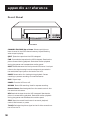
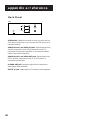
1
video cassette recorder
user's guide
VR643HF
Important Information
WARNING
RISK OF ELECTRIC
SHOCK DO NOT OPEN
To reduce the risk of electric shock, do not remove
cover (or back). No user serviceable parts inside.
Refer servicing to qualified service personnel.
This symbol indicates
"dangerous voltage" inside
the product that presents a
risk of electric shock or
personal injury.
This symbol indicates
important instructions
accompanying the product.
Caution: To reduce the risk of electric shock, match
wide blade of plug to wide slot, fully insert.
Attention: Pour éviter les chocs électriques, introduire
la lame la plus large de la fiche dans la borne
correspondante de la prise et pousser jusqú au fond.
Refer to the identification/rating label located on the back panel of your
product for its proper operating voltage.
FCC Regulations state that unauthorized changes or modifications to this
equipment may void the user’s authority to operate it.
Cable TV Installer: This reminder is provided to call your attention to
Article 820-40 of the National Electrical Code (Section 54 of the Canadian
Electrical Code, Part 1) which provides guidelines for proper grounding
and, in particular, specifies that the cable ground shall be connected to the
grounding system of the building as close to the point of cable entry as
practical.
Product Registration
Please fill out the product registration card and return it immediately.
Returning this card allows us to contact you if needed.
Keep your sales receipt to obtain warranty parts and service and for
proof of purchase. Attach it here and record the serial and model
numbers in case you need them. The numbers are located on the back
of the product.
Model No.
VR643HF
␣␣␣␣␣␣␣␣␣␣␣␣␣␣␣␣␣␣␣␣␣␣␣␣␣␣␣␣␣␣␣␣␣␣␣␣␣␣␣␣␣␣␣␣␣␣␣␣␣␣␣␣␣␣␣␣␣␣␣␣␣␣␣␣␣␣␣␣␣␣
Serial No. ␣ ␣ ␣ ␣ ␣ ␣ ␣ ␣ ␣ ␣ ␣ ␣ ␣ ␣ ␣ ␣ ␣ ␣ ␣ ␣ ␣ ␣ ␣ ␣ ␣ ␣ ␣ ␣ ␣ ␣ ␣ ␣ ␣ ␣ ␣ ␣ ␣ ␣ ␣ ␣ ␣ ␣ ␣ ␣ ␣ ␣ ␣ ␣ ␣ ␣ ␣ ␣ ␣ ␣ ␣ ␣ ␣ ␣ ␣ ␣ ␣ ␣ ␣ ␣ ␣ ␣ ␣ ␣ ␣ ␣ ␣ ␣ ␣ ␣ ␣ ␣ ␣ ␣ ␣ ␣ ␣ ␣ ␣ ␣ ␣ ␣ ␣ ␣ ␣ ␣ ␣ ␣ ␣ ␣ ␣ ␣ ␣ ␣ ␣ ␣
Purchase Date: ␣ ␣ ␣ ␣ ␣ ␣ ␣ ␣ ␣ ␣ ␣ ␣ ␣ ␣ ␣ ␣ ␣ ␣ ␣ ␣ ␣ ␣ ␣ ␣ ␣ ␣ ␣ ␣ ␣ ␣ ␣ ␣ ␣ ␣ ␣ ␣ ␣ ␣ ␣ ␣ ␣ ␣ ␣ ␣ ␣ ␣ ␣ ␣ ␣ ␣ ␣ ␣ ␣ ␣ ␣ ␣ ␣ ␣ ␣ ␣ ␣ ␣ ␣ ␣ ␣ ␣ ␣ ␣ ␣ ␣ ␣ ␣ ␣ ␣ ␣ ␣ ␣ ␣ ␣ ␣ ␣ ␣ ␣ ␣ ␣ ␣ ␣ ␣ ␣ ␣ ␣ ␣
Dealer/Address/Phone: ␣ ␣ ␣ ␣ ␣ ␣ ␣ ␣ ␣ ␣ ␣ ␣ ␣ ␣ ␣ ␣ ␣ ␣ ␣ ␣ ␣ ␣ ␣ ␣ ␣ ␣ ␣ ␣ ␣ ␣ ␣ ␣ ␣ ␣ ␣ ␣ ␣ ␣ ␣ ␣ ␣ ␣ ␣ ␣ ␣ ␣ ␣ ␣ ␣ ␣ ␣ ␣ ␣ ␣ ␣ ␣ ␣ ␣ ␣ ␣ ␣ ␣ ␣ ␣ ␣ ␣ ␣ ␣ ␣ ␣ ␣ ␣ ␣ ␣ ␣ ␣ ␣ ␣ ␣
␣␣␣␣␣␣␣␣␣␣␣␣␣␣␣␣␣␣␣␣␣␣␣␣␣␣␣␣␣␣␣␣␣␣␣␣␣␣␣␣␣␣␣␣␣␣␣␣␣␣␣␣␣␣␣␣␣␣␣␣␣␣␣␣␣␣␣␣␣␣␣␣␣␣␣␣␣␣␣␣␣␣␣␣␣␣␣␣␣␣␣␣␣␣␣␣␣␣␣␣␣␣␣␣␣␣␣␣␣␣␣␣␣␣␣␣␣␣␣
WARNING
To reduce the risk of fire or
shock hazard, do not expose
this product to rain or moisture.
TABLE OF CONTENTS
First Things First .............................................................. 3
Setting up the VCR ......................................................... 7
Using the Menu to Set Up Features ................................................. 8
Language .......................................................................................... 8
Cable Box Setup ............................................................................ 8
VCR Channels List....................................................................... 10
To Auto Channel Search ...................................................... 10
To Change the Signal Type................................................... 11
To Add or Remove Channels ............................................. 11
Time and Date .............................................................................. 12
Auto Clock Set Feature ....................................................... 12
Set the Time and Date Manually ........................................ 14
VCR Plus+ Channels ................................................................... 15
Additional Set-Up Features in the PREFERENCES Menu.......... 17
Remote VCR1/VCR2 Option .................................................... 17
Auto Play........................................................................................ 18
Auto TV/VCR................................................................................ 18
Front Panel (VCR Display) ......................................................... 19
VCR Basics ..................................................................... 21
Remote Buttons .................................................................................. 22
Component Buttons ................................................................... 22
VCR Function Buttons ................................................................ 22
TV Function Buttons ................................................................... 23
Playing a Tape ....................................................................................... 24
Automatic Rewind .............................................................................. 24
Tape Eject ............................................................................................. 25
Recording ............................................................................................. 25
Check the Safety Tab ................................................................... 25
Recording ............................................................... 27
Recording Features ............................................................................ 28
Express Recording ....................................................................... 28
Timer Recording .......................................................................... 29
Timer Recording with VCR Plus+ ............................................ 30
Stopping a Timer Recording ...................................................... 32
Reviewing and Clearing Programs ........................................... 32
Recording Broadcast Stereo TV or SAP
(Second Audio Program) ...................................................... 32
Recording Audio Only ................................................................ 33
Using Two VCRs for Copying and Editing Tapes .................... 34
7
1
TABLE OF CONTENTS
Programming the Remote ............................................ 35
To Control a TV .................................................................................. 36
Other Features .............................................................. 37
COMMERCIAL66ADVANCE ........................................................ 38
MOVIE66ADVANCE ....................................................................... 41
Picture Search Options ..................................................................... 43
Forward and Reverse Search .................................................... 43
Slow Motion .................................................................................. 44
Frame Advance ............................................................................. 44
Index Search .................................................................................. 44
Go-To Search ................................................................................ 45
Time Counter...................................................................................... 45
Tracking ................................................................................................. 46
On-Screen Displays ............................................................................ 46
Audio Set-Up Features ...................................................................... 47
Reception ....................................................................................... 48
Tape Playback ................................................................................ 48
Connections .................................................................. 49
Things to Know Before Connecting Components ..................... 49
Connecting Your VCR ........................................................................ 50
TV with RF Jack Only ................................................................. 52
TV with Audio/Video Jacks ........................................................ 53
TV with Audio/Video Jacks and Cable Box to
Unscramble Pay Channels Only ................................... 54
TV with RF Jack and Satellite Receiver ................................... 55
TV with Audio/Video Jacks and Satellite Receiver ............... 56
Appendix A: Reference ................................................ 57
Front Panel ........................................................................................... 58
Display Panel ........................................................................................ 59
Back Panel ............................................................................................ 60
Troubleshooting Tips .......................................................................... 61
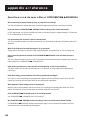
Questions and Answers About
COMMERCIAL66ADVANCE ................................................. 64
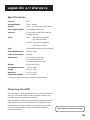
Specifications ....................................................................................... 65
Cleaning the VCR ................................................................................ 65
Limited Warranty ................................................................................ 66
Index .............................................................................. 67
2
First Things First
Hi, my name is Roger...
First things first
➣
and I wrote this User’s Guide. It’s my job to see
that you have a rewarding user manual experience.
And, I think you’ll be pleased with the features that
can be accessed through the on-screen menus.
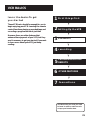
1
2 Setting Up the VCR
➣
Read the First Three sections
3 VCR Basics
➣
The first three sections of the manual introduce
you to your VCR, and show you how to set the VCR
up and use the on-screen menus. Reading these
sections gives you the basic information you need
to use your VCR.
4 recording
➣
What’s Left?
5
5
PROGRAMMING THE
REMOTE
➣
The rest of the book highlights playback and
recording information, contains a detailed
connections section, and a reference section that
includes troubleshooting tips, limited warranty, and
index.
➣
OTHER FEATURES
6
5
7
Connections
READ ME!
These note boxes give you tips for
your new video cassette recorder.
3
First Things First
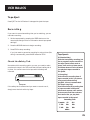
Step 1: Unpack the Box
The following items come packed in the box:
•
VCR
•
Remote control
•
RF coaxial cable
STEP 2: Install Batteries In the
Remote Control
Follow these steps whenever you need to install or change the
batteries in your VCR remote.
1. Remove the cover of the battery compartment.
2. Place batteries in the remote, matching the + and – ends of
each battery to the diagram inside the compartment.
3. Replace the cover.
STEP 3: Connect your vcr
If you connect your VCR to your home antenna or cable system
and then to your TV, use the VCR’s IN FROM ANT and OUT TO TV
jacks for a good signal as shown.
If you have a TV with AUDIO/VIDEO jacks, use the jacks for a
better connection. Refer to the Connections section, toward the
back of the manual.
CABLE, CABLE BOX, OR ANTENNA
VCR
OUT
IN
IN FROM
ANT
R
AUDIO
L
3
CH
4
OUT TO
TV
VIDEO
TV
CABLE/
ANTENNA
4
First Things First
STEP 4: PLUG IN THE VCR
Match the wide blade of the plug with the wide slot in the
outlet. Be sure to insert the plug completely.
STEP 5: TUNe THE TV
Tune the TV to the VCR viewing channel. The VCR viewing
channel is channel 3 or 4 or the TV’s video input, depending on
the connection you’ve chosen.
•
If you connect your VCR using the ANTENNA connectors with
RF coaxial cable, set the 3CH4 switch to channel 3 or channel
4—the channel you want to use on your TV.
•
If you connect your VCR using the AUDIO/VIDEO jacks with
audio/video cables, select the TV’s video input to see the
signal. See the TV Owner’s Manual.
Auto Channel Search/Auto Clock
STEP 6: turn on the vcr
Press POWER on the VCR’s front panel, or VCR on the remote to
turn on the VCR. The VCR will begin Auto Channel Search. Once
your local channels are stored in memory, the VCR searches for a
channel carrying XDS (Extended Data Services) information to
automatically set the time.
To complete setting up the VCR, you will need to understand
how to move through and change items in the on-screen menus.
STEP 7: Access the menus
The MENU and number buttons let you access, select and change
menu items. For example, to change the AUTO PLAY setting, you
would do the following:
You can quit Auto Channel Search by
pressing any key on the remote.
However, doing so may prevent the
time from being set automatically
Auto Clock will set the time, but you
may have to set the time zone and
daylight saving time manually before
the time is correct.
Refer to the next section, Setting up
the VCR, for more information on
these features.
VCR Viewing Channel
When using only the IN FROM ANT
and OUT TO TV jacks to connect your
VCR, tune your TV to channel 3 or 4.
When using the audio/video jacks to
connect your VCR, tune your TV to
the TV’s video input.
5
First Things First
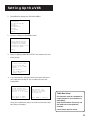
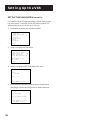
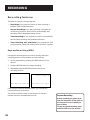
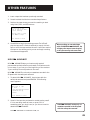
1. Press MENU to display the VCR MAIN MENU.
1
2
3
4
5
6
7
VCR MAIN MENU
VCR Plus+
Timer Recordings
Time
Channels
Preferences
Audio
Language
0 Exit
2. Press 5 to display the PREFERENCES menu.
1
2
3
4
5
PREFERENCES
Remote Control: VCR1
Auto Play:
ON
Auto TV/VCR:
ON
Front Panel
AUTO
Commercial Advance
0 Exit
3. Press 2 to switch Auto Play to ON or OFF.
1
2
3
4
PREFERENCES
Remote Control: VCR1
Auto Play:
OFF
Auto TV/VCR:
ON
Front Panel
AUTO
0 Exit
See Additional Set-Up Features for detailed information
about the Auto Play feature.
STEP 8: SET UP THE VCR
Once you understand how to move around through the menus,
go to the next section to set up your VCR.
6
Setting Up the VCR
Set-up features
•
Set up VCR Channel List (Auto Channel
Search)
•
Set Time Zone and Daylight-Saving Time
(Auto Clock)
•
Set the Time and Date Manually
•
Set up VCR Plus+ Channels
•
Set the Remote VCR1/VCR2 feature
•
Set the Auto Play feature
•
Set the Auto TV/VCR feature
•
Set the Front Panel Brightness feature
3 VCR Basics
4 recording
5
5
PROGRAMMING THE
REMOTE
➣
Set Up for a Cable Box
➣
•
2 Setting Up the VCR
➣
Select a Language
➣
•
First things first
➣
Below is a list of features that you may want to set
up before you begin using your VCR for the first
time.
1
➣
OTHER FEATURES
6
5
7
Connections
7
Setting Up the VCR
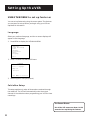
USING THE MENU to set up features
You can set up features by using the menu system. The features
you may want to set up before you begin using your VCR are
explained in this section.
language
Select your preferred language, and the on-screen displays will
appear in that language.
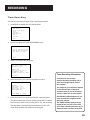
1. Press MENU to display the VCR MAIN MENU.
1
2
3
4
5
6
7
VCR MAIN MENU
VCR Plus+
Timer Recordings
Time
Channels
Preferences
Audio
Language
0 Exit
2. Press 7 to select the LANGUAGE menu.
LANGUAGE
Select a language.
1>English
2 Français
Press MENU to continue
3. Select English or Français (French).
Cable Box Setup
This setup applies only when all channels are received through
the cable box. The VCR will automatically enter the output
channel of the cable box when programming your VCR for timer
recordings.
On-Screen Menus
Not all the VCR screens are shown in this
manual when explaining the features.
8
Setting Up the VCR
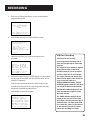
1. Press MENU to display the VCR MAIN MENU.
1
2
3
4
5
6
7
VCR MAIN MENU
VCR Plus+
Timer Recordings
Time
Channels
Preferences
Audio
Language
0 Exit
2. Press 4 to display the CHANNELS menu.
CHANNELS
1
2
3
4
5
Auto Channel Search
Add/Remove Channels
Signal Type: CABLE
VCR Plus+ Channel List
Cable Box Setup
0 Exit
3. Press 5 to display CABLE BOX SETUP. Then select one of the
three choices.
CABLE BOX SETUP
Do you use your cable
box to receive ALL
channels or only SOME
Channels?
1 ALL channels
2 Only SOME channels
3 Cancel setup
4. If you selected ALL channels, enter the output channel of
your cable box, usually 03, 04, or video line input and
press MENU.
CABLE BOX SETUP
On what channel does
the VCR receive signals
from the cable box?
(usually 3, 4, or Video)
CABLE BOX SETUP
The VCR will now
receive all signals
from the cable box
on channel 04.
Cable Box Setup
-Enter 01-13 or INPUT
Press MENU to cancel
Press MENU to continue
Once you complete the setup, the VCR confirms that Cable
Box Setup is complete
ALL channels: enter two numbers for
output channel of your cable box or
press INPUT.
Only SOME channels: if you only use
the cable box to tune premium
channels.
Cancel setup: select to cancel.
9
Setting Up the VCR
VCR CHANNELS LIST
If you use a cable box for all channels, this step is not
necessary. Your VCR may come with a channel list preset at
the factory. Even though your VCR may come with a list, it’s
possible that you may want to add or eliminate some
channels depending on whether they are active.
To Auto Channel Search
1. Press MENU to display the VCR MAIN MENU.
1
2
3
4
5
6
7
VCR MAIN MENU
VCR Plus+
Timer Recordings
Time
Channels
Preferences
Audio
Language
0 Exit
2. Press 4 to display the CHANNELS menu.
CHANNELS
1
2
3
4
5
Auto Channel Search
Add/Remove Channels
Signal Type: CABLE
VCR Plus+ Channel List
Cable Box Setup
0 Exit
3. Press 1 to display the AUTO CHANNEL SEARCH menu.
AUTO CHANNEL SEARCH
What type of signal
are you using?
1 Cable TV
2 Antenna
3>Detect Automatically
0 Cancel
Auto Channel Search
4. Select one of the three AUTO CHANNEL SEARCH options.
Choices one and two are self-explanatory. If you choose
Detect Automatically, the VCR automatically detects
which signal system you have attached to your VCR.
10
Use the Auto Channel Search
feature to place all available
channels in memory.
If you ever change cable or
antenna signals, you may need to
Auto Channel Search again.
Setting Up the VCR
AUTO CHANNEL SEARCH
Now scanning channel 14
Press any key to cancel
The VCR begins scanning for the available channels—this
takes about one to two minutes. The lowest channel is tuned
once the search is complete. Now pressing CHANNEL up or
down should only select the active channels.
To Change the Signal Type
1. Press MENU to display the VCR MAIN MENU.
2. Press 4 to display the CHANNELS menu.
3. Press 3 to change the Signal Type between CABLE and
ANTENNA.
To Add or Remove Channels
You may want to add or remove channels after you Auto
Channel Search, especially if some of the channels have weak
signals or you don’t want to watch them.
1. Press MENU to display the VCR MAIN MENU.
2. Press 4 to display the CHANNELS menu.
3. Press 2 to display the ADD/REMOVE CHANNELS screen. Use
CHANNEL up or down or number buttons to go to the
channels you want to remove or add.
ADD/REMOVE CHANNELS
ADD/REMOVE CHANNELS
Channel 115
is presently ADDED
Channel 115
is presently REMOVED
Press CLEAR to remove
Press MENU to exit
Press INFO to add
Press MENU to exit
Detect Automatically
A strong cable or antenna signal in
your area may cause Auto Detect
to mis-detect. If this should
happen, select 1 or 2 for the
system you have.
Selecting Channels
The CHANNEL up and down buttons
access those channels active in your
VCR channel list.
You can still access channels not in
the channel list by using the number
buttons on the remote.
11
Setting Up the VCR
Time and Date
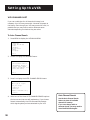
The VCR gives you two ways to set the time and date. The Auto
Clock feature which enables the VCR to update the clock each
time you turn off the VCR. The Auto Clock feature is
advantageous because it updates the time for you automatically.
The second way is entering the time and date manually into the
menu system.
Auto Clock SET Feature
The Auto Clock feature is set to ON at the factory. In the ON
setting, the VCR looks for a channel carrying XDS (Extended Data
Services) information and updates the clock using the
Coordinated Universal Time. After the clock is initially set, you
may have to set the Time Zone and Daylight Saving features.
Set the Time Zone
1. Press MENU to display the VCR MAIN MENU.
1
2
3
4
5
6
7
VCR MAIN MENU
VCR Plus+
Timer Recordings
Time
Channels
Preferences
Audio
Language
0 Exit
2. Press 3 to display TIME menu.
1
2
3
4
TIME
Set Time and Date
Auto Clock Set:
ON
Set Time Zone
Set Daylight Savings
0 Exit
Auto Clock Info
With a cable box, the VCR will not
reset the clock after a power outage
unless the cable box is set to the
channel carrying the broadcast signal.
If Auto Clock Set is unsuccessful, try
tuning the VCR (or cable box) to a
channel carrying the XDS information
(usually PBS), then turn the VCR off.
If the time does not set within 10
minutes, set the time and date
manually through the menu items.
Check local cable system or TV
stations for availability of channels
with XDS.
12
Setting Up the VCR
3. Press 3 to display the SET TIME ZONE screen.
SET TIME ZONE
What is your Time Zone?
1 Eastern
2 Central
3 Mountain
4 Pacific
5 Alaska
6 Hawaii
7>Automatic
Press MENU to continue
4. Select your time zone.
If you select Automatic for your time zone, the VCR sets the
clock using the first Coordinated Universal Time information
it finds. If the time is not correct, select another time zone or
set the time and date through the menu system.
Set Daylight Saving Time
1. Press MENU to display the VCR MAIN MENU.
2. Press 3 to display the TIME menu.
3. Press 4 to display the SET DAYLIGHT SAVINGS menu.
SET DAYLIGHT SAVINGS
Does your area observe
Daylight Savings Time
from April to October?
1 Yes, DST is observed
2 No
3>Automatic
Press MENU to continue
4. Select one of the options.
•
DST is the acronym for Daylight-Savings Time.
•
If you choose AUTOMATIC, the VCR sets the clock using the
DST information broadcast in the signal (channel).
Spring forward; Fall backward
In the Spring, daylight-saving time
begins on the first Sunday in April.
Because the clock automatically
changes from 2:00 AM to 3:00 AM
(forward one hour), remember to
include the extra hour for timer
recording falling within this time
frame.
In the Autumn, daylight-saving time
ends on the last Sunday in October.
The VCR clock automatically changes
from 2:00 AM to 1:00 AM (back one
hour). Therefore, it can affect your
recording length.
Time/Date Display
Pressing INFO on the remote displays
the time and date on the screen.
13
Setting Up the VCR
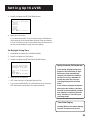
SET THE TIME AND DATE Manually
If the AUTO CLOCK SET was unsuccessful, set the clock through
the menu option. The AUTO CLOCK SET feature is set to OFF
automatically when you set the clock this way.
1. Press MENU to display the VCR MAIN MENU.
1
2
3
4
5
6
7
VCR MAIN MENU
VCR Plus+
Timer Recordings
Time
Channels
Preferences
Audio
Language
0 Exit
2. Press 3 to display the TIME menu.
1
2
3
4
TIME
Set Time and Date
Auto Clock Set:
ON
Set Time Zone
Set Daylight Savings
XDS Time Data was
not found.
0 Exit
3. Press 1 to display the SET TIME AND DATE menu.
SET TIME AND DATE
Time --:-(hh:mm)
Date --/--/--
Press MENU to cancel
4. Enter the data using the number buttons. Press 0 before
single-digit numbers and follow the on-screen directions.
SET TIME AND DATE
Time 12:34 PM
Date 11/18/97 Tuesday
Press CLEAR to correct
Press MENU to set
14
Setting Up the VCR
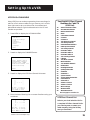
VCR PLUS+ CHANNELS
Using VCR Plus+ can make programming timer recordings for
cable or off-air antenna easier, but you have to put in a little
time right now to set up a channel list. A worksheet and
abbreviated codes for typical cable services in the U.S. and
Canada are provided.
1. Press MENU to display the VCR MAIN MENU.
1
2
3
4
5
6
7
VCR MAIN MENU
VCR Plus+
Timer Recordings
Time
Channels
Preferences
Audio
Language
0 Exit
2. Press 4 to display the CHANNELS menu.
CHANNELS
1
2
3
4
5
Auto Channel Search
Add/Remove Channels
Signal Type: CABLE
VCR Plus+ Channel List
Cable Box Setup
0 Exit
3. Press 4 to display the VCR Plus+ Channel List screen.
VCR+ Channel My Channel
5
-4
-3 -> -> -> -2
-1
-Use CH+/- to select
Press 0-9 to change
Press MENU to save
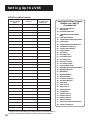
Two-Digit VCR Plus+ Channel
Numbers for Cable TV
(USA List)
35
39
57
54
42
45
98
37
53
63
34
47
33
95
96
51
46
58
48
49
38
64
99
41
97
59
52
44
62
93
94
55
43
60
American Movie Classics
Arts &-Entertainment
Black Entertainment
Bravo
Cable News Network
Cinemax
Cinemax 2
The Discovery Channel
The Disney Channel
Entertainment Television
ESPN Sports Network
The Family Channel
Home Box Office
Home Box Office 2
Home Box Office 3
The Learning Channel
Lifetime
The Movie Channel
Music Television
The Nashville Network
Nickelodeon
Nostalgia Television
Quality Value Cable
Showtime
Showtime 2
Sports Channel
Turner Network Television
USA-Network
Video Hits 1
Viewer’s Choice 1
Viewer’s Choice 2
WGN Chicago
WTBS Atlanta
WWOR-New York
See next page for Canadian List
4. Enter the data following the on-screen directions using your
worksheet.
VCR+ Channel My Channel
5
46
4
-3 -> -> -> 23
2
-1
-Use CH+/- to select
Press 0-9 to change
Press MENU to save
Screen is for an example only.
VCR Plus+ Channel List
Refer to your local television list for
a complete VCR Plus+ channel list for
your viewing area or contact your
cable company. Using the list may
save you some time.
15
Setting Up the VCR
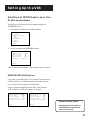
VCR Plus++ Worksheet
Broadcast or
Cable-TV Station
Name
VCR Plus+ Channel
Number**
Hbo
33
ESPN
34
Channel Number
You Receive the
Station On*
*Check your local or cable listing for the channel number you receive this station on.
**Check your local listing for broadcast or VCR Plus+ channel number assigned.
16
Two-Digit VCR Plus+ Channel
Numbers for Cable TV
(Canadian List)
67
Allarcom Pay Television/
Superchannel
44
Arts & Entertainment
72
Cable News Network-Headline
News
61
Cable News Network
70
Canadian Home Shopping Network
56
Canal Famille
69
Cathay International Television Inc
68
Chinavision Canada Corp
60
Country Music Television
63
Family Channel
62
First Choice
96
First Choice Two
97
First Choice Three
99
First Choice Four
90
House of Commons
91
La Chaine Francaise
51
The Learning Channel
65
MeteoMedia/The Weather Network
48
MuchMusic Network
55
MusiquePlus
52
Nashville Network
73
Newsworld/CBC
53
Le Reseau des Sports
43
The Sports Network
64
Super Ecran
37
Super Ecran B
98
Super Ecran C
66
Telatino Network
46
TV5 Montreal
92
Viewer’s Choice 1
93
Viewer’s Choice 2
94
Viewer’s Choice 3
95
Viewer’s Choice 4
71
Vision TV: Canada’s Faith Network
38
Youth TV, Canada Inc.
Setting Up the VCR
Additional SET-UP features in the
Preferences menu
The features in this section are all accessed through the
PREFERENCES menu.
1. Press MENU to display the VCR MAIN MENU.
1
2
3
4
5
6
7
VCR MAIN MENU
VCR Plus+
Timer Recordings
Time
Channels
Preferences
Audio
Language
0 Exit
2. Press 5 to display the PREFERENCES menu.
1
2
3
4
5
PREFERENCES
Remote Control: VCR1
Auto Play:
ON
Auto TV/VCR:
ON
Front Panel
AUTO
Commercial Advance
0 Exit
Now you are ready to select an item from the menu to set up.
REMOTE VCR1/VCR2 Option
If you own a compatible RCA, GE, or ProScan remote that has
a VCR2, VCR2•LD, or VCR2•DVD button, this feature allows
you to set this VCR to respond to that button.
Press 1 to select the Remote Control item. Then press the
VCR2, VCR2•LD, or VCR2•DVD button to change.
PREFERENCES
(PRESS VCR2 TO CHANGE)
2 Auto Play:
ON
3 Auto TV/VCR:
ON
4 Front Panel
AUTO
5 Commercial Advance
1
2
3
4
5
PREFERENCES
Remote Control: VCR2
Auto Play:
OFF
Auto TV/VCR:
OFF
Front Panel
AUTO
Commercial Advance
Remote Control Option
0 Exit
0 Exit
Changing the remote option to
VCR2 disables the remote that
came with your VCR.
17
Setting Up the VCR
The VCR will only respond to the compatible remote’s VCR2,
VCR2•LD, or VCR2•DVD button. If you change the remote
setting to VCR2, the remote that came with your VCR will no
longer control it.
Use the compatible remote to change the remote setting back
to VCR1. Display the PREFERENCES menu, press 1, and then press
VCR on the VCR’s remote.
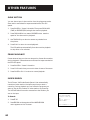
AUTO PLAY
This feature allows the VCR to automatically start playing when
you insert a tape with the safety tab removed. Press 2 to switch
between ON or OFF.
•
Select ON if you want a tape with its safety tab removed—
a prerecorded movie, for example—to start playing
automatically when the tape is inserted.
•
Select OFF if you do not want a tape with its safety tab
removed to start playing automatically.
Auto TV/VCR
This feature controls whether the TV/VCR switch changes
automatically to the VCR mode, when the VCR is turned on.
Press 3 to switch between ON and OFF.
•
Select ON if you want the VCR to switch to the VCR mode
when the VCR is turned on or a cassette is inserted. This only
applies if you connect the IN FROM ANT and OUT TO TV
jacks of your VCR and TV and watch your VCR on channel 3
or 4 of your TV.
•
Select OFF if you want the VCR to remain in the TV mode.
This is useful if you watch your VCR on the TV’s video input
and you don’t want your antenna/cable signal interrupted
by the VCR.
Auto TV/VCR
Pressing TV•VCR will still switch
between the VCR and TV mode.
VCR mode: VCR indicator in the
display panel lights.
TV mode: VCR indicator turns off.
18
Setting Up the VCR
Front panel (vcr display)
You can change the brightness level of the fluorescent display
panel on the front of the VCR. Press 4 to switch between the
options.
•
AUTO brightens the display when the VCR is on and dims the
display when the VCR is off.
•
BRIGHT keeps the display bright.
•
DIM keeps the display at a low brightness level.
19
Setting Up the VCR
20
VCR BAsICS
learn the basics To get
you started
1
These VCR basics should be enough for you to
begin enjoying your VCR. Learning the remote
control functions, playing a recorded tape, and
recording a program should do just that.
2 Setting Up the VCR
➣
➣
3 VCR Basics
➣
However, there are other features that
enhance the enjoyment of your VCR, but they
aren’t necessary to get you started. If you want
to learn more about your VCR, just keep
reading.
First things first
4 recording
➣
➣
5
5
PROGRAMMING THE
REMOTE
➣
OTHER FEATURES
6
5
7
Connections
VCR Basics tells you what you need
to know in order to watch a movie
or tape your favorite show.
21
VCR Basics
Remote Buttons
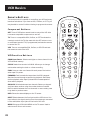
The remote control is capable of controlling your VCR and many
brands of televisions. If you have an RCA, ProScan, or GE TV, you
may be able to control it without having to program the remote.
OFF
TV
VCR
REVERSE
PLAY
FORWARD
OFF Turns off VCR when remote is set to control the VCR. Also
turns some compatible components on and off.
RECORD
STOP
PAUSE
TV Turns on a compatible RCA, ProScan, or GE TV and sets the
remote to control the TV. Also used with the OFF button to turn
on a different brand of TV (if programmed) and sets the remote
to control the TV.
INFO
CHAN
Component Buttons
VOL
MUTE
CLEAR
VCR Function Buttons
CLEAR Resets time counter to 0:00:00. Allows you to change
entries when setting the clock or a timer recording.
FORWARD Fast forwards the tape when the VCR is stopped.
Searches forward through a tape during playback. Starts slowmotion playback when tape is paused and increases speed of
slow-motion playback
GO BACK Switches between two channels. Select one channel
and then select another using the number buttons. Press GO
BACK to switch between the two channels. In menu mode, press
to go back to previous menu.
INFO Shows the status displays on the TV screen.
INPUT Selects between the line input and the VCR’s tuner. Line
input refers to the signal coming from the component connected
to the audio/video input jacks on the back of the VCR.
MENU Brings up VCR MAIN MENU on the TV screen. Used to
select a menu item or exit a menu.
22
GO BACK
MENU
SPEED
1
2
3
4
5
6
7
8
9
INPUT
V•VC
0
TRACKING
R
F.ADV Lets you view one frame with each press of the button
when tape is in pause.
CHAN
T
CHAN Up or Down Selects next higher or lower channel in the
VCR’s channel memory.
VOL
VCR Turns on a compatible RCA, ProScan, or GE VCR and sets
the remote to control the VCR.
SEARCH
F.ADV
VCR BAsICS
Numbers (0 through 9) Select a channel up to 99 by pressing
two numbers. Select a cable channel over 99 by pressing and
holding 1 until 1 – – appears on the screen. Then press the other
two numbers.
OFF Turns off the VCR when the remote is set to control the
VCR. Turns off other components if remote is programmed.
PAUSE Pauses playback or recording. Press PAUSE again to
return to playback or recording.
PLAY Plays a tape.
RECORD Starts VCR recording. Also used for express recording.
REVERSE Rewinds the tape when the VCR is stopped. Searches
backward through a tape during playback. Starts slow-motion
playback when tape is paused and decreases speed of slowmotion playback.
SEARCH Displays Index, and Go-To Search menus on TV screen
when VCR is stopped. Advances the tape 30 seconds of recorded
material during playback.
SPEED Selects a recording speed (SP or SLP).
STOP Stops the current VCR function such as record, playback,
rewind, or fast forward.
TRACKING Up or Down Lets you manually reduce the streaks
that may appear on the picture during play, slow motion, or
pause. Reduces picture “jitter” during stop-action playback.
TV•VCR Switches the picture signal so that it either comes from
the VCR or cable/antenna system.
TV Function Buttons
CHAN Up or Down Selects next higher or lower channel in the
TV’s channel memory.
CLEAR Removes menus or status displays from the screen.
GO BACK Switches between two channels. Select one channel
and then select another using the number buttons. Press GO
BACK to switch between the two channels.
INFO Shows the TV’s status displays on the TV screen.
MUTE Reduces volume to minimum level.
TV Buttons
The TV buttons may not control all
features of all models of RCA,
ProScan, and GE TVs.
23
VCR Basics
Numbers (0 through 9) Select a channel up to 99 by pressing
two numbers. Select a cable channel over 99 by pressing and
holding 1 until 1 – – appears on the screen. Then press the other
two numbers.
OFF Turns the TV off.
VOL Up and Down Raises and lowers sound of TV.
Playing a Tape
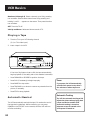
1. Tune the TV to your VCR viewing channel
(3, 4, or TV’s video input).
2. Insert a tape in the VCR.
POWER
EJECT
TV•VCR
REV
INPUT
RECORD
PLAY•PAUSE
FWD
CHANNEL
TRACKING
STOP
PAUSE
If the Auto Play feature is set to ON, the tape automatically
begins playback (if the safety tab on the cassette is removed).
•
Press FORWARD or REVERSE to position the tape.
•
Press PLAY (if necessary) to begin tape play.
Pause
•
Press PAUSE for stop action.
•
Press TRACKING up or down to remove any streaks from the
picture, if necessary.
If you pause, the VCR automatically
switches from pause to stop after a
few minutes to reduce tape wear.
•
Press STOP to stop playback.
Automatic Tracking
Automatic Rewind
The VCR automatically rewinds the tape if it reaches the end of
the tape during playback. While rewinding, you can press
POWER on the VCR (OFF on the remote) and the VCR will turn
off after rewinding.
24
The VCR has automatic tracking which
adjusts the picture when playing back
a tape recorded on another VCR.
Automatic tracking is turned on
whenever a tape is inserted or the
VCR’s power is turned on.
VCR BAsICS
Tape Eject
Press EJECT on the VCR when it is stopped to eject the tape.
Recording
If you want to record something that you’re watching, you can
use basic recording.
1. Set the tape speed by pressing the SPEED button on the
remote (see margin note for information about tape speed
settings).
2. Press the RECORD button to begin recording.
3. Press STOP to stop recording.
If you just want to pause the recording for a short time (like
during a commercial), press PAUSE instead of STOP.
Check the Safety Tab
No matter which recording option you use, you need to make
sure there is a tape in the VCR, and that the tape’s safety tab is
in place. You cannot record on a tape with the safety tab
removed.
Tape Speeds
SP (Standard Play)
Gives the best quality recording, but
fewer programs can be recorded on
the tape. Special effects such as
pause, slow motion, picture search,
and frame advance work well when
you play back tapes recorded in
this speed.
LP (Long Play)
Gives twice the recording time of
tapes recorded in LP. If you plan on
using special effects during
playback, LP is not recommended.
Safety Tab
If the safety tab is removed and you want to record over it,
simply cover the hole with vinyl tape.
SLP (Super Long Play)
Gives three times the recording time
of tapes recorded in SP. Special
effects such as pause, slow motion,
picture search, and frame advance
work well when you play back
tapes recorded in this speed.
Recording Time
Cassette
SP
SLP
T-120
2Hr
6Hr
T-160
2Hr
40Min
8Hr
25
RECORDING
SEVERAL recording OPTIONS
Express Recording
•
Timer Recording
•
Timer Recording with VCR Plus+
•
Broadcast Stereo or Second Audio
Program (SAP)
•
Audio Only Recording
•
Copying and Editing Tapes
4 recording
5
5
PROGRAMMING THE
REMOTE
➣
•
3 VCR Basics
➣
Recording (explained in VCR
Basics section)
➣
•
2 Setting Up the VCR
➣
Recording Features:
First things first
➣
Now that you’ve gone through the necessary
steps to operate your VCR, I’ll explain the
different recording features that are available
to suit your needs.
1
➣
OTHER FEATURES
6
5
7
Connections
27
RECORDING
Recording features
There are four ways to record programs:
•
Recordinglets you press one button to start recording a
program. (See VCR Basics section.)
•
Express Recordinglets you start recording a program you
are watching, and then set the VCR to automatically stop
recording after a designated period of time.
•
Timer Recordinglets you program the VCR to automatically
start and stop recording at a predetermined time.
•
Timer Recording with VCR Plus+
lets you program the VCR
just by entering a PlusCode number found in some TV guides.
Express Recording (XPR)
Use express recording when you want to quickly record the
remaining portion of the program you are watching.
1. Set the tape speed by pressing the SPEED button on the
remote.
2. Press the RECORD button to begin recording.
3. Repeatedly press the RECORD button to set up the
recording duration.
Rec
Ch 13
0:00
Press REC to set length SLP
Rec
Ch 13
Record Length 0:00
Press REC to set length
Each time you press the RECORD button, you increase the
recording time (up to 4 hours).
The VCR continues to record for the amount of time you
indicate, and then automatically turns off.
Express Recording
Express recording is a great way to
tape the last quarter of the game, or
the last part of a movie when you
have to leave.
To stop an express recording, press
and hold STOP for a few seconds.
28
RECORDING
Timer Recording
You can set up as many as eight timer recording programs.
1. Press MENU to display the VCR MAIN MENU.
1
2
3
4
5
6
7
VCR MAIN MENU
VCR Plus+
Timer Recordings
Time
Channels
Preferences
Audio
Language
0 Exit
2. Press 2 to display the TIMER RECORDINGS menu.
TIMER RECORDINGS
1 Create a New Program
2 Review Existing Progs.
3 Use VCR Plus+ Code
0 Exit
3. Press 1 to Create a New Program.
How often should this
program record?
1
2
3
4
One Time
Daily (every day)
Weekdays (M-F)
Weekly (Once per week)
Timer Recording Information
0 Cancel
4. Select how often you want the program to record.
Program 1 (One Time)
Channel
Start Time
End Time
Start Date
Tape Speed
---:---:---/--/-SLP
Press MENU to cancel
5. Enter the data for the program with the number buttons.
The data includes the channel number (press INPUT to select
the line input), start time including AM or PM, and end time.
The start date is automatically entered based on the VCR
clock. Both the date and speed can be changed.
Clock must be set correctly.
Insert a tape with the safety tab in
place and enough tape to record
the program.
The output of your cable box appears
in the Channel item of the timer
recording menu if you’ve set up the
VCR for a cable box for all channels.
PROGRAMS OVERLAP appears if you
have entered two programs where
the times overlap.
The TIMER indicator appears in the
display when you turn off the VCR
and a timer recording has been set. It
flashes if there is no tape in the VCR.
29
RECORDING
6. Review the information to make sure it is correct, and then
press MENU to save.
Program 1 (One Time)
Program 1 has been saved
Channel
03 Cable
Start Time 08:00 PM
End Time
09:30 PM
Start Date 10/24/97 Fri
Tape Speed SLP
1=SP
Press CLEAR to correct
Press MENU to save
Remember to insert a
recordable tape and
turn the VCR off before
the program start time.
Remember to leave your
cable box on and tuned
to the desired channel.
Timer Recording with VCR PluS+
You can use VCR Plus+ to simplify timer programming if you
have cable TV and don’t receive all channels through a cable
box, have a cable box the VCR can control, or if you get your TV
signal off-air.
Setting Up the Channel List
If you did not set up the VCR Plus+ channel list, you can do
it now.
1. Display the CHANNELS menu from the VCR MAIN MENU.
2. Display the VCR Plus+ Channel List menu.
3. Go to Setting Up Your VCR if you need more information
on setting up your VCR Plus+ channel list.
Using VCR Plus+
1. Press MENU to bring up the VCR MAIN MENU.
1
2
3
4
5
6
7
VCR MAIN MENU
VCR Plus+
Timer Recordings
Time
Channels
Preferences
Audio
CHANNELS
Language
1 Auto Channel Search
0 2Exit
Add/Remove Channels
3 Signal Type: CABLE
4 VCR Plus+ Channel List
5 Cable Box Setup
VCR+ Channel My Channel
5
46
-0 Exit 4
3 -> -> -> 23
2
-1
-1
2
3
4
5
6
7
Use CH+/- to select
Press 0-9 to change
Press MENU to save
VCR MAIN MENU
VCR Plus+
Timer Recordings
Time
Channels
Preferences
Audio
Language
0 Exit
2. Press 1 to display the VCR PLUS+ menu.
VCR PLUS+
Enter PlusCode Number
(from TV listing)
-
Press MENU to cancel
VCR Plus+ and PlusCode are registered trademarks of Gemstar Development Corporation.
30
RECORDING
3. Enter the VCR PlusCode shown in your local television
programming guide.
VCR PLUS+
Enter PlusCode Number
(from TV listing)
12876
Press CLEAR to correct
Press MENU when done
4. Press MENU to enter the VCR PlusCode number.
How often should this
program record?
1
2
3
4
One Time
Daily (every day)
Weekdays (M-F)
Weekly (Once per week)
0 Cancel
5. Indicate how often you want the program to be
recorded.
Program 1 (One Time)
Channel
Start Time
End Time
Start Date
Tape Speed
03 CABLE
08:00 PM
09:30 PM
10/24/97 Fri
SLP
Press CLEAR to adjust
Press MENU to save
6. Change the speed with the SPEED button on the remote
or the program end time with the CLEAR button on the
remote (if necessary).
Changing the end time comes in handy when you are
recording a program such as a sporting event that may
exceed the scheduled broadcast time.
7. Press MENU to save the program.
Program 1 has been saved
Remember to insert a
recordable tape and
turn the VCR off before
the program start time.
Remember to leave your
cable box on and tuned
to the desired channel.
VCR Plus+ Recording
Clock must be set correctly.
Insert a tape with the safety tab in
place and enough tape to record the
program.
The output of your cable box appears
in the Channel item of the timer
recording menu if you’ve set up the
VCR for a cable box for all channels.
The correct channel and start & stop
time will also appear if the VCR is set
up to control the cable box.
UNRECOGNIZED NUMBER... PLEASE
RE-ENTER appears when the VCR does
not recognize the PlusCode number.
PROGRAMS OVERLAP appears if you
have entered two programs where
the times overlap.
The TIMER indicator appears in the
display when you turn off the VCR
and a timer recording has been set. It
flashes if there is no tape in the VCR.
For a cable box, turn it on and tune it
to the channel you want to record
before the recording is to begin.
31
RECORDING
Stopping a Timer Recording
To stop or cancel a timer recording in progress (even an express
recording):
•
Press and hold the STOP button for a few seconds.
REVIEWING AND CLEARING PROGRAMS
To review programs that you have already set up:
1. Press 2 when the VCR MAIN MENU is displayed to display the
TIMER RECORDINGS menu.
TIMER RECORDINGS
1 Create a New Program
2 Review Existing Progs.
3 Use VCR Plus+ Code
0 Exit
2. Press 2 to display the Review Existing Progs. screen.
Program 1 (One Time)
Channel
Start Time
End Time
Start Date
Tape Speed
104 CABLE
12:00 AM
01:30 AM
10/24/97 Fri
SLP
Press CLEAR to erase
Press MENU for next prog
3. Press CLEAR to erase or MENU to see the next program.
Recording Broadcast Stereo TV or SAP
(Second Audio Program)
Some TV programs are broadcast with stereo audio or SAP
(Second Audio Program).
1. Turn on the TV and tune it to the VCR viewing channel
(either 3, 4, or TV’s video input).
2. Insert a tape with safety tab in place.
32
RECORDING
3. If your VCR viewing channel is 3 or 4, make sure the VCR
indicator appears in the VCR’s display panel. If not, press TV•VCR
to turn it on.
4. Use the SPEED button on the remote to select a recording speed.
The tape speed indicator appears on the TV screen.
5. Select the channel or line input to be recorded.
6. Set the Reception: STEREO/MONO/SAP feature for the type of
audio you want to record. See Other Features section.
AUDIO
1 Reception:
STEREO
2 Tape Playback: HI-FI
0 Exit
7. Press RECORD to start recording.
8. Press STOP when you are finished.
Recording Audio Only
You can record audio only from another audio source connected
to the AUDIO IN (R and L) jacks on the back of the VCR.
1. Press the INPUT button on the remote to select the line
input (LINE).
The VCR will record audio from the audio equipment
connected to the AUDIO IN jacks.
2. Use SPEED on the remote to select the recording speed.
3. Start audio source playing and press RECORD to begin
recording.
Audio Connection
VCR
OUT
IN
IN FROM
ANT
R
AUDIO
4. Press STOP when you are finished.
OUT TO
TV
L
3
CH
4
VIDEO
Playing Back Audio Only
To get stereo sound, connect the AUDIO OUT jacks of the VCR to
the appropriate input on your amplifier or receiver. Do not use
the phono input. Refer to your amplifier or receiver user’s guide.
AMPLIFIER / RECEIVER
LEFT
RIGHT
OUT
PHONO
TUNER
IN
TAPE
AUX
33
RECORDING
Using Two VCRs for Copying and Editing
Tapes
Use one VCR as the playback VCR and the other as the
recording VCR.
1. Turn on the TV and VCRs.
2. Tune the TV to the VCR viewing channel (either 3, 4, or TV’s
video input).
3. If you connected your VCR using the IN FROM ANT and OUT
TO TV jacks, tune recording VCR to channel 3 or 4—the one
selected on the back of the playback VCR.
If you have connected your VCR using the audio/video jacks,
make sure you select the line input on the recording VCR.
4. Insert the tape you want to copy into the playback VCR.
Insert a blank tape with safety tab in place into the
recording VCR.
5. Press PLAY on the playback VCR to begin playback. When you
reach the point on the tape or program where you want to
begin copying, press PAUSE again. You may need to adjust
the tracking.
6. Press the RECORD button, then press PAUSE, on the
recording VCR.
Caution:
The unauthorized recording
of television programs or other
copyrighted materials may infringe
the rights of others.
Two VCR Connection
CABLE BOX
IN
7. Press the PAUSE buttons on both VCRs at the same time to
begin copying the tape.
8. To edit segments that you do not want to copy:
OR
OUT
ANTENNA
PLAYBACK VCR
OUT
•
Press PAUSE on recording VCR to pause copying.
•
Locate the next segment you want to copy on playback VCR
by using FWD, REV, and PLAY, and then press PAUSE.
•
Press PAUSE on both VCRs at the same time to resume
copying.
IN
IN FROM
ANT
R
AUDIO
OUT TO
TV
L
3
CH
4
VIDEO
OR
RECORDING VCR
OUT
9. Press STOP on both VCRs when you are finished.
IN
IN FROM
ANT
R
AUDIO
OUT TO
TV
L
3
CH
4
VIDEO
OR
TO TV
34
TO TV
programming the remote
control your Television
First things first
➣
The remote may also operate your TV. Initially, it
is programmed to control RCA, GE, and ProScan
models. Other manufacturers’ brands need to
be programmed.
1
2 Setting Up the VCR
➣
3 VCR Basics
➣
4 recording
➣
THE
5 PROGRAMMING
REMOTE
➣
6 OTHER FEATURES
➣
7 Connections
35
Programming the Remote
Using the Remote with a TV
Your remote can control most RCA, ProScan, and GE
TVs. To use the remote with other manufacturer’s
brands, it must be programmed. If the TV does not
turn on when you press the TV button, the remote
needs to be programmed.
Follow these steps to program the remote to
control your particular TV:
1. Turn on the TV.
2. Find your TV brand and code number(s) on the
code list.
3. Press and hold the TV button on the remote.
4. Enter the code from the code list.
5. Release TV, and then press CHAN up or down. If
the TV responds to the remote commands, the
remote is programmed.
6. If the TV does not respond, repeat these steps
using the next code in the list.
Operate the TV
After you set up the remote, see which buttons
operate your TV.
1. Point the remote at the TV, and press the TV
button.
If the TV does not turn on, press the TV button
and then press the OFF button.
2. You may want to experiment to see which
buttons operate your TV. Try pressing buttons,
such as VOL and MUTE. See “TV Function
Buttons” in the VCR Basic Section for details.
TV Codes
Akai ................................ 03
AOC ......................... 06,12
Candle ........................... 06
Citizen ........................... 06
Colortyme................... 06
Concerto...................... 06
Curtis Mathes ...... 01,06
Daewoo .................. 06,12
Daytron ......................... 06
Electrohome ........ 06,12
Emerson ....................... 06
Envision .................. 05,06
Fisher ....................... 05,08
GE ................. 00,01,06,11
Goldstar ................. 06,12
Hallmark ...................... 06
Hitachi .................... 06,14
Infinity ........................... 04
JC Penney . 00,01,06,09,12
JBL .................................. 04
Jensen ............................ 06
JVC............................ 10,11
Kawasho ................. 03,06
Kenwood ................ 06,12
Loewe ............................ 04
Luxman ........................ 06
LXI ...................... 04,05,07
Magnavox ......... 04,06,12
Marantz .................. 04,06
MGA ......................... 06,12
Mitsubishi .............. 06,12
MTC ............................... 06
NAD ............................... 07
NEC ................................ 06
Panasonic ......... 04,08,11
Philco ................. 04,06,12
Philips .......... 03,04,06,12
Pioneer ......................... 06
Portland .................. 06,12
ProScan ........................ 01
Proton ........................... 06
Quasar .......................... 11
Radio Shack .... 01,05,13
RCA .................... 01,06,12
Realistic ........................ 05
Sampo ........................... 06
Samsung ........... 06,09,12
Sanyo ....................... 05,08
Sears01,05,06,07,08,10,12
Sharp ....................... 06,13
Sony ................................ 03
Soundesign .................. 06
Sylvania ............. 04,06,12
Technics ........................ 11
Techwood .................... 06
Teknika .......................... 06
TMK ............................... 06
Toshiba ........ 05,07,08,09
Universal ...................... 00
Victor ............................. 10
Wards .. 00,01,04,06,12,13
Yamaha ......................... 12
Zenith ............................ 02
This remote may not operate all
models of the brands that are shown.
Note the difference between the TV
and VCR on-screen displays to see
which one the remote is operating.
36
OTHER FEATURES
features to enhance VCR
operation
•
Picture Search Options
•
Tracking
•
Time Counter
•
On-Screen Displays
•
Audio Reception
•
Audio Tape Playback
2 Setting Up the VCR
3 VCR Basics
4 recording
➣
MOVIE66ADVANCE
➣
•
➣
COMMERCIAL66ADVANCE
First things first
➣
•
1
➣
5
5
PROGRAMMING THE
REMOTE
➣
OTHER FEATURES
6
5
7
Connections
37
OTHER FEATURES
COMMERCIAL66ADVANCE
COMMERCIA L66ADVANCE is a patented technolo gy that
detects and marks most commercials on your tape for any
recording that is more than 15 minutes long. After recording,
the VCR rewinds the tape to the beginning of the recording
and determines where the commercials are located. It then
marks the beginning and end of the detected commercial
segments and when finished returns the tape to the end of
the recording. It does not erase the commercials from
the tape.
During playback, the VCR automatically skips the detected
commercial segments, or you can choose to manually skip
them. This feature reduces three minutes of commercials to
approximately 8-12 seconds of fast forwarding in the SLP
speed.You can select a background display of blue or see the
video as the commercials are skipped.
Because television signals do not indicate where commercials
are located, this feature finds and marks them through a set
of form ulas based on how television is broadcast today. Since
television stations broadcast differently and insert their own
commercials, you may experience some variations in this
feature’s effectiveness. Station promotions, identifications,
and announcements are not considered commercials—but
might be skipped. For more information—see Questions and
Answers About COMMERCIAL66ADVANCE in the References
section. All of the COMMERCIA L66ADVANCE f eatures are
accessed thr ough the COMMERCIAL ADVANCE men u.
1. Press MENU to display the VCR MAIN MENU.
1
2
3
4
5
6
7
VCR MAIN MENU
VCR Plus+
Timer Recordings
Time
Channels
Preferences
Audio
Language
0 Exit
COMMERCIAL66ADVANCE is a registered trademark in the U.S. of SRT, Inc.
38
OTHER FEATURES
2. Press 5 to display the PREFERENCES menu.
1
2
3
4
5
PREFERENCES
Remote Control: VCR1
Auto Play:
ON
Auto TV/VCR:
ON
Front Panel
AUTO
Commercial Advance
0 Exit
3. Pr ess 5 to display the COMMERCIAL ADVANCE men u.
1
2
3
4
COMMERCIAL ADVANCE
Marking:
ON
Playback:
AUTO
Display:
BLUE
Mark an unmarked tape
0 Exit
Now, you can select one of the COMMERCIA L66ADVANCE
features.
COMMERCIAL 66ADVANCE Marking
Pr ess 1 to turn commer cial Marking ON or OFF .
•
Select ON, and the VCR will mark commercials within
approximately 30 seconds for the following types of
recording:
•
Timer, Timer with VCR Plus+, or Express
Recording
The VCR automatically marks the commercials after
the power is turned off.
•
Recording When you stop the recording, the VCR
prompts you to mark the commercials.
The VCR is waiting to
mark commercials in the
program you recorded.
1 Mark them now
2 Mark them later
3 Don't mark commercials
The VCR will begin
marking in 30 seconds. . .
•
Select OFF and the VCR will not mark the commercials.
39
OTHER FEATURES
COMMERCIAL 66ADVANCE Playback
Press 2 to switch between Playback: AUTO and MANUAL.
•
Select AUTO to have the VCR automatically advance
through the blocks of marked commercials.
It works with most 30, 45, and 60-second commercials.
A commercial group starting within the first two minutes
or last two minutes of a recording will not be
automatically skipped.
A commercial will not be skipped if the recording starts in
the middle of a commercial segment, one isolated
commercial is shown without others, or a commercial is
longer than one minute. Press FWD to scan through the
commercial.
Part of a recorded program may be skipped if the program
segment is between commercials and less than one minute
or there are frequent dark and quiet scenes. If part of the
program is skipped, rewind the tape to the beginning of
the skipped program segment and press PLA Y.
•
Select MANU AL and theVCR w on’t advance through the
blocks of marked commercials until you press SEARCH.
If you press SEARCH during playback of material other than
commercials, the VCR advances to the end of the next
“marked” commercial block and resumes playback.
The VCR resumes playback when it reaches the end of the
marked commercials.
COMMERCIAL 66ADVANCE Display
Press 3 to switch between Display: BLUE or VIDEO.
•
Select BLUE to display a BLUE background when the VCR
advances through the block of marked commercials.
•
Select VIDEO to display the recorded video when the VCR
advances through the block of marked commercials.
Marking an Unmarked Tape
This feature allows you to mark an existing tape turning it into
a COMMERCIA L66ADVANCE ta pe.The VCR will play the tape
and then mark the commercial segments it finds.
40
OTHER FEATURES
1. Insert a tape that has been previously recorded.
2. Press 4 to select the Mark an unmarked tape feature.
3. Position the tape where you want the marking to start
using PLAY, FWD , and REV buttons.
Set the tape to the
point at which you want
to start marking.
When the tape is ready,
press MENU to begin.
Press CLEAR to cancel
4. Press MENU to begin the marking process. The VCR will
play the tape until it finds six seconds (or more) of blank
tape or until the tape reaches the end. It will then rewind
the tape to the starting point you set and begin marking
the commercial segments.
When marking an unmarked tape
with COMMERCIAL 66ADVANCE, the
VCR plays the tape at normal speed,
so this process may take some time.
MOVIE66ADVANCE
MOVI E66ADVANCE helps y ou locate certain parts of
prerecorded movies (rented or purchased). The feature works
in two ways: 1) you can go to the beginning of the movie or
2) you can skip from one preview to the next.
MOVI E66ADVANCE w orks only on cassettes r ecor ded in the
SP speed with the safety tab removed.
1. To select MOVI E 66ADVANCE, insert a tape with the
safety tab removed and press SEARCH. The following
menu appears.
What type of tape
is this?
1 Purchased/Rented Movie
2 Home Recording
3 Other
Press CLEAR to cancel
2. Press 1 if the tape is a purchased or rented movie, press 2
if it’s a recording made at home, or press 3 if it is
something else, you don’t know, or you do not want to
select MOVIE66ADVANCE.
MOVIE 66ADVANCE is a trademark of SRT, Inc.
MOVIE 66ADVANCE works only on
cassettes recorded in the SP speed
with the safety tab removed.
41
OTHER FEATURES
Pressing 2 or 3 gives the same response and takes you to a
different search feature. If you accidentally make a wrong
selection, press GO BACK to return to this screen.
If you press 1, the MOVIE ADVANCE men u appears.
MOVIE ADVANCE
Would you like to go to
the start of the movie
or to the next preview?
1 Go to movie
2 Go to preview
Press CLEAR to cancel
3. Press 1 to advance directly to the beginning of the movie
or press 2 to view the first (next) pr eview.
•
Press 1 to Go to movie. The following screen appears with
a blue background.
MOVIE ADVANCE
Searching for start
of movie
Press STOP to cancel
When the movie is found, the following screen is
displayed.
MOVIE ADVANCE
The movie is ready.
Press PLAY to start.
Press STOP to cancel
This display will time out after a few minutes
and the VCR will enter the stop mode.
•
Pr ess 2 to Go to pr eview. The following screen appears
with a video background.
Preview Search Note
Any time during the preview search
mode, pressing SEARCH will reverse
the search direction.
42
OTHER FEATURES
MOVIE ADVANCE
Searching for preview...
Press SEARCH to reverse
Press STOP to cancel
When a preview is detected, the VCR cues it and begins
playing.
MOVIE ADVANCE
Press SEARCH for next
Picture Search Options
The most basic wa y to search during playback is using the FOR WARD
(FWD) and REVERSE (REV) buttons. This section contains several other
options available for searching a tape.
Forward and REVERSE Search
You can search a tape during playback. Sound is turned off during
picture search. Search works best for tapes recorded at the SP or SLP
speed.
1. Pr ess FOR W ARD (FWD) to sear ch forward or REVERSE (REV) to
search in reverse.
2. Pr ess FOR WARD or REVERSE a gain or press PLA Y to return to
normal playback.
Insert Tape
Don’t forget to insert a recorded
tape when using the search features.
43
OTHER FEATURES
SLOW MOTION
You can view a tape in slow motion from the play-pause mode.
Slow motion works best for tapes recorded at the SP or SLP
speed.
1. Pr ess PAUSE to “freeze” the action.Then press FOR WARD
(FWD) or REVERSE (REV) to begin slow-motion playback.
2. Pr ess FOR WARD to incr ease or REVERSE to decr ease the
speed of the slow-motion playback.
3. Use TRACKING up or down to remove any streaks from
the picture.
4. Pr ess PLA Y to return to normal playback.
The VCR switches automatically from slow-motion playback
to stop after a few minutes.
FRAME ADVANCE
Frame advance lets you view one-stop action frame after another
during playback. Frame advance works best for tapes recorded at
the SP or SLP speed.
1. Pr ess PAUSE to “freeze” the action.
2. Pr ess F.ADV each time y ou want to view a frame of the scene.
3. Pr ess PAUSE or PLA Y to return to normal playback.
INDEX SEARCH
The VCR has a “VHS Index Search System” that automatically
records an index mark on the tape every time you start a
recording. During playback you can locate the program you
want to play by the number of index marks or by scanning.
The VCR will search forward or reverse from the location you
are on the tape.
To Search:
1. Pr ess ST OP.
2. Press SEARCH on the remote until the INDEX SEARCH
menu appears on the TV screen.
44
INDEX SEARCH
Press REV OR FWD
to begin scanning
OR
enter a specific
index number
_ _
Press SEARCH to exit
OTHER FEATURES
3. If you want to search through a certain number of index marks,
press two number buttons to enter the number of marks you
want to search. Pr ess CLEAR on the r emote to correct an entry.
4. Pr ess FOR W ARD (FWD) to sear ch forward or REVERSE (REV) to
search in reverse. The VCR will locate your index mark and begin
playback. If you did not enter a specific index number, the VCR
will locate the next index mark and begin playback.
5. Press STOP to stop index searching.
Some index marks may be missed by the VCR:
•
A mark too close to your location on the tape.
•
The mark at the beginning of a recorded segment of five
minutes or less.
•
The first index mark on the tape when you start at the beginning
of the tape.
INDEX SEARCH
Searching for
index number 12...
Press STOP to cancel
INDEX SEARCH
Searching for
index marks...
Press STOP to cancel
Go-To Search
The Go-T o search feature enables the VCR to quickl y locate a
counter reading anywhere on the tape. When the VCR locates
the counter reading, it will begin playback.
Current tape counter is
2:17:25
1. Pr ess ST OP.
Press REV or FWD
to go to -:--:00
2. Press SEARCH on the remote until the GO-TO SEARCH menu
appears on the screen.
Press SEARCH to exit
3. Press number buttons to enter the hour(s) and/or minutes of
the counter reading you want the VCR to “go to”. Press
CLEAR on the r emote to cor rect an entry.
GO-TO SEARCH
GO-TO SEARCH
Searching for
0:00:00...
4. Pr ess FOR WARD (FWD) to sear ch forward or REVERSE (REV)
to search in reverse.
Press STOP to cancel
5. Pr ess ST OP to stop Go-T o searching.
Time Counter
The time counter shows the actual time it takes to record a
program or play back a segment of a recorded tape. It helps
locate the beginning or end of programs you taped. The time
counter resets to 0:00:00 whenever the tape is ejected from
the VCR.
45
OTHER FEATURES
For example, if you record a 30-minute program at the beginning
of the tape and you want to go to the end of that program to
begin another recording, you would:
1. Pr ess INFO twice on the remote to display the time counter.
0:30:00
2. Press CLEAR to reset the time counter to 0:00:00.
Hours
3. Pr ess FOR WARD (FWD) to f orward the tape until the time
counter reads 0:30:00.
Minutes
Seconds
4. Pr ess ST OP.This is the a pproximate end of the program.
(You may want to press PLA Y to verify.) Now, you can begin
recording at this spot.
5. Press INFO to remove the time counter from the screen and
return to the normal display mode.
TRACKING
Your VCR has automatic tracking which r emoves the str eaks or
snow from the picture. Automatic tracking is activated when you
insert a tape or turn on the VCR. Occasionally you may need to
manually adjust tracking, especially if the tape was recorded on a
different VCR. Just use the TRA CKING buttons to r emove the
streaks or snow. You can also use tracking when you pause a tape
to reduce jittering of the picture.
When you manually adjust the picture, automatic tracking is
turned off.To turn automatic tracking back on, press both
TRACKING buttons on the VCR at the same time, or eject the
tape and re-insert it.
Tracking only effects playback—not recording.
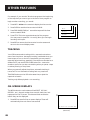
ON-SCREEN DISPLAYS
The INFO button sho ws the status of theVCR (ST OP, PLA Y,
RECORD , etc.), channel number, time counter, date, time, and
tape speed on the TV screen. The date and time must be set
before they can be displayed.
1
Stop
Ch 05
0:30:00
1. Press INFO to see all of the on-screen displays. These will
automatically time out after a few seconds
11/18/97 Tue 01:30PM SLP
On-screen display
(times out)
46
OTHER FEATURES
2. Press INFO again to have only the time counter remain on
the scr een.This displa y does not time out automatically.
2
0:30:00
3. Pressing INFO a third time disables the on-screen displays.
This feature prevents you from accidently recording onscreen displays while copying tapes.
4. Press INFO to see all of the on-screen displays again.
Time counter only
(does not time out)
3
On-screen display off
Audio Set-Up Features
The audio set-up features enhance your tape playback and
recordings. The features in this section are accessed through the
AUDIO men u and are shown in the displays below.
1. Press MENU to display the VCR MAIN MENU.
1
2
3
4
5
6
7
VCR MAIN MENU
VCR Plus+
Timer Recordings
Time
Channels
Preferences
Audio
Language
0 Exit
2. Press 6 to display the AUDIO menu.
AUDIO
1 Reception:
STEREO
2 Tape Playback: HI-FI
0 Exit
Now you are ready to select an item from the menu to set up.
47
OTHER FEATURES
Reception
Some TV programs are broadcast with stereo audio or a second
audio program (SAP) which off ers a second language. The
Reception feature lets you select the type of audio you want to
record. Press 1 to switch between Reception: STEREO, MONO,
and SAP.
•
Select STEREO for normal or stereo broadcast TV recording.
STEREO indicator appears on the TV screen when the station
you are tuned to is broadcasting stereo.
•
Select MONO if the stereo signal is weak and the sound is
too noisy.
•
Select SAP to record a second audio program instead of the
normal audio on both the hi-fi and linear tracks. The SAP
indicator appears on the TV screen when the station you are
tuned to is broadcasting SAP.
Tape Playback
The VCR records the same audio on both the Hi-Fi and linear
tracks on the tape. Hi-Fi sound is recorded on separate left and
right stereo channels. Monaural sound is recorded on the linear
track. Pr ess 2 to switch betweenTape Playback: HI-FI, LINEAR,
and MIX.
To enjoy Hi-Fi sound, connect your VCR to a ster eo television or
amplifier/receiver using the audio/video jacks.The Tape Playback
feature lets you select which audio you play back.
•
Select HI-FI to play back sound recorded on the Hi-Fi track
and for normal use.
•
Select LINEAR to play back the sound recorded on the linear
monaural track, such as a second audio program, (SAP) or a
dubbed voice-over.
•
Select MIX to play back the sound recorded on both the
linear track and the Hi-Fi track, sound-on-sound.
48
connections
Things to Know Before
Connecting Components
1
First things first
➣
Protect Your Components from Power Surges
Connect all components before plugging any power
cor ds into the wall outlet.
•
Always turn off theTV and other components before
you connect or disconnect any cables.
Insert all cable plugs firmly into their jacks.
•
Place the audio/video cables to the sides of theTV’ s back
panel instead of straight down the middle after you
connect your components.
•
Try not to coil any twin-lead cables and keep them away
from the audio/video cables as much as possible.
•
Protect Your Components from Overheating
Do not block ventilation holes in any of the components.
Arrange the components so that air can circulate freely.
•
Do not stack components.
•
Allow adequate ventilation when placing your
components in a stand.
•
Place an amplifier or satellite receiver on the top shelf of
the stand so heated air rising from it will not flow
around other components.
OTHER FEATURES
6
5
➣
•
5
5
PROGRAMMING THE
REMOTE
➣
Make sure all antennas and cables are properly
grounded. Refer to the Safety Tips sheet packed with
your unit.
4 recording
➣
•
3 VCR Basics
➣
Position Cables Correctly to Avoid Audio Hum or
Interference
2 Setting Up the VCR
➣
•
7
Connections
49
connections
Connecting Your VCR
Refer to these pages to help you connect your VCR.
Jacks and Cables
RF Jacks and Coaxial Cables (F-type)
The RF jacks provide good picture and mono sound quality, and
must be used if audio/video connections are not available for
your TV.
These jacks are required for antenna or cable-TV connections.
The RF jacks on the VCR are labeled IN FROM ANT and OUT TO
TV. The coaxial cable supplied with your VCR is used to connect
the VCR’s OUT TO TV jack and your TV’s antenna input.
RF Jack
Audio/Video Jacks and Cables (RCA-type)
The audio/video jacks provide very good picture and sound
quality, and can be used if your TV has audio/video input jacks.
These jacks must be used for stereo sound. The VCR audio/video
jacks are color coded (yellow for video, red for right audio, and
white for left audio). If your TV has only one input for audio
(mono), you may need a Y-adapter to hear sound from both
channels.
50
Audio/Video Jack
connections
Choosing a VCR Connection
There are several different ways to connect your VCR, depending on
whether or not you have cable service, and if you have a cable box,
and whether some of the channels are scrambled, and maybe you
have a satellite receiver along with cable (but no cable box), or a
satellite receiver and no cable or...well, you get the picture.
Five connections are described in this section and one of them should
provide you with a VCR connection that works.
•
TV with RF jack only
•
TV with audio/video jacks
•
TV with audio/video jacks and cable box to unscramble pay
channels only
•
TV with RF jack and satellite receiver
•
TV with audio/video jacks and satellite receiver
If you need to connect additional components not shown in the
diagrams here (and are unsure of how to connect them), refer to the
instruction manual that came with that particular component.
Advantages of Audio/Video Cable
Connections
Using a simple coaxial cable connection gives you good picture
quality. If your television has audio/video jacks, I highly recommend
using them to get even better picture quality and stereo sound when
recording and playing back videotapes. These connections give you
more convenient operation by not having to share the TV’s antenna
signal.
Don’t Forget about the Auto TV/VCR
Feature
The TV/VCR switch controls whether the picture signal is coming
from the VCR or the cable/antenna system.
You can change the setting manually by using the TV•VCR button on
the remote or you can set the Auto TV/VCR feature to ON when
using only IN FROM ANT and OUT TO TV jacks and OFF when using
the AUDIO/VIDEO output jacks—so your TV signal is not interrupted
when the VCR is turned on.
51
connections
TV with rf jack only
This connection assumes:
•
You are connecting antenna, cable, or cable box system.
•
Your television has only an RF input jack.
This connection provides:
•
Mono sound playback from VCR.
•
Record one channel while watching another (except
when using a cable box for all channels).
To use this connection, you must have:
•
(1) coaxial cable for cable or antenna connection; (2) for
cable box
To connect:
1. Connect cables as shown.
2. Return to First Things First, then follow the steps.
Using This Connection
Tune your TV to channel 3 or 4, whichever one you selected
with the 3CH4 switch on the back of the VCR.
Auto TV/VCR Setting:
•
Set the Auto TV/VCR feature to ON.
To play a tape:
CABLE, CABLE BOX, OR ANTENNA
1. Insert a tape.
2. If necessary, press PLAY.
To record one program and watch another:
1. Begin recording a program using one of the
recording features.
VCR
OUT
IN
IN FROM
ANT
R
2. Press the TV•VCR button, and select a different channel
on the TV.
AUDIO
L
3
CH
4
OUT TO
TV
VIDEO
TV
CABLE/
ANTENNA
52
connections
TV with audio/Video jacks
This connection assumes:
•
You are connecting an antenna, cable, or cable box system.
•
Your television has audio/video jacks.
This connection provides:
•
Stereo sound playback from VCR.
•
Record one channel while watching another (except when
using a cable box for all channels).
To use this connection, you must have:
•
(1) coaxial cable for cable/antenna connection; (2) for
cable box
•
(3) audio/video cables
To connect:
1. Connect cables as shown.
2. Return to First Things First, then follow the steps.
Using This Connection
Tune your TV to its video input channel. Use of TV•VCR button is
not required.
Auto TV/VCR Setting:
•
Set the Auto TV/VCR feature to OFF.
CABLE, CABLE BOX, OR ANTENNA
To play a tape:
1. Insert a tape.
2. If necessary, press PLAY.
To record one program and watch another:
VCR
OUT
1. Begin recording a program using one of the
recording features.
IN
IN FROM
ANT
R
AUDIO
OUT TO
TV
L
2. Select a different channel on the TV.
3
CH
4
VIDEO
TV
INPUT 1
VIDEO
VIDEO
R
R
R
L/MONO
L/MONO
S-VIDEO
INPUT 2
L
AUDIO
OUTPUT
CABLE/
ANTENNA
53
connections
TV with audio/Video jacks and Cable box
to unscramble pay channels only
This connection assumes:
•
You are using a cable box only to unscramble premium
channels.
•
Your TV has audio/video input jacks.
This connection provides:
•
Stereo sound playback from VCR.
•
Recording a scrambled or unscrambled channel through the
cable box while watching an unscrambled channel.
To use this connection, you must have:
•
(3) coaxial cables
•
(3) audio/video cables
•
(1) splitter
To connect:
1. Connect cables as shown.
2. Return to First Things First, then follow the steps.
All scrambled channels must be
viewed through the VCR.
For Cable Box Setup, select ALL
channels.
Using This Connection
CABLE
Tune your TV to its video input channel. Use of TV•VCR button is
not required.
Auto TV/VCR Setting:
•
Set the Auto TV/VCR feature to OFF.
CABLE BOX
To play a tape:
IN
OUT
1. Insert a tape.
2. If necessary, press PLAY.
To record a scrambled or unscrambled program and watch
another unscrambled program:
VCR
OUT
IN
IN FROM
ANT
R
AUDIO
1. Begin recording a scrambled or unscrambled program
through the cable box using one of the recording features.
OUT TO
TV
L
3
CH
4
VIDEO
2. Select an unscrambled channel on the TV.
TV
INPUT 1
VIDEO
VIDEO
R
R
R
L/MONO
L/MONO
S-VIDEO
54
INPUT 2
L
AUDIO
OUTPUT
CABLE/
ANTENNA
connections
TV with RF jack and satellite receiver
This connection assumes:
•
You have a basic satellite system.
•
Your TV does not have audio/video input jacks.
This connection provides:
•
Mono sound playback from VCR.
•
Recording from a satellite receiver.
•
Recording one off-air or cable channel while watching another.
To use this connection, you must have:
•
(4) coaxial cables and (3) audio/video cables
To connect:
1. Connect cables as shown.
2. Return to the First Things First Section, then follow the steps.
Using This Connection
•
Tune your TV to channel 3 or 4, whichever one you selected
with the 3CH4 switch on the back of the VCR.
•
To record and watch off-air or cable, tune your VCR to
channel 3 or 4 whichever one you selected with the CH3/CH4
switch on the back of the receiver. Turn off receiver.
•
To watch and/or record from the satellite receiver, tune your
VCR to its line input (LINE appears in display).
Caution
The unauthorized recording of satellite
broadcasts, television programs, or
other copyrighted materials may
infringe the rights of others.
CABLE,CABLE BOX OR ANTENNA
SATELLITE SIGNAL
Auto TV/VCR Setting:
•
Set the Auto TV/VCR feature to ON.
SATELLITE RECEIVER
IN FROM ANT
To play a tape:
OUT TO TV
CH3
CH4
VIDEO
R AUDIO L
SATELLITE
IN
S-VIDEO
1. Insert a tape.
2. If necessary, press VCR and then PLAY.
VCR
To record one off-air or cable program and watch another:
OUT
1. Turn off the satellite receiver and begin recording a program
using a recording feature.
IN FROM
ANT
AUDIO
L
3
2. Press TV•VCR and select a different channel on the TV.
To record a satellite receiver program:
IN
R
CH
4
OUT TO
TV
VIDEO
TV
1. Turn on the satellite receiver, tune the VCR to its line input,
and begin recording a program using a recording feature.
CABLE/
ANTENNA
55
connections
TV with audio/video jacks and satellite receiver
This connection assumes:
• You have an advanced satellite system.
•
Your TV has audio/video input jacks.
This connection provides:
•
Stereo sound playback from VCR.
•
Recording from receiver while watching cable or off-air
channel.
•
Recording one cable or off-air channel while watching another.
To use this connection, you must have:
•
(3) coaxial cables and (6) audio/video cables
To connect:
1. Connect cables as shown.
2. Return to the First Things First, then follow the steps.
Using This Connection
•
•
To record from the satellite receiver, tune your VCR to its line
input (LINE appears in display).
CABLE OR ANTENNA
Tune your TV to its video input to watch the VCR or satellite
receiver.
SATELLITE SIGNAL
Auto TV/VCR Setting:
•
Set the Auto TV/VCR feature to OFF. Use of TV•VCR button is
not required.
SATELLITE RECEIVER
To play a tape:
IN FROM ANT
OUT TO TV
1. Insert a tape
CH3
CH4
VIDEO
R AUDIO L
SATELLITE
IN
S-VIDEO
2. If necessary, press VCR and then PLAY.
To record one off-air or cable program and watch another:
VCR
OUT
1. Begin recording a program using a recording feature.
2. Select a different channel on the TV.
56
OUT TO
TV
L
3
1. Turn on satellite receiver, tune the VCR to its line input, and
begin recording a program using a recording feature.
IN FROM
ANT
AUDIO
2. Select a different channel on the TV.
To record a satellite receiver program and watch a cable or
off-air channel:
IN
R
CH
4
VIDEO
TV
INPUT 1
VIDEO
VIDEO
R
R
R
L/MONO
L/MONO
S-VIDEO
INPUT 2
L
AUDIO
OUTPUT
CABLE/
ANTENNA
appendix a: reference
This section gives you some additional information
about the VCR, including a description of the unit’s
controls and display.
You also will find a Troubleshooting Tips section in this
Appendix, which might help to resolve some of those
simple problems.
Finally, this section contains your warranty
information.
57
appendix a: reference
Front Panel
POWER
CHANNEL
EJECT
TRACKING
TV•VCR
REV
PLAY
FWD
INPUT
RECORD
STOP
PAUSE
Remote Sensor
CHANNEL•TRACKING Up or Down Selects next higher or
lower channel in the VCR’s channel memory. Adjusts tracking
when a tape is playing.
EJECT Ejects the tape when the VCR is stopped.
FWD Forwards the tape when the VCR is stopped. Searches the
picture forward during playback. Starts slow-motion playback
during play-pause and increases slow-motion speed.
INPUT Selects between the line input and VCR’s tuner. Line input
refers to the signal coming from the component connected to
the audio/video input jacks on the back of the VCR.
PAUSE Pauses action for viewing during playback. Pauses
recording to prevent recording of unwanted scenes.
PLAY Plays a tape.
POWER Turns the VCR on or off.
RECORD Starts VCR recording. Used for express recording.
Remote Sensor Receives signals from the remote control. Aim
the remote at this sensor.
REV Rewinds the tape when the VCR is stopped. Searches the
picture in reverse during playback. Starts slow-motion playback
during play-pause and decreases slow-motion speed.
STOP Stops the normal functions such as record, playback,
rewind, fast-forward, or pause.
TV•VCR Switches the picture signal so that it either comes from
the VCR or the TV.
58
appendix a: reference
Display Panel
Cassette Indicator
Channel Number, LINE, Current Time,
Time Counter, or Status Displays
VCR
TIMER
REC
SLP
Tape Speed
Cassette Indicator Shows when a cassette is inserted and
displays direction tape is moving.
Time, Time Counter, Channel Number, Line Input
Indicator (LINE), or Status Displays
Time or Time Counter Press INFO to switch between the
current time and time counter.
Channel Number or Line Input Indicator The channel
number appears when the VCR is tuned to a channel. The line
indicator (LINE) appears when the line input is selected.
Status Indicators Show what the VCR is doing.
•
EJECT Ejecting tape
•
F-FWD Fast forward
•
PLAY Playback
•
REC Record
•
REW Rewind
•
SLOW Slow motion
•
SEARCH + or – Forward or reverse search
•
STILL Play pause and frame advance
•
STOP VCR stopped
•
X-REC Express recording
TIMER Indicator Lights when VCR is turned off and set for
timer recording. Flashes when timer recording is set and there is
no cassette in the VCR.
VCR Indicator (Applies only if the VCR Viewing Channel is 3
or 4). Press the TV•VCR button to turn on or off.
•
VCR indicator on: Picture from VCR.
•
VCR indicator off: Picture from TV channel.
59
appendix a: reference
Back Panel
VCR
OUT
IN
IN FROM
ANT
R
AUDIO
L
3
CH
4
OUT TO
TV
VIDEO
3CH4 Switch Selects the channel to which you will tune the
TV to see the VCR picture if you connect the VCR using one of
the basic hookups.
AUDIO (R and L) and VIDEO IN Jacks Receives signals from
another component, like a VCR or camcorder, when it is
connected to these jacks. Use INPUT on the remote to select
LINE to record from these jacks.
AUDIO (R and L) and VIDEO OUT Jacks Sends signals from
VCR to another component, like a TV or VCR, when it is
connected to these jacks.
IN FROM ANT Jack Receives a signal from an antenna or
cable system when attached.
OUT TO TV Jack Passes signal to TV using the cable supplied.
60
appendix a: reference
Troubleshooting Tips
No power
•
Check to make sure it is plugged into an operating outlet.
•
Check to make sure your connections are correct.
VCR does not respond to remote
•
Press VCR to set remote to control the VCR.
•
Check to make sure there are no objects between the VCR and remote.
•
The batteries may need changing.
•
Make sure the Remote VCR1/VCR2 setting is set to VCR1 so the remote that came packed with your VCR
can operate it.
•
Remove batteries and hold number button 1 for at least 60 seconds to drain the microprocessor inside
the remote. Release number 1 and replace the batteries.
•
Remove all batteries for approximately 12 hours. Then replace batteries.
Remote no longer controls an RCA, ProScan, or GE TV
•
Press TV to set remote to control a compatible TV.
•
Check to make sure the remote is programmed to control an RCA, ProScan, or GE TV.
Remote no longer controls a compatible TV
•
Press TV to set remote to control the compatible TV.
•
Check to make sure there are no objects between the component and remote.
•
The batteries may need changing.
•
Reprogram remote after batteries have been changed.
•
Remove batteries and hold number button 1 for at least 60 seconds to drain the microprocessor inside
the remote. Release number 1, replace the batteries, and (if necessary) reprogram the remote.
•
Remove all batteries for approximately 12 hours. Then replace batteries and (if necessary) reprogram the
remote.
Poor or no picture for normal TV viewing
•
Check to make sure the VCR indicator is off.
•
Check to make sure the TV is switched to an active channel.
•
Check to make sure the antenna connections are secure and correct.
Snowy or no picture during playback
•
Press TV•VCR to turn VCR indicator on.
•
Check TV channel selected (3 or 4) to make sure it matches the channel selected with 3CH4 switch on
back of VCR.
•
Check to make sure the TV’s fine tuning is correct for the channel you have selected.
•
Check video cable connections between VCR and TV monitor.
•
Check to make sure the TV monitor is set to video input.
61
appendix a: reference
•
Try another tape.
•
Some snow/streaks are normal during search, stop action, frame advance, and slow-motion playback.
Streaks in picture during normal playback
•
Press one of the TRACKING buttons to move streaks up or down for the best picture.
•
Check to make sure the tape is of good quality and not worn out.
Will not record or play
•
Check to make sure there is a tape in the VCR.
•
Try ejecting and reinserting the cassette.
•
Check to make sure the tape is not broken.
•
Check to make sure the VCR is not in pause mode. Press PAUSE or PLAY to return to normal playback.
Will not record
•
Check to make sure the safety tab is intact.
•
Check to make sure the VCR is not in the line mode. Press INPUT.
VCR Plus+ or timer recording not made or wrong program recorded
•
Check to make sure the correct VCR PlusCode is entered.
•
Check to make sure the cable box was turned on when recording was to begin.
•
Check to make sure the program was entered correctly (wrong channel or times).
•
VCR cannot control cable box or satellite receiver. Check to make sure VCR was set up for cable box
or DSS control or try repositioning the cable box.
•
Power interruption. Reset the clock.
•
Check to see if time and date are correct—including AM/PM.
•
Check to make sure the program did not exceed the tape’s length or the tape was not rewound
beforehand.
•
Check to make sure the VCR was turned off at the time recording was to start.
•
Check to make sure there was a tape in the VCR and the cassette’s safety tab was intact.
•
VCR ejects cassette when the end of the tape is reached during a timer recording.
•
Check to make sure VCR Plus+ channel setup was completed correctly.
Clock shows incorrect time or date
•
Power interruption. Automatic clock set was not turned on or did not work properly. Check time
zone and daylight-savings settings.
•
Make sure VCR or cable box is tuned to channel carrying XDS information.
•
Auto clock set is not supported by digital satellite receivers. Set the clock manually.
Time did not adjust for daylight-saving time
•
62
Check to make sure daylight-saving feature is set correctly.
appendix a: reference
VCR makes noise when stopped
•
VCR is removing tape from heads. This is normal. The head cylinder inside the VCR will continue to rotate for a few
minutes after you put the VCR in the stop mode.
Will not Auto Channel Search active channels correctly
•
Check to make sure the antenna connections are secure and correct.
•
Check to make sure the Signal Type: CABLE/ANTENNA feature is set correctly.
•
If Detect Automatically was selected for the Signal Type in the Auto Channel Search menu, try using either CABLE TV or
ANTENNA instead.
Tape plays back in slow motion
•
Press PLAY to return to normal playback.
Cannot select channels over 69
•
Cable channels over 69 can only be selected if Signal Type: CABLE/ANTENNA feature is set to CABLE.
Cassette with safety tab removed does not start to play automatically
•
Check to make sure the Auto Play ON/OFF feature is set to ON.
No stereo sound during playback
•
Check to make sure the Playback: HI-FI/LINEAR/MIX feature is set to HI-FI to hear stereo sound during playback.
•
Must use the AUDIO/VIDEO jacks on the back of the VCR to hear stereo sound.
Stereo audio too noisy
•
Stereo signal is weak. Set Reception: STEREO/MONO/SAP feature to MONO.
•
Press one of the TRACKING up or down buttons to minimize the noise.
Cannot access MOVIE 66ADVANCE feature
•
Cassette must have safety tab removed and be recorded in SP speed.
•
Home Recording was selected as the Tape Type in the menu. Eject and reinsert the tape.
VCR forwards through commercials or momentarily displays a blue screen during playback.
•
Commercial Advance Playback feature is set to AUTO. Set it to MANUAL.
COMMERCIAL 66ADVANCE feature does not mark commercials when:
•
The Marking feature is set to OFF in the COMMERCIAL ADVANCE menu. Set it to ON.
•
A recording is less than 15 minutes or the commercial is longer than one minute.
•
A single isolated commercial can not be marked.
•
Recording started in the middle of a commercial segment.
•
A commercial group within the first or last two minutes of a recording.
•
Accuracy and effectiveness can vary depending upon program content and the characteristics of the commercials.
•
A commercial is between 30-and-45 seconds and 45-and-60 seconds.
•
Effectiveness may vary when local television stations insert their own commercials.
63
appendix a: reference
Questions and Answers About COMMERCIAL 66ADVANCE+
Will commercials be scanned through only on playback of recordings?
Yes. The VCR does not rewind and mark commercial segments until after recording is finished.
How fast does the COMMERCIAL 66ADVANCE VCR scan through the commercial breaks?
In SLP tape speed, a 3-minute commercial break is scanned through in approximately 8-12 seconds.
In SP, it takes about 25-35 seconds.
Are commercials still recorded if I want to watch them?
Yes. The recorded program, including commercials, can be viewed by setting the Playback feature to
MANUAL.
What if the VCR scans forward through part of my program?
Simply rewind the tape to just before the skipped segment, and press PLAY to view the program.
Once a recording has been marked, does COMMERCIAL 66ADVANCE work each time the tape is
played?
Yes. If the Playback feature is set to AUTO, the marked commercials should be skipped each time the
tape is played in a COMMERCIAL 66ADVANCE VCR.
After marking commercials, is the tape left at the beginning or end of the recording?
The tape is left at the end of the recording so it is in position to begin additional programmed
recordings.
Does the marking process interfere with other programmed recordings?
No. If two or more recordings are programmed together without sufficient time to mark the first
recording, marking will take place after all recordings have completed.
What happens if the marking process is interrupted?
Marking can be interrupted to allow use of the VCR. Marking will resume again when the VCR’s
power is turned off as long as the tape has not been ejected from the VCR.
Does COMMERCIAL 66ADVANCE work in all recording speeds?
Yes, COMMERCIAL 66ADVANCE works in SP and SLP.
Will COMMERCIAL 66ADVANCE marked recordings work in non-Commercial Advance VCRs?
A COMMERCIAL 66ADVANCE marked recording will play in a non-commercial advance VCR, but
commercials will not automatically be skipped.
64
appendix a: reference
Specifications
Format:
VHS
Record/Playback
System:
Video: 4-head
Audio: 2 Hi-Fi record/playback system
Video Signal System:
EIA standard: NTSC color
Antenna:
75-ohm external VHF/UHF combined
antenna terminal
Tuner:
USA:
181 channels capability*
(125 cable channels)
Canada: 178 channels capability*
(122 cable channels)
Type:
AutoProgramming frequency synthesis
Power Requirement:
120V AC, 60 Hz
Power Consumption:
18 watts
Dimensions:
3.7 inches high (92.5 mm)
15 inches wide (380 mm)
12.4 inches deep (313.5 mm)
Weight:
8.8 pounds (4.2 kg)
Storage Temperature
Range:
- 22˚F to +149˚F
(-30˚C to +65˚C)
Operating
Temperature Range:
+41˚F to +104˚F
(+5˚C to +40˚C)
*Check your cable company‘s compatibility requirements.
Cleaning the VCR
Use a soft cloth or dusting attachment of your vacuum cleaner to
dust your VCR. Remove dust from the ventilation holes on the
top, back, sides, and bottom of the cabinet.
Plastic surfaces are easily scratched and can be marred by alcohol
and various solvents. Avoid excessive use of oil-based furniture
polishes since the materials used in the cabinet will accumulate
more dust. We recommend using a nonabrasive, antistatic
cleaner and polisher.
Specifications are subject to change.
65
Appendix A: Reference
Index
Limited Warranty
What your warranty covers:
•
Any defect in material or workmanship.
For how long after your purchase:
•
Ninety days for labor charges.
•
One year for parts.
The warranty period for rental units begins with the first rental or 45 days from date of shipment to the
rental firm, whichever comes first.
What we will do:
•
Pay any Authorized RCA VCR Servicenter the labor charges to repair your VCR.
•
Pay any Authorized RCA VCR Servicenter for the new or, at our option, refurbished replacement parts
required to repair your VCR.
How you get service:
•
Take your VCR to any Authorized RCA VCR Servicenter. To identify your nearest Authorized RCA VCR
Servicenter, ask your dealer, look in the Yellow Pages, or call 1-800-336-1900.
•
Show the service technician your evidence of purchase date.
•
Pick up your VCR when repairs are completed.
What your warranty does not cover:
•
Customer instruction. (Your Owner’s Manual clearly describes how to install, adjust, and operate your
VCR. Any additional information should be obtained from your Dealer.)
•
Installation and related adjustments.
•
Signal reception problems not caused by your VCR.
•
Damage from misuse or neglect.
•
Cleaning of video/audio heads.
•
Remote control batteries.
•
A VCR that has been modified or incorporated into other products or is used for institutional or other
commercial purposes.
•
A VCR purchased or serviced outside the USA.
•
Acts of God, such as but not limited to lightning damage.
Product Registration:
•
Please complete and mail the Product Registration Card packed with your VCR. It will make it easier to
contact you should it ever be necessary. The return of the card is not required for warranty coverage.
How state law relates to this warranty:
•
This warranty gives you specific legal rights, and you also may have other rights that vary from state
to state.
If you purchased your VCR outside the United States:
•
66
This warranty does not apply. Contact your dealer for warranty information.
Index
3CH4 switch 52, 55, 60
A
Accessing menus 5
Add or remove channels 11
ADD/REMOVE CHANNELS screen 11
Audio
playback type 48
selecting 48
Audio features, set up 47
AUDIO menu 47
Audio only
playing back 33
recording 33
Audio/Video jacks 33
Audio/video jacks 33, 51, 53, 54, 56, 60
Auto channel search 10
AUTO CHANNEL SEARCH menu 10
Auto Clock 12
Auto clock set 12
Auto play feature 18, 24
Auto TV/VCR feature 18, 51, 52, 53, 54, 55, 56
Automatic rewind 24
Automatic tracking 24
B
Back panel 60
Basic recording 25
Basics, learn the 21
Batteries, installing in the remote 4
Broadcast stereo TV recording 32
C
Cable box setup 8
CABLE BOX SETUP menu 9
Cables
positioning 49
types of 50
Cassette indicator 59
CHAN buttons 22, 36
CHANNEL buttons 58
Channel number display 59
Channel, viewing 5
Channels, add or remove 11
Channels list, VCR 10
CHANNELS menu 9, 10, 11, 15, 30
Choosing a VCR connection 51
Cleaning the VCR 65
CLEAR button 22, 31, 32, 45, 46
Clearing programs 32
COMMERCIAL66ADVANCE 38
display 40
marking 39
marking an unmarked tape 40, 41
marking feature 39
menu 39, 40
playback 37, 40
questions and answers 64
Connections 49
choosing 51
TV with audio/video jacks 53
TV with audio/video jacks and cable box to unscram
54
TV with audio/video jacks and satellite receiver 56
TV with RF jack and satellite receiver 55
TV with RF jack only 52
two VCRs 34
using audio/video cables 51
Contents 1
Controls
back panel 60
front panel 58
Copying and editing tapes 34
D
Date and time setting 12
Daylight Saving Time 13
Displays
on-screen 46, 59
E
EJECT button 25, 58
Eject, tape 25
Express recording 28
F
F.ADV button 22, 23, 44
First setup 3
First things first 3
FORWARD button 22, 24, 43, 44, 45, 46
Frame advance 44
Front panel controls 58
Front panel display feature 19
FWD button 34, 43, 44, 45, 46, 58
67
Index
G
GO BACK button 22, 23, 42
Go-to search feature 45
GO-TO SEARCH menu 45
I
IN FROM ANT jack 18, 51, 52, 55, 60
Index search feature 44
INDEX SEARCH menu 44
INFO button 22, 23, 46, 59
INPUT button 22, 29, 33, 58
J
Jacks, types of 50
L
Language feature 8
LANGUAGE menu 8
Limited warranty 66
LINE indicator 33, 55, 59
M
Marking an unmarked tape 40
MENU button
6, 8, 9, 10, 11, 12, 13, 14, 15, 17, 22, 29, 30, 31, 32, 38, 41, 47
Menus, accessing 5
MOVIE66ADVANCE 41, 42
MUTE button 23
N
PLAY button
23, 24, 34, 43, 44, 46, 52, 53, 54, 55, 56, 58
Playing a tape 24
POWER button 58
Power surges 49
PREFERENCES menu 6, 17, 18, 39
Problem solving 61
PROGRAMS OVERLAP message 29, 31
R
Reception: STEREO/MONO/SAP 33
Reception: STEREO/MONO/SAP feature 48
RECORD button 23, 25, 28, 33, 34, 58
Recording
audio only 33
basic 25
broadcast stereo TV 32
copying and editing tapes 34
express 28
features 28
SAP 32
speeds 25
timer 29
VCR plus+ 30
Remote
buttons 22
component buttons 22
installing batteries 4
TV function buttons 23
VCR function buttons 22–24
Remote VCR1/VCR2 option 17
Remove or add channels 11
REV button 34, 43, 44, 45, 58
REVERSE button 23, 24, 43, 44, 45
Review programs screen 32
Reviewing programs 32
Rewind, automatic 24
Number buttons 23, 24
O
OFF button 22, 23, 24, 36
On-screen displays 46
OUT TO TV jack 18, 51, 52, 55, 60
Overheating 49
P
PAUSE button 23, 24, 25, 34, 44, 58
Picture search options 43
68
S
Safety tab 25
SAP, recording 32
Search
forward 43
frame advance 44
go-to 45
index 44
MOVIE66ADVANCE 41
reverse 43
slow motion 44
Index
SEARCH button 23, 40, 41, 44, 45
Sensor, remote 58
SET DAYLIGHT SAVINGS screen 13
Set time and date manually 14
SET TIME AND DATE menu 14
SET TIME ZONE screen 13
Set up
audio features 47
cable box 8
first 3
language 8
using the menus 8
Signal type
changing 11
selecting 11
Slow motion playback 44
Solving problems 61
Specifications 65
Speed
LP 25
SLP 25
SP 25
SPEED button 23, 25, 28, 31, 33
Speeds, recording 25
Status indicators
EJECT 59
F-FWD 59
PLAY 59
REC 59
REW 59
SEARCH + and - 59
STILL 59
STOP 59
X-REC 59
STEREO indicator 48
STOP button 23, 24, 25, 28, 32, 33, 34, 45, 46, 58
Stopping a timer recording 32
T
TIME menu 12, 13, 14
Time setting
set daylight saving 13
set time zone 13
TIMER indicator 29, 31, 59
Timer recording 29
Timer recording, stopping 32
TIMER RECORDINGS menu 29, 32
Tips, troubleshooting 61
TRACKING button 24
TRACKING buttons 23, 44, 46, 58
Tracking feature 46
Troubleshooting tips 61
TV button 22, 36
TV codes 36
TV•VCR button 18, 23, 33, 51, 52, 53, 55, 56, 58
V
VCR button 18, 22
VCR channels list 10
VCR, cleaning 65
VCR indicator 33, 59
VCR MAIN MENU
6, 8, 9, 10, 11, 13, 14, 15, 17, 22, 29, 30, 32, 38, 47
VCR Plus+
channel list 30
channel list menu 15, 30
menu 30
PlusCode number 31
setting up channels 15
using 30
worksheet for channels 16
Viewing channel 5
VOL buttons 24
W
Warranty, limited 66
Tab, safety 25
Table of contents 1
Tape eject 25
Tape playback 48
Tape playback: HIFI, LINEAR and MIX 48
Tape, playing a 24
Tape speeds 25
Time and date setting 12
Time counter 45
Time counter display 59
Time display 59
69
If your VCR needs service, please contact your dealer or the
nearest Servicenter from the yellow pages. Please do not
send any products to the Indianapolis address listed in this
manual or on the carton. This will only add delays in service
for your product.
10330 North Meridian Street
Indianapolis, IN 46290
©1997 Thomson Consumer Electronics, Inc.
Trademark(s)® Registered
Marca(s) Registrada(s)
Printed in Indonesia
TOCOM 15244100