Transcript
QuickStartGuide
TH1812, TH1814
www.rcaaudiovideo.com
Congratulations on purchasing your new RCA Player.
Please read these instructions for quick tips on using the player.
Getting started
•
For details in using RCA easyRip, click the Help icon (
)
on the module dock.
b) Windows Explorer: Simply drag and drop media files onto
the drive letter associated with the player.
• Your RCA Player is also compatible with most PC music
management softwares.
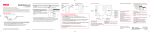
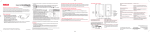
General controls
Skip to the previous file
Mode
Power on/off/Play/pause
Skip to next or previous artist/playlist
Increase volume
Player
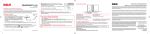
1. Install the battery into the player:
• Apply thumb pressure to slide the battery compartment cover in the
direction of the arrow, then remove the cover.
• Insert the supplied AAA battery, following the polarity marks in the
battery compartment.
• Reinstall the cover.
5. Disconnect the player from your PC by clicking the Safely
Remove Hardware icon
) in the system tray (located in the lower right corner
(
of your screen) and selecting the player from the list of devices, then unplug the player
from the PC.
Display
2. Rotate the USB plug out of the player body and connect the player
to your PC as shown.
USB port
3. The RCA easyRipTM Media Software installer is stored on the player.
of your
Go to My Computer (XP users) / Go to Computer (Vista and 7 users)
computer
in the Start menu, find and open the drive letter associated with the
player (i.e. RCA MP3) and then double-click the rcaeasyrip_setup.exe file to launch the
installer.
4. Transfer audio files to your player using either of the two methods below:
a) RCA easyRip: Helps to rip CD’s, create playlists, load content and manage your library with
an intuitive and modular design. Click the easyRip icon
(
) on your PC desktop to launch the software.
v1.0 (1.0.1.0) (EN/E)
•
To view the user manual directly from the player:
Step 1: Click Start.
Step 2: Click My Computer (XP users) / Click Computer (Vista and 7 users).
Step 3: Find and open the drive letter associated with the player (i.e. RCA MP3) and
then open User Manuals folder.
Step 4: From the User Manuals folder, select the user manual in your preferred
language for more information on the player’s features, safety and warranty
information, and answers to Frequently Asked Questions (FAQ’s).
Keep player out of direct sunlight. Exposure to direct sunlight or extreme heat
(such as inside a parked car) may cause damage or malfunction.
Need more help? Do not return this product to the store.
Visit www.rcaaudiovideo.com for the latest firmware, RCA easyRip Media Software, user
manual and FAQ’s.
* The latest software can be downloaded from www.rcaaudiovideo.com.
Windows is a registered trademark of Microsoft Corporation in the United States and other countries.
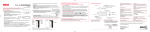
Reset the player
Earphone socket
Learn more about the player
•
Lock/unlock
player
controls
USB plug
Lock the keys
Press within the first 4 seconds of the current
audio file
Press and hold or during playback (After
skipping all Artists, Playlists will be skipped.)
Slide the Lock Slider towards the Lock icon
(Towards the headphone jack). To unlock, slide
the Lock Slider towards the un-lock icon (Away
from the headphone jack)
Remove and replace the battery
Skip back/
reverse
Turn the player on/off
Play an audio file
Pause playback
Adjust the volume
Skip to the next file
Decrease
volume
Skip forward/
fast forward
Press and hold the Power ( ).
Press
Press
during playback, press again to
resume
Press + or – during playback
Press
Product registration
Thank you for purchasing an RCA product. We pride ourselves on the quality and
reliability of all our electronic products but if you ever need service or have a question, our
customer service staff stands ready to help. Contact us at www.rcaaudiovideo.com
PURCHASE REGISTRATION: Registering On-line will allow us to contact you in the
unlikely event a safety notification is required under the Federal Consumer Safety Act.
Register Online at:
WWW.RCAAUDIOVIDEO.COM
Click on Product Registration and Fill Out the Brief Questionnaire
12 Month Limited Warranty
Applies to RCA Portable Media Players
AUDIOVOX ACCESSORIES CORP. (the Company) warrants to the original retail purchaser of this product that should this product
or any part thereof, under normal use and conditions, be proven defective in material or workmanship within 12 months from the
date of original purchase, such defect(s) will be repaired or replaced with reconditioned product (at the Company’s option) without
charge for parts and repair labor.
To obtain repair or replacement within the terms of this Warranty, the product is to be delivered with proof of warranty coverage
(e.g. dated bill of sale), specification of defect(s), transportation prepaid, to the Company at the address shown in the User Manual.
This Warranty does not extend to the elimination of externally generated static or noise, to correction of antenna problems, loss/
interruptions of broadcast or internet service, to costs incurred for installation, removal or reinstallation of product, to corruptions
caused by computer viruses, spyware or other malware, to loss of media, files, data or content, or to damage to tapes, discs,
removable memory devices or cards, speakers, accessories, computers, computer peripherals, other media players, home networks
or vehicle electrical systems.
This Warranty does not apply to any product or part thereof which, in the opinion of the Company, has suffered or been damaged
through alteration, improper installation, mishandling, misuse, neglect, accident, or by removal or defacement of the factory
serial number/bar code label(s). THE EXTENT OF THE COMPANY’S LIABILITY UNDER THIS WARRANTY IS LIMITED TO THE REPAIR OR
REPLACEMENT PROVIDED ABOVE AND, IN NO EVENT, SHALL THE COMPANY’S LIABILITY EXCEED THE PURCHASE PRICE PAID BY
PURCHASER FOR THE PRODUCT.
This Warranty is in lieu of all other express warranties or liabilities. ANY IMPLIED WARRANTIES, INCLUDING ANY IMPLIED WARRANTY
OF MERCHANTABILITY, SHALL BE LIMITED TO THE DURATION OF THIS WRITTEN WARRANTY.
Visit http://store.audiovox.com to find
ANY ACTION FOR BREACH OF ANY WARRANTY HEREUNDER INCLUDING ANY IMPLIED
the best accessories for your products.
WARRANTY OF MERCHANTABILITY MUST BE BROUGHT WITHIN A PERIOD OF 24 MONTHS
FROM DATE OF ORIGINAL PURCHASE. IN NO CASE SHALL THE COMPANY BE LIABLE FOR
ANY CONSEQUENTIAL OR INCIDENTAL DAMAGES FOR BREACH OF THIS OR ANY OTHER
WARRANTY. No person or representative is authorized to assume for the Company any
liability other than expressed herein in connection with the sale of this product.
Some states do not allow limitations on how long an implied warranty lasts or the exclusion
or limitation of incidental or consequential damage so the above limitations or exclusions
may not apply to you. This Warranty gives you specific legal rights and you may also have
other rights which vary from state to state.
© 2011 Audiovox Accessories Corporation
111 Congressional Blvd., Suite 350
Carmel, IN 46032
Trademark Registered
Printed in China