1
Installing Your Phone
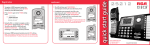
To install using two 2-line phone jacks and two 2-line phone cords
(included with your phone):
Using the 25420 with your RCA 4-line system:
After you plug the phone lines into your 25420, it will automatically
search for other RCA 4-line phones.
To install using four single-line phone jacks and two 2-line couplers:
When it finds the other phones, it is assigned a
unique extension number between 1 and 16.
This will be the number used for intercom calls
and when the auto attendant on the RCA 25425RE1
directs calls.
(03) STATION
00 NEW CALLS
If you would like more information on changing the extension number of
your 25420, please see page 18 of your instruction booklet.
NOTE: Make sure that the phone line being used as Line 1 is the same on each
phone in your system.
Note: the 25420 works with RCA 4-line models 25413RE3, 25414RE3, 25415RE3,
25423RE1, 25424RE1 and 25425RE1.
25420
Setting Your Phone ID
Menu, Format/Redial,
Select/Save
1. Use the Vol (+ or -) buttons to scroll up or
down to PHONE SETTINGS.
1. Use the Vol (+ or -) buttons to move
the arrows in menus.
Visual Ring Indicator
DND
Delete/Mute,
Do Not Disturb,
Line Select
Vol +/Vol -
2. Use menu to access the menu.
2. Press the Sel/Save button.
3. Use Select/Save to enter submenus
and to save settings.
3. Use the Vol (+ or -) buttons to scroll up
or down to PHONE ID.
4. Use exit to go back one menu level.
4. Press the Sel/Save button.
SOUND SETTINGS
PHONE SETTINGS
DND
Page/Volume
5. Press the Sel/Save button again to automatically
set the phone ID, or use the keypad to enter
your desired phone ID.
Intercom/Call Transfer,
Call Conference,
Store Number
DND
DELAY RING
PHONE ID
Charge Indicator
Hold, Flash/Exit
Line In Use Indicators
Press SELECT or
Any Digit Keys