1
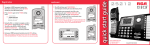
Setting Your Phone ID
Menu, Format/Redial,
Select/Save
1. Use the Vol (+ or -) buttons to scroll up or
down to PHONE SETTINGS.
1. Use the Vol (+ or -) buttons to move
the arrows in menus.
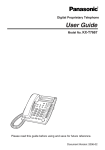
Visual Ring Indicator
DND
Delete/Mute,
Do Not Disturb,
Line Select
Vol +/Vol -
2. Use menu to access the menu.
2. Press the Sel/Save button.
3. Use Select/Save to enter submenus
and to save settings.
3. Use the Vol (+ or -) buttons to scroll up
or down to PHONE ID.
4. Use exit to go back one menu level.
4. Press the Sel/Save button.
SOUND SETTINGS
PHONE SETTINGS
DND
Page/Volume
5. Press the Sel/Save button again to automatically
set the phone ID, or use the keypad to enter
your desired phone ID.
Intercom/Call Transfer,
Call Conference,
Store Number
DND
DELAY RING
PHONE ID
Charge Indicator
Hold, Flash/Exit
Line In Use Indicators
Press SELECT or
Any Digit Keys