1
25212
Registration
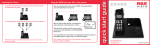
5. The LCD will then read “REGISTERING…”
and will begin searching for your 25212 base phone.
1. To register a 25055 accessory handset to a
RCA 25212 cordless phone, press the MENU
soft key on your 25212 base phone.
2. Press SELECT again on the PHONE setting
menu.
MAIN MENU
PHONE SETTING
DISPLAY SETTING
SOUND SETTING
6. If registration was successful, the LCD on the
base phone will read “PAIRING COMPLETE!”, the
LCD on the handset will read “REGISTRATION
COMPLETE!” and you will hear a confirmation tone
as both return to the main menu.
PRESS ‘REG’ TO INITIATE
REGISTRATION
3. Using the VOL (+/-) button to navigate, scroll to
ADD HEADSET and press the SELECT soft key.
The LCD on the 25212 or 25252 will read
“PAIRING PLEASE WAIT…” and will begin
searching for a compatible accessory handset.
REG
STORE
NOTE: If your headset is unregistered, the LCD screen will read “PRESS ‘REG’
TO INITIATE REGISTRATION.” The REG soft key will be the only option available.
REG
STORE
NOTE: If registration fails, you will hear an error tone and the LCD on the
base phone will read “PAIRING FAILED!” You will head an identical error
tone from the handset, with the “LCD reading HS REG FAILED.”
Privacy
DND
4. Using your 25055 accessory handset, press the REG soft key.
REGISTERING
PAIRING COMPLETE!
Voicemail 1
REGISTRATION
COMPLETE!
Voicemail 2
REG
STORE
REG
STORE
Privacy,
Voicemail 1
Voicemail 2
DND
Privacy
Voicemail 1
Voicemail 2
o
DND
Privacy
Voicemail 1
Voicemail 2
o