1
SuperLoader 3
If the supplied SCSI cable does not fit the connector on your SCSI host adapter, you either
have an incompatible SCSI host adapter or you need to purchase a cable adapter. Contact
your service representative or your SCSI host adapter manufacturer for information.
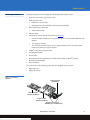
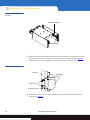
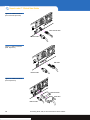
4 Attach the terminator to the remaining SCSI connector on the back panel (see
figure 12) of the autoloader (if the autoloader is the last or only device on the SCSI
bus). Otherwise, attach the cable to the next device on the SCSI bus. Make sure that
the last device on the SCSI bus is properly terminated.
5 Attach one end of your Ethernet cable to the Ethernet port on the back panel of the
autoloader for remote management.
6 Attach the other end of the Ethernet cable to your host network port or router.
7 Attach the female connector of the power cable to the power connector on the back
panel of the autoloader.
8 Plug in the power cable to the nearest properly grounded power outlet.
Caution:
Whenever you power cycle the autoloader, allow 10 seconds before
turning the power back on. The power supply requires at least two to
three seconds for the capacitors to discharge. This ensures a complete
system reset on power down and may avoid system errors.
9 Turn on the autoloader by setting the power switch on the back panel to the ON
position and pressing the power switch on the front panel.Turn on any other devices
you turned off earlier. Check the LCD screen to make sure the autoloader is receiving
power. If it is not, check the power connections and your power source.
During the Power-on Self Test (POST), both LEDs are illuminated briefly, followed by
only the Ready/Activity LED flashing. When the initialization sequence is complete,
the LCD screen displays the Home screen.
Note:
The autoloader will not complete the initialization sequence unless both
tape magazine openings are properly closed. You can use two magazines
or one magazine and one magazine blank.
10 Turn on the server.
Connecting SCSI, SAS, or Fibre Channel and Power Cables
15