1
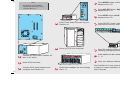
Press MODE button until LOAd SLOT is
Note:
7 displayed on LCD.
The SCSI ID of the FastStor
robotics has been factory set to
1 and the drive to 3.
MO
Press SELECT button. SNgL LOAd is
DE
8 displayed on LCD.
XT
NE
CT
LE
SE
US
IO
V
RE
P
ALARM
Press NEXT button, bULK LOAd is
ACTIVITY
POWER
MOD
E
POWER
NEXT
CT
SELE
IOUS
PREV
ALARM
ACTIVITY
POWER
POWER
4
Press Power button to power up your
FastStor 22.
9 displayed on LCD.
10
Press SELECT button, tapes in front
slots will be moved to rear slots 12-22.
MODE
NEXT
T
SELEC
OUS
PREVI
ALARM
ACTIVITY
POWER
POWER
5
1
Power up your Host Computer.
Rear Slot Indicator LEDs will Illuminate
11 indicating cartridge presence.
12
Connect AC line cord to FastStor 22,
then to AC outlet.
MO
Install additional data cartridges in slots
1 - 11.
DE
XT
NE
LE
SE
CT
EV
PR
US
IO
ALARM
ACTIVITY
POWER
POWER
2
3
Install SCSI terminator.
Connect SCSI cable between host
computer and FastStor 22..
6
Install data cartridges into front storage
slots 1-11.
13 Verify your backup software.
Your FastStor 22 is now ready to perform
a backup or restore operation via your
Host Computer.