1
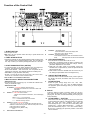
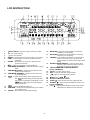
LCD INSTRUCTION
1.
2.
3.
4.
5.
6.
7.
8.
9.
10.
11.
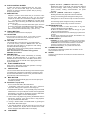
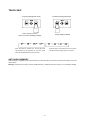
TOTAL TRACK – the track number of the CD or CARD.
15.
MINUTES – Shows the minutes elapsed or remaining
16.
SECONDS – Shows the seconds elapsed or remaining
17.
FRAMES – The CD Player breaks down a second into 75
depending on mode setting.
– The unit is in playing.
– The unit is paused
depending on mode setting.
SINGLE – Shows when the unit is set to play only one track.
CONT – Shows when the unit is set to play the all tracks
continually.
OUTRO – Shows when the unit is set to play the last 30
seconds of each track.
MP3 – Lights up when the unit is playing MP3 file.
TIME MODE (ELAPSED) – Shows the time as it is taking
place.
TIME MODE(TOTAL) – Shows how much time is left on
full CD, but not for MP3 CD.
TIME MODE (REMAIN) – Shows how much time is left
on a particular track.
18.
19.
THE PARAMETER OF SOUND EFFECT
(not for CDMP630)
20. PITCH – The pitch change range
21. KEY – Lights up when KEY mode activated
22.
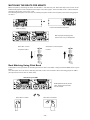
– A1 lights up after setting up start point(A point). A1
BPM: Manual ; BPM
: Auto
Number of Beat per minute
25. CARD ▼– Lights up when the unit is reading SD card.
26. EFFECT ▼ – Lights up when the EFFECT function is on.
(not for CDMP630)
27. +10 ▼ – Lights up and indicate the scope value of effect
24.
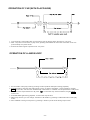
light up after exiting the LOOP playback
and in performance.
– Refer to SEAMLESS LOOP A1.
TIME BAR – Show the time length depending on the setting
14.
of the “TIME” mode.
TRACK – Shows the track number that is playing.
– Lights up when KEY mode activated.
23.
and
flash after setting end point (B point)
and start the loop playback automatically. A1 and
12.
13.
frames for accurate cueing. This shows the
frames elapsed or remaining depending on mode
setting.
EFFECT MODE DISPLAY – Shows the effect name
selected in effect parameter setting mode and
shows the song name in performance.
parameter to be adjusted 10 units each time.
-6-