1
Instruction
manual
ESPAÑOL: PÁGINA 21
FRANÇAISE : PAGE 41
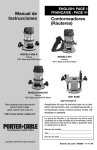
Routers
MODEL 690LR
Including
Motor and 1001 Base
MODEL 691
Including
Motor and 6911 Base
MODEL 690LRVS
Including
Motor and 1001 Base
6931 BASE
To learn more about Porter-Cable
visit our website at:
http://www.porter-cable.com
IMPORTANT
Please make certain that the person who is
to use this equipment carefully reads and
understands these instructions before
starting operations.
The Model and Serial No. plate is located on the main
housing of the tool. Record these numbers in the
spaces below and retain for future reference.
Model No. ______________________________________
Type ___________________________________________
Serial No. _______________________________________
Copyright © 2004 Porter-Cable Corporation
Part No. 903699 - 11-17-04
TABLE OF CONTENTS
IMPORTANT SAFETY INSTRUCTIONS . . . . . . . . . . . . . . . . . . . . . . . . . .2
SAFETY GUIDELINES . . . . . . . . . . . . . . . . . . . . . . . . . . . . . . . . . . . . . . . .3
GENERAL SAFETY RULES . . . . . . . . . . . . . . . . . . . . . . . . . . . . . . . . . . .4
ADDITIONAL SPECIFIC SAFETY RULES . . . . . . . . . . . . . . . . . . . . . . . .6
FUNCTIONAL DESCRIPTION . . . . . . . . . . . . . . . . . . . . . . . . . . . . . . . . .8
OPERATION . . . . . . . . . . . . . . . . . . . . . . . . . . . . . . . . . . . . . . . . . . . . . . .9
TROUBLESHOOTING . . . . . . . . . . . . . . . . . . . . . . . . . . . . . . . . . . . . . .18
MAINTENANCE . . . . . . . . . . . . . . . . . . . . . . . . . . . . . . . . . . . . . . . . . . . .19
SERVICE . . . . . . . . . . . . . . . . . . . . . . . . . . . . . . . . . . . . . . . . . . . . . . . . .19
ACCESSORIES . . . . . . . . . . . . . . . . . . . . . . . . . . . . . . . . . . . . . . . . . . . .20
WARRANTY . . . . . . . . . . . . . . . . . . . . . . . . . . . . . . . . . . . . . . . . . . . . . . .20
ESPAÑOL . . . . . . . . . . . . . . . . . . . . . . . . . . . . . . . . . . . . . . . . . . . . . . . .21
FRANÇAISE . . . . . . . . . . . . . . . . . . . . . . . . . . . . . . . . . . . . . . . . . . . . . . .41
SERVICE CENTER LOCATIONS . . . . . . . . . . . . . . . . . . . . . . .back cover
IMPORTANT SAFETY INSTRUCTIONS
Read and understand all warnings and operating instructions
before using any tool or equipment. When using tools or equipment, basic
safety precautions should always be followed to reduce the risk of personal
injury. Improper operation, maintenance or modification of tools or equipment
could result in serious injury and property damage. There are certain
applications for which tools and equipment are designed. Porter-Cable strongly
recommends that this product NOT be modified and/or used for any application
other than for which it was designed.
If you have any questions relative to its application DO NOT use the product
until you have written Porter-Cable and we have advised you.
Online contact form at www.porter-cable.com
Postal Mail: Technical Service Manager
Porter-Cable Corporation
4825 Highway 45 North
Jackson, TN 38305
Information regarding the safe and proper operation of this tool is available from
the following sources:
Power Tool Institute
1300 Sumner Avenue, Cleveland, OH 44115-2851
www.powertoolinstitute.org
National Safety Council
1121 Spring Lake Drive, Itasca, IL 60143-3201
American National Standards Institute, 25 West 43rd Street, 4 floor, New York,
NY 10036 www.ansi.org ANSI 01.1Safety Requirements for Woodworking
Machines, and the U.S. Department of Labor regulations www.osha.gov
SAVE THESE INSTRUCTIONS!
2
SAFETY GUIDELINES - DEFINITIONS
It is important for you to read and understand this manual. The
information it contains relates to protecting YOUR SAFETY and
PREVENTING PROBLEMS. The symbols below are used to help
you recognize this information.
indicates an imminently hazardous situation which, if not
avoided, will result in death or serious injury.
indicates a potentially hazardous situation which, if not
avoided,could result in death or serious injury.
indicates a potentially hazardous situation which, if not
avoided,may result in minor or moderate injury.
used without the safety alert symbol indicates potentially
hazardous situation which, if not avoided, may result in
property damage.
CALIFORNIA PROPOSITION 65
Some dust created by power sanding, sawing, grinding, drilling,
and other construction activities contains chemicals known (to the
State of California) to cause cancer, birth defects or other reproductive harm. Some
examples of these chemicals are:
● lead from lead-based paints
● crystalline silica from bricks and cement and other masonry products
● arsenic and chromium from chemically-treated lumber
Your risk from these exposures varies, depending on how often you do this type
of work. To reduce your exposure to these chemicals: work in a well ventilated
area, and work with approved safety equipment, always wear MSHA/NIOSH
approved, properly fitting face mask or respirator when using such tools.
3
GENERAL SAFETY RULES*
Read all instructions Failure to follow all
instructions listed below may result in electric shock, fire and/or
serious injury. The term "power tool" in all of the warnings listed
below refers to your mains-operated (corded) power tool or
battery-operated (cordless) power tool.
SAVE THESE INSTRUCTIONS
1) Work area safety
a) Keep work area clean and well lit. Cluttered or dark areas invite
accidents.
b) Do not operate power tools in explosive atmospheres, such as in the
presence of flammable liquids, gases or dust. Power tools create
sparks which may ignite the dust or fumes.
c) Keep children and bystanders away while operating a power tool.
Distractions can cause you to lose control
2) Electrical safety
a) Power tool plugs must match the outlet. Never modify the plug in any
way. Do not use any adapter plugs with earthed (grounded) power
tools. Unmodified plugs and matching outlets will reduce risk of electric
shock
b) Avoid body contact with earthed or grounded surfaces such as
pipes, radiators, ranges and refrigerators. There is an increased risk of
electric shock if your body is earthed or grounded.
c) Do not expose power tools to rain or wet conditions. Water entering a
power tool will increase the risk of electric shock
d) Do not abuse the cord. Never use the cord for carrying, pulling or
unplugging the power tool. Keep cord away from heat, oil, sharp
edges or moving parts. Damaged or entangled cords increase the risk
of electric shock.
e) When operating a power tool outdoors, use an extension cord
suitable for outdoor use. Use of a cord suitable for outdoor use reduces
the risk of electric shock.
3) Personal safety
a) Stay alert, watch what you are doing and use common sense when
operating a power tool. Do not use a power tool while you are tired
or under the influence of drugs, alcohol or medication. A moment of
inattention while operating power tools may result in serious personal
injury.
b) Use safety equipment. Always wear eye protection. Safety equipment
such as dust mask, non-skid safety shoes, hard hat, or hearing
protection used for appropriate conditions will reduce personal injuries.
c) Avoid accidental starting. Ensure the switch is in the off-position
before plugging in. Carrying power tools with your finger on the switch
or plugging in power tools that have the switch on invites accidents.
4
*The text used in the General Safety Rule section of this manual is
verbatim, as required, from the applicable UL60745 3rd edition standard.
GENERAL SAFETY RULES* continued
d) Remove any adjusting key or wrench before turning the power tool
on. A wrench or a key left attached to a rotating part of the power tool
may result in personal injury.
e) Do not overreach. Keep proper footing and balance at all times. This
enables better control of the power tool in unexpected situations.
f) Dress properly. Do not wear loose clothing or jewellery. Keep your
hair, clothing and gloves away from moving parts. Loose clothes,
jewellery or long hair can be caught in moving parts.
g) If devices are provided for the connection of dust extraction and
collection facilities, ensure these are connected and properly used.
Use of these devices can reduce dust-related hazards.
4) Power tool use and care
a) Do not force the power tool. Use the correct power tool for your
application. The correct power tool will do the job better and safer at the
rate for which it was designed.
b) Do not use the power tool if the switch does not turn it on and off.
Any power tool that cannot be controlled with the switch is dangerous
and must be repaired.
c) Disconnect the plug from the power source before making any
adjustments, changing accessories, or storing power tools. Such
preventive safety measures reduce the risk of starting the power tool
accidentally.
d) Store idle power tools out of the reach of children and do not allow
persons unfamiliar with the power tool or these instructions to
operate the power tool. Power tools are dangerous in the hands of
untrained users.
e) Maintain power tools. Check for misalignment or binding of moving
parts, breakage of parts and any other condition that may affect the
power tools operation. If damaged, have the power tool repaired
before use. Many accidents are caused by poorly maintained power
tools.
f) Keep cutting tools sharp and clean. Properly maintained cutting tools
with sharp cutting edges are less likely to bind and are easier to control.
g) Use the power tool, accessories and tool bits etc., in accordance
with these instructions and in the manner intended for the
particular type of power tool, taking into account the working
conditions and the work to be performed. Use of the power tool for
operations different from those intended could result in a hazardous
situation.
5) Service
a) Have your power tool serviced by a qualified repair person using only
identical replacement parts. This will ensure that the safety of the
power tool is maintained.
5
*The text used in the General Safety Rule section of this manual is
verbatim, as required, from the applicable UL60745 3rd edition standard.
ADDITIONAL SPECIFIC SAFETY RULES
1.
2.
3.
4.
5.
6.
7.
8.
9.
10.
11.
12.
13.
14.
15.
16.
17.
18.
19.
20.
21.
Hold power tools by insulated gripping surfaces when performing an
operation where the cutting tool may contact hidden wiring or its own
cord. Contact with a "live" wire will make exposed metal parts of the tool
"live" and shock the operator.
Use clamps or other practical way to secure and support the workpiece
to a stable platform. Holding the work by hand or against your body is
unstable and may lead to loss of control.
Disconnect tool from power source before making adjustments or
changing bits.
Tighten Collet nut securely to prevent the bit from slipping.
Use a clamp or some other device to hold the workpiece rigidly in position and
clear the path of the tool of obstructions.
Provide clearance under workpiece for router bit when through-cutting.
Check to see that the cord will not “hang up” during routing operation.
Clear the router bit area before starting motor.
Maintain firm grip on router to resist starting torque.
Keep hands clear of bit when motor is running to prevent personal injury.
Keep cutting pressure constant. Do not overload motor.
let the motor come to a complete stop before putting the tool down.
Never touch router bits after use. They may be extremely hot.
Never tighten collet nut without a bit.
Do not use router bits with a diameter in excess of 2-1/2" at RPM above
13,000. Router bits up to 3-1/2" in diameter can be used when speed
control is set for 13,000 RPM or less.
Always keep chip shield clean and in place.
Avoid “Climb-Cutting” (see “Using The Router” section in this manual).
“Climb-cutting” increases the chance for loss of control resulting in possible
personal injury.
Do not hand-hold the router in an upside-down or horizontal position.
The motor can separate from the base if not properly attached according to
the instructions.
Wear eye and hearing protection. Always use safety glasses. Everyday
eyeglasses are NOT safety glasses. USE CERTIFIED SAFETY EQUIPMENT.
Eye protection equipment should comply with ANSI Z87.1 standards.
Hearing equipment should comply with ANSI S3.19 standards.
Take precautions against dust inhalation. The dust generated by certain
woods and wood products can be injurious to your health. Always operate
machinery in well-ventilated areas, and provide for proper dust removal.
Use wood dust collection systems whenever possible. Also, use face or
dust mask if cutting operation is dusty. Dust mask protection should
comply with MSHA/NIOSH certified respirator standards. Splinters, airborne debris, and dust can cause irritation, injury, and/or illness.
Some wood contains preservatives which can be toxic. Take extra care
to prevent inhalation and skin contact when working with these materials.
Request and follow any safety information available from your material
supplier.
SAVE THESE INSTRUCTIONS!
6
SYMBOL
V
........................
A
........................
Hz
........................
W
........................
kW
........................
F
........................
µF
........................
l
........................
g
........................
kg
........................
bar
........................
Pa
........................
h
........................
min
........................
s
........................
n0
........................
…/min or …min-1 .........
DEFINITION
volts
amperes
hertz
watts
kilowatts
farads
microfarads
litres
grams
kilograms
bars
pascals
hours
minutes
seconds
no-load speed
Revolutions or reciprocations per minute
or d.c. ................ direct current
or a.c. ................ alternating current
2
2N
3
3N
........................ two-phase alternating current
........................ two-phase alternating current with neutral
........................ three-phase alternating current
........................ three-phase alternating current with neutral
........................ rated current of the appropriate fuse-link in amperes
........................ time-lag miniature fuse-link where X is the symbol
for the time/current characteristic, as given in IEC 60127
........................ protective earth
IPXX
........................ class II tool
........................ IP symbol
7
MOTOR
Many Porter-Cable tools will operate on either D.C., or single phase 25 to 60
cycle A.C. current and voltage within plus or minus 5 percent of that shown on
the specification plate on the tool. Several models, however, are designed for
A.C. current only. Refer to the specification plate on your tool for proper voltage
and current rating.
Do not operate your tool on a current on which the
voltage is not within correct limits. Do not operate tools rated A.C.
only on D.C. current. To do so may seriously damage the tool.
EXTENSION CORD SELECTION
If an extension cord is used, make sure the conductor size is large enough to
prevent excessive voltage drop which will cause loss of power and possible
motor damage. A table of recommended extension cord sizes will be found in
this section. This table is based on limiting line voltage drop to 5 volts (10 volts
for 230 volts) at 150% of rated amperes.
If an extension cord is to be used outdoors, it must be marked with the suffix WA or W following the cord type designation. For example – SJTW-A to indicate it
is acceptable for outdoor use.
Nameplate Ampere Rating
RECOMMENDED EXTENSION CORD SIZES FOR USE WITH PORTABLE ELECTRIC TOOLS
115V
230V
25 Ft.
50 Ft.
50 Ft.
100 Ft.
0-2
2-3
3-4
4-5
5-6
6-8
8-10
10-12
12-14
14-16
16-18
18-20
18
18
18
18
18
18
18
16
16
16
14
14
18
18
18
18
16
16
14
14
12
12
12
12
Length of Cord in Feet
100 Ft. 150 Ft. 200 Ft. 250 Ft.
200 Ft. 300 Ft. 400 Ft. 500 Ft.
18
16
16
14
14
12
12
10
10
10
8
8
16
14
14
12
12
10
10
8
8
8
8
6
16
14
12
12
10
10
8
8
6
6
6
6
300 Ft.
600 Ft.
14
12
12
10
10
8
8
6
6
6
4
4
14
12
10
10
8
6
6
6
6
4
4
4
400 Ft. 500 Ft.
800 Ft. 1000 Ft.
12
10
10
8
8
6
6
4
4
4
2
2
12
10
8
8
6
6
4
4
2
2
2
2
SAVE THESE INSTRUCTIONS!
FUNCTIONAL DESCRIPTION
FOREWORD
Porter-Cable routers are designed for continuous, rugged operation to handle
the most demanding production applications.
SELECTING THE BIT
These Porter-Cable routers are furnished with 1/4" and 1/2" diameter collets to
accommodate bits with 1/4" or 1/2" diameter shanks installed directly into the
power unit collet. An accessory collet is available that will allow the use of bits
having 3/8" diameter shanks.
Do not use router bits with a diameter in excess of 2-1/8" in
this tool.
ALWAYS disconnect this tool from the power source
when preparing the tool for use, when making adjustments,
and when the tool is not in use.
8
OPERATION
1001 BASE
INSTALLING AND REMOVING THE BIT
B
A
Fig. 1
Fig. 2
DISCONNECT TOOL FROM POWER SOURCE.
1.
2.
3.
4.
5.
6.
To remove motor unit from base unit:
(a) Open the clamp (A) Fig. 1.
(b) While holding base, turn power unit COUNTER-CLOCKWISE until
the lower pin (B) in the motor housing is disengaged from groove in
base.
(c) Lift power unit free from base unit.
Clean and insert the shank of the bit into the collet until the shank
bottoms, then back it out approximately 1/16".
Lay the power unit on its side on a bench with the collet pointing AWAY
from you.
Place one wrench on the flats of the chuck with the opposite end of the
wrench resting on the bench to your left (Fig. 2).
Place other wrench on the collet and tighten COUNTER-CLOCKWISE.
Tighten firmly.
To remove the bit, reverse the procedure.
Avoid possible damage to collet. Never tighten collet without a bit.
INSTALLING THE MOTOR
DISCONNECT TOOL FROM POWER SOURCE.
1.
2.
3.
4.
Open the clamp (A) Fig. 1 and set the power unit in the base unit.
Align the lower pin of the power unit (B) Fig. 1 with the groove in the
base.
Rotate the power unit CLOCKWISE into the base until the upper guide
pins are set in the groove of the base.
Close the clamp.
9
ADJUSTING DEPTH OF CUT
DISCONNECT TOOL FROM POWER SOURCE.
1.
2.
3.
4.
5.
6.
7.
8.
9.
Open the clamp (A) Fig.
D
F
3.
B
C
Hold the base (E) and
turn the power unit (F)
Fig. 3 COUNTER-CLOCKE
WISE until the tip of the
A
bit is above the bottom
of the base.
Fig. 3
Set the tool on a flat
surface.
Turn the power unit (F) Fig. 3 CLOCKWISE until bit touches the work.
Close the clamp (A) Fig. 3.
Rotate the depth adjusting ring (B) Fig. 3 until the zero-line (C) is
opposite the index line (D) on the housing.
Open the clamp (A) Fig. 3.
Tip the router so that the bit is clear of the work surface. Turn the power
unit (F) Fig. 3 CLOCKWISE until the index line (D) on the motor housing
reaches the desired depth indicated on the ring.
Close the clamp (A) Fig. 3.
NOTE: Setting the index line to 1/4" on the ring means the cutting edge of
the bit is exposed 1/4" below the base.
ADJUSTING SUB-BASE ALIGNMENT (All Routers)
Applications using a templet guide require the bit to be centered in the guide
This, in turn, requires the center hole in the sub-base to be in line with the
collet of the motor unit. Your model has an adjustable sub-base which has
been aligned at the factory. If the sub-base has been removed and/or
readjustment is required, use the following procedure:
Be sure power switch is in “OFF” position and tool is
disconnected from power source to avoid accidental
starting of motor which could result in injury.
1.
2.
3.
Loosen the sub-base mounting screws (C) Fig. 4 just
enough to allow the sub-base
(D) to move.
Open the clamp (A) Fig. 4, and
adjust the power unit so that
the collet nut (B) engages the
center hole in the sub-base (D).
Allow the sub-base to center
itself on the collet nut. Close
the clamp (A).
Tighten the sub-base mounting screws (C) Fig. 4 securely.
D
B
C
E
A
10
Fig. 4
6931 BASE
INSTALLING THE MOTOR
A
B
B
C
]
1
/2"
A
D
Fig. 5A
Fig. 5B
DISCONNECT TOOL FROM POWER SOURCE.
1.
2.
3.
Support motor clamp (Fig. 5A)
and loosen motor clamp screw
approximately 1/2" with the hex
wrench (furnished).
Insert motor unit into the base
with switch positioned at front of
left handle, and align the four
pins (A) Fig. 6 in the motor case
with the slots (B) Fig. 6 in the
base.
Seat the motor in the base and
tighten the motor clamp screw.
A
B
Fig. 6
REMOVING MOTOR
DISCONNECT TOOL FROM POWER SOURCE.
1.
2.
3.
4.
Remove clamp screw (A) Fig. 5A, flat washer (B), lock washer (C), and
clamp-locking nut (A) Fig. 5B.
Insert hex wrench (A) Fig. 7 to contact locking plate. Tap lightly to
release and remove locking plate.
Slide motor out of base.
Reassemble clamp screw, lock washer, flat washer, locking plate and
clamp locking nut to the base and tighten lightly to prevent loss.
INSTALLING AND REMOVING THE BIT
Be certain that the power switch is in the “OFF” position and
tool is disconnected from power source to avoid accidental
starting of motor which could result in injury.
11
1.
2.
3.
4.
Stand router upside down on its motor cap (Fig. 8).
Clean and insert shank of bit into collet until the shank bottoms. Then
back it out approximately 1/16".
Place one wrench on flats on chuck and one wrench on collet nut (Fig.
8). Tighten firmly.
To remove the bit, reverse the procedure.
D
A
Fig. 7
Fig. 8
Do not allow the wrenches to contact the columns (A) Fig. 9.
Columns could be damaged, restricting the plunge action.
Avoid possible damage to collet. Never tighten collet without a bit.
B
A
Fig. 9
ADJUSTING THE PLUNGE BASE
DISCONNECT TOOL FROM POWER SOURCE.
1.
Loosen depth rod locking knob (A) Fig. 10, and depth indicator knob (D)
Fig. 10, allowing the depth rod (E) Fig. 10 to contact one of the turret
stops (B) Fig. 10. Normally the deepest desired cut is set with the depth
rod resting on the shortest turret stop (A) Fig. 11. The other two fixed
stops (B) Fig. 11 provide reduced cutting depths of 1/4" and 1/2"
respectively. The three adjustable stops (C) Fig. 11 may be adjusted to
any desired height. Any combination of fixed and/or adjustable stops may
be utilized to achieve the desired depths required for a particular job.
12
C
C
D
A
A
E
B
B
Fig. 10
2.
3.
4.
5.
6.
Fig. 11
Release plunge mechanism by pulling the locking lever (B) Fig. 9 to the
left. Lower the plunge mechanism until the router bit touches the work
surface. Release the lever and push it to the right to lock the mechanism
in this position.
Tighten depth-rod locking knob.
Position depth indicator (C) Fig. 10 at the “0” position and tighten the
knob.
Loosen depth-rod locking knob (A) Fig 10, and raise until indicator aligns
with the graduation representing the desired depth of plunge. (The
example in Fig. 12 shows setting for 1" plunge.)
Turn lower-travel limiting nut (A) Fig. 13 until it is approximately 1/4"
above the top of the plunge housing (Fig. 13). While holding lower nut,
turn upper nut until it “jams” against the lower nut.
B
A
1-1/4"
Fig. 12
Fig. 13
The travel limiting nuts must always be “jammed” together
to prevent movement (caused by vibration) which could
prevent full bit retraction.
The travel limiting nuts must always be set so that bit can be
retracted into the base of the router, clear of the workpiece.
DO NOT attempt to increase the plunge travel by
readjusting the stop nut. Increasing the travel beyond
2-1/2" can cause the mechanism to jam.
13
ADJUSTING THE PLUNGE LOCKING LEVER
The plunge-locking mechanism may be adjusted to reposition lever (in locked
position), or to compensate for wear.
To adjust:
A
Fig. 15
Fig. 14
C
B
A
A
B
Fig. 17
Fig. 16
DISCONNECT TOOL FROM POWER SOURCE.
1.
2.
3.
4.
While holding lever in upright position (Fig. 14), remove retaining screw.
Continue to hold lever through remaining steps.
Insert 1/8" hex wrench (A) Fig. 15 (not furnished) into adjustment screw
and turn counter-clockwise approximately 1/2 turn.
Move lever to desired locked position and tighten adjustment screw.
Remove hex wrench and replace retaining screw.
ATTACHING THE POWER UNIT TO THE “D” HANDLE
DISCONNECT BOTH POWER CORDS (base and motor)
FROM POWER SOURCE.
1.
2.
3.
4.
5.
6.
Loosen the clamp screw (A) Fig. 16 to set the power unit in the base unit.
With the motor switch (C) Fig. 16 in the “ON” position, insert the motor
unit into the base aligning the lower pin (B) with the groove in the base.
Rotate the motor unit into the base CLOCKWISE until the motor switch
(A) Fig. 17 is directly above the knob handle (B) Fig. 17.
Connect the motor unit cord to the outlet in handle (C) Fig. 17.
Continue rotating the motor unit into the base until upper guide pins set
rigidly into base.
Tighten the clamp screw firmly.
14
ADJUSTING DEPTH OF CUT
DISCONNECT TOOL FROM POWER SOURCE.
1.
2.
3.
4.
5.
6.
7.
8.
9.
Loosen the clamp screw (A) Fig. 18.
Hold the base (E) and turn the motor
unit (F) Fig. 18 COUNTER-CLOCKF
WISE until the tip of the bit is above
B
the bottom of the base.
D
Set the router on a flat surface.
C
Turn the motor unit (F) Fig. 18
CLOCKWISE until bit touches the
A
wood surface.
Tighten the clamp screw (A) Fig. 18.
Rotate the depth adjusting ring (B)
E
Fig. 18, until the zero-line (C) is
Fig. 18
opposite the index line (D) on the
housing.
Loosen the clamp screw (A) Fig. 18.
Tip the router so that the bit is clear of the wood surface. Turn the motor
unit (F) Fig. 18 CLOCKWISE until the index line (D) on the motor housing
reaches the desired depth indicated on the ring.
Tighten the clamp screw (A) Fig. 18 firmly.
NOTE: Setting the index line to 1/4" on the ring means the cutting edge of
the bit is exposed 1/4" below the base.
INSTALLING AND REMOVING THE BIT
A
B
Fig. 19
Fig. 20
DISCONNECT TOOL FROM POWER SOURCE.
1. Remove the motor unit from the base unit:
(a) Loosen the clamp screw (A) Fig. 19.
(b) While holding the base, turn the motor unit COUNTER-CLOCKWISE
until the lower pin (B) in the motor housing is disengaged from the
groove in the base.
(c) Lift the motor unit from the base unit.
2. Clean and insert the shank of the bit into the collet until the shank
bottoms. Then back it out approximately 1/16".
3. Lay the motor unit on its side on a supporting surface with the collet
pointed AWAY from you.
15
4.
5.
6.
Place one wrench on the flats of the chuck with the opposite end of the
the wrench resting on the bench to your left (Fig. 18C).
Place the other wrench on the collet and tighten COUNTER-CLOCKWISE
(Fig. 20). Tighten firmly.
To remove the bit, reverse the procedure.
Avoid possible damage to collet. Never tighten collet without a bit.
CONNECTING TO POWER SOURCE
Before connecting tool to power source, CHECK TO SEE
THAT THE SWITCH IS IN THE “OFF” POSITION. Also,
check the power circuit to see that it is the same as that
shown on specification plate of the tool.
STARTING AND STOPPING THE MOTOR
A
A
D
B
Fig. 21
C
Fig. 22
Before starting the tool, clear the work area of all foreign
objects. Also keep firm grip on tool to resist starting torque.
To start the tool, move the rocker switch (A) Fig. 21 to the “ON” or “1”
position. To stop the tool, move the rocker switch to the “OFF” or “O”
position.
To avoid personal injury and/or damage to finished work,
always allow the power unit to come to a COMPLETE
STOP before putting the tool down.
STARTING AND STOPPING THE MOTOR - “D” Handle
Before starting the tool, clear the work area of all foreign
objects. Also keep a firm grip on the tool to resist starting
torque.
Check to see that the motor unit power cord (A) Fig. 22 is plugged into the
handle, and that the switch (B) on the motor is set to the “ON” position. The
starting and stopping of the motor is then controlled by pressing and
releasing the trigger switch (C) Fig. 20 in the handle of the base.
To allow the tool to run without continually pressing the trigger (C) Fig. 22,
press the trigger (C) into the handle and engage the switch locking button (D)
on the side of the handle. While holding the button in, slowly release the
trigger. To stop the tool, squeeze the trigger into the handle and release.
16
To avoid injury and/or damage to finished work, always allow
motor to come to a COMPLETE STOP before putting the tool
down.
SOFT START
The Model 690LRVS has a “Soft Start” feature designed to minimize startup
reaction torque.
VARIABLE STARTING SPEED CONTROL (690LRVS)
This router is equipped with a variable
speed control (A) Fig. 23 with an infinite
number of speeds between 10,000 and
27,000 RPM.
The speed is adjusted by turning the
speed control knob (A), labeled 1
through 4, with 1 being the slowest
speed and 4 being the highest.
A
Fig. 23
USING THE TOOL
IMPORTANT: Before using the tool, consider the kind and total amount of
material to be removed. More than one cut may be necessary to avoid
overloading the power unit. Before beginning the cut on the actual
workpiece, make a sample cut on a piece of scrap lumber. This will allow you
to see the finished cut and to check dimensions.
Always be sure the work is rigidly clamped or otherwise
secured before making a cut.
Generally speaking, when working on a bench, the workpiece should be held
on the bench by wood clamps. When routing edges, hold the router firmly
down and against the work with both guiding knobs.
Since the cutter rotates clockwise (when viewing router from top), the router
should be moved from left to right as you stand facing the work. When
working on the inside of a templet, move the router in a clockwise direction.
When working on the outside of a templet, move the router in a counterclockwise direction.
Avoid “Climb-Cutting” (cutting in direction opposite that
shown in Fig. 24). “Climb-Cutting” increases the chance for
loss of control resulting in possible injury. When “ClimbCutting” is required (backing around a corner), exercise
extreme caution to maintain control of router.
The speed and depth of cut will depend largely on the workpiece. Keep the
cutting pressure constant but do not crowd the router so the motor speed
slows excessively. On exceptionally hard woods or problem materials, more
than one pass at various settings may be necessary to get the desired depth
of cut.
17
When making cuts on all four edges of
the workpiece, make the first cut on the
end of the piece across the grain. If
chipping of wood occurs at the end of a
cut, it will be removed when making the
next cut parallel with the grain.
Periodically wipe columns clean with a
dry cloth. DO NOT lubricate the columns.
Fig. 24
THE EDGE GUIDE
An edge guide is available as an accessory to aid in routing operations such
as straight edge planing, parallel grooving, dado, or slotting operations.
To attach, insert guide rods (A) in holes in base Fig. 25, and secure with
screws (B). The guide (C) is adjusted on the rods and secured the desired
position with thumb screws (D).
B
LOCKNUT
A D
B
ROUTER
BASE
TEMPLET
GUIDE
SUB-BASE
ROUTER BIT
Fig. 26
A
C
Fig. 25
TEMPLET GUIDES
A wide variety of templet guides is available for use in pattern and templet
routing operations. A typical combination bit, templet guide, and locknut are
illustrated in Fig. 264.
DISCONNECT TOOL FROM POWER SOURCE.
To install, insert templet guide in center hole in router base and secure in
place with a locknut. Before connecting router to power source, install the
bit, adjust the depth of cut, and rotate the router chuck by hand to ensure
that bit or collet do not contact the templet guide.
TROUBLESHOOTING GUIDE
For assistance with your tool, visit our website at www.porter-cable.com for a
list of service centers or call the Porter-Cable help line at 1-800-487-8665.
18
MAINTENANCE
KEEP TOOL CLEAN
Periodically blow out all air passages with dry compressed air. All plastic parts
should be cleaned with a soft damp cloth. NEVER use solvents to clean plastic
parts. They could possibly dissolve or otherwise damage the material.
Wear ANSI Z87.1 safety glasses while using compressed air.
FAILURE TO START
Should your tool fail to start, check to make sure the prongs on the cord plug are
making good contact in the outlet. Also, check for blown fuses or open circuit
breakers in the line.
LUBRICATION
This tool has been lubricated with a sufficient amount of high grade lubricant for
the life of the unit under normal operating conditions. No further lubrication is
necessary.
BRUSH INSPECTION
For your continued safety and electrical protection, brush inspection and
replacement on this tool should ONLY be performed by an AUTHORIZED
PORTER-CABLE SERVICE STATION or a PORTER-CABLE•DELTA FACTORY
SERVICE CENTER.
At approximately 100 hours of use, take or send your tool to your nearest
authorized Porter-Cable Service Station to be thoroughly cleaned and inspected.
Have worn parts replaced and lubricated with fresh lubricant. Have new brushes
installed, and test the tool for performance.
Any loss of power before the above maintenance check may indicate the need
for immediate servicing of your tool. DO NOT CONTINUE TO OPERATE TOOL
UNDER THIS CONDITION. If proper operating voltage is present, return your
tool to the service station for immediate service.
SERVICE
REPLACEMENT PARTS
When servicing use only identical replacement parts. For a service parts list or to
learn more about Porter-Cable visit our website at www.porter-cable.com
SERVICE AND REPAIRS
All quality tools will eventually require servicing, or replacement of parts due to
wear from normal use. For assistance with your tool, visit our website at
www.porter-cable.com for a list of service centers or call the Customer Care
Department at 1-800-487-8665. All repairs made by our service centers are fully
guaranteed against defective material and workmanship. We cannot guarantee
repairs made or attempted by others.
Should you have any questions about your tool, feel free to write us at any time.
In any communications, please give all information shown on the nameplate of
your tool (model number, type, serial number, etc.).
19
ACCESSORIES
A complete line of accessories is available from your Porter-Cable • Delta
Supplier, Porter-Cable • Delta Factory Service Centers, and Porter-Cable
Authorized Service Stations. Please visit our Web Site www.porter-cable.com
for a catalog or for the name of your nearest supplier.
Since accessories other than those offered by
Porter-Cable•Delta have not been tested with this product, use of
such accessories could be hazardous. For safest operation, only
Porter-Cable•Delta recommended accessories should be used
with this product.
WARRANTY
PORTER-CABLE LIMITED
ONE YEAR WARRANTY
Porter-Cable warrants its Professional Power Tools for a period of one year from the date of original
purchase. We will repair or replace at our option, any part or parts of the product and accessories
covered under this warranty which, after examination, proves to be defective in workmanship or
material during the warranty period. For repair or replacement return the complete tool or accessory,
transportation prepaid, to your nearest Porter-Cable Service Center or Authorized Service Station.
Proof of purchase may be required. This warranty does not apply to repair or replacement required
due to misuse, abuse, normal wear and tear or repairs attempted or made by other than our Service
Centers or Authorized Service Stations.
ANY IMPLIED WARRANTY, INCLUDING THE IMPLIED WARRANTIES OF MERCHANTABILITY AND
FITNESS FOR A PARTICULAR PURPOSE, WILL LAST ONLY FOR ONE (1) YEAR FROM THE DATE
OF PURCHASE.
To obtain information on warranty performance please write to: PORTER-CABLE CORPORATION,
4825 Highway 45 North, Jackson, Tennessee 38305; Attention: Product Service. THE FOREGOING
OBLIGATION IS PORTER-CABLE’S SOLE LIABILITY UNDER THIS OR ANY IMPLIED WARRANTY
AND UNDER NO CIRCUMSTANCES SHALL PORTER-CABLE BE LIABLE FOR ANY INCIDENTAL
OR CONSEQUENTIAL DAMAGES. Some states do not allow limitations on how long an implied
warranty lasts or the exclusion or limitation of incidental or consequential damages, so the above
limitation or exclusion may not apply to you.
This warranty gives you specific legal rights and you may also have other legal rights which vary
from state to state.
20
PORTER-CABLE • DELTA SERVICE CENTERS
(CENTROS DE SERVICIO DE PORTER-CABLE • DELTA)
(CENTRE DE SERVICE PORTER-CABLE • DELTA)
Parts and Repair Service for Porter-Cable • Delta Power Tools are Available at These Locations
(Obtenga Refaccion de Partes o Servicio para su Herramienta en los Siguientes Centros de Porter-Cable • Delta)
(Locations où vous trouverez les pièces de rechange nécessaires ainsi qu’un service d’entretien)
ARIZONA
Tempe 85282 (Phoenix)
2400 West Southern Avenue
Suite 105
Phone: (602) 437-1200
Fax: (602) 437-2200
GEORGIA
Forest Park 30297 (Atlanta)
5442 Frontage Road,
Suite 112
Phone: (404) 608-0006
Fax: (404) 608-1123
CALIFORNIA
Ontario 91761 (Los Angeles)
3949A East Guasti Road
Phone: (909) 390-5555
Fax: (909) 390-5554
ILLINOIS
Addison 60101 (Chicago)
400 South Rohlwing Rd.
Phone: (630) 424-8805
Fax: (630) 424-8895
San Diego 92111
7638 Clairemont Blvd.
Phone: (858) 277-9595
Fax: (858) 277-9696
Woodridge 60517 (Chicago)
2033 West 75th Street
Phone: (630) 910-9200
Fax: (630) 910-0360
San Leandro 94577 (Oakland)
3039 Teagarden Street
Phone: (510) 357-9762
Fax: (510) 357-7939
MARYLAND
Elkridge 21075 (Baltimore)
7397-102 Washington Blvd.
Phone: (410) 799-9394
Fax: (410) 799-9398
COLORADO
Arvada 80003 (Denver)
8175 Sheridan Blvd., Unit S
Phone: (303) 487-1809
Fax: (303) 487-1868
FLORIDA
Davie 33314 (Miami)
4343 South State Rd. 7 (441)
Unit #107
Phone: (954) 321-6635
Fax: (954) 321-6638
MINNESOTA
Minneapolis 55429
5522 Lakeland Avenue North
Phone: (763) 561-9080
Fax: (763) 561-0653
Cleveland 44125
8001 Sweet Valley Drive
Unit #19
Phone: (216) 447-9030
Fax: (216) 447-3097
MISSOURI
North Kansas City 64116
1141 Swift Avenue
Phone: (816) 221-2070
Fax: (816) 221-2897
OREGON
Portland 97230
4916 NE 122 nd Ave.
Phone: (503) 252-0107
Fax: (503) 252-2123
St. Louis 63119
7574 Watson Road
Phone: (314) 968-8950
Fax: (314) 968-2790
PENNSYLVANIA
Willow Grove 19090 (Philadelphia)
520 North York Road
Phone: (215) 658-1430
Fax: (215) 658-1433
NEW YORK
Flushing 11365-1595 (N.Y.C.)
175-25 Horace Harding Expwy.
Phone: (718) 225-2040
Fax: (718) 423-9619
NORTH CAROLINA
Charlotte 28270
9129 Monroe Road, Suite 115
Phone: (704) 841-1176
Fax: (704) 708-4625
MASSACHUSETTS
Franklin 02038 (Boston)
Franklin Industrial Park
101E Constitution Blvd.
Phone: (508) 520-8802
Fax: (508) 528-8089
MICHIGAN
Madison Heights 48071 (Detroit)
30475 Stephenson Highway
Phone: (248) 597-5000
Fax: (248) 597-5004
OHIO
Columbus 43214
4560 Indianola Avenue
Phone: (614) 263-0929
Fax: (614) 263-1238
TEXAS
Carrollton 75006 (Dallas)
1300 Interstate 35 N, Suite 112
Phone: (972) 446-2996
Fax: (972) 446-8157
Houston 77043
4321 Sam Houston Parkway, West
Suite 180
Phone: (713) 983-9910
Fax: (713) 983-6645
WASHINGTON
Auburn 98001(Seattle)
3320 West Valley HWY, North
Building D, Suite 111
Phone: (253) 333-8353
Fax: (253) 333-9613
Tampa 33609
4538 W. Kennedy Boulevard
Phone: (813) 877-9585
Fax: (813) 289-7948
Authorized Service Stations are located in many large cities. Telephone 800-487-8665 or 731-541-6042 for assistance locating one. Parts and
accessories for Porter-Cable • Delta products should be obtained by contacting any Porter-Cable • Delta Distributor, Authorized Service
Center, or Porter-Cable • Delta Factory Service Center. If you do not have access to any of these, call 888-848-5175 and you will be directed to
the nearest Porter-Cable • Delta Factory Service Center. Las Estaciones de Servicio Autorizadas están ubicadas en muchas grandes ciudades.
Llame al 800-487-8665 ó al 731-541-6042 para obtener asistencia a fin de localizar una. Las piezas y los accesorios para los productos PorterCable • Delta deben obtenerse poniéndose en contacto con cualquier distribuidor Porter-Cable • Delta, Centro de Servicio Autorizado o Centro
de Servicio de Fábrica Porter-Cable • Delta. Si no tiene acceso a ninguna de estas opciones, llame al 888-848-5175 y le dirigirán al Centro de
Servicio de Fábrica Porter-Cable • Delta más cercano. Des centres de service agréés sont situés dans beaucoup de grandes villes. Appelez au
800-487-8665 ou au 731-541-6042 pour obtenir de l’aide pour en repérer un. Pour obtenir des pièces et accessoires pour les produits PorterCable • Delta, s’adresser à tout distributeur Porter-Cable • Delta, centre de service agréé ou centre de service d’usine Porter-Cable • Delta. Si
vous n’avez accès à aucun de ces centres, appeler le 888-848-5175 et on vous dirigera vers le centre de service d’usine Porter-Cable • Delta le
plus proche.
CANADIAN PORTER-CABLE • DELTA SERVICE CENTERS
ALBERTA
Bay 6, 2520-23rd St. N.E.
Calgary, Alberta
T2E 8L2
Phone: (403) 735-6166
Fax: (403) 735-6144
MANITOBA
1699 Dublin Avenue
Winnipeg, Manitoba
R3H 0H2
Phone: (204) 633-9259
Fax: (204) 632-1976
BRITISH COLUMBIA
8520 Baxter Place
Burnaby, B.C.
V5A 4T8
Phone: (604) 420-0102
Fax: (604) 420-3522
ONTARIO
505 Southgate Drive
Guelph, Ontario
N1H 6M7
Phone: (519) 767-4132
Fax: (519) 767-4131
QUÉBEC
1515 Ave.
St-Jean Baptiste, Suite 160
Québec, P.Q.
G2E 5E2
Phone: (418) 877-7112
Fax: (418) 877-7123
1447, Begin
St-Laurent, (Mtl), P.Q.
H4R 1V8
Phone: (514) 336-8772
Fax: (514) 336-3505
The following are trademarks of PORTER-CABLE • DELTA (Las siguientes son marcas registradas de PORTER-CABLE • DELTA S.A.) (Les
marques suivantes sont des marques de fabriquant de la PORTER-CABLE • DELTA): Auto-Set®, BAMMER®, B.O.S.S.®, Builder’s Saw®,
Contractor’s Saw®, Contractor’s Saw II™, Delta®, DELTACRAFT®, DELTAGRAM™, Delta Series 2000™, DURATRONIC™, Emc²™, FLEX®, Flying
Chips™, FRAME SAW®, Grip Vac™, Homecraft®, INNOVATION THAT WORKS®, Jet-Lock®, JETSTREAM®, ‘kickstand®, LASERLOC®, MICROSET®, Micro-Set®, MIDI LATHE®, MORTEN™, NETWORK™, OMNIJIG®, POCKET CUTTER®, PORTA-BAND®, PORTA-PLANE®, PORTERCABLE®&(design), PORTER-CABLE®PROFESSIONAL POWER TOOLS, PORTER-CABLE REDEFINING PERFORMANCE™, Posi-Matic®, Q3®&(design), QUICKSAND®&(design), QUICKSET™, QUICKSET II®, QUICKSET PLUS™, RIPTIDE™&(design), SAFE GUARD II®, SAFE-LOC®,
Sanding Center®, SANDTRAP®&(design), SAW BOSS®, Sawbuck™, Sidekick®, SPEED-BLOC®, SPEEDMATIC®, SPEEDTRONIC®, STAIR EASE®,
The American Woodshop®&(design), The Lumber Company®&(design), THE PROFESSIONAL EDGE®, THE PROFESSIONAL SELECT®, THINLINE™, TIGER®, TIGER CUB®, TIGER SAW®, TORQBUSTER®, TORQ-BUSTER®, TRU-MATCH™, TWIN-LITE®, UNIGUARD®, Unifence®,
UNIFEEDER™, Unihead®, Uniplane™, Unirip®, Unisaw®, Univise®, Versa-Feeder®, VERSA-PLANE® , WHISPER SERIES®,
WOODWORKER’S CHOICE™.
Trademarks noted with ™ and ® are registered in the United States Patent and Trademark Office and may also be registered in other countries.
Las Marcas Registradas con el signo de ™ y ® son registradas por la Oficina de Registros y Patentes de los Estados Unidos y también pueden
estar registradas en otros países. Marques déposées, indiquées par la lettre ™ et ®, sont déposées au Bureau des brevets d’invention et
7.2-PTG-F-1
marques déposées aux Etats-Unis et pourraient être déposées aux autres pays.