1
E8E2CCD_E8E2CCH_EN_v1.book Page 10
Friday, March 9, 2012
6:37 PM
English
10 Hookups (cont’d)
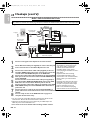
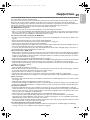
DVD / VCR to An External Tuner
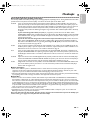
This DVD / VCR does not have a tuner input jack. To record TV programs on your DVD / VCR, you need to connect this
DVD / VCR to an external tuner device (e.g., set top box, cable box or satellite receiver) that has audio / video output jacks.
e.g.)
Back of TV
RF coaxial cable
(not supplied)
TV Signal
AUDIO IN
1
2
ANT. IN
R
6
RF coaxial cable
(not supplied)
VIDEO IN
VIDEO
OUT
DIGITAL
AUDIO OUT
DVD
AUDIO
OUT
S-VIDEO COMPONENT
VIDEO OUT
OUT
Y
L
OUT
Audio Cable
(not supplied)
Video Cable
(not supplied)
AUDIO OUT
R
L
IN
5
L
COAXIAL
R
CB /
PB
DVD/VCR VCR
AUDIO OUT AUDIO IN
L
L
R
R
VIDEO OUT VIDEO IN
CR /
PR
DVD / VCR
Video Cable (supplied)
External tuner
Audio Cable (supplied)
Connections
1
2
3
4
5
6
7
8
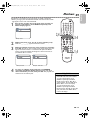
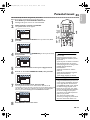
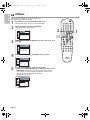
Connect a TV signal to the IN jack on the external tuner.
Helpful Hint
• If your TV has antenna in jack only,it is
still possible to connect this unit to
Use an RF coaxial cable (not supplied) to connect the Out jack your TV by using a commercially
on the external tuner to the ANT. IN jack on the TV.
available stereo audio/video RF
modulator. Refer to the manual
Connect the red and white audio cable (supplied) to the red
accompanying the modulator for more
and white AUDIO OUT jacks on the external tuner and to the information.
red and white VCR AUDIO IN jacks on the DVD/VCR.
• Required cables and connecting
Connect the yellow video cable (supplied) to the yellow VIDEO methods differ depending on the
OUT jack on the external tuner and to the VCR VIDEO IN jack external tuner. For more information,
please contact your external tuner
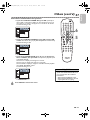
on the DVD/VCR.
provider.
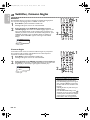
Connect another red and white audio cable (not supplied) to
the red and white DVD/VCR AUDIO OUT jacks on the DVD/ • Instead of using video out jack of this
DVD/VCR, you can also use S-video
VCR and to the red and white Audio In jacks on the TV.
out jack or component video output
Connect another yellow video cable (not supplied) to the DVD/
jack for connecting to your TV.
VCR VIDEO OUT jack on the DVD/VCR and to the Video In
•
Refer
to the manual accompanying
jack on the TV.
external devices for more information.
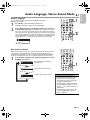
Connect the power cords of the TV and the DVD/VCR to a
power outlet. Turn on the TV and set it to the correct Video In
channel.
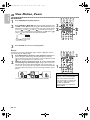
You are ready to turn on the DVD/VCR. Go to page 15 to
complete the first-time setup.
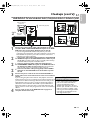
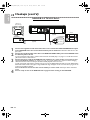
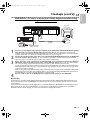
● You can record any unscrambled channel by selecting the channel on the
external tuner. Be sure that the external tuner is turned on.
● Signal from the external tuner can be output only on CVBS output even
when the power of the DVD/VCR is off.
● You cannot record one channel while watching another channel.
EN - 10