1
SmartManage
2. Installation
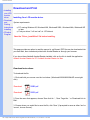
How to download "SmartControl Installation " file:
1.
2.
3.
4.
5.
6.
Visit http:// www.philips.com
Select "your country"
Click into "PC stuff or monitors" page
Select "Manuals/drivers"
Enter "Download" page
Select "SmartControl Installation", and you can download SmartControl and its driver for
installation.
Please follow the guidance in the SmartControl installation program.
3. Accessing SmartControl
●
●
●
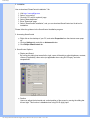
Right click on the desktop of your PC, and select Properties from the shortcut menu pops
up.
Click on Settings tab, and click on Advanced button.
Click Philips SmartControl tab.
4. SmartControl Options
●
●
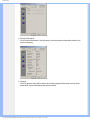
Display and Sound
By moving the sliding bar toward left or right, users will be able to adjust brightness, contrast,
volume (if applicable), video noise (not applicable when using DVI-D input), and color
temperatures.
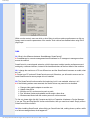
Position
Users can adjust the horizontal and vertical position of the screen by moving the sliding bar
left and right. This function is disabled when using DVI-D (digit) input.
file:///D|/My%20documents/dfu/W5/english/150s5/product/smart.htm (2 of 5)6/7/2004 11:15:53 AM