1
PC600-1000 Rev N —
Pelican PC600/PC1000 Premium Whole House Water Filter
Page 9
Installation
Pre-Filter Assembly
Sediment Filter
Pre-Filter Cover
O-Ring
Blue Pre-Filter Housing
Stand Pipe
Figure 5
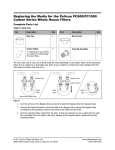
1. Unscrew the cover from the Blue Pre-Filter Housing.
2. Remove the plastic covering from the Sediment Filter.
3. Place the Sediment Filter onto the Stand Pipe in the Blue Pre-Filter Housing.
4. Screw the cover onto the Blue Pre-Filter Housing until hand-tight.
Pre-Filter Installation
Mounting
Bracket
Top View Pre-Filter
Inlet Water
Supply
Blue Pre-Filter Housing
Figure 6
1.
2.
3.
4.
5.
6.
Shut off the water.
Attach the Mounting Bracket to the wall using the supplied Phillips Head Screws and Washers.
Attach the Pre-Filter System to the Mounting Bracket using the supplied Bolt Head Screws.
Lube the o-ring with clean silicone grease before attaching the cover onto the housing.
Tighten the Blue Pre-Filter Housing using the supplied Pre-Filter Wrench (counter clockwise).
Determine the size of your inlet water supply line. PVC Reducers may be needed to fit the 1” PreFilter System.
Notice:
The Pre-Filter Housing comes with a 1” threaded female inlet/outlet and will require additional fittings to
adapt to your plumbing. A shut-off valve is recommended prior to the Pre-Filter System.
© 2013 Enviro Water Solutions, Inc.
3060 Performance Circle, Suite 2, DeLand, FL 32724
www.pelicanwater.com
(877) 842-1635