1
PayPal Merchant Tools
A note about credit
cards:
Your Primary credit card
is not always your default
funding source. For more
information about Funding
Sources, see page 12.
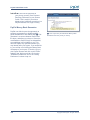
Add Bank Account Page.
Verification
PayPal buyers are clear:
they prefer doing business
with Verified sellers
(i.e. sellers who have a
confirmed bank account).
Why? Because it means
that the seller has passed
a bank’s verification
checks. Everyone’s heard
horror stories about doing
business online; Verification
just lets your buyer know
that there’s a legitimate
seller on the other side of
the computer screen…and
that builds trust and sales.
Copyright 2003 PayPal. All rights reserved
Insert Text
you can qualify for protection under
PayPal’s Seller Protection Policy. For
more information, see page 16.
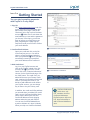
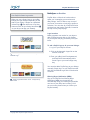
4. Add Bank Account
While you can now use your PayPal
account to accept payments, your only
method of withdrawing funds is by
check, which can take 1-2 weeks and
costs $1.50 per withdrawal. By adding
a bank account, you will be able to
withdraw funds to your bank account in
3-4 business days via electronic funds
transfer, which will make you a Verified
member of PayPal.
Before you add your bank account,
you will need a check or deposit slip
for that bank account. Log in to your
PayPal account and click on the
“Profile” subtab of the “My Account”
tab. Click on the “Bank Accounts” link
in the “Financial Information” column.
On the Bank Accounts page, click the
“Add” button. Once you have added
your bank account it will become your
Primary bank account. If you decide to
add additional bank accounts to your
PayPal account, you can change any of
them to be your Primary account.
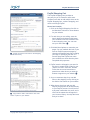
When you add your bank account,
PayPal will send two small deposits,
each of less than $1.00, to your bank
account. Check your bank statement
in 3-4 business days for the amounts
of the two deposits. After getting the
deposit amounts, log in to your PayPal
account and click on the “Confirm Bank
Account” link in the “Activate Account”
box on your Account Overview. Enter
the amounts of each of the deposits on
the page and your bank account will be
confirmed and you will become Verified.
5