1
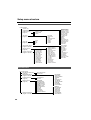
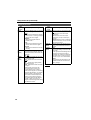
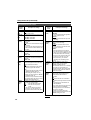
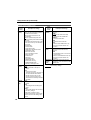
RECORDING SETUP screen (continued)
Item/
(Display
mode)
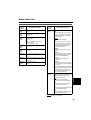
UB MODE
(camera)
(VCR)
Description of settings
Set the information you want for user
information.
USER:
Records user information.
TIME:
Records the current time.
DATE:
Records the current date.
TCG:
Records the data from the time code
generator.
FRM. RATE:
Records the frame conversion frame
rate.
a
b
c
d
Item/
(Display
mode)
Description of settings
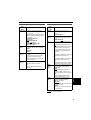
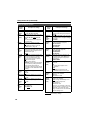
UB PRESET
(camera)
(VCR)
Set user information. Make sure you
have set USER in UB MODE.
ONE-SHOT
REC
(camera)
Set ONE-SHOT recording mode.
(Page 34)
ON:
OFF:
REC TIME
(camera)
Sets the length of time for ONE-SHOT
recording. (Page 34)
0.5s: 0.5 seconds 1s: 1.0 second
1.5s: 1.5 seconds 2s: 2.0 seconds
DV IN PRESET Synchronizes the camera’s TCG with
the TC from DV input when you press
(VCR)
the TC SET button.
ON: The mode is on.
OFF: Cancels the mode.
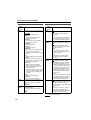
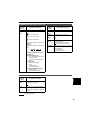
a: Checking information for user
information
b: Frame sequence No.
• 0 to 4 are displayed during 24P/
24P (ADV) mode.
• F is displayed during 60i/30P
mode.
c: Frame rates
• Frame rate (60/30/24)
• I/P ID
• Conversion data
• Frame rate coefficient
d: Recording management data
• Frame updates
• REC START/STOP data
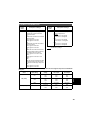
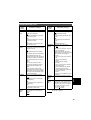
AV IN/OUT SETUP screen
Description of settings
A DUB INPUT
(VCR)
Selects the sound to be recorded for
audio dubbing. (Page 56)
MIC:
A_IN:
DV OUT
(VCR)
Select ON to convert analog input signals into digital signals and output
them from the DV connector. (Page 58)
ON OFF
Menus
Item/
(Display
mode)
are the factory settings.
75