1
Using the setup menus
Use the setup menus to change the settings to suit
the scenes you are shooting or what you are
recording.
You can also use the menu buttons on the remote
control. (Page 19)
3
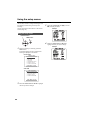
Example:
Using the setup menus
OPERATION lever
MENU button
4
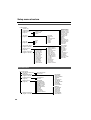
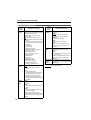
CAMERA MENU
1 . SCENE FILE
2
3
4
5
6
7
. CAMERA SETUP
. SW MODE
. AUTO SW
. RECORDING SETUP
. DISPLAY SETUP
. OTHER FUNCTIONS
PUSH MENU TO EXIT
VCR mode
VCR FUNCTIONS
1 . PLAYBACK FUNCTIONS
2
3
4
5
. RECORDING SETUP
. AV IN/OUT SETUP
. DISPLAY SETUP
. OTHER FUNCTIONS
PUSH MENU TO EXIT
66
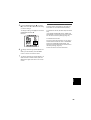
Move the OPERATION lever e or r to
highlight the item you want to change.
Example:
When not shooting or recording, press the
MENU button.
The camera enters the menu mode and the
following is displayed on the screen.
Camera mode
2
MENU
1
Press the OPERATION lever (h) (or move it
y) to display the items.
Move the OPERATION lever e or r to highlight
the item you want to change.