1
 Section 2: Setu
up
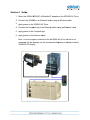
1. Mount th
he 3G3AX-M
MX2-EIP-A EtherNet/I P adapter o
on the 3G3MX2 AC Drive.
2. Connect the 3G3MX
X2 to an Ethernet swittch using an
n Ethernet cable.
3. Apply po
ower to the 3G3MX2 AC
A Drive.
4. Connect the Compa
actLogix to an Etherne
et switch ussing an Ethe
ernet cable
e.
5. Apply po
ower to the CompactLo
ogix.
6. Apply po
ower to the Ethernet sw
witch.
Note: A motor may
y be connec
cted to the 3
3G3MX2 A
AC Drive, bu
ut this is not
necessarry for this example,
e
as
s the comm
manded freq
quency is diisplayed on
n the
3G3MX2
2 LCD display.
3