1
Processing Images on Personal Computer
Image processing software allows you to edit images taken on your computer.
This section explains how to connect the Camedia C-2500L to a personal computer and edit images taken using the CAMEDIA
Master 1.11.
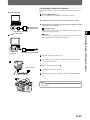
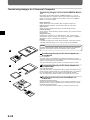
How to Connect to Personal Computer
Connecting the Camedia C-2500L to a personal computer makes it possible to download images from the card in the camera to
the PC. The connection will differ depending on the type of PC used.
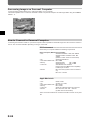
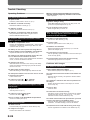
PC Environment
Check that your computer satisfies the following requirements.
DOS/V Computer (IBM PC/AT Compatible)
• CPU
Windows 98:486DX or later, Min. 66MHz
Windows 95/NT4.0:486SX or later, Min.
33MHz
(Pentium or later version recommended)
• OS
Windows 95/98/NT4.0
• Hard disk available area Min. 20MB
• Memory
Windows 95/98
Min. 16 MB
Windows NT4.0
Min. 24 MB
• Connector
Standard RS-232C interface
DOS/V Computer (IBM PC/AT Compatible):
D-SUB 9-pin connector
• Monitor
Min. 256 colors (32,000 colors recommended),
Min. 640 2 480 dot
Apple Macintosh
•
•
•
•
•
•
CPU
OS
Hard disk available area
Memory
Connector
Monitor
68040 or later
System 7.5 or later,
Min. 20 MB
Min. 24 MB
Serial port, Miniature DIN 8-pin connector
Min. 256 colors, Min. 640 2 480 dot
(32,000 colors recommended)
*Direct connection between the C-2500L and USB connector is not possible.
E-66