1
NTI CRYSTALMON TFT/LCD MONITOR
Power Up
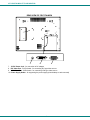
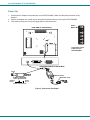
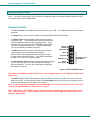
1. Connect the AC adapter to the power jack on the CRYSTALMON. Make sure the power connector is fully
inserted.
2. Plug the AC adapter into a power source and press the power button to power up the CRYSTALMON.
3. If the video source(s) are not yet ON, apply power to them at this time.
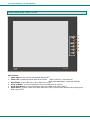
Power
Button
REAR VIEW OF CRYSTALMON
NTI
R
NE TWORK
TECH NOLOGIES
INC OR PORATED
12 75 Danne r Dr Tel:3 30-5 62-70 70
Aurora, OH 44 202 Fax:33 0-562 -1999
www.networktec hinc.c om
12VDC
5A
-
+
DVI
VGA
View of the control
buttons for the
CRYSTALMON
UNDERSIDE VIEW OF CRYSTALMON
Barrel
12 VDC
AC
ADAPTER
Power Connector
12VDC @ 5A OUTPUT
(Outside
(Inside
barrel)
barrel)
2.5 mm x 5.5 mm Female
IEC Connector
IEC Power Cord
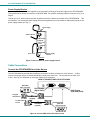
Figure 5- Connect the AC adapter
9