1
Configuring Observer for Wireless Operation
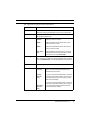
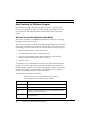
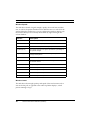
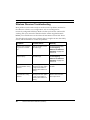
The configuration options are described below:
Option
Description
Site Profiles
Site Profiles let mobile users save and retrieve wireless parameters,
rather than re-keying the parameters every time you change sites.
Monitor Traffic By
Choose the method to monitor traffic. The three available methods
are as follows (choose one):
Channel
Specify a channel to monitor.
BSSID
Specify the Basic Service Set ID of the Access
Point you want to monitor.
ESSID
Specify the Extended Service Set ID of the network you want to monitor.
Scan Channels
(Only available if you have chosen to monitor by
Channel) Scan the selected channels. To select
channels to scan, click Channel Map…
WEP Encryption
Choose Wireless Equivalency Privacy encryption settings. To use
WEP, check the “Use WEP keys to decrypt wireless traffic” checkbox
and click Edit WEP Keys... to enter the appropriate encryption keys.
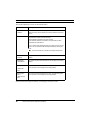
Antenna to use
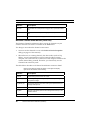
Specify the type of antenna connected to your system:
Antenna
Diversity
Use the stronger signal from the two antenna
ports. This is the recommended setting for the
standard snap-on antenna.
Primary
Antenna
Only
If you are not using the standard snap on antenna,
choose this option if the antenna you are using is
connected to the primary antenna port (see your
NIC manual for details).
Secondary
Antenna
Only
If you are not using the standard snap on antenna,
choose this option if the antenna you are using is
connected to the secondary antenna port (see
your NIC manual for details).
© Network Instruments, LLC
7