1
DSX-80/160 Quick Start Guide
DSX-80 Cabinet
16COIU
PCB
16SLIU
PCB
Dedicated
AC Outlet
Surge
Protector
16ESIU
PCB
Lines 1-4
CPU
25-PAIR CABLE
RJ61X
RJ61X
1
5
4
3
6
2
7
1
8
WHT-BLU
BLU-WHT
WHT-ORN
ORN-WHT
WHT-GRN
GRN-WHT
WHT-BRN
BRN-WHT
Cold water
pipe
To known
good
earth ground
FUNCTION
1
1
2
2
3
3
4
4
T
R
T
R
T
R
T
R
BLOCK
TERM
1
2
3
4
5
6
7
8
To Telco
Power
Supply
COLOR
CODE
Optional
DSX IntraMail
Extensions 316-319 Shown
25-PAIR CABLE
RJ61X
RJ61X
COLOR
CODE
1
5
4
3
6
2
7
1
8
WHT-BLU
BLU-WHT
WHT-ORN
ORN-WHT
WHT-GRN
GRN-WHT
WHT-BRN
BRN-WHT
Extensions
300-303 Shown
25-PAIR CABLE
RJ61X
RJ61X
COLOR
CODE
1
5
4
3
6
2
7
1
8
WHT-BLU
BLU-WHT
WHT-ORN
ORN-WHT
WHT-GRN
GRN-WHT
WHT-BRN
BRN-WHT
FUNCTION
300
300
301
301
302
302
303
303
T
R
T
R
T
R
T
R
BLOCK
TERM
1
2
3
4
5
6
7
8
DSX Keyset
YEL
BLU-WHT
FUNCTION
316
316
317
317
318
318
319
319
T
R
T
R
T
R
T
R
BLOCK
TERM
1
2
3
4
5
6
7
8
YEL
BLU-WHT
WHT-BLU
BLK
WHT-BLU
RED
1093096 - 54
RED
BLK
GRN
GRN
625
Modular
Jack
625
Modular
Jack
Analog
To 66 Block
WHT-BLU (1T)
To CPU
Mod Jack
RJ61X Port
Pin
Designation
1
2
3
4
5
6
7
8
4T
3T
2T
1R
1T
2R
3R
4R
80000 - 18C
Latch
faces up
BLU-WHT (1R)
WHT-ORN (2T)
ORN-WHT (2R)
WHT-GRN (3T)
WHT-BRN (4T)
Note
reversal
Important
GRN-WHT (3R)
BRN-WHT (4R)
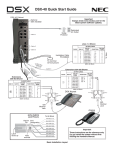
Basic Installation Layout
These instructions are for reference only.
Do not install the system without first
reading the Hardware Manual.
Default Features
Default Features for Lines
1.
All lines are loop start DTMF.
• Use 3101-01: Line Type to change this assignment.
2.
•
•
3.
To customize line ringing, use one of the following:
• User Programmable Features code #RAL. (See the User Programmable Features feature for more.)
• Use 2132-[01-64]: Line Ringing.
Lines 1-12 ring on line keys 1-12 for extensions 300-315. (Lines 13-64 do not appear on line keys.)
All other extensions are lamp only for lines 1-12.
Default Features for Extensions
1.
The circuit types for keyset extensions are automatically set when the extension is plugged in.
2.
Keyset users can place outside calls by:
• Pressing a line key and dialing the outside number. (See the Central Office Calls, Placing feature for more.)
• Pressing INTERCOM, dialing 9, then dialing the outside number. (See the Line Group Routing feature for more.)
• Line Dial-Up and Direct Line Access are disabled. (See the Central Office Calls, Placing feature for more.)
3.
All extensions have full incoming and outgoing access to all outside lines.
• See Initial Startup Programming below to change this assignment.
4.
By default, Feature Keys 1-12 are line keys. Keys 13-24 are undefined. See the Feature Keys feature for more.
Default Features for IntraMail
1.
Each extension has an IntraMail voice mailbox.
2.
All mailboxes are enabled. To disable a mailbox, see 2141-01: Station Mailbox Type.
3.
The IntraMail Automated Attendant does not answer outside calls. (See the Automated Attendant feature for more.)
Initial Startup Programming
1.
Enter the programming mode.
1. From any display telephone, press INTERCOM + Dial #*#* + Enter the system password + HOLD.
2. The system passwords are:
- 632379 (NECDSX) for Installer (level 3), 9999 for System Administrator 2 (level 2), 0000 for System
Administrator 1 (level 1).
2.
Assign the correct circuit type to each of your installed lines.
1. In 3101-01: Line Type, assign the correct circuit type for each line. Analog line types are:
- 51 for loop start DTMF, 52 for loop start DP.
3.
By default, each extension has full incoming and outgoing access to each line. To change this assignment:
1. In 2131-[01-64]: Line Access, change each extension’s line access as required. The options are:
- 0 for no access, 1 for incoming access only, 2 for outgoing access only, 3 for full access
2. Using 902x-Copy may save you time.
4.
By default, extensions 300-315 ring immediately day and night for lines 1-12. To change this assignment:
1. In 2132-[01-64]: Line Ringing, set the ringing option for each extension, The options are:
- 0 for lamp only (no ringing) day and night, 1 for day and night ringing, 2 for night ringing only, 3 for delay
ringing day and night
2. Using 902x-Copy may save you time.
5.
To change the default system passwords:
1. Turn to the System Programming Password Protection feature to learn more about system passwords.
(1093088)
June 15, 2006, Rev 1
Printed in U.S.A.
Empowered by Innovation