1
Chapter 5
Results from LogTag
65
Degree Minutes
There are some products and materials that exist which can change their characteristics
and/or degrade if they experience temperatures which are not within ideal conditions for
long enough. For example, some products may experience freezer burn if they experience
an extremely cold condition or experience a colder than ideal temperature for long
enough period of time. Other products for example, ice cream, change their
characteristics if they experience temperatures which allow it to melt. The LogTag
Analyzer will automatically display the results of two separate Degree Minutes
calculations. The result of the first Degree Minutes calculation displayed will be based on
the readings that were recorded below the ideal conditions and the result of the second
Degree Minutes calculation displayed will be based on the readings that were recorded
above the ideal conditions. The ideal conditions used in the calculation of the Degree
Minutes formula are based on the upper and lower alert values that where configured
when the LogTag was originally prepared for use.
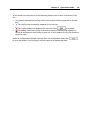
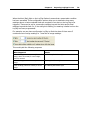
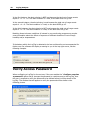
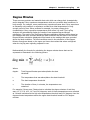
Mathematically the formula for calculating the degree minutes above alert can be
expressed as illustrated in the following picture:
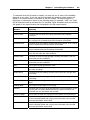
Where:
degmin
Total Degree Minutes spent above/below the alert
threshold.
ti
The temperature that was above/below the alert threshold.
a
The alert temperature threshold.
s
The duration of time, in minutes, the temperature was
sustained.
For example, if there were 5 data points to calculate the degree minutes of and they
were, 12.3, 15.9, 16.2, 14.7 and 14.9 degrees, each of these temperatures were recorded
at 2 minute intervals and the high alert temperature threshold was 12.6 degrees, then the
degree minutes temperature above the upper alert threshold would be 22.6 degreeminutes.