Transcript
PRODUCT DESCRIPTION
CCM-1A
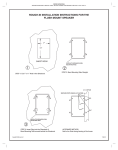
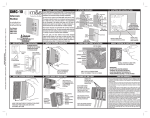
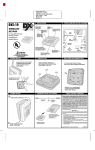
1. REMOVE THE COVER PLATE
Linear’s Model CCM-1A (P/N ACP00904A) CCTV camera can be installed inside the
AE-100, AE-500, AE1000Plus or AE2000Plus access control systems. The camera
provides a video signal for viewing the area in front of the system.
The camera is continuously powered by the access system. Focus has been factory
adjusted to a range of three to four feet. No adjustment is needed.
The AE1000Plus and AE2000Plus provide a video jack for connection to a video cable
with a Type “BNC” connector. Up to 400 feet of 75-ohm RG-59 video cable can be used.
Longer cable runs may require the use of a video amplifier.
Color
Camera
Module
REMOVE BOTH
COVER PLATE
RETAINING NUTS
REMOVE THE
COVER PLATE
NOTE: If camera is being installed on an existing installation, system power should
be off prior to installing the camera.
PRINTER’S INSTRUCTIONS:
INSTR,INSTL,CCM-1A - LINEAR P/N: 229332 A - INK: BLACK - MATERIAL: 20 LB. MEAD BOND - SIZE: 8.500” X 11.000” - SCALE: 1-1
Installation Instructions
USA & Canada (800) 421-1587 & (800) 392-0123
(760) 438-7000 - Toll Free FAX (800) 468-1340
www.linearcorp.com
2. INSTALL THE WINDOW
3. REMOVE THE LENS CAP
AE-100 AE-500, AE1000Plus AND AE2000Plus ONLY
4. INSTALL THE CAMERA
REMOVE THE LENS CAP
FROM THE CAMERA LENS
POSITION THE
GASKET ON
THE TWO STUDS
ATTACH THE CAMERA
USING THE TWO NUTS
AE-100 ONLY - IF THE ORIGINAL PROTECTIVE WINDOW IS
DAMAGED, IT MAY BE REPLACED BY PRESSING IT OUT
FROM THE OUTSIDE IN. REMOVE THE ADHESIVE BACKING
FROM THE NEW WINDOW (INCLUDED) AND PRESS IT INTO
PLACE, ADHESIVE TOWARDS THE FRONT.
GASKET
5. CONNECT THE CAMERA AND VIDEO CABLE
6. TEST CAMERA
CAUTION! BE SURE THE SYSTEM POWER IS OFF
2 CONNECT VIDEO
CABLE TO VIDEO
OUTPUT CONNECTOR
APPLY POWER TO THE ACCESS SYSTEM
THEN VIEW THE VIDEO MONITOR TO TEST
THE VIDEO OUTPUT FROM THE CAMERA
LINEAR LIMITED WARRANTY
This Linear product is warranted against defects in material and workmanship for twenty four
(24) months. The Warranty Expiration Date is labeled on the product. This warranty extends
only to wholesale customers who buy direct from Linear or through Linear’s normal distribution
channels. Linear does not warrant this product to consumers. Consumers should inquire from
their selling dealer as to the nature of the dealer’s warranty, if any. There are no obligations or
liabilities on the part of Linear Corporation for consequential damages arising out of or in
connection with use or performance of this product or other indirect damages with respect
to loss of property, revenue, or profit, or cost of removal, installation, or reinstallation.
All implied warranties, including implied warranties for merchantability and implied warranties
for fitness, are valid only until Warranty Expiration Date as labeled on the product. This Linear
Corporation Warranty is in lieu of all other warranties express or implied.
All products returned for warranty service require a Return Product Authorization Number (RPA#).
Contact Linear Technical Services at 1-800-421-1587 for an RPA# and other important details.
1 PLUG THE CAMERA'S
WIRING HARNESS INTO
ACCESS SYSTEM'S
CAMERA CONNECTOR
USE CABLE TIES TO
DRESS CABLE
FCC NOTICE: This device complies with FCC Rules Part 15. Operation is subject to the following
two conditions: (1) This device may not cause harmful interference, and (2) This device must
accept any interference received, including interference that may cause undesired operation.
Copyright © 2009 Linear LLC
229332 A