1
Subscribing & Watching TV
1. Unlock the phone, and tap the center of the touch screen to access
the Shortcut Menu. Tap Mobile TV
.
2. Rotate phone clock wise.
3. An introduction video clip will play (for the first time).
4. Tap Subscribe Now. Review base package and tap Continue.
5. Read the Terms and Conditions and tap Agree. Confirm selection
and tap Submit.
6. From the V CAST screen, tap Program Guide icon
on the top
left corner. Tap the show you want to watch.
Pull out TV antenna for enhanced TV reception.
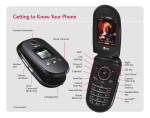
Back
Scroll Up
Info
Scroll Down
Options
Scroll Back
Scroll Forward