1
Add Items to Your Screens
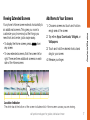
Your phone’s Home screen extends horizontally to
six additional screens. This gives you room to
customize your phone and put the things you
need front and center, just a swipe away.
from
•To display the Home screen, press
any screen.
•To view extended screens, flick the screen left or
right. There are three additional screens on each
side of the Home screen.
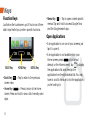
1. Choose a screen and touch and hold an
empty area of the screen.
Android Basics
Viewing Extended Screens
2. Tap either Apps, Downloads, Widgets, or
Wallpapers.
3. Touch and hold the desired shortcut and
drag to your screen.
4. Release your finger.
Location Indicator
The white bar at the bottom of the screen indicates which Home screen canvas you are viewing.
visit sprint.com/support for guides, tutorials and more
7