1
Color LCD MP3 w/ FM/Touch Pad
V10M10_IM_EN_01182008
OPERATING INSTRUCTIONS
Explorer Mode
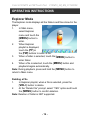
The Explorer mode displays all the folders and files stored in the
player.
1.
In Main menu,
select Explorer
menu and touch the
[MENU] button to
enter.
2.
When Explorer
playlist is displayed,
touch the [FF] or
the [FW] buttons to select a file.
3.
When a folder is selected, touch the [MENU] button to
enter folder.
4.
When a file is selected, touch the [MENU] button and
playback begins automatically.
Note: During playback, press and hold the [MENU] button to
return to Main menu.
Deleting a File
1.
In Explorer playlist, when a file is selected, press the
[VOL+] button to delete.
2.
At the “Delete File” prompt, select “YES” option and touch
the [MENU] button to confirm deletion.
Note: Deletion of folder is NOT supported.
- 19 -