1
Peripheral Devices
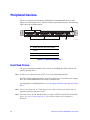
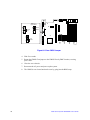
The server system provides locations and hardware for installing hard drives, a USB
floppy drive, and an optical drive. The drives must be purchased separately. The following
figure shows the available options.
A
B
D
C
TP02156
.
A.
Slimline drive bay (drive not included)
B.
Control panel (standard control panel
shown)
C.
Hard Drive Status LEDs
D.
Hard drive bays (drives not included)
Figure 13. Optional Peripherals
Hard Disk Drives
The server system ships with three drive carriers for installing three SAS or Serial ATA
(SATA) hot-swap drives.
Note: SAS drives are supported on the Intel® Server System SR1500ALSAS only.
One left drive bay can be converted to be used as a floppy bay. To use the bay for a floppy
drive, the AXXFLOPHDDTRAY accessory kit must be used.
For instructions on installing hard drives, see “Installing and Removing a Hot-swap Hard
Drive”.
Note: Drives can consume up to 17 watts of power each. Drives must be specified to run at a
maximum ambient temperature of 45C.
Note: The Intel® Server System SR1500AL does not support all SAS or Serial ATA (SATA) hard
drives. See “Server System References” for an Internet link to a list of supported
hardware.
18
Intel® Server System SR1500AL User’s Guide