1
Intel® NetStructure™
MPCHC5525 System Master
Processor Board IPMI Reference
Driver
User’s Manual
May 2004
Order Number: 301561-001
INFORMATION IN THIS DOCUMENT IS PROVIDED IN CONNECTION WITH INTELR PRODUCTS. EXCEPT AS PROVIDED IN INTEL’S TERMS
AND CONDITIONS OF SALE FOR SUCH PRODUCTS, INTEL ASSUMES NO LIABILITY WHATSOEVER, AND INTEL DISCLAIMS ANY EXPRESS
OR IMPLIED WARRANTY RELATING TO SALE AND/OR USE OF INTEL PRODUCTS, INCLUDING LIABILITY OR WARRANTIES RELATING TO
FITNESS FOR A PARTICULAR PURPOSE, MERCHANTABILITY, OR INFRINGEMENT OF ANY PATENT, COPYRIGHT, OR OTHER
INTELLECTUAL PROPERTY RIGHT.
Intel Corporation may have patents or pending patent applications, trademarks, copyrights, or other intellectual property rights that relate to the
presented subject matter. The furnishing of documents and other materials and information does not provide any license, express or implied, by
estoppel or otherwise, to any such patents, trademarks, copyrights, or other intellectual property rights.
Intel products are not intended for use in medical, life saving, life sustaining, critical control or safety systems, or in nuclear facility applications.
Intel may make changes to specifications and product descriptions at any time, without notice.
Designers must not rely on the absence or characteristics of any features or instructions marked “reserved” or “undefined.” Intel reserves these for
future definition and shall have no responsibility whatsoever for conflicts or incompatibilities arising from future changes to them.
This User’s Manual as well as the software described in it is furnished under license and may only be used or copied in accordance with the terms of
the license. The information in this manual is furnished for informational use only, is subject to change without notice, and should not be construed as
a commitment by Intel Corporation. Intel Corporation assumes no responsibility or liability for any errors or inaccuracies that may appear in this
document or any software that may be provided in association with this document.
Except as permitted by such license, no part of this document may be reproduced, stored in a retrieval system, or transmitted in any form or by any
means without the express written consent of Intel Corporation.
Contact your local Intel sales office or your distributor to obtain the latest specifications and before placing your product order.
Copies of documents which have an ordering number and are referenced in this document, or other Intel literature may be obtained by calling
1-800-548-4725 or by visiting Intel's website at http://www.intel.com.
AnyPoint, AppChoice, BoardWatch, BunnyPeople, CablePort, Celeron, Chips, CT Media, Dialogic, DM3, EtherExpress, ETOX, FlashFile, i386, i486,
i960, iCOMP, InstantIP, Intel, Intel Centrino, Intel logo, Intel386, Intel486, Intel740, IntelDX2, IntelDX4, IntelSX2, Intel Create & Share, Intel GigaBlade,
Intel InBusiness, Intel Inside, Intel Inside logo, Intel NetBurst, Intel NetMerge, Intel NetStructure, Intel Play, Intel Play logo, Intel SingleDriver, Intel
SpeedStep, Intel StrataFlash, Intel TeamStation, Intel Xeon, Intel XScale, IPLink, Itanium, MCS, MMX, MMX logo, Optimizer logo, OverDrive,
Paragon, PC Dads, PC Parents, PDCharm, Pentium, Pentium II Xeon, Pentium III Xeon, Performance at Your Command, RemoteExpress, SmartDie,
Solutions960, Sound Mark, StorageExpress, The Computer Inside., The Journey Inside, TokenExpress, VoiceBrick, VTune, and Xircom are
trademarks or registered trademarks of Intel Corporation or its subsidiaries in the United States and other countries.
*Other names and brands may be claimed as the property of others.
Copyright © 2004, Intel Corporation
2
Intel® NetStructure™ MPCHC5525 System Master Processor Board IPMI Reference Driver User’s Manual
Contents
Contents
1
Using This Guide .............................................................................................................................7
1.1
1.2
2
IBMU Functionality .......................................................................................................................... 9
2.1
2.2
3
Introduction ........................................................................................................................... 9
2.1.1 Purpose of IPMI ....................................................................................................... 9
2.1.2 Who Gathers the Information?................................................................................. 9
2.1.3 Where Is IPMI-Relevant Information Stored? ........................................................ 10
2.1.4 Basic Communication Principles............................................................................ 11
2.1.4.1 Boards/Devices with IPMI Controller ..................................................... 11
2.1.4.2 Nonintelligent Devices ........................................................................... 11
2.1.4.3 On-Board Temperature Sensor ............................................................. 11
2.1.5 Requirements ........................................................................................................11
2.1.5.1 Boards/Devices with IPMI Controller and On-Board Sensors................ 11
2.1.5.2 Nonintelligent Devices ........................................................................... 12
2.1.6 Available Drivers .................................................................................................... 13
How Does Communication Work? ...................................................................................... 13
2.2.1 Communication Within a Chassis .......................................................................... 14
2.2.1.1 Devices with IPMI Controller ..................................................................15
2.2.1.2 Nonintelligent Devices ........................................................................... 15
2.2.1.3 On-Board Temperature Sensor ............................................................. 16
2.2.2 Communication between Chassis.......................................................................... 16
Preparing Software for IPMI Usage ............................................................................................... 19
3.1
3.2
3.3
3.4
4
Terms and Definitions ........................................................................................................... 7
Other Sources of Information................................................................................................8
Action Plan.......................................................................................................................... 19
Notes on Writing Your Own IPMI Driver ............................................................................. 19
Sensor Data Records ......................................................................................................... 20
3.3.1 Obtaining SDR Settings ......................................................................................... 20
Notes on Writing System Management Software ............................................................... 20
3.4.1 Requirements for Events ....................................................................................... 20
3.4.2 Checking CPU Board Signals ................................................................................ 21
3.4.2.1 Critical IRQ Status ................................................................................. 21
3.4.2.2 CPCI Signal ........................................................................................... 21
3.4.2.3 Ejector Switch ........................................................................................ 21
3.4.2.4 POST Code............................................................................................22
3.4.3 Monitoring the IBMU .............................................................................................. 22
3.4.3.1 Self Test .................................................................................................22
3.4.3.2 IPMI Controller Watchdog ...................................................................... 22
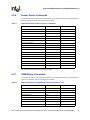
Supported IPMI Commands
and BMC/PM Addresses23
4.1
4.2
Standard IPMI Commands .................................................................................................23
Global IPMI Commands...................................................................................................... 23
4.2.1 System Interface Commands ................................................................................ 23
4.2.2 Watchdog Commands ........................................................................................... 23
4.2.3 SEL Commands..................................................................................................... 24
Intel® NetStructure™ MPCHC5525 System Master Processor Board IPMI Reference Driver User’s Manual
3
Contents
4.3
4.4
5
4.2.4 SDR Commands.................................................................................................... 24
4.2.5 FRU Inventory Device Commands ....................................................................... 24
4.2.6 Sensor Device Commands .................................................................................... 25
4.2.7 ICMB Bridge Commands ....................................................................................... 25
Force-Specific Commands ................................................................................................ 26
4.3.1 BMC/PMChangeRole ............................................................................................ 26
4.3.1.1 Request Data ......................................................................................... 26
4.3.1.2 Response Data ...................................................................................... 26
4.3.2 FlashFileSystemClear............................................................................................ 27
4.3.2.1 Request Data ......................................................................................... 27
4.3.2.2 Response Data ...................................................................................... 27
4.3.3 GetGeographicalAddress ...................................................................................... 27
4.3.3.1 Request Data ......................................................................................... 27
4.3.3.2 Response Data ...................................................................................... 27
4.3.4 GetSDRRepositoryCRC ........................................................................................ 27
4.3.4.1 Request Data ......................................................................................... 28
4.3.4.2 Response Data ...................................................................................... 28
4.3.5 SetShadowRepositoryEnable ................................................................................ 28
4.3.5.1 Request Data ......................................................................................... 28
4.3.5.2 Response Data ...................................................................................... 28
BMC and PM Addresses .................................................................................................... 28
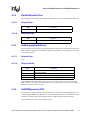
Customer Support ......................................................................................................................... 31
5.1
5.2
5.3
Customer Support............................................................................................................... 31
Technical Support and Return for Service Assistance ....................................................... 31
Sales Assistance ................................................................................................................ 31
Figures
1
2
3
4
5
6
7
8
9
10
11
Repositories of BMC and PMs ................................................................................................... 10
Required Parts for Communication with IPMI Devices and On-Board Sensors ......................... 12
Required Parts for Communication with Nonintelligent Devices ................................................ 12
Buses/Interfaces Provided by the IBMU ..................................................................................... 13
Communication within a Chassis................................................................................................ 14
Example for PM with IPMI Controller.......................................................................................... 15
Example for Nonintelligent Devices ............................................................................................ 16
Example: On-Board Sensor........................................................................................................ 16
Intelligent Chassis Management Bus (ICMB) ............................................................................. 17
Fan without IPMI Controller Monitored via ICMB ....................................................................... 17
Example for Nonintelligent Device via ICMB .............................................................................. 18
Tables
1
2
3
4
5
6
7
8
9
4
Terms and Definitions................................................................................................................... 7
Reference Documents .................................................................................................................. 8
Data in Repositories ................................................................................................................... 10
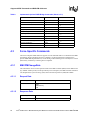
Optional Global IPMI Commands ............................................................................................... 23
Optional SEL Device Commands ............................................................................................... 24
Optional SDR Device Commands .............................................................................................. 24
Implemented Optional Sensor Device Commands..................................................................... 25
Implemented Optional ICMB Bridge Commands........................................................................ 25
Address Mapping........................................................................................................................ 29
Intel® NetStructure™ MPCHC5525 System Master Processor Board IPMI Reference Driver User’s Manual
Contents
Revision History
Date
Revision
May 2004
001
Description
Initial Release of this manual.
Intel® NetStructure™ MPCHC5525 System Master Processor Board IPMI Reference Driver User’s Manual
5
Contents
6
Intel® NetStructure™ MPCHC5525 System Master Processor Board IPMI Reference Driver User’s Manual
Using This Guide
1
Using This Guide
The Intel® NetStructure™ MPCHC5525 System Master Processor Board IPMI Reference Driver
User’s Guide is intended for users qualified in electronics or electrical engineering. Users should
have a working understanding of PCI, CompactPCI*, telecommunications, and the IPMI
Specification V1.0 Rev. 1.1.
1.1
Terms and Definitions
Table 1.
Terms and Definitions
Abbreviation
Description
BIB
Board Information Block
BMC
Base Board Management Controller
CMD
Command Code
CPU
Central Processing Unit
CRC
Cyclic Redundancy Code
ECC
Error Correction Code
FRU
Field Replaceable Unit
GPIO
General Purpose I/O
I2C
Intelligent I/O Controller
IBMU
Intelligent Board Management Unit
ICMB
Intelligent Chassis Management Bus
IPMB
Intelligent Peripheral Management Bus
IPMI
Intelligent Platform Management Interface
IRQ
Interrupt Request
KCS
Keyboard Controller Style
LSB
Least Significant Byte
MSB
Most Significant Byte
NetFn
Network Function Code
NMI
Nonmaskable Interrupt
OEM
Original Equipment Manufacturer
PMC
Peripheral Management Controller
POST
Power-on Self Test
PSU
Power Supply Unit
RAM
Random Access Memory
RTB
Rear Transition Board
Intel® NetStructure™ MPCHC5525 System Master Processor Board IPMI Reference Driver User’s Guide
7
Using This Guide
Table 1.
Terms and Definitions
Abbreviation
Description
SDR
Sensor Data Record
SEL
System Event Log
SMI
System Management Interface
1.2
Other Sources of Information
Table 2.
Reference Documents
Document
Intel®
8
Can be found at
NetStructure™ MPCBL5525 System Master
Processor Board Technical Product Specification
Intel order number 301070
Intelligent Platform Management Interface Specification
v. 1.0 Rev. 1.1
www.intel.com/design/servers/ipmi/spec_old.htm
Platform Management FRU Information Storage
Definition v1.0 Rev. 1.1
developer.intel.com
Intelligent Chassis Management Bus Bridge Specification
v1.0 Rev. 1.2
www.intel.com/design/servers/ipmi/spec.htm
PICMG 2.9 R1.0 System Management Specification
www.picmg.com
Force Computers* PENT/CPCI-735/736 Family
Reference Guide
www.forcecomputers.com
Intel® NetStructure™ MPCHC5525 System Master Processor Board IPMI Reference Driver User’s Guide
IBMU Functionality
IBMU Functionality
2.1
2
Introduction
The Intelligent Board Management Unit (IBMU) equips the Intel® NetStructure™ MPCBL5525
board with Intelligent Platform Management Interface (IPMI) functionality as designed by Force
Computers*. IPMI is used for platform management.
IPMI is completely independent of the software running on the CPU board; it remains operative
even if the board software has crashed or the board is not powered. Due to this fact, IPMI is used to
log system status information.
IPMI functionality on the IBMU is based on the Intelligent Platform Management Standards V1.0
Rev. 1.1. In addition, the following optional features applying to the IPMI standard are offered:
• Buses that allow internal and external communication
• Optional IPMI commands
• BMC standby mode
The features of the IBMU allow platform management with devices with and without IPMI
controllers (nonintelligent devices). Both are handled differently in many aspects as explained in
the next sections.
2.1.1
Purpose of IPMI
The purpose of IPMI is to gather information and control devices (e.g., fans). The types of
information that can be gathered are:
• Inventory – Board type, manufacturer, serial number, board revision etc.
• Sensor – Temperature, fan speeds, power supply unit (PSU) voltages.
The system management software can use the gathered information to monitor system events and
trigger actions, i.e. perform so called platform management.
2.1.2
Who Gathers the Information?
In a system there are, for example, several CPU boards and fans. Each of them has inventory data
and sensors and can provide this inventory data and sensor data. To make communication within
your system easier, your system management software communicates with the CPU boards and
fans via one single IPMI controller on a CPU board. This IPMI controller will be the Base Board
Management Controller (BMC) and the other IPMI controllers on CPU boards or fans will be
Peripheral Management Controllers (PMs).
The BMC has a central function in gathering inventory and sensor-specific data, whereas the PMs
only provide data. That is why only one BMC is allowed within one system chassis.
Intel® NetStructure™ MPCHC5525 System Master Processor Board IPMI Reference Driver User’s Guide
9
IBMU Functionality
2.1.3
Where Is IPMI-Relevant Information Stored?
The following table shows which information is stored in which repository of a BMC/PM.
Table 3.
Data in Repositories
Information
Repository
Available in
Inventory information on board or device: Manufacturer ID, product ID etc.
Field Replaceable
Unit (FRU)
PM and BMC
Messages concerning events, such as abnormal voltages, out-of-range
temperatures etc.
System Event Log
(SEL)
BMC
Sensor data records (SDRs) of all sensors on a board. SDRs contain, for
example, threshold values, conversion factors, and information on
whether events are generated.
Local SDR
PM and BMC
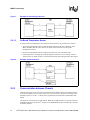
SDRs of all sensors available in the entire system. At first, the SDR
repository of the BMC is empty, and the SDRs of all PMs must be copied
into the BMC’s SDR repository (will be explained later).
SDR
BMC
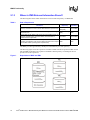
The IBMU provides approximately 100 Kbytes of flash memory for each repository.
The following figure shows the repositories available in IPMI controllers operated as BMC or PM
after the SDRs of the PMs were copied into the BMC’s SDR repository. Nonintelligent devices
provide none of the repositories.
Figure 1.
10
Repositories of BMC and PMs
Intel® NetStructure™ MPCHC5525 System Master Processor Board IPMI Reference Driver User’s Guide
IBMU Functionality
2.1.4
Basic Communication Principles
The system management software communicates with the devices via the BMC. It can
communicate with:
• Boards/devices with IPMI controller
• Boards/devices without IPMI controller (nonintelligent devices)
• On-board sensors
The following sections describe the basic communication procedure between the system
management software and the boards/devices given in the list above.
2.1.4.1
Boards/Devices with IPMI Controller
As seen in Figure 1, the BMC contains SDRs of all sensors in the system. If the temperature
threshold value is exceeded on a board set as PM, the PM sends an event message to the BMC. The
system management software can then trigger actions, for example, to increase the fan speed.
2.1.4.2
Nonintelligent Devices
For nonintelligent devices, there are no SDRs in the SDR repository of the BMC. Since
nonintelligent devices have no IPMI controller, they do not send event messages. For this reason,
the system management software must regularly request sensor data (e.g., temperature) and check
whether the value has exceeded the normal range.
2.1.4.3
On-Board Temperature Sensor
The on-board temperature sensor is connected to the IPMI controller; therefore, there is also an
SDR for this sensor in the BMC’s SDR repository. If, for example, the temperature threshold value
is exceeded, the IPMI controller sends an event message to the BMC. The system management
software can then trigger actions, for example, to increase the fan speed.
2.1.5
Requirements
2.1.5.1
Boards/Devices with IPMI Controller and On-Board Sensors
For communication between system management software and IPMI controller devices or onboard sensors, the following components are necessary:
•
•
•
•
SDRs – For each sensor attached to an IPMI controller an SDR must be available
IPMI driver for operating system
Middleware
System management software
Intel® NetStructure™ MPCHC5525 System Master Processor Board IPMI Reference Driver User’s Guide
11
IBMU Functionality
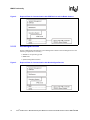
Figure 2.
Required Parts for Communication with IPMI Devices and On-Board Sensors
2.1.5.2
Nonintelligent Devices
For the communication between the system management software and nonintelligent devices the
following components are necessary:
• IPMI driver for operating system
• Middleware
• System management software
Figure 3.
12
Required Parts for Communication with Nonintelligent Devices
Intel® NetStructure™ MPCHC5525 System Master Processor Board IPMI Reference Driver User’s Guide
IBMU Functionality
2.1.6
Available Drivers
IPMI drivers for the following operating systems are available:
•
•
•
•
VxWorks*
Windows 2000/NT*
Solaris*
MontaVista Linux*
These drivers include an application programming interface (API) to use IPMI commands. Please
see Appendix A for an API to use IPMI commands. Additional information regarding
implementing this software is available by contacting Force Computers
(www.forcecomputers.com).
2.2
How Does Communication Work?
Communication in this case means sending IPMI commands and receiving a response. All standard
IPMI commands are described in the IPMI Specification.
System management software can communicate with:
• Devices with IPMI controller
• Nonintelligent devices
• On-board sensors
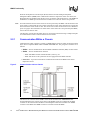
Communication is realized via buses and/or interfaces.
Figure 4.
Buses/Interfaces Provided by the IBMU
Intel® NetStructure™ MPCHC5525 System Master Processor Board IPMI Reference Driver User’s Guide
13
IBMU Functionality
Whereas the Keyboard Controller Style (KCS0) interface and the Intelligent Peripheral
Management Buses (IPMB) allow communication between components within one chassis, the
KCS0 interface and ICMB connect the devices of one chassis with another chassis. The IPMB and
ICMB buses are IBMU powered and will be available even if the CPU board is not powered.
Note:
On some boards the sensors on the sensor bus are not powered by the IBMU. This means that if the
power supply is interrupted, the sensor status at the time of power supply interruption is logged but
the current sensor value cannot be read. The current sensor value can be read as soon as the board
power is up again. For information on which sensor on the sensor bus is not powered by the IBMU,
refer to the CPU board’s TPS.
The following sections describe which device is connected to which bus and give simple examples
for communication within a chassis and between two chassis.
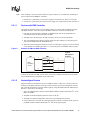
2.2.1
Communication Within a Chassis
Communication within a chassis is possible via IPMB and the sensor bus which are both I²C-based
buses. Force Computers IBMU offers an IPMB0 and IPMB1 bus. The purpose of each bus is as
follows:
• IPMB0 – Allows communication between BMC and IPMI controllers (PMs) on CPU boards.
• IPMB1 – Allows communication between:
— BMC and IPMI controller of PMs like PSUs, fan trays, etc.
— BMC and devices in the system that are not equipped with an IPMI controller
• Sensor bus – A private bus that allows communication between the BMC and on-board
temperature sensor
Figure 5.
Communication within a Chassis
The devices are connected to the IPMB1 via the Intel® NetStructure™ MPRTM4848 Rear
Transition Board for the respective CPU board. The IPMB1 signals are routed from the IPMI
controller on the CPU board to the RTB via the backplane and are then available at an IPMB1
connector of the RTB. This IPMB1 connector is located on-board the RTBs.
14
Intel® NetStructure™ MPCHC5525 System Master Processor Board IPMI Reference Driver User’s Guide
IBMU Functionality
Note:
After installing or removing a board under hot-swap conditions, it is possible that nonintelligent
devices will block the IPMB bus. Therefore:
• If the device is powered by its own power supply, turn off the device, then turn it on again.
• If the device is powered by the system’s power supply, turn off the whole system, then turn on.
2.2.1.1
Devices with IPMI Controller
The following describes an easy event handling example for a fan module with IPMI controller.
The IPMI controller on the CPU board is the BMC and the one on the fan module the PM.
1. PM sends an event message to the BMC via IPMB1 saying that the fan temperature has
exceeded the threshold value defined in the SDR.
2. The BMC stores the message in the SEL repository and in an event message buffer.
3. The system management software regularly checks the SEL whether an event message was
sent with the IPMI command “Read SEL Entry”.
4. When the system management software gets the event message it triggers an action according
to the defined error handling procedure, i.e. increase fan speed via the BMC and fan register.
Figure 6.
Example for PM with IPMI Controller
PM
System
Management
Software
BMC
1
Buffer
2
3
SEL
IPMI
Controller
of Fan
Event Message
Buffer
SDR
4
IPMB1 Interface
4
To make this possible the SDR of each sensor connected to an IPMI controller has to be written
into the SDR repository of the BMC on the CPU board.
2.2.1.2
Nonintelligent Devices
Suppose another fan module does not have an IPMI controller. In this case, it cannot send event
messages to the IPMI controller on the CPU board. Therefore, the system management software
has to read the temperature of the fan module regularly using the IPMI command “Master WriteRead I2C” and control it accordingly.
1. The system management software sends the IPMI command “Master Write-Read I2C” to the
BMC via IPMB1.
2. The BMC reads the temperature from the sensor on the fan.
3. The BMC forwards the temperature value to the system management software.
4. If the temperature is too high, the system management software can change the fan speed via
the IPMI command “Master Write-Read I2C” and the fan speed register.
Intel® NetStructure™ MPCHC5525 System Master Processor Board IPMI Reference Driver User’s Guide
15
IBMU Functionality
Figure 7.
Example for Nonintelligent Devices
2.2.1.3
On-Board Temperature Sensor
To read out the actual temperature value from the on-board sensor, the procedure is as follows:
1. The system management software sends the IPMI command “Get Sensor Reading” to the
BMC, the BMC reads the value from the on-board sensor and sends it to the system
management software.
2. The system management software compares the read value with a threshold value.
3. If the temperature is too high, the system management software can, for example, initiate a
switch board or an alarm module to switch off the board by deactivating the BD_SEL# signal.
Figure 8.
Example: On-Board Sensor
2.2.2
Communication between Chassis
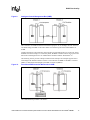
Communication between several chassis is possible with the ICMB, which is an RS-485-based bus.
It connects the BMCs of two or more chassis. You can connect up to 42 chassis, according to the
ICMB Specification v1.0 Rev. 1.2. Refer to this specification for information on maximum cable
length.
The chassis are connected via the CPU boards’ RTBs. The ICMB connector is typically located on
the RTB’s front panel. See the Intel® NetStructure™ MPRTM4808 Technical Product Specification
for further reference.
16
Intel® NetStructure™ MPCHC5525 System Master Processor Board IPMI Reference Driver User’s Guide
IBMU Functionality
Figure 9.
Intelligent Chassis Management Bus (ICMB)
The connection via ICMB is useful for maintenance purposes. If, for example, the CPU board in
one chassis hangs, the BMC in the other chassis can read the log file of the affected BMC via
ICMB.
Another application is the monitoring and controlling of nonintelligent devices. If the CPU board
the BMC is located on hangs or is in stand-by mode, the BMC in another chassis can request sensor
data of the nonintelligent device via ICMB and the command “Master Write-Read I2C”.
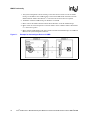
The following section provides a simple communication example. The example supposes that a
nonintelligent fan module located in chassis 1 and connected via IPMB1 to the BMC in chassis 1
(BMC1) is monitored and managed by the BMC in chassis 2 (BMC2).
Figure 10.
Fan without IPMI Controller Monitored via ICMB
The communication procedure is as follows:
Intel® NetStructure™ MPCHC5525 System Master Processor Board IPMI Reference Driver User’s Guide
17
IBMU Functionality
1. The system management software residing on the CPU board in chassis 2 sends an ICMB
message to the BMC2. This ICMB message contains the ICMB header information and the
IPMI command “Master Write-Read I2C” with which the fan sensor data is requested.
2. The BMC2 sends the ICMB message to the BMC1 via ICMB.
3. BMC1 extracts the IPMI command “Master Write-Read I2C” from the ICMB message.
4. BMC1 reads the sensor temperature on the fan module via the command “Master Write-Read
I2C” and sensor registers.
5. BMC1 adds an ICMB header to the sensor result and sends the ICMB message via ICMB and
BMC2 to the system management software.
Figure 11.
18
Example for Nonintelligent Device via ICMB
Intel® NetStructure™ MPCHC5525 System Master Processor Board IPMI Reference Driver User’s Guide
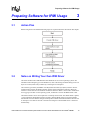
Preparing Software for IPMI Usage
Preparing Software for IPMI Usage
3.1
3
Action Plan
Before being able to use IPMI the following steps are required and will be described in this chapter.
3.2
Notes on Writing Your Own IPMI Driver
The Intel® NetStructure™ MPCBL5525 offers IPMI drivers for several operating systems. For
information about designing your own IPMI driver, refer to the Intelligent Board Management Unit
Reference Guide (PN217328), available by contacting Force Computers.
The interface type used by the IBMU is the Keyboard Controller Style (KCS) interface. For the
communication between the IPMI controller and the system management software, the KCS0
interface is used. There are also the KCS1 and KCS2 interfaces: KCS 1 can be used to enable ECC
error logging in the SEL via the operating system, and KCS2 is used for the BIOS POST codes.
The KCS0 interface can be used in polled or in interrupt-driven mode. The default mode is polled,
i.e. the application management software regularly reads the KCS0 register to find out whether
data has arrived or the state has changed. Interrupt-driven mode means that the IPMI controller sets
an interrupt in case data has arrived or the state has changed so that the IPMI driver is informed
automatically.
Intel® NetStructure™ MPCHC5525 System Master Processor Board IPMI Reference Driver User’s Guide
19
Preparing Software for IPMI Usage
3.3
Sensor Data Records
For each sensor attached to an IPMI controller in a system you need SDRs. SDRs for sensors on
Force CPU boards are provided by Force Computers. SDRs for sensors on third-party products
must be obtained by the respective manufacturer.
3.3.1
Obtaining SDR Settings
To obtain SDR settings (thresholds, whether thresholds can be changed, whether a sensor generates
events etc.), the default way is to write a function using the IPMI command “Get Device SDR” via
your operating system IPMI driver API. To obtain only the threshold values, the default way is to
write a function using the IPMI command “Get Sensor Threshold” via your operating system IPMI
driver API.
Note:
On some boards, the thresholds for the board temperature sensor can be changed. For these boards,
the upper and lower threshold values are by default set to the sensor’s minimum/maximum reading
values so that events from the board temperature sensor are not likely to occur. To generate events,
change the thresholds values. Keep in mind that the measured sensor value depends on the system’s
components and their location. For information on where the board temperature is measured on
your CPU board, refer to the CPU board’s TPS.
To obtain SDR information without having to write a function, go to http://www.intel.com/design/
servers/ipmi/tools.htm for the Intel IPMI Tool. See the IPMI Specification for more information.
3.4
Notes on Writing System Management Software
For creating your own system management software you can use all IPMI commands marked as
mandatory in the IPMI Specification. For information regarding Force-specific OEM IPMI
commands, see the Intelligent Board Management Unit Reference Guide (PN217328) available by
contacting Force Computers.
With your management software and Force-specific OEM IPMI commands, you:
• Can check status of board sensors (physical sensors such as temperature or voltage sensors and
discrete sensors). In the following only the reading values of the discrete sensors are described.
• Can obtain IBMU self-test results.
• Have to check whether the IPMI controller watchdog has reset the IPMI firmware.
3.4.1
Requirements for Events
By default, the BMC only receives event messages from sensors attached to the BMC itself. To
make PMs send event messages to the BMC, you need to define the event receiver, the BMC, via
the IPMI command “Set Event Receiver”.
20
Intel® NetStructure™ MPCHC5525 System Master Processor Board IPMI Reference Driver User’s Guide
Preparing Software for IPMI Usage
3.4.2
Checking CPU Board Signals
The IBMU is equipped with several discrete sensors used to check the assertion or deassertion of
CPU board signals. After an assertion or deassertion of such a signal, the IPMI controller generates
event messages. For further information on event messages, refer to tables 17-5 and 19-1 of the
IPMI Specification 1.0.
Set as PM, the IPMI controller sends these messages to the BMC in the system. The BMC saves
the messages in the SEL and in the event message buffer.
Note:
In comparison to the event message buffer, the SEL keeps all events, even if the IPMI controller is
turned off. Therefore, read the events from the SEL with the IPMI command “Get SEL Entry” and
not from the event message buffer.
Set as BMC, the IPMI controller simply saves the event messages in the SEL and in the event
message buffer.
The following subsections describe the discrete sensors that generate event messages which can be read by the system management software.
Note:
3.4.2.1
Usually the sensor type is used to find out which sensor has sent an event and which signals were
asserted. Since all sensors checking the CPU board signals are of the same sensor type, you have to
use the sensor number to distinguish between the sensors.
Critical IRQ Status
This sensor reads the following signals which have IRQ capability:
• PCI_RESET
If asserted, signals that all devices attached to PCI buses are reset.
• NMI
• SMI
• IPMB1_ALERT
If asserted, signals that a sensor on IPMB1 has reached a critical status.
3.4.2.2
CPCI Signal
This sensor reads two PCI-relevant signals, CPCI_ENUM and CPCI_BD_SEL. CPCI_ENUM is
asserted, if a board is about to be removed from the system. CPCI_BD_SEL is asserted, if a board
was fully plugged into the system and is running.
3.4.2.3
Ejector Switch
This sensor reads the LOCAL_ENUM signal. It is asserted when the lower front panel handle on
the board containing the IPMI module was opened.
Intel® NetStructure™ MPCHC5525 System Master Processor Board IPMI Reference Driver User’s Guide
21
Preparing Software for IPMI Usage
3.4.2.4
POST Code
This sensor allows you to read the board’s POST code with the IPMI command “Get Sensor
Reading”.
Note:
3.4.3
This sensor does not generate event messages.
Monitoring the IBMU
The Intel NetStructure MPCBL5525 System Master Board provides the possibility for the system
management software to obtain information on a possible IBMU problem source (missing SDRs,
memory error, or inaccessible buses). Furthermore, the IBMU guarantees uninterrupted system
operation because the IPMI controller watchdog resets the firmware if the firmware hangs.
3.4.3.1
Self Test
The IBMU provides a self test that is run every time it is restarted, i.e. after plugging in the board
containing the IBMU or after a crash. The self test result can be read with the IPMI command “Get
Self Test Results”.
3.4.3.2
IPMI Controller Watchdog
The IPMI controller watchdog constantly monitors the IPMI firmware. If it detects a firmware
crash, it automatically issues a reset of the IPMI controller. The board the IPMI controller is
located on will NOT be reset.
If the BMC is reset and a PM sends a message to the BMC during this reset, the message is lost.
Your system management software therefore must send the command “Re-arm Sensor Events” to
the PM. Then this PM will send the event as long as the critical situation persists.
Note:
22
If a PM is reset, your system management application must realize that a reset has occurred and
initialize the IPMI controller. You need to take this into consideration when programming your
system management application. Check e.g. the system time which is 0.00 after a reset.
Intel® NetStructure™ MPCHC5525 System Master Processor Board IPMI Reference Driver User’s Guide
Supported IPMI Commands and BMC/PM Addresses
Supported IPMI Commands
and BMC/PM Addresses
4.1
4
Standard IPMI Commands
This section provides information on which IPMI commands are supported. All commands are
uniquely identified by:
• Network function code (NetFn) – Specifies functional category of a command
• Command code (CMD) – Byte which specifies the operation
The IPMI Specification defines several software channels which allow communication. The
channel number must always be included in Send Message commands (for further information
refer to the IPMI Specification). IPMB0 is addressed via software channel 0 and IPMB1 via
channel 1.
4.2
Global IPMI Commands
All commands in this category defined as mandatory by the IPMI Specification are implemented.
In addition, the following optional commands are available.
Table 4.
Optional Global IPMI Commands
Command
NetFn
CMD
Cold Reset
App
0216
EnableMessageChannelReceive
App
3216
GetDeviceGUID 1
App
0816
ReadEventMessageBuffer
App
3516
1.
Only available on boards produced after 03/01/2003. You can read the production date from
the Product Info Area of the FRU repository.
All implemented commands can be used in every operation mode.
4.2.1
System Interface Commands
All commands in this category defined as mandatory by the IPMI specification are implemented.
All commands can be used in every operation mode.
4.2.2
Watchdog Commands
All commands in this category defined as mandatory by the IPMI specification are implemented.
All commands can be used in every operation mode.
Intel® NetStructure™ MPCHC5525 System Master Processor Board IPMI Reference Driver User’s Guide
23
Supported IPMI Commands and BMC/PM Addresses
4.2.3
SEL Commands
All commands in this category defined as mandatory by the IPMI specification are implemented. In
addition, the following optional commands are available.
Note:
Table 5.
SEL commands can only be used in BMC mode.
Optional SEL Device Commands
Command
4.2.4
NetFn
CMD
Get SEL Allocation Info
Storage
4116
Reserve SEL
Storage
4216
Add SEL Entry
Storage
4416
Partial Add SEL Entry
Storage
4516
Delete SEL Entry
Storage
4616
SDR Commands
All commands in this category defined as mandatory by the IPMI specification are implemented. In
addition, the following optional commands are available.
Table 6.
Optional SDR Device Commands
Command
NetFn
CMD
Get SDR Allocation Info
Storage
2016
Add SDR
Storage
2416
Partial Add SDR
Storage
2516
Delete SDR
Storage
2616
Get SDR Repository Time
Storage
2816
Set SDR Repository Time
Storage
2916
All commands can be used in every operation mode.
4.2.5
FRU Inventory Device Commands
All commands in this category defined as mandatory by the IPMI Specification are implemented.
The commands can be used in every operation mode.
The FRU information returned by the IPMI command “Read FRU Inventory Data” is compatible
with the Platform Management FRU information Storage Definition v1.0.
The size of the complete FRU record consisting of:
•
•
•
•
Internal Use Area
Board Info Area
Product Info Area
Multi Record Area
is limited to 1024 bytes.
24
Intel® NetStructure™ MPCHC5525 System Master Processor Board IPMI Reference Driver User’s Guide
Supported IPMI Commands and BMC/PM Addresses
4.2.6
Sensor Device Commands
All commands in this category defined as mandatory by the IPMI specification are implemented. In
addition, the following optional commands are available.
Table 7.
Implemented Optional Sensor Device Commands
Command
NetFn
CMD
Get Device SDR Info
S/E
2016
Get Device SDR
S/E
2116
Reserve Device SDR Repository
S/E
2216
Get Sensor Reading Factors
S/E
2316
Set Sensor Hysteresis
S/E
2416
Get Sensor Hysteresis
S/E
2516
Set Sensor Threshold
S/E
2616
Get Sensor Threshold
S/E
2716
Set Sensor Event Enable
S/E
2816
Get Sensor Event Enable
S/E
2916
Re-arm Sensor Events
S/E
2A16
Get Sensor Reading
S/E
2D16
Set Sensor Type
S/E
2E16
Get Sensor Type
S/E
2F16
Set Event Receiver
S/E
0016
Get Event Receiver
S/E
0116
Platform Event
S/E
0216
All commands can be used in every operation mode.
4.2.7
ICMB Bridge Commands
All commands in this category defined as mandatory by the IPMI specification are implemented. In
addition, the following optional commands are available.
Table 8.
Implemented Optional ICMB Bridge Commands (Sheet 1 of 2)
Command
NetFn
CMD
Get Bridge State
Bridge
0016
Set Bridge State
Bridge
0116
Get ICMB Address
Bridge
0216
Set ICMB Address
Bridge
0316
Set Proxy Address
Bridge
0416
Get Bridge Statistics
Bridge
0516
Clear Bridge Statistics
Bridge
0816
Get Proxy Address
Bridge
0916
Intel® NetStructure™ MPCHC5525 System Master Processor Board IPMI Reference Driver User’s Guide
25
Supported IPMI Commands and BMC/PM Addresses
Table 8.
Implemented Optional ICMB Bridge Commands (Sheet 2 of 2)
Command
4.3
NetFn
CMD
Get ICMB Connector Info
Bridge
0A16
Prepare for Discovery
Bridge
1016
Get Addresses
Bridge
1116
Set Discovered
Bridge
1216
Bridge Request
Bridge
2016
Bridge Message
Bridge
2116
Get Bridge Event Count
Bridge
3016
Set Event Destination
Bridge
3116
Set Event Reception State
Bridge
3216
Send ICMB Event Message
Bridge
3316
Get Event Destination
Bridge
3416
Get Event Reception State
Bridge
3516
Force-Specific Commands
The Force Computers IPMI firmware supports several commands that are not defined in the IPMI
specification but are introduced by Force Computers. For more information regarding Forcespecific OEM IPMI implementations, see the Intelligent Board Management Unit Reference Guide
(PN217328), available by contacting Force Computers.
4.3.1
BMC/PMChangeRole
This command is used to set the operation mode of the IPMI controller (BMC, PM or BMC standby). In BMC stand-by mode, a mode provided by Force Computers, the IPMI controller is PM but
can manipulate the system event log (SEL) and sensor data repositories (SDR) like a BMC.
4.3.1.1
Request Data
Byte
Role
0: BMC
1: BMC stand-by
2: PM
1
4.3.1.2
Data Field
Response Data
Byte
1
26
Data Field
Completion Code
Intel® NetStructure™ MPCHC5525 System Master Processor Board IPMI Reference Driver User’s Guide
Supported IPMI Commands and BMC/PM Addresses
4.3.2
FlashFileSystemClear
This command is used to delete all the SDR, FRU and SEL repository and to update the FRU data.
4.3.2.1
Request Data
Byte
-
4.3.2.2
Data Field
-
Response Data
Byte
1
4.3.3
Data Field
Completion Code
GetGeographicalAddress
This command is used to obtain the geographical address of the slot into which the board with the
IPMI controller is plugged in and the IPMI controller’s I2C address. This command can be used in
every operation mode.
4.3.3.1
Request Data
None
4.3.3.2
Response Data
Byte
Data Field
1
Completion Code
2
Geographical address
3
I²C address of the IPMI controller on the IPMB(s) bus(es) in its current role
4
I²C address of the IPMI controller on the IPMB(s) bus(es) in PM role
If the IPMI controller acts as PM or BMC stand-by, the values in bytes 3 and 4 are equal. If the
IPMI controller acts as BMC, the value in byte 3 is 2016 and the value in byte 4 is the I2C address
the BMC would have if he acts as PM.
4.3.4
GetSDRRepositoryCRC
This command is used to obtain the Cyclic Redundancy Code (CRC) of the SDR repository. It can
be used in high-availability configurations to verify that the SDR repository of the IPMI controller
in BMC active mode and that of the IPMI controller in BMC stand-by mode are identical.
This command can be used in every operation mode.
Intel® NetStructure™ MPCHC5525 System Master Processor Board IPMI Reference Driver User’s Guide
27
Supported IPMI Commands and BMC/PM Addresses
4.3.4.1
Request Data
Byte
-
4.3.4.2
Data Field
-
Response Data
Byte
4.3.5
Data Field
1
Completion Code
2
Record count LSB
3
Record count MSB
4
CRC16 LSB
5
CRC16 MSB
SetShadowRepositoryEnable
This command is used to enable or disable the access to the shadow repository of an IPMI
controller in BMC stand-by mode.
Note:
4.3.5.1
4.3.5.2
4.4
This command can only be used if IPMI controller is in BMC stand-by mode. If the IPMI
controller is not in BMC stand-by mode, “invalid command” is returned.
Request Data
Byte
Data Field
1
Access
0: Disabled
1: Enabled
Response Data
Byte
Data Field
1
Completion Code
BMC and PM Addresses
To be able to send messages to other IPMI controllers (PMs) with your system management
software, you need the IPMI controller’s I2C address.
If the IPMI controller acts as BMC, the I2C address is 2016.
If the IPMI controller is set to PM, it depends on the geographical address of the board in the
system. Refer to the system’s backplane description to find the geographical addresses or use the
Force-specific IPMI command GetGeographicalAddress. The mapping of geographical and I 2C
28
Intel® NetStructure™ MPCHC5525 System Master Processor Board IPMI Reference Driver User’s Guide
Supported IPMI Commands and BMC/PM Addresses
addresses is defined in the PICMG 2.9 Specification and is also shown in the table that follows.
The IPMI controller of a board which has the geographical address 4 in a system, for example, can
be addressed via I2C address B616.
Table 9.
Address Mapping
Geographical Address
I²C Address
0
Disabled
1
B016
2
B216
3
B416
4
B616
5
B816
6
BA16
7
BC16
8
BE16
9
C016
10
C416
11
C616
12
C816
13
CA16
14
CC16
15
CE16
16
D016
17
D216
18
D416
19
D616
20
D816
21
DA16
22
DC16
23
DE16
24
E016
25
E216
26
E416
27
E616
28
E816
29
EA16
30
EC16
31
Disabled
Intel® NetStructure™ MPCHC5525 System Master Processor Board IPMI Reference Driver User’s Guide
29
Supported IPMI Commands and BMC/PM Addresses
30
Intel® NetStructure™ MPCHC5525 System Master Processor Board IPMI Reference Driver User’s Guide
Customer Support
Customer Support
5.1
5
Customer Support
This chapter offers technical and sales assistance information for this product. Information on
returning an Intel® NetStructure™ product for service is in the following chapter.
5.2
Technical Support and Return for Service
Assistance
For all product returns and support issues, please contact your Intel product distributor or Intel
Sales Representative for specific information.
5.3
Sales Assistance
If you have a sales question, please contact your local Intel NetStructure Sales Representative or
the Regional Sales Office for your area. Address, telephone and fax numbers, and additional
information is available at Intel's website located at:
http://www.intel.com/network/csp/sales/
Intel Corporation
Telephone (in U.S.) 1-800-755-4444
Telephone (Outside U.S.) 1-973-993-3030
FAX 1-973-967-8780
Intel® NetStructure™ MPCHC5525 System Master Processor Board IPMI Reference Driver User’s Guide
31
Customer Support
32
Intel® NetStructure™ MPCHC5525 System Master Processor Board IPMI Reference Driver User’s Guide