1
Figures
1 4/8 and 4/16 SAN Switch port side . . . . . . . . . . . . . . .
2 4/32 SAN Switch port side . . . . . . . . . . . . . . . . . . .
3 4/32 SAN Switch nonport side . . . . . . . . . . . . . . . . . .
4 4/64 SAN Switch port side . . . . . . . . . . . . . . . . . . .
5 4/64 SAN Switch port numbering . . . . . . . . . . . . . . . . .
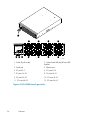
6 4/64 SAN Switch nonport side . . . . . . . . . . . . . . . . . .
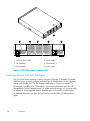
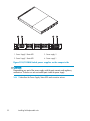
7 4/32B SAN Switch port side . . . . . . . . . . . . . . . . . . .
8 4/32B SAN Switch FC ports . . . . . . . . . . . . . . . . . . .
9 SAN Switch shipping carton contents . . . . . . . . . . . . . . .
10 Installing the rear mounting brackets (HP 10000 series racks) . . . .
11 Installing the rear mounting brackets (HP System/e Rack) . . . . . .
12 Installing the outer rails (HP 10000 series racks) . . . . . . . . . .
13 Assembling the outer rails (HP 10000 series racks) . . . . . . . . .
14 Assembling the outer rails (HP System/e Rack) . . . . . . . . . . .
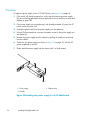
15 Attaching the inner rails to the 4/8 or 4/16 SAN Switch . . . . . .
16 Attaching the inner rails to the 4/32 or 4/64 SAN Switch . . . . . .
17 Attaching the Plenum to the 4/8 or 4/16 SAN Switch . . . . . . .
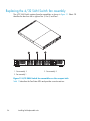
18 Securing the switch (in HP 9000 Series or HP 10000 Series Racks) . .
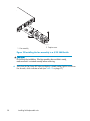
19 Securing the switch (in an HP System/e rack) . . . . . . . . . . .
20 Connecting the serial cable . . . . . . . . . . . . . . . . . . .
21 Connecting the power cord . . . . . . . . . . . . . . . . . . .
22 Connecting the Ethernet cable . . . . . . . . . . . . . . . . . .
23 4/8 and 4/16 SAN Switch LED locations . . . . . . . . . . . . .
24 4/32 SAN Switch port side LEDs . . . . . . . . . . . . . . . . .
25 4/32 SAN Switch nonport side LEDs . . . . . . . . . . . . . . .
26 4/64 SAN Switch port side LEDs . . . . . . . . . . . . . . . . .
27 4/64 SAN Switch nonport side LEDs . . . . . . . . . . . . . . .
28 4/32B SAN Switch port side LEDs . . . . . . . . . . . . . . . .
29 4/32 SAN Switch power supplies on the nonport side . . . . . . .
30 Installing the power supply in a 4/32 SAN Switch . . . . . . . . .
31 4/32 SAN Switch fan assemblies on the nonport side . . . . . . . .
32 Installing the fan assembly in a 4/32 SAN Switch . . . . . . . . .
33 4/64 SAN Switch power supplies on the nonport side . . . . . . .
34 Installing the power supply in the 4/64 SAN Switch . . . . . . . .
35 4/64 SAN Switch fan assemblies on the nonport side . . . . . . . .
36 Inserting the fan assembly in a 4/64 SAN Switch . . . . . . . . .
37 4/32B SAN Switch Power Supply/Fan Assembly Unit . . . . . . . .
38 Inserting the Power Supply/Fan Assembly Unit in the 4/32B SAN Switch
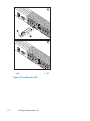
39 Installing the SFP . . . . . . . . . . . . . . . . . . . . . . .
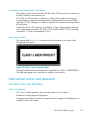
40 Class 1 laser product label . . . . . . . . . . . . . . . . . . .
8
.
.
.
.
.
.
.
.
.
.
.
.
.
.
.
.
.
.
.
.
.
.
.
.
.
.
.
.
.
.
.
.
.
.
.
.
.
.
.
.
.
.
.
.
.
.
.
.
.
.
.
.
.
.
.
.
.
.
.
.
.
.
.
.
.
.
.
.
.
.
.
.
.
.
.
.
.
.
.
.
.
.
.
.
.
.
.
.
.
.
.
.
.
.
.
.
.
.
.
.
.
.
.
.
.
.
.
.
.
.
.
.
.
.
.
17
21
22
26
27
28
30
31
35
43
43
44
45
46
48
48
50
51
51
54
56
58
69
75
78
80
83
85
92
94
96
98
99
102
103
105
106
110
112
115