1
3.
4.
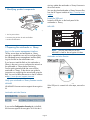
Attach the holders to the tokens.
Track the tape cartridges that are written with
keys stored on the token and keep a copy of this
record in a secure location.
To use the serial numbers to identify the tokens:
• Record the token identification information and
tape cartridges that are written with keys stored
on the token, and keep a copy of the record in a
secure location.
3 Preparing the key server tokens
As part of your security process, you will need to track
each key server token, along with information
associated with the token, as required by your security
policy. If you do not have a security policy that
specifies this information, download the HP 1/8 G2
Tape Autoloader and MSL Tape Library Encryption Kit
User Guide from http://www.hp.com/support/tape
for information about creating your encryption key
management processes. HP recommends that you track
at least:
•
Token name
•
Whether this token is a backup of another token
•
Date range token was used for writing data
•
The tape cartridges written with keys stored on
the token. When possible, record the barcode
label associated with the tape cartridge.
•
TIP: The serial number is on the bottom of the
token when the token is in the autoloader or
library, making it difficult to see. You can find
the token serial number and firmware version
from the RMI Status: Security screen or the
MSL6480 home screen.
4 Configuring encryption
Token backup file filename and password.
In this section, you will configure the name and
personal information number (PIN) for the key server
token and configure encryption on the autoloader or
library.
The encryption kit includes two methods of tracking
the tokens. Choose the approach that works best for
your security policy and organization. HP recommends
that you use both approaches.
•
Attached tag — The encryption kit includes a card
and holder, which can be used to attach
information to the token.
•
Serial number — Each key server token has a
unique serial number. You can use the serial
number to identify the key server token and
correlate the tape cartridges written with keys on
the token.
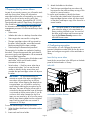
Insert the key server token
Insert the key server token in the USB port on the back
panel of the autoloader or library.
MSL6480
IMPORTANT: HP recommends that you
maintain a record of the tape cartridges that
are written with encryption keys on the key
server token. When restoring the data from an
encrypted tape, you will need to use the key
server token containing the encryption key for
that tape. The name of the key server token is
not stored on the tape and the name of the tape
is not stored on the key server token. If you do
not know which token contains the key for a
tape, you may need to try all of your key server
tokens when restoring data from an encrypted
tape. Each key server token can contain a
maximum of 100 keys.
Autoloader and other libraries
To use the attached tags to identify the tokens:
1. Write the token identification information on the
paper cards.
2. Insert each card into a holder.
Page 3