1
2.
2.
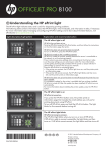
Back Returns you to the previous screen.
Copy From the Home screen, opens the Copy menu
for you to choose color and number of copies
Cancel Stops the current operation, restores previous
settings, and clears the current photo selection.
Photo From the Home screen, opens the Photo menu
for you to edit, print, and save photos.
Directional keys Navigate through menu options and
photos. Left key moves left or up. Right key moves
right or down.
Scan From the Home screen, opens the Scan menu
for you to scan to a connected computer or photo
memory card.
Settings From the Home screen, opens the Setup
menu. On other menus, selects options related to the
displayed menu.
Apps From the Home screen, opens Apps menu for
you to access and print information from the Web,
without using a computer.
OK Selects a menu setting, value, or photo.
a
a
Memory Card Slots
b
b
LED for Memory Card Slots
c
c
Power On/Off button
d
e
d
LED for Wireless Lit when wireless enabled
e
Wireless button Press for Wireless and Web
Services menu
3
English
Get to know your HP Photosmart